
Local Area Connection IP address failure/Network down issue

ptglj

New member
For over 5 years, I've run the same network in my home.

My personal computer receives it's signal from a custom-built antenna with attached ampliflier, which gives my internet signal directly to my machine; the internet source is from my parents' house (I live in a neighboring home).

The internet on my machine works just fine, like usual; however, I recently went on vacation and took my computer with me and upon return my network now fails. I used a direct ethernet link for internet during this vacation. This situation has happened before, but I previously fixed this problem with a system restore; this is no longer an option because I don't have the option to restore to a point before I was gone on vacation. When I say this happened before, I mean everything about this problem is identical to the time I encountered it last, that my network router remained visible and the internet worked on my main computer, but the router wouldn't 'take' the signal and broadcast it properly.

The problem as best as I can understand is this: the router is visible and is directly connected to my personal computer; however, there is no internet signal when connecting to the router via phone, laptop, etc. The only message that suggests something is wrong is the following: Local Area Connection does not have a valid IP configuration. When trying to connect with her laptop, my girlfriend received this message and also when trying to diagnose my local area connection I received the same message about the IP address being invalid for the Local Area Connection.

What could be wrong? When this happened before, my friend who works in IT explained that since normally you receive internet from routers and not vice versa (I'm trying to get my router to broadcast the internet signal that my computer already has) that the diagnostics behind it can be difficult and thus only did a system restore.

I'm completely in the dark as how to fix this. Nothing is wrong hardware-wise, I am sure of this. I read about trying to reset ip settings for ipv4/ipv6 through cmd, but nothing has worked so far.

------

System specs updated
 
Last edited:

My Computer

Computer Manufacturer/Model Number
Dell Precision 690
OS
Windows 7 Ultimate x64
CPU
2 x 5160 intel xeon dualcore 3.0 ghz
Motherboard
not sure
Memory
6 gigs ddr2
Graphics Card(s)
GT-430
Sound Card
integrated
Hard Drives
250 gigabyte Seagate 7200
PSU
750-watt
Cooling
airflow
Internet Speed
business speed comcast
Other Info
Broadcom NetXtreme 57xx Gigabit adapter
Netgear N600 Wireless Dual Band router (but switching out the router doesn't fix my problem, pretty sure the problem is with my main comp)
Please fill out your system specs. Click on the link in my signature to do it.
 

My Computer

Computer Manufacturer/Model Number
Dell XPS 15 L502x
OS
Windows 7 Ultimate x64 SP1
CPU
Core i7-2670QM
Memory
8GB DDR3 PC3-10600
Graphics Card(s)
Intel HD Graphics 3000 + GeForce GT 540M
Screen Resolution
1920x1080
Hard Drives
1TB 5400RPM Seagate
updated the specs; thanks in advance having a look!
 

My Computer

Computer Manufacturer/Model Number
Dell Precision 690
OS
Windows 7 Ultimate x64
CPU
2 x 5160 intel xeon dualcore 3.0 ghz
Motherboard
not sure
Memory
6 gigs ddr2
Graphics Card(s)
GT-430
Sound Card
integrated
Hard Drives
250 gigabyte Seagate 7200
PSU
750-watt
Cooling
airflow
Internet Speed
business speed comcast
Other Info
Broadcom NetXtreme 57xx Gigabit adapter
Netgear N600 Wireless Dual Band router (but switching out the router doesn't fix my problem, pretty sure the problem is with my main comp)
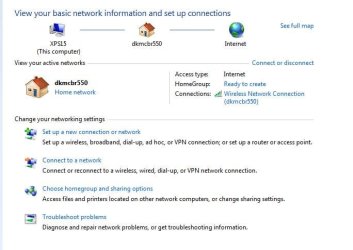
Connect your computer to your network and boot it up. Open up a command prompt and do an ipconfig /all, then paste those results into your next post. Also, take a screenshot of your network and sharing center and attach it to your next post.
 

Attachments

  • Capture.JPG
    Capture.JPG
    53.5 KB · Views: 13

My Computer

Computer Manufacturer/Model Number
Dell XPS 15 L502x
OS
Windows 7 Ultimate x64 SP1
CPU
Core i7-2670QM
Memory
8GB DDR3 PC3-10600
Graphics Card(s)
Intel HD Graphics 3000 + GeForce GT 540M
Screen Resolution
1920x1080
Hard Drives
1TB 5400RPM Seagate
Command ipconfig /all yielded this:

Microsoft Windows [Version 6.1.7601]
Copyright (c) 2009 Microsoft Corporation. All rights reserved.
C:\Users\OWNER>ipconfig /all
Windows IP Configuration
Host Name . . . . . . . . . . . . : OWNER-PC
Primary Dns Suffix . . . . . . . :
Node Type . . . . . . . . . . . . : Hybrid
IP Routing Enabled. . . . . . . . : No
WINS Proxy Enabled. . . . . . . . : No
Wireless LAN adapter Wireless Network Connection 2:
Connection-specific DNS Suffix . :
Description . . . . . . . . . . . : Linksys Wireless-G PCI Adapter
Physical Address. . . . . . . . . : 00-1C-10-E3-FA-4A
DHCP Enabled. . . . . . . . . . . : Yes
Autoconfiguration Enabled . . . . : Yes
Link-local IPv6 Address . . . . . : fe80::6ce9:bc31:21f9:569f%14(Preferred)
IPv4 Address. . . . . . . . . . . : 192.168.1.12(Preferred)
Subnet Mask . . . . . . . . . . . : 255.255.255.0
Lease Obtained. . . . . . . . . . : Monday, July 30, 2012 7:15:56 PM
Lease Expires . . . . . . . . . . : Tuesday, July 31, 2012 7:15:56 PM
Default Gateway . . . . . . . . . : 192.168.1.1
DHCP Server . . . . . . . . . . . : 192.168.1.1
DHCPv6 IAID . . . . . . . . . . . : 184556560
DHCPv6 Client DUID. . . . . . . . : 00-01-00-01-15-63-4F-54-00-19-B9-0B-DD-C8
DNS Servers . . . . . . . . . . . : 192.168.1.1
NetBIOS over Tcpip. . . . . . . . : Enabled
Ethernet adapter Local Area Connection:
Connection-specific DNS Suffix . :
Description . . . . . . . . . . . : Broadcom NetXtreme 57xx Gigabit Controlle
r
Physical Address. . . . . . . . . : 00-19-B9-0B-DD-C8
DHCP Enabled. . . . . . . . . . . : Yes
Autoconfiguration Enabled . . . . : Yes
Link-local IPv6 Address . . . . . : fe80::c78:d77a:11a3:bbd2%10(Preferred)
Autoconfiguration IPv4 Address. . : 169.254.187.210(Preferred)
Subnet Mask . . . . . . . . . . . : 255.255.0.0
Default Gateway . . . . . . . . . :
DHCPv6 IAID . . . . . . . . . . . : 234887609
DHCPv6 Client DUID. . . . . . . . : 00-01-00-01-15-63-4F-54-00-19-B9-0B-DD-C8
DNS Servers . . . . . . . . . . . : fec0:0:0:ffff::1%2
fec0:0:0:ffff::2%2
fec0:0:0:ffff::3%2
NetBIOS over Tcpip. . . . . . . . : Enabled
Tunnel adapter 6TO4 Adapter:
Media State . . . . . . . . . . . : Media disconnected
Connection-specific DNS Suffix . :
Description . . . . . . . . . . . : Microsoft 6to4 Adapter #2
Physical Address. . . . . . . . . : 00-00-00-00-00-00-00-E0
DHCP Enabled. . . . . . . . . . . : No
Autoconfiguration Enabled . . . . : Yes
Tunnel adapter Teredo Tunneling Pseudo-Interface:
Connection-specific DNS Suffix . :
Description . . . . . . . . . . . : Teredo Tunneling Pseudo-Interface
Physical Address. . . . . . . . . : 00-00-00-00-00-00-00-E0
DHCP Enabled. . . . . . . . . . . : No
Autoconfiguration Enabled . . . . : Yes
IPv6 Address. . . . . . . . . . . : 2001:0:4137:9e76:81a:2a10:3f57:fef3(Prefe
rred)
Link-local IPv6 Address . . . . . : fe80::81a:2a10:3f57:fef3%11(Preferred)
Default Gateway . . . . . . . . . : ::
NetBIOS over Tcpip. . . . . . . . : Disabled
Tunnel adapter isatap.{DD068D6D-676A-41A9-A3F3-232AF5720105}:
Media State . . . . . . . . . . . : Media disconnected
Connection-specific DNS Suffix . :
Description . . . . . . . . . . . : Microsoft ISATAP Adapter
Physical Address. . . . . . . . . : 00-00-00-00-00-00-00-E0
DHCP Enabled. . . . . . . . . . . : No
Autoconfiguration Enabled . . . . : Yes
Tunnel adapter isatap.{38057470-3035-4029-AB04-9B8404F20B7D}:
Media State . . . . . . . . . . . : Media disconnected
Connection-specific DNS Suffix . :
Description . . . . . . . . . . . : Microsoft ISATAP Adapter #2
Physical Address. . . . . . . . . : 00-00-00-00-00-00-00-E0
DHCP Enabled. . . . . . . . . . . : No
Autoconfiguration Enabled . . . . : Yes

------
screenshot of network sharing center attached; thanks
 

Attachments

  • network.png
    network.png
    420.7 KB · Views: 21

My Computer

Computer Manufacturer/Model Number
Dell Precision 690
OS
Windows 7 Ultimate x64
CPU
2 x 5160 intel xeon dualcore 3.0 ghz
Motherboard
not sure
Memory
6 gigs ddr2
Graphics Card(s)
GT-430
Sound Card
integrated
Hard Drives
250 gigabyte Seagate 7200
PSU
750-watt
Cooling
airflow
Internet Speed
business speed comcast
Other Info
Broadcom NetXtreme 57xx Gigabit adapter
Netgear N600 Wireless Dual Band router (but switching out the router doesn't fix my problem, pretty sure the problem is with my main comp)
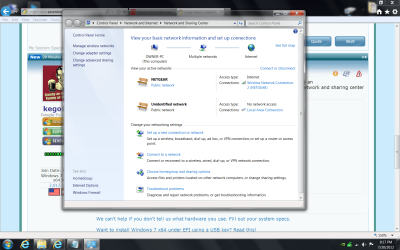
You have a valid IP address assigned by the router, which means there's nothing wrong with that. It just looks like you no longer have a home network being assigned - for some reason you are now using a public connection. We can fix that. Are you using the wireless or the wired connection?
 

My Computer

Computer Manufacturer/Model Number
Dell XPS 15 L502x
OS
Windows 7 Ultimate x64 SP1
CPU
Core i7-2670QM
Memory
8GB DDR3 PC3-10600
Graphics Card(s)
Intel HD Graphics 3000 + GeForce GT 540M
Screen Resolution
1920x1080
Hard Drives
1TB 5400RPM Seagate
My computer receives the internet signal from wired antenna; my computer serves as sort of a hotspot for my network except that the internet source doesn't come from the router (it comes from the antenna) and my computer sends the internet signal to the router. I just want to make clear my situation as I've been told it's quite rare to do it this way.


As for the public connection, it's set this way because my parents leave an open network for the business they run and I can reach it easily with the antenna I have. I leave it as public because the network is unsecured; I should also note that it has always been like that as far as my internet connection goes. The local area connection may have been set as Home but I don't recall.
 

My Computer

Computer Manufacturer/Model Number
Dell Precision 690
OS
Windows 7 Ultimate x64
CPU
2 x 5160 intel xeon dualcore 3.0 ghz
Motherboard
not sure
Memory
6 gigs ddr2
Graphics Card(s)
GT-430
Sound Card
integrated
Hard Drives
250 gigabyte Seagate 7200
PSU
750-watt
Cooling
airflow
Internet Speed
business speed comcast
Other Info
Broadcom NetXtreme 57xx Gigabit adapter
Netgear N600 Wireless Dual Band router (but switching out the router doesn't fix my problem, pretty sure the problem is with my main comp)
Yes, it's not common practice to do that. A much better way would be for your family to have two separate networks - an open one for visitors, and a secured one for family. You would then connect to the secured network and not have to worry about the public connection at all. Something to think about.

You can connect to a public network, but not an unidentified public network. Since it's unidentified, Windows automatically locks you out. Can you click on the icon of the bench and choose what type of network it is?
 

My Computer

Computer Manufacturer/Model Number
Dell XPS 15 L502x
OS
Windows 7 Ultimate x64 SP1
CPU
Core i7-2670QM
Memory
8GB DDR3 PC3-10600
Graphics Card(s)
Intel HD Graphics 3000 + GeForce GT 540M
Screen Resolution
1920x1080
Hard Drives
1TB 5400RPM Seagate
It won't let me click on the icon for the Unidentified Network, it's simply just not highlighted/clickable like the public option under NETGEAR which I can change from Public to whichever option.

Then again, I'm not sure that it ever was clickable. Everything that I can see looks normal to me except that my network creates no internet access and running the diagnostics yields an invalid IP address conflict that always remains "Not fixed".
 

My Computer

Computer Manufacturer/Model Number
Dell Precision 690
OS
Windows 7 Ultimate x64
CPU
2 x 5160 intel xeon dualcore 3.0 ghz
Motherboard
not sure
Memory
6 gigs ddr2
Graphics Card(s)
GT-430
Sound Card
integrated
Hard Drives
250 gigabyte Seagate 7200
PSU
750-watt
Cooling
airflow
Internet Speed
business speed comcast
Other Info
Broadcom NetXtreme 57xx Gigabit adapter
Netgear N600 Wireless Dual Band router (but switching out the router doesn't fix my problem, pretty sure the problem is with my main comp)
Followed those instructions and all that did was end up changing it to "Unidentified Network" and "Work Network" underneath it for some reason. I changed it to private via the instructions so not sure what the "Work Network" is about.

Also, I restarted just in case, but no change. Router remains accessible but provides no internet.
 
Last edited:

My Computer

Computer Manufacturer/Model Number
Dell Precision 690
OS
Windows 7 Ultimate x64
CPU
2 x 5160 intel xeon dualcore 3.0 ghz
Motherboard
not sure
Memory
6 gigs ddr2
Graphics Card(s)
GT-430
Sound Card
integrated
Hard Drives
250 gigabyte Seagate 7200
PSU
750-watt
Cooling
airflow
Internet Speed
business speed comcast
Other Info
Broadcom NetXtreme 57xx Gigabit adapter
Netgear N600 Wireless Dual Band router (but switching out the router doesn't fix my problem, pretty sure the problem is with my main comp)
So.... any other ideas? The network is still available but provides no internet access. Are there no configuration settings for troubleshooting a computer when you've set it up as I have? Or at least some way to turn my computer's network settings to default?
 

My Computer

Computer Manufacturer/Model Number
Dell Precision 690
OS
Windows 7 Ultimate x64
CPU
2 x 5160 intel xeon dualcore 3.0 ghz
Motherboard
not sure
Memory
6 gigs ddr2
Graphics Card(s)
GT-430
Sound Card
integrated
Hard Drives
250 gigabyte Seagate 7200
PSU
750-watt
Cooling
airflow
Internet Speed
business speed comcast
Other Info
Broadcom NetXtreme 57xx Gigabit adapter
Netgear N600 Wireless Dual Band router (but switching out the router doesn't fix my problem, pretty sure the problem is with my main comp)
While this did remove the unidentified network from the network and sharing page, it did nothing to resolve the internet issue. It's as if when hooking up to the internet while on vacation through an ethernet cable and sort of changing how my machine used its ethernet port, it somehow broke some setting when trying to return to using the ethernet cable in the opposite way.... I guess I mean that my computer should now be sending the internet connection out through the cable to the router and it's like it has forgotten how to do that in lieu of its vacation.

Should I reverse any of the previous fixes you've posted links to in the meantime? I suppose they can't hurt to leave them but I wasn't sure.
 

My Computer

Computer Manufacturer/Model Number
Dell Precision 690
OS
Windows 7 Ultimate x64
CPU
2 x 5160 intel xeon dualcore 3.0 ghz
Motherboard
not sure
Memory
6 gigs ddr2
Graphics Card(s)
GT-430
Sound Card
integrated
Hard Drives
250 gigabyte Seagate 7200
PSU
750-watt
Cooling
airflow
Internet Speed
business speed comcast
Other Info
Broadcom NetXtreme 57xx Gigabit adapter
Netgear N600 Wireless Dual Band router (but switching out the router doesn't fix my problem, pretty sure the problem is with my main comp)
Back
Top