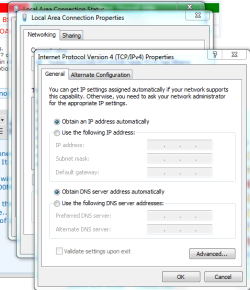
Local Area Connection does not have a valid IP configuration

Beachy

New member
Local time
11:23 PM
Messages
88
Hello,
I dont know how this happened but Im getting this message when I try to use my Ethernet wired connection. It was working fine up until a couple of days ago?

I have both Wireless and a wired connection. I prefer to used the LAN connection to the internet as its running at 100Mbps where as the wireless connection only runs at 36Mbps.
For some strange reason Windows has lost the IP settings for this connection and i get the above message.

I have done all the obvious things
Changed the Ethernet cable....Run the diagnostics..
I have looked in properties of IPV4 and IPV6 but i don't really know how to add my IP address?
 

Attachments

  • IPV4.PNG
    IPV4.PNG
    26.7 KB · Views: 49

My Computer My Computer

Computer type
PC/Desktop
Computer Manufacturer/Model Number
Custom Build
OS
windows 7 64bit home premium
CPU
Processor Intel i5 4440 @ 3.1GHz
Motherboard
Gigabyte Technology GA-B85M-D3H
Memory
Memory (RAM) CrossHair Vengance 8.00 GB
Graphics Card(s)
Graphics ATI Radeon HD 5400 Series (not currently installed)
Hard Drives
SeaGate 1TB
PSU
CrossHair 750W
Case
CiT Mars Midi Tower Gaming Case
Keyboard
Sidewinder
Internet Speed
9 Meg Download
Other Info
Storage ________________________________________
Total size of hard disk(s) 1863 GB
Disk partition (C 1822 GB Free (1863 GB Total)
Media drive (D CD/DVD
Have you tried power cycling the modem/router/computer?

Turn all off.
Turn on modem, wait till it settles down.
Turn on router (if you have one) and wait for it to settle.
Turn on computer.

See if that helps. If not, click on Start then Run or press Window key (next to left Ctrl key) +R and paste the following into the Run box, exactly as shown, including double quotes:

cmd /c "ipconfig /all > postme.txt & ping yahoo.com >> postme.txt & notepad postme.txt & del postme.txt"

and press ENTER.

A file will open in Notepad. Please copy and paste the contents here. Close the Notepad window and the file will be deleted and the Command Prompt window will also close.

If you don't have a Run selection off the Start menu, see here: Enable Run Command on Windows 7 or Vista Start Menu
 

My Computer My Computer

Computer type
PC/Desktop
Computer Manufacturer/Model Number
Lenovo IdeaCenter 450
OS
Windows 10 Pro X64
CPU
Intel Quad Core i7-4770 @ 3.4Ghz
Memory
16.0GB PC3-12800 DDR3 SDRAM 1600 MHz
Graphics Card(s)
Intel Integrated HD Graphics
Sound Card
Realtek HD Audio
Monitor(s) Displays
HP 22" LCD
Screen Resolution
1680 x 1050
Hard Drives
250GB Samsung EVO SATA-3 SSD
2TB Seagate ST2000DM001 SATA-2
1.5TB Seagate ST3150041AS SATA
Keyboard
Dell USB
Mouse
Lenovo USB
Internet Speed
Cable via Road Runner 3MB Upload, 30MB Download
Antivirus
Windows Defender, MBAM Pro, MBAE
Browser
Seamonkey
Other Info
UEFI/GPT
PLDS DVD-RW DH16AERSH
Windows IP Configuration

Host Name . . . . . . . . . . . . : Beachlover-PC
Primary Dns Suffix . . . . . . . :
Node Type . . . . . . . . . . . . : Hybrid
IP Routing Enabled. . . . . . . . : No
WINS Proxy Enabled. . . . . . . . : No
DNS Suffix Search List. . . . . . : home

Wireless LAN adapter Wireless Network Connection 2:

Media State . . . . . . . . . . . : Media disconnected
Connection-specific DNS Suffix . :
Description . . . . . . . . . . . : Microsoft Virtual WiFi Miniport Adapter
Physical Address. . . . . . . . . : 00-12-0E-78-60-C8
DHCP Enabled. . . . . . . . . . . : Yes
Autoconfiguration Enabled . . . . : Yes

Wireless LAN adapter Wireless Network Connection:

Connection-specific DNS Suffix . : home
Description . . . . . . . . . . . : 802.11b/g Mini Wireless LAN USB 2.0 Adapter
Physical Address. . . . . . . . . : 00-12-0E-78-60-C9
DHCP Enabled. . . . . . . . . . . : Yes
Autoconfiguration Enabled . . . . : Yes
Link-local IPv6 Address . . . . . : fe80::6dd8:662a:3051:d17%11(Preferred)
IPv4 Address. . . . . . . . . . . : 192.168.1.89(Preferred)
Subnet Mask . . . . . . . . . . . : 255.255.255.0
Lease Obtained. . . . . . . . . . : 06 August 2012 06:55:31
Lease Expires . . . . . . . . . . : 07 August 2012 06:55:31
Default Gateway . . . . . . . . . : 192.168.1.254
DHCP Server . . . . . . . . . . . : 192.168.1.254
DHCPv6 IAID . . . . . . . . . . . : 184553998
DHCPv6 Client DUID. . . . . . . . : 00-01-00-01-16-97-3A-9B-00-24-E8-18-05-3E
DNS Servers . . . . . . . . . . . : 192.168.1.254
NetBIOS over Tcpip. . . . . . . . : Enabled

Ethernet adapter Local Area Connection:

Connection-specific DNS Suffix . :
Description . . . . . . . . . . . : Realtek RTL8102E/RTL8103E Family PCI-E Fast Ethernet NIC (NDIS 6.20)
Physical Address. . . . . . . . . : 00-24-E8-18-05-3E
DHCP Enabled. . . . . . . . . . . : Yes
Autoconfiguration Enabled . . . . : Yes
Link-local IPv6 Address . . . . . : fe80::4430:da4b:8a8e:f9ea%9(Preferred)
Autoconfiguration IPv4 Address. . : 169.254.249.234(Preferred)
Subnet Mask . . . . . . . . . . . : 255.255.0.0
Default Gateway . . . . . . . . . :
DHCPv6 IAID . . . . . . . . . . . : 218113256
DHCPv6 Client DUID. . . . . . . . : 00-01-00-01-16-97-3A-9B-00-24-E8-18-05-3E
DNS Servers . . . . . . . . . . . : fec0:0:0:ffff::1%1
fec0:0:0:ffff::2%1
fec0:0:0:ffff::3%1
NetBIOS over Tcpip. . . . . . . . : Enabled

Tunnel adapter isatap.home:

Media State . . . . . . . . . . . : Media disconnected
Connection-specific DNS Suffix . : home
Description . . . . . . . . . . . : Microsoft ISATAP Adapter
Physical Address. . . . . . . . . : 00-00-00-00-00-00-00-E0
DHCP Enabled. . . . . . . . . . . : No
Autoconfiguration Enabled . . . . : Yes

Tunnel adapter isatap.{03181453-DF2D-44C3-AE68-6D7E7A5DF683}:

Media State . . . . . . . . . . . : Media disconnected
Connection-specific DNS Suffix . :
Description . . . . . . . . . . . : Microsoft ISATAP Adapter #2
Physical Address. . . . . . . . . : 00-00-00-00-00-00-00-E0
DHCP Enabled. . . . . . . . . . . : No
Autoconfiguration Enabled . . . . : Yes

Tunnel adapter isatap.{379BFD63-C616-4EF5-8A9A-87C82C7F454C}:

Media State . . . . . . . . . . . : Media disconnected
Connection-specific DNS Suffix . :
Description . . . . . . . . . . . : Microsoft ISATAP Adapter #3
Physical Address. . . . . . . . . : 00-00-00-00-00-00-00-E0
DHCP Enabled. . . . . . . . . . . : No
Autoconfiguration Enabled . . . . : Yes

Tunnel adapter Teredo Tunneling Pseudo-Interface:

Connection-specific DNS Suffix . :
Description . . . . . . . . . . . : Teredo Tunneling Pseudo-Interface
Physical Address. . . . . . . . . : 00-00-00-00-00-00-00-E0
DHCP Enabled. . . . . . . . . . . : No
Autoconfiguration Enabled . . . . : Yes
IPv6 Address. . . . . . . . . . . : 2001:0:5ef5:79fd:c2f:1c85:a97e:c8c9(Preferred)
Link-local IPv6 Address . . . . . : fe80::c2f:1c85:a97e:c8c9%18(Preferred)
Default Gateway . . . . . . . . . : ::
NetBIOS over Tcpip. . . . . . . . : Disabled

Pinging yahoo.com [98.139.183.24] with 32 bytes of data:
Reply from 98.139.183.24: bytes=32 time=240ms TTL=44
Reply from 98.139.183.24: bytes=32 time=141ms TTL=45
Reply from 98.139.183.24: bytes=32 time=142ms TTL=44
Reply from 98.139.183.24: bytes=32 time=141ms TTL=44

Ping statistics for 98.139.183.24:
Packets: Sent = 4, Received = 4, Lost = 0 (0% loss),
Approximate round trip times in milli-seconds:
Minimum = 141ms, Maximum = 240ms, Average = 166ms

 

My Computer My Computer

Computer type
PC/Desktop
Computer Manufacturer/Model Number
Custom Build
OS
windows 7 64bit home premium
CPU
Processor Intel i5 4440 @ 3.1GHz
Motherboard
Gigabyte Technology GA-B85M-D3H
Memory
Memory (RAM) CrossHair Vengance 8.00 GB
Graphics Card(s)
Graphics ATI Radeon HD 5400 Series (not currently installed)
Hard Drives
SeaGate 1TB
PSU
CrossHair 750W
Case
CiT Mars Midi Tower Gaming Case
Keyboard
Sidewinder
Internet Speed
9 Meg Download
Other Info
Storage ________________________________________
Total size of hard disk(s) 1863 GB
Disk partition (C 1822 GB Free (1863 GB Total)
Media drive (D CD/DVD
I just updated the drivers and Im still getting the same message. "local Area connection does not have a valid IP configuration"
 

My Computer My Computer

Computer type
PC/Desktop
Computer Manufacturer/Model Number
Custom Build
OS
windows 7 64bit home premium
CPU
Processor Intel i5 4440 @ 3.1GHz
Motherboard
Gigabyte Technology GA-B85M-D3H
Memory
Memory (RAM) CrossHair Vengance 8.00 GB
Graphics Card(s)
Graphics ATI Radeon HD 5400 Series (not currently installed)
Hard Drives
SeaGate 1TB
PSU
CrossHair 750W
Case
CiT Mars Midi Tower Gaming Case
Keyboard
Sidewinder
Internet Speed
9 Meg Download
Other Info
Storage ________________________________________
Total size of hard disk(s) 1863 GB
Disk partition (C 1822 GB Free (1863 GB Total)
Media drive (D CD/DVD
You are not getting an wired IP Address from your router/modem.
Autoconfiguration IPv4 Address. . : 169.254.249.234(Preferred)

You are getting a Wireless IP Address:
IPv4 Address. . . . . . . . . . . : 192.168.1.89(Preferred)


Do you have a router? If so, what make and model. If yes, try bypassing the router and connect directly to the modem, see if that works.

Did you try power cycling as I suggested previously?
 

My Computer My Computer

Computer type
PC/Desktop
Computer Manufacturer/Model Number
Lenovo IdeaCenter 450
OS
Windows 10 Pro X64
CPU
Intel Quad Core i7-4770 @ 3.4Ghz
Memory
16.0GB PC3-12800 DDR3 SDRAM 1600 MHz
Graphics Card(s)
Intel Integrated HD Graphics
Sound Card
Realtek HD Audio
Monitor(s) Displays
HP 22" LCD
Screen Resolution
1680 x 1050
Hard Drives
250GB Samsung EVO SATA-3 SSD
2TB Seagate ST2000DM001 SATA-2
1.5TB Seagate ST3150041AS SATA
Keyboard
Dell USB
Mouse
Lenovo USB
Internet Speed
Cable via Road Runner 3MB Upload, 30MB Download
Antivirus
Windows Defender, MBAM Pro, MBAE
Browser
Seamonkey
Other Info
UEFI/GPT
PLDS DVD-RW DH16AERSH

My Computer My Computer

Computer type
PC/Desktop
Computer Manufacturer/Model Number
Custom Build
OS
windows 7 64bit home premium
CPU
Processor Intel i5 4440 @ 3.1GHz
Motherboard
Gigabyte Technology GA-B85M-D3H
Memory
Memory (RAM) CrossHair Vengance 8.00 GB
Graphics Card(s)
Graphics ATI Radeon HD 5400 Series (not currently installed)
Hard Drives
SeaGate 1TB
PSU
CrossHair 750W
Case
CiT Mars Midi Tower Gaming Case
Keyboard
Sidewinder
Internet Speed
9 Meg Download
Other Info
Storage ________________________________________
Total size of hard disk(s) 1863 GB
Disk partition (C 1822 GB Free (1863 GB Total)
Media drive (D CD/DVD
Definitely can't bypass the modem. I thought you might have had a router and modem.

Download and run Piriform Speccy - System Information - Free Download
Click on File then Save as text.

Upload the file as an attachment here please.
 

My Computer My Computer

Computer type
PC/Desktop
Computer Manufacturer/Model Number
Lenovo IdeaCenter 450
OS
Windows 10 Pro X64
CPU
Intel Quad Core i7-4770 @ 3.4Ghz
Memory
16.0GB PC3-12800 DDR3 SDRAM 1600 MHz
Graphics Card(s)
Intel Integrated HD Graphics
Sound Card
Realtek HD Audio
Monitor(s) Displays
HP 22" LCD
Screen Resolution
1680 x 1050
Hard Drives
250GB Samsung EVO SATA-3 SSD
2TB Seagate ST2000DM001 SATA-2
1.5TB Seagate ST3150041AS SATA
Keyboard
Dell USB
Mouse
Lenovo USB
Internet Speed
Cable via Road Runner 3MB Upload, 30MB Download
Antivirus
Windows Defender, MBAM Pro, MBAE
Browser
Seamonkey
Other Info
UEFI/GPT
PLDS DVD-RW DH16AERSH
Back
Top