Solved Windows 7 Network Discovery Issue

EricMcBride

New member
Local time
2:39 PM
Messages
5
I'm unable to get my network discovery working. This is preventing me from connecting to my homegroup and even my printer. I can ping the other computers and devices on my network, I just can't connect to them.

Here are all the services currently running.

Application Experience
Background Intelligent Transfer Service
Base Filtering Engine
Bluetooth Support Service
Bonjour Service
CNG Key Isolation
COM+ Event System
Creative Audio Service
Cryptographic Services
DCOM Service Process Launcher
Desktop Window Manager Session Manager
DHCP Client
Diagnostic Policy Service
Diagnostic Service Host
Distributed Link Tracking Client
DNS Client
Extensible Authentication Protocol
Function Discovery Provider Host
Function Discovery Resource Publication
Group Policy Client
Handsfree Headset Service
HomeGroup Provider
Human Interface Device Access
IKE and AuthIP IPsec Keying Modules
Infrared monitor service
IPsec Policy Agent
LightScribeService Direct Disc Labeling Service
Machine Debug Manager
Microsoft Antimalware Service
MSI_SuperCharger
Multimedia Class Scheduler
Network Connections
Network List Service
Network Location Awareness
Network Store Interface Service
NVIDIA Display Driver Service
NVIDIA Stereoscopic 3D Driver Service
Peer Name Resolution Protocol
Peer Networking Grouping
Peer Networking Identity Manager
Plug and Play
PnkBstrA
PNRP Machine Name Publication Service
Portable Device Enumeration Service
Power
Print Spooler
Program Compatibility Assistant Service
Protexis Licensing V2
Remote Procedure Call (RPC)
RPC Endpoint Manager
Security Accounts Manager
Server
Shell Hardware Detection
Skype C2C Service
Software Protection
SQL Server (CMJ)
SQL Server Browser
SQL Server VSS Writer
SSDP Discovery
Superfetch
System Event Notification Service
Task Scheduler
TCP/IP NEtBIOS Helper
Themes
TightVNC Server
TomTomHOMEService
UMVPFSrv
UPnP Device Host
User Profile Service
VMware Authorization Service
VMware DHCP Service
VMware NAT Service
VMware USB Arbitration Service
VNC Server Version 4
Windows Audio
Windows Audio Endpoint Builder
Windows Connect Now - Config Registrar
Windows Driver Foundation - User-mode Driver Framework
Windows Event Log
Windows Firewall
Windows Font Cache Service
Windows Live ID Sign-in Assistant
Windows Management Instrumentation
Windows Media Player Network Sharing Service
Windows Modules Installer
Windows Search
Windows Update
WinHTTP Web Proxy Auto-Discovery Service
WLAN AutoConfig
Workstation
Yahoo! Updater

(Edit: At some point, my workgroup changed back to the default. Unsure as to what could have caused this. Also, it seems Windows Firewall was preventing me from connecting to my homegroup and my printer, so it's off now.)

Problem fixed.
 
Last edited:

My Computer

Computer Manufacturer/Model Number
Custom Build
OS
Windows 7 Home Premium 64-Bit
CPU
Phenom II X6 1090t
Motherboard
MSI 785GTM-E45
Memory
4GB (Unknown Make)
Graphics Card(s)
EVGA Nvidia GTX 250
Sound Card
On Board
Monitor(s) Displays
HP 2509B x2
Hard Drives
Western Digital 1TB x2
PSU
Unknown
Case
Standard ATX
Cooling
Standard Fans
There are various solutions to fix this problem but turning off Windows firewall is definitely not one of them. Turning off Windows firewall leaves your system open to attacks and is something that should never be done under any circumstance.

We can assume that you have network discovery turned on in the Advanced Sharing Settings window. This is a fairly common problem by the way.

network discovery will not stay on - Microsoft Answers

Network Discovery will not stay on or enabled. - Microsoft Answers

Others have fixed the problem by doing this:

I went to Control Panel -> Administrative Tools -> Services. I found that SSDP Discovery service was set to "Disabled". I haven't had any reason to change services, so apparently it was set that way by default. After setting the service to "Automatic" and starting it, I was able to set Network Discovery to "on" successfully.

Also make sure to Turn on DNS Client, Function Discovery Resource Publication, SSDP Discovery, and UPnP Device Host services.
 
Last edited:

My Computer

Computer type
PC/Desktop
Computer Manufacturer/Model Number
Home built
OS
Windows 7 Ult, Windows 8.1 Pro,
CPU
Q9650-4.275GHz, E8600 4.5GHz, E6750-3.8GHz
Motherboard
Evga 780i FTW
Memory
G.Skill PC2 9600 1200Mhz 5 5 5 15 2T
Graphics Card(s)
GTX480
Sound Card
Asus Xonar D2
Monitor(s) Displays
HannsG
Screen Resolution
1680X1050
Hard Drives
GSkill Phoenix Pro 120GB SSD
PSU
ThermalTake Toughpower 1000Watt modular
Case
ThermalTake XaserV
Cooling
Xigmatek S1283
Keyboard
Logitech G15
Mouse
Logitech G9
Internet Speed
T1
I have in fact tried both those solutions, along with several others that I have researched, hence why the first thing I did was post the services that I have running.

The network discovery would not stay turned on in the Advanced Sharing Settings, nor would it stick when I clicked the drop-down warning that would occur after clicking on the "Network" link in the file manager
 

My Computer

Computer Manufacturer/Model Number
Custom Build
OS
Windows 7 Home Premium 64-Bit
CPU
Phenom II X6 1090t
Motherboard
MSI 785GTM-E45
Memory
4GB (Unknown Make)
Graphics Card(s)
EVGA Nvidia GTX 250
Sound Card
On Board
Monitor(s) Displays
HP 2509B x2
Hard Drives
Western Digital 1TB x2
PSU
Unknown
Case
Standard ATX
Cooling
Standard Fans
I have in fact tried both those solutions, along with several others that I have researched, hence why the first thing I did was post the services that I have running.

The network discovery would not stay turned on in the Advanced Sharing Settings, nor would it stick when I clicked the drop-down warning that would occur after clicking on the "Network" link in the file manager

Have tried running the sfc/scannow command to see if there are any file integrity problems?

You will most likely find problems there if you can't turn on Network Discovery.
 

My Computer

Computer type
PC/Desktop
Computer Manufacturer/Model Number
Home built
OS
Windows 7 Ult, Windows 8.1 Pro,
CPU
Q9650-4.275GHz, E8600 4.5GHz, E6750-3.8GHz
Motherboard
Evga 780i FTW
Memory
G.Skill PC2 9600 1200Mhz 5 5 5 15 2T
Graphics Card(s)
GTX480
Sound Card
Asus Xonar D2
Monitor(s) Displays
HannsG
Screen Resolution
1680X1050
Hard Drives
GSkill Phoenix Pro 120GB SSD
PSU
ThermalTake Toughpower 1000Watt modular
Case
ThermalTake XaserV
Cooling
Xigmatek S1283
Keyboard
Logitech G15
Mouse
Logitech G9
Internet Speed
T1
Yes, it came back with no problems found.
 

My Computer

Computer Manufacturer/Model Number
Custom Build
OS
Windows 7 Home Premium 64-Bit
CPU
Phenom II X6 1090t
Motherboard
MSI 785GTM-E45
Memory
4GB (Unknown Make)
Graphics Card(s)
EVGA Nvidia GTX 250
Sound Card
On Board
Monitor(s) Displays
HP 2509B x2
Hard Drives
Western Digital 1TB x2
PSU
Unknown
Case
Standard ATX
Cooling
Standard Fans
Yes, it came back with no problems found.

Ok good, I believe I found another possible cause as I have tracked this same problem down in the past.

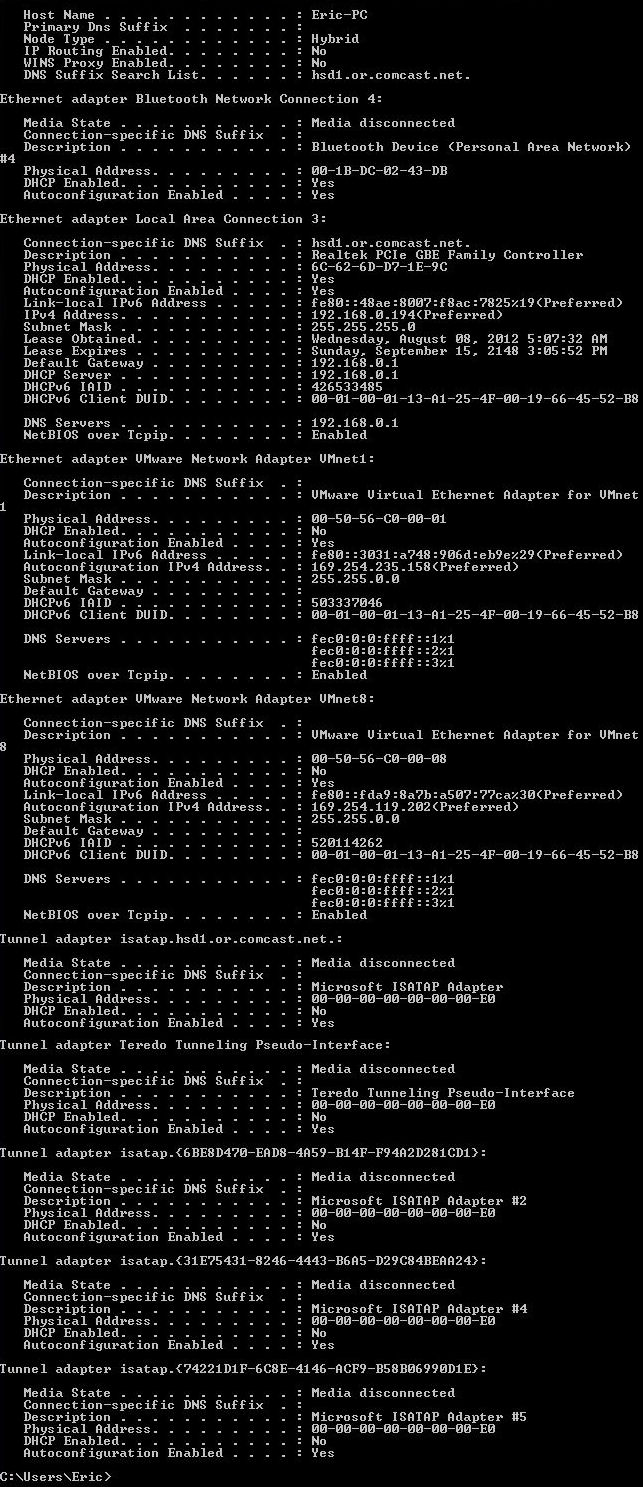
Can you please post a screen shot of the ipconfig/all from this machine?
 

My Computer

Computer type
PC/Desktop
Computer Manufacturer/Model Number
Home built
OS
Windows 7 Ult, Windows 8.1 Pro,
CPU
Q9650-4.275GHz, E8600 4.5GHz, E6750-3.8GHz
Motherboard
Evga 780i FTW
Memory
G.Skill PC2 9600 1200Mhz 5 5 5 15 2T
Graphics Card(s)
GTX480
Sound Card
Asus Xonar D2
Monitor(s) Displays
HannsG
Screen Resolution
1680X1050
Hard Drives
GSkill Phoenix Pro 120GB SSD
PSU
ThermalTake Toughpower 1000Watt modular
Case
ThermalTake XaserV
Cooling
Xigmatek S1283
Keyboard
Logitech G15
Mouse
Logitech G9
Internet Speed
T1
0GH4j.jpg
0GH4j
 

My Computer

Computer Manufacturer/Model Number
Custom Build
OS
Windows 7 Home Premium 64-Bit
CPU
Phenom II X6 1090t
Motherboard
MSI 785GTM-E45
Memory
4GB (Unknown Make)
Graphics Card(s)
EVGA Nvidia GTX 250
Sound Card
On Board
Monitor(s) Displays
HP 2509B x2
Hard Drives
Western Digital 1TB x2
PSU
Unknown
Case
Standard ATX
Cooling
Standard Fans
Ok thanks, just as I suspected. You have a bunch of 6 to4 adaptors there that can cause this problem, this has cause the exact problem you have in the past.

You will need to remove all those extra tunnel adaptors and also disable any virtual adaptors that you aren't using.

This .exe file will remove those extra adaptors for you. Save the file, unzip then right click either the 64 or 32 bit version "depending on your system" and run as admin. Ignore and override any warning messages you receive. After the file runs reboot your machine.

Be sure to enable the Windows firewall then check to see that most of the 6 to 4 adaptors are gone, there should only be a couple of those, then check to see if you can turn on network discovery.
 

Attachments

Last edited:

My Computer

Computer type
PC/Desktop
Computer Manufacturer/Model Number
Home built
OS
Windows 7 Ult, Windows 8.1 Pro,
CPU
Q9650-4.275GHz, E8600 4.5GHz, E6750-3.8GHz
Motherboard
Evga 780i FTW
Memory
G.Skill PC2 9600 1200Mhz 5 5 5 15 2T
Graphics Card(s)
GTX480
Sound Card
Asus Xonar D2
Monitor(s) Displays
HannsG
Screen Resolution
1680X1050
Hard Drives
GSkill Phoenix Pro 120GB SSD
PSU
ThermalTake Toughpower 1000Watt modular
Case
ThermalTake XaserV
Cooling
Xigmatek S1283
Keyboard
Logitech G15
Mouse
Logitech G9
Internet Speed
T1
Ran it, it said it removed 1. Turned my firewall back on to recommended settings and now my homegroup is no longer working. Network discovery is on now.

Here is the ipconfig now.

SYh1x.jpg
 

My Computer

Computer Manufacturer/Model Number
Custom Build
OS
Windows 7 Home Premium 64-Bit
CPU
Phenom II X6 1090t
Motherboard
MSI 785GTM-E45
Memory
4GB (Unknown Make)
Graphics Card(s)
EVGA Nvidia GTX 250
Sound Card
On Board
Monitor(s) Displays
HP 2509B x2
Hard Drives
Western Digital 1TB x2
PSU
Unknown
Case
Standard ATX
Cooling
Standard Fans
For anyone else with this problem where Network Discovery won't stay on.

The problem is that the base filtering engine requires a repair, it was most likely caused by a virus.

Pay no attention to the stuff saying check to see if the base filtering engine is missing etc. If the Network Discovery won't stay on then you have to run this repair, no doubt about it.

To repair the base filtering engine click on the link and follow directions. :)

http://kb.eset.com/esetkb/index?page=content&id=SOLN2861
 
Last edited:

My Computer

Computer type
PC/Desktop
Computer Manufacturer/Model Number
Home built
OS
Windows 7 Ult, Windows 8.1 Pro,
CPU
Q9650-4.275GHz, E8600 4.5GHz, E6750-3.8GHz
Motherboard
Evga 780i FTW
Memory
G.Skill PC2 9600 1200Mhz 5 5 5 15 2T
Graphics Card(s)
GTX480
Sound Card
Asus Xonar D2
Monitor(s) Displays
HannsG
Screen Resolution
1680X1050
Hard Drives
GSkill Phoenix Pro 120GB SSD
PSU
ThermalTake Toughpower 1000Watt modular
Case
ThermalTake XaserV
Cooling
Xigmatek S1283
Keyboard
Logitech G15
Mouse
Logitech G9
Internet Speed
T1
HI guys first time here and first post I have the same problem as Eric and have tried that 6to4 but it just flashed and the I rebooted and found nothing has changed can anyone help me please it started when I had a trojan but dead now but I think it has corrupted some system files can I repair them in any way without having to reinstall ??? thanks in advance.

Nice to be here
Scoobydoo1

If I have to make a new post I will thanks
 

My Computer

Computer type
PC/Desktop
OS
Windows 7 64bit
HI guys first time here and first post I have the same problem as Eric and have tried that 6to4 but it just flashed and the I rebooted and found nothing has changed can anyone help me please it started when I had a trojan but dead now but I think it has corrupted some system files can I repair them in any way without having to reinstall ??? thanks in advance.

Nice to be here
Scoobydoo1

If I have to make a new post I will thanks

yes make a new topic
 

My Computer

Computer type
PC/Desktop
Computer Manufacturer/Model Number
Ordi
OS
Windows 7 Home Premium SP1, 64 bit
CPU
Athlon 2 x2 250
Motherboard
ECS A740GM-M
Memory
4GB DDR2
Graphics Card(s)
nVida Geforce GT-440
Sound Card
onboard
Monitor(s) Displays
21'' Philips @ 1080p, 19,5''' Samsung @ 1440x900
Hard Drives
500GB SAMSUNG HD502HJ (SATA)
PSU
400w thermaltake
Cooling
Stock CPU fan, one fan on the back
Keyboard
A keyboard
Mouse
A mouse
Internet Speed
7 down 1 up
Antivirus
KIS 2014
Browser
Chrome
HI guys first time here and first post I have the same problem as Eric and have tried that 6to4 but it just flashed and the I rebooted and found nothing has changed can anyone help me please it started when I had a trojan but dead now but I think it has corrupted some system files can I repair them in any way without having to reinstall ??? thanks in advance.

Nice to be here
Scoobydoo1

If I have to make a new post I will thanks

yes make a new topic

Why estXcrew because as I browse though this great helpful site I have found a lot of other people with the same relating problem asking related questions on the same threads and it never seems to be a problem :huh:
 

My Computer

Computer type
PC/Desktop
OS
Windows 7 64bit
Hi there, I know this thread is quite old now (and solved), but I want to add my solution:

In my case it was Windows Firewall problem (when I turned it off the network discovery worked).
Link to a Firewall repairer (below) fixed my problem...

Download Tweaking.com - Repair Windows Firewall 2.0.0

Cheers and good luck.
 

My Computer

OS
Windows 7 Professional x64
CPU
Intel Core i7 930
Motherboard
Gigabyte X58A-UD3R
Yes it could be the firewall in come cases or the base filtering engine requires a repair. Either of those can cause this Network Discovery problem where it won't stay turned on.

To repair the base filtering entire follow directions in the link from Eset, pay no attention to the stuff about checking if the base filtering engine is working or not, this repair doesn't matter if you had ESET or not. If Network Discovery won't stay on then you need to run the .exe repair file from the following link. :)

I receive the message that my ESET installation ended prematurely - ESET Knowledgebase
 

My Computer

Computer type
PC/Desktop
Computer Manufacturer/Model Number
Home built
OS
Windows 7 Ult, Windows 8.1 Pro,
CPU
Q9650-4.275GHz, E8600 4.5GHz, E6750-3.8GHz
Motherboard
Evga 780i FTW
Memory
G.Skill PC2 9600 1200Mhz 5 5 5 15 2T
Graphics Card(s)
GTX480
Sound Card
Asus Xonar D2
Monitor(s) Displays
HannsG
Screen Resolution
1680X1050
Hard Drives
GSkill Phoenix Pro 120GB SSD
PSU
ThermalTake Toughpower 1000Watt modular
Case
ThermalTake XaserV
Cooling
Xigmatek S1283
Keyboard
Logitech G15
Mouse
Logitech G9
Internet Speed
T1
Back
Top