
Starting a bat file on networked computer from local bat file question

nzdreamer55

New member
Member
Local time
11:09 PM
Messages
51
Hello everyone,

I have a bat file that is launched when a torrent finishes downloading on my laptop which launched robocopy to copy it to my server computer.

I want to have the server run a few programs to extract the file and move it to the correct directory structure.

I want to launch a bat file on the server from the first bat file using the call command, however I am not sure if this command will cause my server to execute the bat or my laptop to execute the bat.

Is there a way to get my server to run the bat from the bat that is run on my laptop?

I think that if I use the call command that it will run the called bat on my laptop even though the bat is located on my server.

Thanks in advance
-S
 

My Computer My Computer

At a glance

Windows 7 Home Premium 64bitAMD Athlon II X4 640 Propus 3.0GHz Socket AM3...G.SKILL NS 4GB (2 x 2GB) 240-Pin DDR3 SDRAM D...On board graphics-HDMI output
Computer Manufacturer/Model Number
Home built
OS
Windows 7 Home Premium 64bit
CPU
AMD Athlon II X4 640 Propus 3.0GHz Socket AM3 95W Quad-Core
Motherboard
ASUS M4A88TD-M/USB3 AM3 AMD 880G SATA 6Gb/s USB 3.0 HDMI Mic
Memory
G.SKILL NS 4GB (2 x 2GB) 240-Pin DDR3 SDRAM DDR3 1333 (PC3 1
Graphics Card(s)
On board graphics-HDMI output
Sound Card
On board output over HDMI output
Monitor(s) Displays
Vizio 42" TV M420NV
Screen Resolution
1080p
Hard Drives
OS:Western Digital SiliconEdge Blue SSC-D0064SC-2100 2.5" 64GB SATA II MLC Internal Solid State Drive (SSD) - OEM
3X:Western Digital Caviar Green WD20EARS 2TB SATA 3.0Gb/s 3.5"
1X:500mg seagate drive (not sure model)
PSU
Antec BP550 Plus 550W Continuous Power ATX12V V2.2 80 PLUS C
Case
COOLER MASTER HAF 912 RC-912-KKN1 Black SECC/ ABS Plastic AT
Cooling
3 fans 1x 200mm, 1x120mm LED Cas
Keyboard
IOGear Multimedia Keyboard with Laser Trackball wireless
Mouse
see keyboard
Internet Speed
16M/s Cable Provider Charter
Other Info
Microsoft Windows 7 Home Premium 64-bit 1-Pack for System Builders - OEM
ASUS 24X DVD Burner Black SATA Model DRW-24B3LT LightScribe Support - OEM
Gigibit Router
Your exactly correct that the batch file will run on your laptop. The only way to run from the server is to use Remote desktop RDP from your machine to the server which will allow you to run the program in the server's memory.
Or, you could have a planned event (Task Manager) on your server which would check to see if the file exists at some point in time and then run the batch program in the servers memory space.

Rich
 

My Computer My Computer

At a glance

Windows 7 Pro x64 SP1Intel Core I716 GigsNVIDIA GeForce GTX 670M
Computer type
Laptop
Computer Manufacturer/Model Number
Toshiba Laptop Qosimo X870
OS
Windows 7 Pro x64 SP1
CPU
Intel Core I7
Motherboard
Toshiba Qosmio
Memory
16 Gigs
Graphics Card(s)
NVIDIA GeForce GTX 670M
Monitor(s) Displays
17.7" laptop
Screen Resolution
1600 x 900
Hard Drives
256 Gig SanDisk SSD for C
256 Gig Intel SSD for D
Internet Speed
50/25 FIOS
Antivirus
Vipre (all you can eat for 10 machines)
Browser
IE and FF
Other Info
I have dos 6.22, wfwg 3.11, win98, 2000 and xp VHD's available for testing. MS's Virtual PC works great.
Thanks so much Rich for the reply. I was using the task scheduler to run the bat every 5 minutes, however this lead to some problems if the files were being copied at the time that the bat was started.

Would you be able to help me config a way to have a planned event on my server "Check" to see if a file exists and then run a batch program?

Thanks
-S
 

My Computer My Computer

At a glance

Windows 7 Home Premium 64bitAMD Athlon II X4 640 Propus 3.0GHz Socket AM3...G.SKILL NS 4GB (2 x 2GB) 240-Pin DDR3 SDRAM D...On board graphics-HDMI output
Computer Manufacturer/Model Number
Home built
OS
Windows 7 Home Premium 64bit
CPU
AMD Athlon II X4 640 Propus 3.0GHz Socket AM3 95W Quad-Core
Motherboard
ASUS M4A88TD-M/USB3 AM3 AMD 880G SATA 6Gb/s USB 3.0 HDMI Mic
Memory
G.SKILL NS 4GB (2 x 2GB) 240-Pin DDR3 SDRAM DDR3 1333 (PC3 1
Graphics Card(s)
On board graphics-HDMI output
Sound Card
On board output over HDMI output
Monitor(s) Displays
Vizio 42" TV M420NV
Screen Resolution
1080p
Hard Drives
OS:Western Digital SiliconEdge Blue SSC-D0064SC-2100 2.5" 64GB SATA II MLC Internal Solid State Drive (SSD) - OEM
3X:Western Digital Caviar Green WD20EARS 2TB SATA 3.0Gb/s 3.5"
1X:500mg seagate drive (not sure model)
PSU
Antec BP550 Plus 550W Continuous Power ATX12V V2.2 80 PLUS C
Case
COOLER MASTER HAF 912 RC-912-KKN1 Black SECC/ ABS Plastic AT
Cooling
3 fans 1x 200mm, 1x120mm LED Cas
Keyboard
IOGear Multimedia Keyboard with Laser Trackball wireless
Mouse
see keyboard
Internet Speed
16M/s Cable Provider Charter
Other Info
Microsoft Windows 7 Home Premium 64-bit 1-Pack for System Builders - OEM
ASUS 24X DVD Burner Black SATA Model DRW-24B3LT LightScribe Support - OEM
Gigibit Router
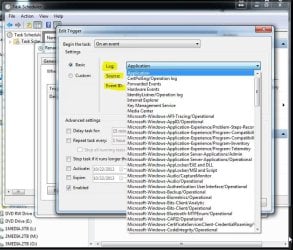
One thing that I posted a while ago in another forum was the event trigger function within the task scheduler. If I knew which log to monitor, what source and the Event ID for a file creation, then I could use the Task Scheduler to run my bat file on my server computer with out setting up a time loop. There are other small programs out there that will monitor a folder and launch a program like a bat file, but it would be nice to get away from third party software and keep a little running on my server as possible.

Anyone know how to set this up?

Thank you very much
-S
 

Attachments

  • Tash Scheduler 1.JPG
    Tash Scheduler 1.JPG
    108.2 KB · Views: 5

My Computer My Computer

At a glance

Windows 7 Home Premium 64bitAMD Athlon II X4 640 Propus 3.0GHz Socket AM3...G.SKILL NS 4GB (2 x 2GB) 240-Pin DDR3 SDRAM D...On board graphics-HDMI output
Computer Manufacturer/Model Number
Home built
OS
Windows 7 Home Premium 64bit
CPU
AMD Athlon II X4 640 Propus 3.0GHz Socket AM3 95W Quad-Core
Motherboard
ASUS M4A88TD-M/USB3 AM3 AMD 880G SATA 6Gb/s USB 3.0 HDMI Mic
Memory
G.SKILL NS 4GB (2 x 2GB) 240-Pin DDR3 SDRAM DDR3 1333 (PC3 1
Graphics Card(s)
On board graphics-HDMI output
Sound Card
On board output over HDMI output
Monitor(s) Displays
Vizio 42" TV M420NV
Screen Resolution
1080p
Hard Drives
OS:Western Digital SiliconEdge Blue SSC-D0064SC-2100 2.5" 64GB SATA II MLC Internal Solid State Drive (SSD) - OEM
3X:Western Digital Caviar Green WD20EARS 2TB SATA 3.0Gb/s 3.5"
1X:500mg seagate drive (not sure model)
PSU
Antec BP550 Plus 550W Continuous Power ATX12V V2.2 80 PLUS C
Case
COOLER MASTER HAF 912 RC-912-KKN1 Black SECC/ ABS Plastic AT
Cooling
3 fans 1x 200mm, 1x120mm LED Cas
Keyboard
IOGear Multimedia Keyboard with Laser Trackball wireless
Mouse
see keyboard
Internet Speed
16M/s Cable Provider Charter
Other Info
Microsoft Windows 7 Home Premium 64-bit 1-Pack for System Builders - OEM
ASUS 24X DVD Burner Black SATA Model DRW-24B3LT LightScribe Support - OEM
Gigibit Router
You could setup a ssh server or telnet server (telnet is not secure). The batch file could open up a session and run the command through the session.

I know with putty you can have a txt file with commands listed then once the command runs it will shutdown.

example:
putty.exe -load "Session name" -l "username -pw "Password" -m c:\test\command.txt

command.txt:
netstat -a

When you run the example above it will open the shh connection (I use sessions that i have already created). Once the connection is open it will run the command in the command.txt file, then close the connection.
 
Last edited:

My Computer My Computer

At a glance

Windows 7 Ultimate x64
OS
Windows 7 Ultimate x64
In a batch file, you can have goto points.
:start
if exist xxx.txt goto ok1
exit
: (put ok1 here) in this forum the ok with a colon in front is an emoticon.
putyour executeor batch file here
exit
 

My Computer My Computer

At a glance

Windows 7 Pro x64 SP1Intel Core I716 GigsNVIDIA GeForce GTX 670M
Computer type
Laptop
Computer Manufacturer/Model Number
Toshiba Laptop Qosimo X870
OS
Windows 7 Pro x64 SP1
CPU
Intel Core I7
Motherboard
Toshiba Qosmio
Memory
16 Gigs
Graphics Card(s)
NVIDIA GeForce GTX 670M
Monitor(s) Displays
17.7" laptop
Screen Resolution
1600 x 900
Hard Drives
256 Gig SanDisk SSD for C
256 Gig Intel SSD for D
Internet Speed
50/25 FIOS
Antivirus
Vipre (all you can eat for 10 machines)
Browser
IE and FF
Other Info
I have dos 6.22, wfwg 3.11, win98, 2000 and xp VHD's available for testing. MS's Virtual PC works great.
Back
Top