JavaScript is disabled. For a better experience, please enable JavaScript in your browser before proceeding.
You are using an out of date browser. It may not display this or other websites correctly.
You should upgrade or use an
alternative browser .
Solved how to turn on Wifi in sony Vaio
Hi
i have a sony vaio computer.yesterday just opened my laptop cleaned fan.then closed clearly.after i can't connect internet via WiFI but i can connect via cable.
my question is when i try to connect via WIFI it's say it's turn off.. how to turn on now?
Computer type Laptop Computer Manufacturer/Model Number sony OS Windows 7 CPU intel i5 Memory 8gb Hard Drives 500gb Browser mozilla
Network Enthusiast
Guru
Gold Member
VIP
Do you have a physical button or switch on your laptop which you can push? Almost all laptops have this feature so that you can turn the wireless off.
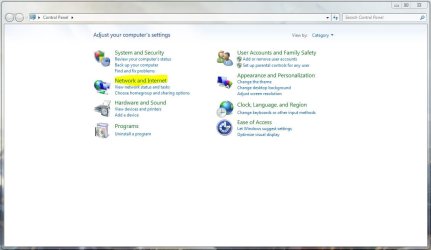
If not then you should be able to force it by going to Start> Control panel
Once opened click on '
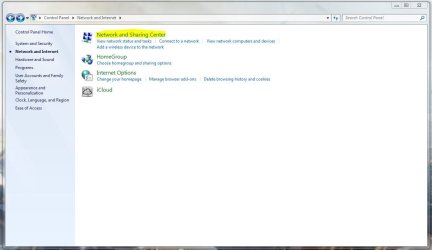
Network and Internet '
Afterwards, click on '
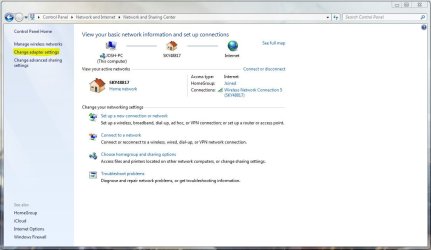
Networking and Sharing Center '
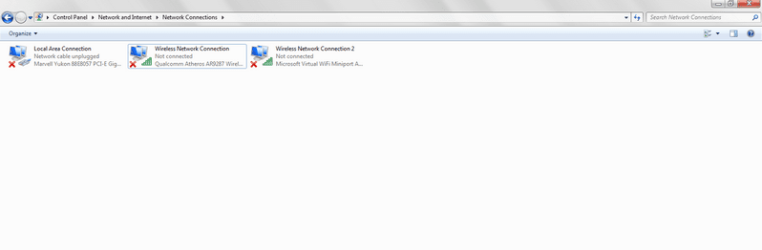
From here you want to click on '
Change Adapter Settings '
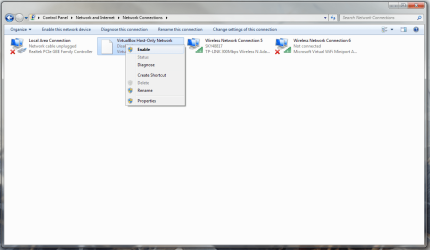
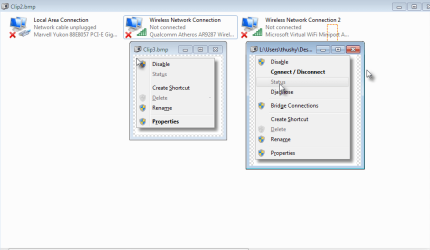
Now, right click on the wireless adapter listed and click on '
Enable '. This should enable your wi-fi card
Hope This Helps,
Josh!
Computer type PC/Desktop Computer Manufacturer/Model Number Custom Built OS Windows 7 Professional x64 SP1 ; Windows Server 2012 R2 Standard CPU Intel Core i5 2400 @ 3.10GHz Motherboard Foxconn H67MP-S/-V/H67MP Memory 8.0GB DDR3 @ 665MHz (2GBx4) Graphics Card(s) AMD Radeon HD 6870 Sound Card Realtek High Definition Audio Monitor(s) Displays AOC 2243W & SMB1930NW Screen Resolution 1440x900 & 1920x1080 Hard Drives 977GB Seagate ST31000524AS ATA Drive (SATA) PSU 750W Gaming PSU Case Novatech Night Cooling Fan Keyboard Dell Standard PS/2 Keyboard Mouse R.A.T 07 Gaming Mouse Internet Speed Download: 10 Mbps Ping: 30ms Upload: 0.81 Mbps Browser Google Chrome Other Info Optiarc DVD RW AD-5260S ATA Device
New member
Guru
Gold Member
VIP
Hi there .. Might be a Function FN + f1 f2 etc there might be a symbol on the F keys for an Antenna .. Or maybe you have disturb some thing when you opened the Laptop
Computer Manufacturer/Model Number W530-3630QM1 OS windows 7 home 64bit CPU INTEL-CORE I7 Memory 16GB Hard Drives 750GB Browser Chrome
New member
Member
Thread Starter
Clip2.jpg
5.8 KB
· Views: 24
2013-07-31_002207.png
11.9 KB
· Views: 5
2013-07-31_002600.png
17.3 KB
· Views: 6
Computer type Laptop Computer Manufacturer/Model Number sony OS Windows 7 CPU intel i5 Memory 8gb Hard Drives 500gb Browser mozilla
Network Enthusiast
Guru
Gold Member
VIP
If you are sure that it is enabled on the laptop then this may indicate a hardware problem at which I cannot repair or a driver issue, however based on what you did (clean the machine) it would seem that this could be a hardware problem.
When opening the laptop did you remove any wires? Laptops are designed to be compact therefore the slightest movement of wires can cause issues as well as it can be difficult to see if you accidentally pulled something out.
To remove any possibility of software causing the issue can you test connectivity in Safe Mode with Networking - (OPTION ONE ONLY)
http://www.sevenforums.com/tutorials/69585-safe-mode.html
Please replace all references of 'Safe Mode' with 'Safe Mode with Networking'
Many Thanks,
Josh
Computer type PC/Desktop Computer Manufacturer/Model Number Custom Built OS Windows 7 Professional x64 SP1 ; Windows Server 2012 R2 Standard CPU Intel Core i5 2400 @ 3.10GHz Motherboard Foxconn H67MP-S/-V/H67MP Memory 8.0GB DDR3 @ 665MHz (2GBx4) Graphics Card(s) AMD Radeon HD 6870 Sound Card Realtek High Definition Audio Monitor(s) Displays AOC 2243W & SMB1930NW Screen Resolution 1440x900 & 1920x1080 Hard Drives 977GB Seagate ST31000524AS ATA Drive (SATA) PSU 750W Gaming PSU Case Novatech Night Cooling Fan Keyboard Dell Standard PS/2 Keyboard Mouse R.A.T 07 Gaming Mouse Internet Speed Download: 10 Mbps Ping: 30ms Upload: 0.81 Mbps Browser Google Chrome Other Info Optiarc DVD RW AD-5260S ATA Device
New member
Member
Thread Starter
Hi there .. Might be a Function FN + f1 f2 etc there might be a symbol on the F keys for an Antenna .. Or maybe you have disturb some thing when you opened the Laptop
i think there a wireless on/off button maybe distubed? but it's work cable connection.because these 2lines ethernet+wifi are same inside the laptop
Computer type Laptop Computer Manufacturer/Model Number sony OS Windows 7 CPU intel i5 Memory 8gb Hard Drives 500gb Browser mozilla
Network Enthusiast
Guru
Gold Member
VIP
Ethernet and Wi-Fi are not the same. Each are two separate components in your machine.
Computer type PC/Desktop Computer Manufacturer/Model Number Custom Built OS Windows 7 Professional x64 SP1 ; Windows Server 2012 R2 Standard CPU Intel Core i5 2400 @ 3.10GHz Motherboard Foxconn H67MP-S/-V/H67MP Memory 8.0GB DDR3 @ 665MHz (2GBx4) Graphics Card(s) AMD Radeon HD 6870 Sound Card Realtek High Definition Audio Monitor(s) Displays AOC 2243W & SMB1930NW Screen Resolution 1440x900 & 1920x1080 Hard Drives 977GB Seagate ST31000524AS ATA Drive (SATA) PSU 750W Gaming PSU Case Novatech Night Cooling Fan Keyboard Dell Standard PS/2 Keyboard Mouse R.A.T 07 Gaming Mouse Internet Speed Download: 10 Mbps Ping: 30ms Upload: 0.81 Mbps Browser Google Chrome Other Info Optiarc DVD RW AD-5260S ATA Device
New member
Member
Thread Starter
When i opened cover it's broken on off button.so resolved with some technique hardware.
Computer type Laptop Computer Manufacturer/Model Number sony OS Windows 7 CPU intel i5 Memory 8gb Hard Drives 500gb Browser mozilla
New member
Guru
Gold Member
VIP
Good news . glad you got it sorted
Computer Manufacturer/Model Number W530-3630QM1 OS windows 7 home 64bit CPU INTEL-CORE I7 Memory 16GB Hard Drives 750GB Browser Chrome