Solved Where Are The N WiFi Settings For Intel® Centrino® Wireless-N 1000?

Night AoX

New member
Member
VIP
Local time
12:39 AM
Messages
115
Where Are The N WiFi Settings For Intel® Centrino® Wireless-N 1000?

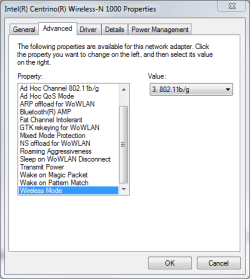
Hello all, I am having issue enabling the 802.11n settings for my WiFi card that is supposed to have N grade (300 Mbps) capabilities. The card standards are 802.11b/g/n. According to Intel's white sheet for the Intel® Centrino® Wireless-N 1000, it should be able to utilize the N grade WiFi speed capabilities. However, I'm not seeing the setting available in the Advanced settings of the driver. The attached screenshot shows that there are only b & g settings available. This is most inconvenient because my internet speed was just upgraded to 105 Mbps & I'd like to at least enjoy a little. I'm not getting anything above 50 Mbps. Is anyone else having this issue?
 

Attachments
  • Capture.PNG
    Capture.PNG
    13.1 KB · Views: 24

My Computer My Computer

At a glance

Windows 7 Home Premium 64 Bit2.53 GHz4 GBNvidia Geforce GT 555M Cuda 2GB
Computer Manufacturer/Model Number
Acer Aspire 5742G-7200
OS
Windows 7 Home Premium 64 Bit
CPU
2.53 GHz
Memory
4 GB
Graphics Card(s)
Nvidia Geforce GT 555M Cuda 2GB
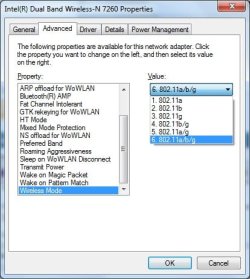
It's the same for ALL Intel WiFi products. Wireless Mode for Intel is basically using ABG, BG, AG, A, G, and B modes only. (see screenshot)

Untitled.jpg

For Centrino series, there's a menu called "802.11n mode" and from there you can use it to enable or disable WiFi N

For 7260 series, it is called "HT mode" and if you disable that, the NIC will refuse to connect to N network and will operate on G or A.

FYI, there's a difference between what Windows say on the connection rate and the actual rate. The actual rate depends on RF environment, walls between the computer, antenna gain, and power management. The best actual speed you can get is around 40 - 50 % of the speed reported by Windows.

Getting an actual speed of 50 Mbps means that you're already connected to WiFi N. I might guess that the connection rate reported by Windows is probably 144 Mbps. 50 Mbps is close to the maximum actual throughput of 70 - 75 Mbps. You can change the settings on your router to "force" 40 MHz channel width on the 2.4 GHz band and then set the "802.11 Channel width for 2.4 GHz to" "Auto" to allow the adapter to use 40 MHz channel width.

If successful, this should give you 300 Mbps reported connection rate and around 130 - 180 Mbps of actual speed. Therefore, your 100+ Mbps internet speed should be covered provided that your environment has little to none RF interference and the laptop is within line of sight of the router.
 
Last edited:

My Computer My Computer

At a glance

Windows 7 Professional x64 SP1Intel® Pentium® 4 @ 2.26 GHz, Intel Core i7-2...512MB Dual channel DDR SDRAM @ 400MHz 2.5-3-3...Intel 82865G, Nvidia GeForce 520M Graphics
Computer type
Laptop
Computer Manufacturer/Model Number
Dell Optiplex SX270, Lenovo Z470
OS
Windows 7 Professional x64 SP1
CPU
Intel® Pentium® 4 @ 2.26 GHz, Intel Core i7-2670QM @ 2.20 GH
Motherboard
Dell, Lenovo
Memory
512MB Dual channel DDR SDRAM @ 400MHz 2.5-3-3-7, 8 GB DDR3
Graphics Card(s)
Intel 82865G, Nvidia GeForce 520M Graphics
Sound Card
SoundMax Integrated Audio, Integrated HD Audio
Monitor(s) Displays
LG W1952
Screen Resolution
1440x900, 1366 x 768
Hard Drives
40 GB 2.5" IDE 4200 RPM HDD, 500 GB 5400 RPM Sata 1.5 + 32 GB SSD
PSU
Dell 145 Watt, Lenovo 120 Watt Power Adapter
Case
Optiplex SX270 Small Form Factor, Laptop
Cooling
Dell Proprietary Air Cooling, Stock laptop cooling
Keyboard
Dell SK-8125 USB Keyboard
Mouse
Dell PS/2 2 button ball mouse with wheel scroll
Internet Speed
300 Mbit down / 20 Mbps up Time Warner Cable
Antivirus
MSE, Malwarebytes Scanner
Browser
Internet (Aizawa) Explorer 11
Other Info
Running Windows Server 2012 Datacenter on a virtual machine to run Metro Apps.
It's the same for ALL Intel WiFi products. Wireless Mode for Intel is basically using ABG, BG, AG, A, G, and B modes only. (see screenshot)

View attachment 314625

For Centrino series, there's a menu called "802.11n mode" and from there you can use it to enable or disable WiFi N

For 7260 series, it is called "HT mode" and if you disable that, the NIC will refuse to connect to N network and will operate on G or A.

Ohh okay. I thought the Wireless Mode setting was missing something. I have Wireless Mode set to 802.11b/g & 802.11n set to Enabled (Those were already set as such). So with that in order, why am I not getting anything above 50 Mbps even when I'm right next to the router?
 

My Computer My Computer

At a glance

Windows 7 Home Premium 64 Bit2.53 GHz4 GBNvidia Geforce GT 555M Cuda 2GB
Computer Manufacturer/Model Number
Acer Aspire 5742G-7200
OS
Windows 7 Home Premium 64 Bit
CPU
2.53 GHz
Memory
4 GB
Graphics Card(s)
Nvidia Geforce GT 555M Cuda 2GB
What is the speed that's being reported by Windows on the connection status?
 

My Computer My Computer

At a glance

Windows 7 Professional x64 SP1Intel® Pentium® 4 @ 2.26 GHz, Intel Core i7-2...512MB Dual channel DDR SDRAM @ 400MHz 2.5-3-3...Intel 82865G, Nvidia GeForce 520M Graphics
Computer type
Laptop
Computer Manufacturer/Model Number
Dell Optiplex SX270, Lenovo Z470
OS
Windows 7 Professional x64 SP1
CPU
Intel® Pentium® 4 @ 2.26 GHz, Intel Core i7-2670QM @ 2.20 GH
Motherboard
Dell, Lenovo
Memory
512MB Dual channel DDR SDRAM @ 400MHz 2.5-3-3-7, 8 GB DDR3
Graphics Card(s)
Intel 82865G, Nvidia GeForce 520M Graphics
Sound Card
SoundMax Integrated Audio, Integrated HD Audio
Monitor(s) Displays
LG W1952
Screen Resolution
1440x900, 1366 x 768
Hard Drives
40 GB 2.5" IDE 4200 RPM HDD, 500 GB 5400 RPM Sata 1.5 + 32 GB SSD
PSU
Dell 145 Watt, Lenovo 120 Watt Power Adapter
Case
Optiplex SX270 Small Form Factor, Laptop
Cooling
Dell Proprietary Air Cooling, Stock laptop cooling
Keyboard
Dell SK-8125 USB Keyboard
Mouse
Dell PS/2 2 button ball mouse with wheel scroll
Internet Speed
300 Mbit down / 20 Mbps up Time Warner Cable
Antivirus
MSE, Malwarebytes Scanner
Browser
Internet (Aizawa) Explorer 11
Other Info
Running Windows Server 2012 Datacenter on a virtual machine to run Metro Apps.
117.0 Mbps, fluctuating of course.
 

My Computer My Computer

At a glance

Windows 7 Home Premium 64 Bit2.53 GHz4 GBNvidia Geforce GT 555M Cuda 2GB
Computer Manufacturer/Model Number
Acer Aspire 5742G-7200
OS
Windows 7 Home Premium 64 Bit
CPU
2.53 GHz
Memory
4 GB
Graphics Card(s)
Nvidia Geforce GT 555M Cuda 2GB
What is the speed that's being reported by Windows on the connection status?

Wait are you subscribed to this thread or just when people quote you?
 

My Computer My Computer

At a glance

Windows 7 Home Premium 64 Bit2.53 GHz4 GBNvidia Geforce GT 555M Cuda 2GB
Computer Manufacturer/Model Number
Acer Aspire 5742G-7200
OS
Windows 7 Home Premium 64 Bit
CPU
2.53 GHz
Memory
4 GB
Graphics Card(s)
Nvidia Geforce GT 555M Cuda 2GB
When I respond I should get subscribed already. 117 Mbps is definitely N and 50 Mbps is the absolute max at that connection rate.

Go to your router settings and see if the there's an option that says "40 MHz only" in the wireless settings.
 

My Computer My Computer

At a glance

Windows 7 Professional x64 SP1Intel® Pentium® 4 @ 2.26 GHz, Intel Core i7-2...512MB Dual channel DDR SDRAM @ 400MHz 2.5-3-3...Intel 82865G, Nvidia GeForce 520M Graphics
Computer type
Laptop
Computer Manufacturer/Model Number
Dell Optiplex SX270, Lenovo Z470
OS
Windows 7 Professional x64 SP1
CPU
Intel® Pentium® 4 @ 2.26 GHz, Intel Core i7-2670QM @ 2.20 GH
Motherboard
Dell, Lenovo
Memory
512MB Dual channel DDR SDRAM @ 400MHz 2.5-3-3-7, 8 GB DDR3
Graphics Card(s)
Intel 82865G, Nvidia GeForce 520M Graphics
Sound Card
SoundMax Integrated Audio, Integrated HD Audio
Monitor(s) Displays
LG W1952
Screen Resolution
1440x900, 1366 x 768
Hard Drives
40 GB 2.5" IDE 4200 RPM HDD, 500 GB 5400 RPM Sata 1.5 + 32 GB SSD
PSU
Dell 145 Watt, Lenovo 120 Watt Power Adapter
Case
Optiplex SX270 Small Form Factor, Laptop
Cooling
Dell Proprietary Air Cooling, Stock laptop cooling
Keyboard
Dell SK-8125 USB Keyboard
Mouse
Dell PS/2 2 button ball mouse with wheel scroll
Internet Speed
300 Mbit down / 20 Mbps up Time Warner Cable
Antivirus
MSE, Malwarebytes Scanner
Browser
Internet (Aizawa) Explorer 11
Other Info
Running Windows Server 2012 Datacenter on a virtual machine to run Metro Apps.
Ok there was nothing in my router settings (Netgear WNDR3400) that say anything about "40 MHz only." I did however notice that the IPv6 settings were Disabled. I then set IPv6 to DHCP.

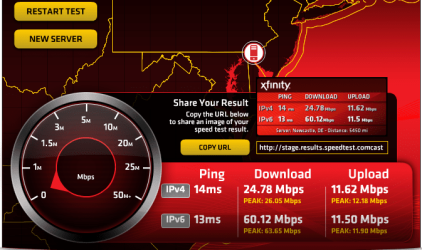
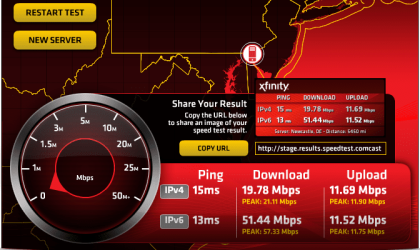
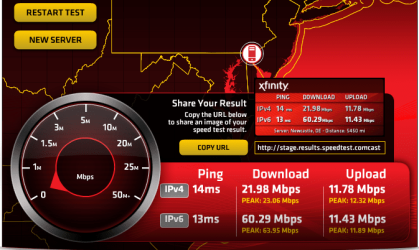
After a few speed tests, I noticed that the IPv4 results were consistently ~25 to ~40 Mbps (from both being right next to the router & where I am in the house now) & the IPv6 results were consistently ~45 to ~60+ Mbps. 45 to 60 Mbps seems a lot more accurate for the 105 Mbps I'm supposed to be getting in relation to where I am in the house (I'm no longer right next to the router).

Could the IPv6 settings have been the culprit or should I be getting the same speeds in IPv4 as well?

Attached are a few results from where I am now (not right next to the router).
 

Attachments

  • Capture2.PNG
    Capture2.PNG
    56.5 KB · Views: 18
  • Capture3.PNG
    Capture3.PNG
    56.9 KB · Views: 18
  • Capture4.PNG
    Capture4.PNG
    56.7 KB · Views: 18

My Computer My Computer

At a glance

Windows 7 Home Premium 64 Bit2.53 GHz4 GBNvidia Geforce GT 555M Cuda 2GB
Computer Manufacturer/Model Number
Acer Aspire 5742G-7200
OS
Windows 7 Home Premium 64 Bit
CPU
2.53 GHz
Memory
4 GB
Graphics Card(s)
Nvidia Geforce GT 555M Cuda 2GB
That's weird. They should be getting the same. Maybe your IPv4 DNS server is not as responsive as the IPv6 DNS server. Well, 60 Mbps is still not the highest speed you can get out that Centrino 1000.

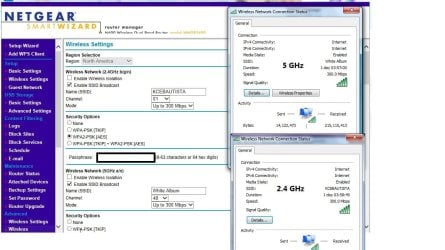
Change the mode to "Up to 300 Mbps" then change the Centrino 1000 "802.11 Channel width for 2.4 GHz to" "Auto". This should give the connection rate to 300 Mbps and your WiFi throughput should get to around 90 Mbps (limited by fast Ethernet of the WNDR3400)

It's good that we both have the same router. I have the "up to 300 Mbps" setting on both 2.4 and 5 Ghz setting and you'll see that I get 300 Mbps speed by following this Intel knowledgebase: http://www.intel.com/support/wireless/sb/CS-030709.htm

Untitled.jpg
 

My Computer My Computer

At a glance

Windows 7 Professional x64 SP1Intel® Pentium® 4 @ 2.26 GHz, Intel Core i7-2...512MB Dual channel DDR SDRAM @ 400MHz 2.5-3-3...Intel 82865G, Nvidia GeForce 520M Graphics
Computer type
Laptop
Computer Manufacturer/Model Number
Dell Optiplex SX270, Lenovo Z470
OS
Windows 7 Professional x64 SP1
CPU
Intel® Pentium® 4 @ 2.26 GHz, Intel Core i7-2670QM @ 2.20 GH
Motherboard
Dell, Lenovo
Memory
512MB Dual channel DDR SDRAM @ 400MHz 2.5-3-3-7, 8 GB DDR3
Graphics Card(s)
Intel 82865G, Nvidia GeForce 520M Graphics
Sound Card
SoundMax Integrated Audio, Integrated HD Audio
Monitor(s) Displays
LG W1952
Screen Resolution
1440x900, 1366 x 768
Hard Drives
40 GB 2.5" IDE 4200 RPM HDD, 500 GB 5400 RPM Sata 1.5 + 32 GB SSD
PSU
Dell 145 Watt, Lenovo 120 Watt Power Adapter
Case
Optiplex SX270 Small Form Factor, Laptop
Cooling
Dell Proprietary Air Cooling, Stock laptop cooling
Keyboard
Dell SK-8125 USB Keyboard
Mouse
Dell PS/2 2 button ball mouse with wheel scroll
Internet Speed
300 Mbit down / 20 Mbps up Time Warner Cable
Antivirus
MSE, Malwarebytes Scanner
Browser
Internet (Aizawa) Explorer 11
Other Info
Running Windows Server 2012 Datacenter on a virtual machine to run Metro Apps.
Thanks for staying up late with me lol. It's 1:34 a.m. here.

Okay according to Comcast?s Speedtest Now Breaks Out IPv6 Speed Vs IPv4 Speed | Deploy360 Programme the issue may very well be that I am currently over my ISP's data cap. If that is the sole reason, at least my IPv4 speed will be back to normal when I pay my bill next week.

Setting my 2.4 GHz channel to Auto knocks off my devices as I've found several times in the past & setting it to 07 seems to be the fastest connection I can get so, I just leave it there.

I already had my 2.4 GHz mode set to 300 Mbps.

Where the Intel link says to check Auto channel scan & Channel width, I don't have 802.11 mode settings or Channel width settings anywhere in my router's settings.

Do you know if this card is a dual band card? I can't connect to my 5 GHz network. I named my 2.4 GHz network iLink & my 5 GHz network iLink-5G. When I try to connect to my 5 GHz network, iLink-5G isn't in my list of available networks to join. I know my 5 GHz network is broadcasting though because I can connect to it with my phone.
 
Last edited:

My Computer My Computer

At a glance

Windows 7 Home Premium 64 Bit2.53 GHz4 GBNvidia Geforce GT 555M Cuda 2GB
Computer Manufacturer/Model Number
Acer Aspire 5742G-7200
OS
Windows 7 Home Premium 64 Bit
CPU
2.53 GHz
Memory
4 GB
Graphics Card(s)
Nvidia Geforce GT 555M Cuda 2GB
Well the 300 Mbps mode is the 40 mhz mode already. I don't think other devices get kicked out when you enable the 40 mhz on the Centrino which is the "802.11 channel width for 2.4 Ghz" set to Auto on the Device manager and not the router. You probably meant to set the router to select its own channel and that causes disconnection. Your Centrino is probably still configured to"20 MHz only" and that's the reason for not getting the 300 Mbps connection speed.

Unfortunately centrino 1000 isn't dual band. You can purchase the same dual band card that I have which is "Intel Dual Band Wireless-N 7260" and get the 5 GHz. Just avoid the one with the Bluetooth for perfect compatibility with your laptop.
 

My Computer My Computer

At a glance

Windows 7 Professional x64 SP1Intel® Pentium® 4 @ 2.26 GHz, Intel Core i7-2...512MB Dual channel DDR SDRAM @ 400MHz 2.5-3-3...Intel 82865G, Nvidia GeForce 520M Graphics
Computer type
Laptop
Computer Manufacturer/Model Number
Dell Optiplex SX270, Lenovo Z470
OS
Windows 7 Professional x64 SP1
CPU
Intel® Pentium® 4 @ 2.26 GHz, Intel Core i7-2670QM @ 2.20 GH
Motherboard
Dell, Lenovo
Memory
512MB Dual channel DDR SDRAM @ 400MHz 2.5-3-3-7, 8 GB DDR3
Graphics Card(s)
Intel 82865G, Nvidia GeForce 520M Graphics
Sound Card
SoundMax Integrated Audio, Integrated HD Audio
Monitor(s) Displays
LG W1952
Screen Resolution
1440x900, 1366 x 768
Hard Drives
40 GB 2.5" IDE 4200 RPM HDD, 500 GB 5400 RPM Sata 1.5 + 32 GB SSD
PSU
Dell 145 Watt, Lenovo 120 Watt Power Adapter
Case
Optiplex SX270 Small Form Factor, Laptop
Cooling
Dell Proprietary Air Cooling, Stock laptop cooling
Keyboard
Dell SK-8125 USB Keyboard
Mouse
Dell PS/2 2 button ball mouse with wheel scroll
Internet Speed
300 Mbit down / 20 Mbps up Time Warner Cable
Antivirus
MSE, Malwarebytes Scanner
Browser
Internet (Aizawa) Explorer 11
Other Info
Running Windows Server 2012 Datacenter on a virtual machine to run Metro Apps.
Ohh I thought you meant to set the router's 2.4 GHz band to Auto...

Okay, I set the WiFi card from 20 MHz to Auto now. Speed tests are about the same as before. I'm gonna wait until my brother leaves to get more accurate results.

I'd buy a new WiFi card for this heap but, it may not be worth the investment. I guess I'll marked this solved until I pay my bill. Then I'll retest speeds to see what I'm getting. Thanks for the help.
 

My Computer My Computer

At a glance

Windows 7 Home Premium 64 Bit2.53 GHz4 GBNvidia Geforce GT 555M Cuda 2GB
Computer Manufacturer/Model Number
Acer Aspire 5742G-7200
OS
Windows 7 Home Premium 64 Bit
CPU
2.53 GHz
Memory
4 GB
Graphics Card(s)
Nvidia Geforce GT 555M Cuda 2GB
Back
Top