Platform: Windows 7 Home Premium 64 bit, ASUS K52F laptop
Note: I have posted this on 2 other forums & did not receive a solution so I am posting it here. Hope that is okay.
I have observed extensive downloads (using the NetMeter gadget) averaging 400-600kbps for up to 10 minutes from Akamai. This happens every time I reboot and log into my laptop. I would appreciate if someone would explain what is happening.
I would like to determine exactly which software on my laptop is initiating this download from Akamai.
Note that I do not have any data in the cloud so this should not be a sync event.
Here is the process I followed to track this download:
(1) Used Windows ResourceMonitor to see the process PID that was downloading from the Internet. ResourceMonitor displayed "svchost (netsvcs)" as the process involved in the download.
(2) Used ProcessMonitor to display the process tree for the svchost process in question. See the attached "Appinfo Svchost process tree.jpg" for details.
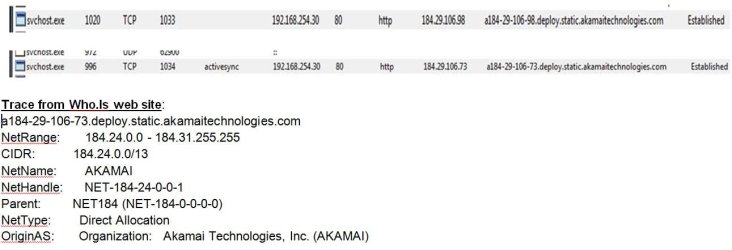
(3) Used CPorts.exe to trace the process PID to a specific URL from which the process is downloading, then traced the IP in Who.Is to see that the site is Akamai. See the attached "Download process & remote address.jpg" for details.
(4) In ProcessMonitor if I kill the specific process, the download immediately stops. This is confirmation that I am looking at the culprit PID.
Note that I have scanned my laptop with the following & nothing was found: AdwCleaner, Avira, Malwarebytes, Stinger, SuperAntiSpyware, Windows Defender, TDSSKiller, Gmer, Junk Removal Tool, Rkill, RogueKiller. I also used SFC to check integrity of Windows libraries - all ok.
I understand that Akamai is a CDN. However the download does seem to be extensive (although I do not have specific numbers as to exactly how much is downloaded).
==> How do I determine exactly which software on my laptop is initiating this download & what is being downloaded from Akamai?
Thank you.
Note: I have posted this on 2 other forums & did not receive a solution so I am posting it here. Hope that is okay.
I have observed extensive downloads (using the NetMeter gadget) averaging 400-600kbps for up to 10 minutes from Akamai. This happens every time I reboot and log into my laptop. I would appreciate if someone would explain what is happening.
I would like to determine exactly which software on my laptop is initiating this download from Akamai.
Note that I do not have any data in the cloud so this should not be a sync event.
Here is the process I followed to track this download:
(1) Used Windows ResourceMonitor to see the process PID that was downloading from the Internet. ResourceMonitor displayed "svchost (netsvcs)" as the process involved in the download.
(2) Used ProcessMonitor to display the process tree for the svchost process in question. See the attached "Appinfo Svchost process tree.jpg" for details.
(3) Used CPorts.exe to trace the process PID to a specific URL from which the process is downloading, then traced the IP in Who.Is to see that the site is Akamai. See the attached "Download process & remote address.jpg" for details.
(4) In ProcessMonitor if I kill the specific process, the download immediately stops. This is confirmation that I am looking at the culprit PID.
Note that I have scanned my laptop with the following & nothing was found: AdwCleaner, Avira, Malwarebytes, Stinger, SuperAntiSpyware, Windows Defender, TDSSKiller, Gmer, Junk Removal Tool, Rkill, RogueKiller. I also used SFC to check integrity of Windows libraries - all ok.
I understand that Akamai is a CDN. However the download does seem to be extensive (although I do not have specific numbers as to exactly how much is downloaded).
==> How do I determine exactly which software on my laptop is initiating this download & what is being downloaded from Akamai?
Thank you.
Attachments

My Computer
At a glance
Windows 7 Home Premium 64bit
- Computer type
- PC/Desktop
- OS
- Windows 7 Home Premium 64bit