Solved On boot-up, the network icon displays: Blu Disk,Yellow triangle,Red X.

klxdrt

New member
In SC, On Charter, boot-up, the network icon displays a #1 Blue Disk, which changes to a #2 Yellow triangle with exclamation point, then a #3 Red X greatly delaying access to the net. My PC is connected to the net with a new Cisco DCP3208 modem, A Netgear wireless is connected to the modem. However I visited NJ recently, Comcast net connection was wireless. I used a Belkin USB wireless, and all worked as normal, got the net, email instantly.

Whould that loading problem be caused by the different ISPs ? Is it correctable?

Happy Holidays,

klx


Attachments

  • net icon.jpg
    net icon.jpg
    10.5 KB · Views: 23
  • wreath w bow.jpg
    wreath w bow.jpg
    17.1 KB · Views: 22

My Computer

Computer type
PC/Desktop
Computer Manufacturer/Model Number
locally made
OS
w7 pro 32 bit w/XP virt enabled.
CPU
AMD A6-3650
Motherboard
ASUS F1A55-M CSM
Memory
4 GB DDR3 RAM
Graphics Card(s)
NVIDIA GeForce 210
Sound Card
NVIDIA High Definition Audio
Monitor(s) Displays
28" HD monitor
Screen Resolution
1680 x 1050 x 32 bits (4294967296 colors) @ 59 Hz
Hard Drives
2 x 500 GB Western Digital Blue Hard Drive
PSU
?
Case
?
Cooling
3-4 fans
Keyboard
big yellow keys
Mouse
logitec
Internet Speed
60 mb
Antivirus
panda
Browser
ff
Other Info
scanner, webcam, bw printer, fax modem, cd/dvd burner, PC usb ports: 2 usb3, 6 usb2 plus 7 port usb hub, 2 tb usb3, 1 Tb usb3, 500Mb usb2, 120Mb USB2 portable drives, asst of flash drives 250 Mb to 32 Gb. backup PC, office
Hi there,

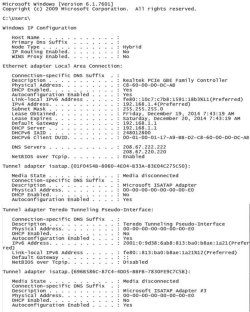
Can you please post an ipconfig/all output coming from your computer?

Have you power cycled your devices?
 

My Computer

Computer Manufacturer/Model Number
Lenovo Desktop/Samsung Laptop
OS
Win7 & Win8 64bit
CPU
Intel i5
Internet Speed
Charter-20 Mbps
Antivirus
Avast
Browser
FF, IE9 and Chrome
Ipconfig\all attached

2xg,

Below are the values in my ipconfig/all as requested. And yes I have power cycled my pc, modem & wireless [netgear] router many times by myself and with a Charter tech on the line to no avail. I'm not a techie, and have not changed anything since the Charter tech installed it in Apr 2014.

Hope this helps. Note this condition resolves itself in several minutes, but my business requires "instant":rolleyes:
responses, especially very early in the morn.

cheers & Happy Holidays,

klx
 

Attachments

  • ipconfig all.jpg
    ipconfig all.jpg
    76.6 KB · Views: 2

My Computer

Computer type
PC/Desktop
Computer Manufacturer/Model Number
locally made
OS
w7 pro 32 bit w/XP virt enabled.
CPU
AMD A6-3650
Motherboard
ASUS F1A55-M CSM
Memory
4 GB DDR3 RAM
Graphics Card(s)
NVIDIA GeForce 210
Sound Card
NVIDIA High Definition Audio
Monitor(s) Displays
28" HD monitor
Screen Resolution
1680 x 1050 x 32 bits (4294967296 colors) @ 59 Hz
Hard Drives
2 x 500 GB Western Digital Blue Hard Drive
PSU
?
Case
?
Cooling
3-4 fans
Keyboard
big yellow keys
Mouse
logitec
Internet Speed
60 mb
Antivirus
panda
Browser
ff
Other Info
scanner, webcam, bw printer, fax modem, cd/dvd burner, PC usb ports: 2 usb3, 6 usb2 plus 7 port usb hub, 2 tb usb3, 1 Tb usb3, 500Mb usb2, 120Mb USB2 portable drives, asst of flash drives 250 Mb to 32 Gb. backup PC, office
Thanks for the output provided. Is the issue in your network both wired and wireless?

The DNS in your ipconfig/all output is showing that you have OpenDNS configured, any reason for this?

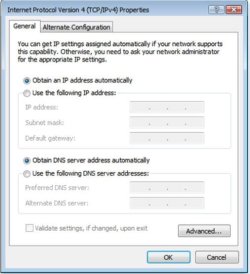
Are your computers DNS settings like this? If not please change it.

Change TCP/IP settings - Windows Help
 

Attachments

  • LAN setting - DHCP.JPG
    LAN setting - DHCP.JPG
    48.9 KB · Views: 11

My Computer

Computer Manufacturer/Model Number
Lenovo Desktop/Samsung Laptop
OS
Win7 & Win8 64bit
CPU
Intel i5
Internet Speed
Charter-20 Mbps
Antivirus
Avast
Browser
FF, IE9 and Chrome
2xg,

Per your analysis, I changed my settings as you suggested as per your image to no avail. However, after just calling Charter for the same problem 378 times since Apr 14, I finally got a tech who knew the answer, my Cisco modem was dropping some type of packet. Of course this was only 3rd or 4th Cisco DPC3208 modem since April 2014.

cheers,

klx
 

Attachments

  • season_greetings.gif
    season_greetings.gif
    9.1 KB · Views: 10

My Computer

Computer type
PC/Desktop
Computer Manufacturer/Model Number
locally made
OS
w7 pro 32 bit w/XP virt enabled.
CPU
AMD A6-3650
Motherboard
ASUS F1A55-M CSM
Memory
4 GB DDR3 RAM
Graphics Card(s)
NVIDIA GeForce 210
Sound Card
NVIDIA High Definition Audio
Monitor(s) Displays
28" HD monitor
Screen Resolution
1680 x 1050 x 32 bits (4294967296 colors) @ 59 Hz
Hard Drives
2 x 500 GB Western Digital Blue Hard Drive
PSU
?
Case
?
Cooling
3-4 fans
Keyboard
big yellow keys
Mouse
logitec
Internet Speed
60 mb
Antivirus
panda
Browser
ff
Other Info
scanner, webcam, bw printer, fax modem, cd/dvd burner, PC usb ports: 2 usb3, 6 usb2 plus 7 port usb hub, 2 tb usb3, 1 Tb usb3, 500Mb usb2, 120Mb USB2 portable drives, asst of flash drives 250 Mb to 32 Gb. backup PC, office
Great news klx!

Happy Holidays to you too!
 

My Computer

Computer Manufacturer/Model Number
Lenovo Desktop/Samsung Laptop
OS
Win7 & Win8 64bit
CPU
Intel i5
Internet Speed
Charter-20 Mbps
Antivirus
Avast
Browser
FF, IE9 and Chrome
Back
Top