Solved How can I delete/reset MAC of network adapter?

Bird333

New member
Local time
8:09 AM
Messages
7
I am running win7 x64 ultimate. I set a MAC address in the bios and somehow Windows has saved it somewhere. I have deleted the device in device manager and when it was redetected it was still there. I have reset the bios to defaults but when I run 'ipconfig /all' the MAC is still there. How can I get rid of it?
 

My Computer

OS
Win 7 x64
Your problem is not addressed clearly.Atleast to me it is not clear.:)

First, it is for the first time I am hearing the Mac address being set in the BIOS. Can you explain how was it set in the BIOS?

Second, what exactly is the device? Name/manufacturer/Model

Third, why do you want to change/reset the Mac Address? ( Yep, it may be possible to reset the Mac Address and I had discussed this matter with NoelDP long back on a different context but I would like to know why you want to change/reset it. What exactly is your problem that necessitates such a change?)
 

My Computer

OS
Windows 7 Home Premium 32 bit
This is a DFI Nforce 4 mobo. It has two adapters. One is part of the nforce chipset (Nvidia) and one is a Marvell. I couldn't get the Marvell one to work. In trying to get it to work, I saw a place in the BIOS to manually set a MAC address but it turns out it was for the Nvidia adapter not the Marvell. Now windows has this MAC stored and I want it to go back to how it was originally. Does that clear it up. :)
 

My Computer

OS
Win 7 x64
Tried clearing CMOS?
 

My Computer

Computer type
PC/Desktop
Computer Manufacturer/Model Number
Custom Build
OS
Windows 7 Ultimate x64 SP1
CPU
AMD Phenom 2 1090T
Motherboard
Gigabyte GA-890FXA-UD5
Memory
2x8GB Kingston HyperX Fury Black 1600Mhz Unganged
Graphics Card(s)
MSI GTX 970 Gaming 4G
Sound Card
Realtek On-Board HD 7.1 Audio / Logitech G35
Monitor(s) Displays
3xAcer GD245HQ
Screen Resolution
1920x1080
Hard Drives
Samsung 850 Pro 512GB SSD - OS /
WD Caviar Black SATA 3 - 1 TBx2 - Dynamic RAID 0 /
WD Caviar Green SATA 2 - 640GBx2 - Dynamic RAID 0 /
WD Caviar Green SATA 2 - 640GB - Internal Backup /
Seagate Barracude SATA 3 - 3TB - External Backup/ Sync
PSU
HighPower 1000W
Case
Cooler Master HAF 932
Cooling
Noctua NH-D14
Keyboard
Logitech G19
Mouse
Logitech G500
Internet Speed
100/4 Mbit Cable (100GB quota)
Antivirus
ZoneAlarm Extreme Security / MBAM Pro / MBAE Free / SAS Free
Browser
IE 11 - Firefox - Chrome
Other Info
Logitech F710/ G27/ G940/ Z5500 // TrackIR 5 // Nvidia 3D Surround Vision
I just had a cursory glance at your motherboard manual.

In the BIOS you should have enabled Machine Mac (NV) Address Input to be able to enter the MAC(NV) Address Input. Simply by disabling it and saving the setting should take away the address you entered. That is what my common sense tells me :). What is that address you entered? Some Random Number?

In the same page enable the Marvel LAN. Again do not forget to save the settings.

Provided you had installed the drivers correctly for both the LAN and the LAN hardware is functional, Windows will always get the hard encoded Mac numbers for both the LAN.

To check open command prompt ( Start > All Programs > Accessories > Command prompt ) and type getmac /v and press enter.

You should see the MAC address of both your LAN.

If you still have problems, its beyond me :D. Let other experts deal with it.( I would return the board and get a new one.)

 
Last edited:

My Computer

OS
Windows 7 Home Premium 32 bit
I've done all that with the BIOS. It seems to me that Windows has the MAC stored in the registry somewhere or are you saying that is not possible?
 

My Computer

OS
Win 7 x64
What is the result of getmac /v? Can you post a screenshot of it?

Let the networking experts see it. What is the address you entered? Wherefrom did you get it?
 

My Computer

OS
Windows 7 Home Premium 32 bit
Try searching the registry for the MAC address.
 

My Computer

Computer type
PC/Desktop
Computer Manufacturer/Model Number
Lenovo IdeaCenter 450
OS
Windows 10 Pro X64
CPU
Intel Quad Core i7-4770 @ 3.4Ghz
Memory
16.0GB PC3-12800 DDR3 SDRAM 1600 MHz
Graphics Card(s)
Intel Integrated HD Graphics
Sound Card
Realtek HD Audio
Monitor(s) Displays
HP 22" LCD
Screen Resolution
1680 x 1050
Hard Drives
250GB Samsung EVO SATA-3 SSD
2TB Seagate ST2000DM001 SATA-2
1.5TB Seagate ST3150041AS SATA
Keyboard
Dell USB
Mouse
Lenovo USB
Internet Speed
Cable via Road Runner 3MB Upload, 30MB Download
Antivirus
Windows Defender, MBAM Pro, MBAE
Browser
Seamonkey
Other Info
UEFI/GPT
PLDS DVD-RW DH16AERSH
The MAC address was probably set in the hardware itself. Not in Windows.
 

My Computer

Computer type
PC/Desktop
Computer Manufacturer/Model Number
Alienware Aurora ALX R4
OS
Windows 10 Pro (x64)
CPU
Intel Core i7-3930K (3.2GHz - 4.5GHz)
Motherboard
Alienware Aurora-R4 x79
Memory
4x Samsung 4GB PC3-12800 DDR3 (16GB 1600MHz)
Graphics Card(s)
Nvidia Geforce GTX 690
Sound Card
SteelSeries Siberia Elite
Monitor(s) Displays
Dell UltraSharp U3011
Screen Resolution
2560x1600
Hard Drives
Samsung 850 Pro 256 GB, Seagate 1TB Desktop Hybrid HDD, 2x Western Digital 4TB Green HDD
PSU
875W Some Dell PSU <.<
Case
Alienware Aurora ALX
Cooling
Custom Liquid Cooling (EK CPU & GPU blocks) dual EK 480RAD
Keyboard
Logitech G710+ Mechanical
Mouse
Logitech G700s
Internet Speed
Verizon Fios (50 mbps average)
Other Info
Server: Intel NUC D54250WYK: i5-4250U, 16GB, 256 GB mSATA, Windows Server 2012 R2
I was curious to know many things, but didn't get an answer for those many things.

OK, my dear friend, here goes the big bang. ( atleast I think so.:))

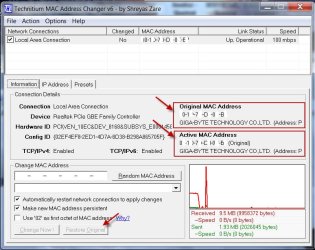
Download, install and run Technitium MAC Address Changer Technitium MAC Address Changer - Free download and software reviews - CNET Download.com ( You will extract the downloaded zip file into a folder, and install the latest version. For the program to install correctly you must be a user with administrative privileges. I would further advise that you create a System Restore point before installing.)

27-05-2015 16-46-57.jpg

If your currently Active MAC address is not the same as the Original hard coded MAC Address, the "Restore Original" tab will not be greyed out . Just click on it to restore the original hard coded MAC Address by removing the registry entry where any changed address is stored.
 
Last edited:

My Computer

OS
Windows 7 Home Premium 32 bit
Thanks for the link. I remembered the old MAC and just put it back in.
 

My Computer

OS
Win 7 x64
OK, good. I presume you again entered into BIOS set up, and entered the original MAC address. That's an easy way out. But for that one must have an elephant's memory to remember that hexadecimal string. You seem to have one :).

For the less endowed Technitium MAC Address Changer is the way to go to wipe the registry entry that contains the changed address and restore the hard coded MAC address.

I am requesting the Admins/Mods to mark this thread as solved, so that it can help others looking for a solution.
 

My Computer

OS
Windows 7 Home Premium 32 bit
Back
Top