I have my own computer repair shop, and there's a dude I know who despise me for no apparent reason. He has much more IT certifications than I do and I'm wondering if he is spying on me or sniffing my IP packets using a customer's PC which he could use as a "trojan horse" inside my house. He can get pretty dirty as he is known to have done so a couple of times!
If there are preventive practices that I could use it will be awesome if you share some!
“Just because you're paranoid doesn't mean they aren't after you.”
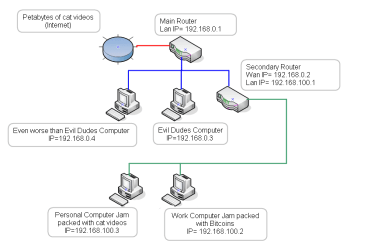
But seriously if you set your working environment like the pic below you will be a lot safer,
Good news your router from your ISP would work in my in diagram it would be the main router
(*(My search google said that the default IP is 192.168.0.1) Don't change any settings*) .
Your Amped wireless SR10000 / SR10000-CA Would need to be connected to the LAN port of the secondary router
(*(My search google said that the default IP is 192.168.1.240) Don't change any settings*) .
Bad news is you are going to have to buy another router (secondary router in my diagram)
All of your routers are gigabit routers so you should buy another simple gig router.
If you go to the computer store what you are lookin for is a"managed switch" (BEST)(Dual WAN Wish I had one) But a cheap 4 port with one wan port would work fine and all you would have to do is change the lan port to 192.168.100.1
Do not buy an unmanaged switch
Managed switches are costlier than unmanaged switches. But managed switches definitely have more benefits and ensure improved, consistent network performance
My Computer
At a glance
Microsoft Windows 7 Ultimate 32-bit 7601Intel(R) Pentium(R) Dual CPU E2160 @ 1.80GHz4.00 GB(1) VNC Mirror Driver (2) Intel(R) G33/G31 Ex...
Your welcome just remember you don't really need anything fancy or expensive if you find a cheap router with WiFi you can disable that in the routers settings, A Managed switch with a wan port is quite expensive (over $150 Canadian) But a cheap $30 to $50 gigabit router would work just fine
My Computer
At a glance
Microsoft Windows 7 Ultimate 32-bit 7601Intel(R) Pentium(R) Dual CPU E2160 @ 1.80GHz4.00 GB(1) VNC Mirror Driver (2) Intel(R) G33/G31 Ex...
Yes! I'm thinking about getting rid of the signal extender and give it to my buddy who has a hard time getting signal from his living room. Ill just use my original router + a basic gigabit router with WIFI. I'm wondering why I should disable WiFi on the secondary router tho..
Yes! I'm thinking about getting rid of the signal extender and give it to my buddy who has a hard time getting signal from his living room. Ill just use my original router + a basic gigabit router with WIFI. I'm wondering why I should disable WiFi on the secondary router tho..
I would keep that extender from the little that I read about it seems like its a kick ass unit. The only reason I said to disable the Wifi in the secondary router is because you already have a good one.
Or you could leave it on and connect the extender with a long Lan cable and move it as far away as you can and give the secondary router WiFi the same name and password as the extender and have WiFi in the house with no dead spots or the need to reconnect if you go out of range of one of them
My Computer
At a glance
Microsoft Windows 7 Ultimate 32-bit 7601Intel(R) Pentium(R) Dual CPU E2160 @ 1.80GHz4.00 GB(1) VNC Mirror Driver (2) Intel(R) G33/G31 Ex...
Thanks! Just to be sure, here is what i understood:
I should connect my costumers' devices with my main router and my personal devices on my secondary router + extender. If that's correct, it should be done very easily and quickly! Correct me if I'm wrong!