Know any Network Usage Monitor Freeware?

dee2809

New member
Local time
4:23 AM
Messages
17
I have been looking for network usage monitor freeware that is compatible with Windows 7 with no luck. I need it urgently to report my own monthly usage to my landlord so that my flatmates cannot lie about their usage in working out porportions of the broadband bills. Please post download links if you happen to know any. I have had though luck with any Windows XP only freeware of this sort.

Thank you

Dee
 

My Computer My Computer

At a glance

Windows 7 Ultimate, Windows Vista BusinessIntel Duo Core4 gbATI Radeon HD 4670
Computer Manufacturer/Model Number
Custom Built
OS
Windows 7 Ultimate, Windows Vista Business
CPU
Intel Duo Core
Motherboard
Gigabyte G31M-ES2L
Memory
4 gb
Graphics Card(s)
ATI Radeon HD 4670
Sound Card
RealTek High Definition Audio
Monitor(s) Displays
COMPAQ FP 7317
Hard Drives
HG
PSU
Don't know
Case
Achilles
Cooling
Don't know

My Computer My Computer

At a glance

Windows 7 Ultimate x64 Service Pack 1 (Build ...Intel Core 2 Quad Q6600 (G0 Kentsfield) LGA77...Corsair TW3X4G1333C9A 4GB PC-10600 (2x XMS3 2GB)ASUS nVIDIA GeForce 560
OS
Windows 7 Ultimate x64 Service Pack 1 (Build 6.1.7601)
CPU
Intel Core 2 Quad Q6600 (G0 Kentsfield) LGA775 (FC-LGA6)
Motherboard
GIGABYTE GA-EP35C-DS3R (Rev. 2.1)
Memory
Corsair TW3X4G1333C9A 4GB PC-10600 (2x XMS3 2GB)
Graphics Card(s)
ASUS nVIDIA GeForce 560
Sound Card
RealTek ALC885/889A/890
Monitor(s) Displays
ChiMei CMV CT-730D 17inch (LCD Monitor)
Screen Resolution
1280-1024 60Hertz (Ture Colour 32bit)
Hard Drives
2x Barracuda 7200.10 SATA 3.0Gb/s 160-GB Hard Drive ST3160815AS (AHCI)
PSU
ANTEC 750w Earthwatts
Case
Thermaltake Shark (VA7000SWA ATX) Full Tower
Cooling
Front 120mm fan (1400 RPM) /Rear 120mm (1400 RPM) blue LED
Keyboard
Labtec Media Desktop Y-SAD65
Mouse
Razer DeathAdder 3G Infrared Sensor (1800DPI)
Internet Speed
Telstra BigPond Elite Liberty ADSL2+ 24Mbps/256kbps
Other Info
ASUS PCE-N13 802.11n Wireless LAN card

My Computer My Computer

At a glance

Windows 7 Ultimate, Windows Vista BusinessIntel Duo Core4 gbATI Radeon HD 4670
Computer Manufacturer/Model Number
Custom Built
OS
Windows 7 Ultimate, Windows Vista Business
CPU
Intel Duo Core
Motherboard
Gigabyte G31M-ES2L
Memory
4 gb
Graphics Card(s)
ATI Radeon HD 4670
Sound Card
RealTek High Definition Audio
Monitor(s) Displays
COMPAQ FP 7317
Hard Drives
HG
PSU
Don't know
Case
Achilles
Cooling
Don't know
I use Netmeter myself, just do a Google for it.
 

My Computer My Computer

At a glance

Windows 7 (64-Bit)Intel® Core™i7 Processor i7-8604GB CORSAIR XMS3 DUAL-DDR3 1333MHz1GB ATI RADEON™ HD 5770 PCI EXPRESS
Computer Manufacturer/Model Number
PC Specialist (www.pcspecialist.co.uk)
OS
Windows 7 (64-Bit)
CPU
Intel® Core™i7 Processor i7-860
Motherboard
Gigabyte GA-P55M-UD2
Memory
4GB CORSAIR XMS3 DUAL-DDR3 1333MHz
Graphics Card(s)
1GB ATI RADEON™ HD 5770 PCI EXPRESS
Sound Card
OnBoard
Monitor(s) Displays
Samsung Syncmaster 20"
Hard Drives
1 x 250 GB SATA II
1 x 1Tb SATA II
PSU
600W Quiet Quad Rail PSU
Case
COOLERMASTER SILEO 500
Cooling
SUPER QUIET 22dBA TRIPLE COPPER HEATPIPE CPU COOLER
I have been looking for network usage monitor freeware that is compatible with Windows 7 with no luck. I need it urgently to report my own monthly usage to my landlord so that my flatmates cannot lie about their usage in working out porportions of the broadband bills. Please post download links if you happen to know any. I have had though luck with any Windows XP only freeware of this sort.

Thank you

Dee

You could do it through a router running DD-WRT firmware. It will keep track of usage by IP or MAC address. It's not too hard if you do some homework. It's an option.

The router MAY already have a monitor inside. Check it out.
 

My Computer My Computer

At a glance

Windows 7 Professional x64Intel Core i7 8604GB DDR3 Mushkin 1600Mhz @ 7-8-7-20MSI GTS250 1GB DDR3 Twin Frozr
Computer Manufacturer/Model Number
Keeps changing - (Custom)
OS
Windows 7 Professional x64
CPU
Intel Core i7 860
Motherboard
Gigabyte GA-P55-UD4P
Memory
4GB DDR3 Mushkin 1600Mhz @ 7-8-7-20
Graphics Card(s)
MSI GTS250 1GB DDR3 Twin Frozr
Sound Card
Onboard realtek
Monitor(s) Displays
Samsung SyncMaster 24" P2450 + Samsung 20" 2033
Screen Resolution
1920 X 1080 and 1600 X 900 (#2 system 1440 X 900)
Hard Drives
Patriot Inferno 120GB SSD + 3 WD Blue 640GB drives
PSU
Corsair 750 HX Modular
Case
Lancool PC-K62
Cooling
Cooler Master TX3 CPU cooler and 4-140mm and 1-120mm case
Keyboard
Gigabyte USB keyboard
Mouse
Microsoft wireless laser mouse 5000
Internet Speed
7 Mb down 1.5 up
Other Info
System #2: AMD Phenom II X6 1055T (Freezer 7 Pro cooler) - Gigabyte 880GMA-UD2H - WD 500GB Black - 9500GT (1GB) 500W OCZ modular PSU - Antec 200 case. System #3 (LapTop) Core 2 Duo T6670 - 320GB 7200RPM HD - 4GB DDR3 RAM.
I have used Bandwidth Monitor.
 

My Computer My Computer

At a glance

Lioni54GBIntel
Computer Manufacturer/Model Number
MacBook Pro
OS
Lion
CPU
i5
Memory
4GB
Graphics Card(s)
Intel
Screen Resolution
1200x800
Hard Drives
Seagate FreeAgent GO 250GB Ext. HDD
As another poster said, I recommend NetMeter also :)
 

My Computer My Computer

At a glance

Windows XP - Now Windows 7 Home Premium (64-b...
OS
Windows XP - Now Windows 7 Home Premium (64-bit).
i didn't check the ones that have been posted here but most i have found are mainly for a one computer set up and do not show network usage...i stumbled upon one that when installed on all your computers gives u a pretty good picture of your network usage (minus things like an Xbox or PS3...and other devices you cant install it on)Cisco - Speed Meter Pro
 

My Computer My Computer

At a glance

Windows 7 Ultimate x64Phenom 9850 Black Edition8Gb PatriotEvga 260 ssc
Computer Manufacturer/Model Number
me
OS
Windows 7 Ultimate x64
CPU
Phenom 9850 Black Edition
Motherboard
Asus M3N78-VM
Memory
8Gb Patriot
Graphics Card(s)
Evga 260 ssc
Sound Card
onboard
Monitor(s) Displays
dual dell E228WFP
Screen Resolution
1680x1050
Hard Drives
2 500gb
Keyboard
G-15
Mouse
G-9
Internet Speed
25Mbps
Thank you guys. I have tried NetMeter and Cisco Speed Meter, but I could not figure how to install the former and the latter failed to install. NetStat Live is now running on my PC, but it does not reset whenever you want it to and I do not know if my total usage is just the addition sum of the incoming totals and outgoing totals shown on the monitor...
 

My Computer My Computer

At a glance

Windows 7 Ultimate, Windows Vista BusinessIntel Duo Core4 gbATI Radeon HD 4670
Computer Manufacturer/Model Number
Custom Built
OS
Windows 7 Ultimate, Windows Vista Business
CPU
Intel Duo Core
Motherboard
Gigabyte G31M-ES2L
Memory
4 gb
Graphics Card(s)
ATI Radeon HD 4670
Sound Card
RealTek High Definition Audio
Monitor(s) Displays
COMPAQ FP 7317
Hard Drives
HG
PSU
Don't know
Case
Achilles
Cooling
Don't know
I'm no expert, but if you have access to the router, it seems like that would be the best way to do it.

You could point to all the usage by IP or MAC address. You could show that report to your landlord.

If you have access to the router, I would take a look at what's available to monitor usage.

Good luck
 

My Computer My Computer

At a glance

Windows 7 Professional x64Intel Core i7 8604GB DDR3 Mushkin 1600Mhz @ 7-8-7-20MSI GTS250 1GB DDR3 Twin Frozr
Computer Manufacturer/Model Number
Keeps changing - (Custom)
OS
Windows 7 Professional x64
CPU
Intel Core i7 860
Motherboard
Gigabyte GA-P55-UD4P
Memory
4GB DDR3 Mushkin 1600Mhz @ 7-8-7-20
Graphics Card(s)
MSI GTS250 1GB DDR3 Twin Frozr
Sound Card
Onboard realtek
Monitor(s) Displays
Samsung SyncMaster 24" P2450 + Samsung 20" 2033
Screen Resolution
1920 X 1080 and 1600 X 900 (#2 system 1440 X 900)
Hard Drives
Patriot Inferno 120GB SSD + 3 WD Blue 640GB drives
PSU
Corsair 750 HX Modular
Case
Lancool PC-K62
Cooling
Cooler Master TX3 CPU cooler and 4-140mm and 1-120mm case
Keyboard
Gigabyte USB keyboard
Mouse
Microsoft wireless laser mouse 5000
Internet Speed
7 Mb down 1.5 up
Other Info
System #2: AMD Phenom II X6 1055T (Freezer 7 Pro cooler) - Gigabyte 880GMA-UD2H - WD 500GB Black - 9500GT (1GB) 500W OCZ modular PSU - Antec 200 case. System #3 (LapTop) Core 2 Duo T6670 - 320GB 7200RPM HD - 4GB DDR3 RAM.
Thank you guys. I have tried NetMeter and Cisco Speed Meter, but I could not figure how to install the former and the latter failed to install. NetStat Live is now running on my PC, but it does not reset whenever you want it to and I do not know if my total usage is just the addition sum of the incoming totals and outgoing totals shown on the monitor...
There is no installing with Netmeter it's just a standalone .exe file.

Once you've run that it should come up with a little graph on screen and also an icon down on the Taskbar which when you right click let's you change options (one of which is to make the app start when Windows 7 Starts). I have it running on Windows 7 Home Premium x64, so it should be okay.
 

My Computer My Computer

At a glance

Windows 7 (64-Bit)Intel® Core™i7 Processor i7-8604GB CORSAIR XMS3 DUAL-DDR3 1333MHz1GB ATI RADEON™ HD 5770 PCI EXPRESS
Computer Manufacturer/Model Number
PC Specialist (www.pcspecialist.co.uk)
OS
Windows 7 (64-Bit)
CPU
Intel® Core™i7 Processor i7-860
Motherboard
Gigabyte GA-P55M-UD2
Memory
4GB CORSAIR XMS3 DUAL-DDR3 1333MHz
Graphics Card(s)
1GB ATI RADEON™ HD 5770 PCI EXPRESS
Sound Card
OnBoard
Monitor(s) Displays
Samsung Syncmaster 20"
Hard Drives
1 x 250 GB SATA II
1 x 1Tb SATA II
PSU
600W Quiet Quad Rail PSU
Case
COOLERMASTER SILEO 500
Cooling
SUPER QUIET 22dBA TRIPLE COPPER HEATPIPE CPU COOLER

My Computer My Computer

At a glance

Windows 7 Ult, Windows 8.1 Pro,Q9650-4.275GHz, E8600 4.5GHz, E6750-3.8GHzG.Skill PC2 9600 1200Mhz 5 5 5 15 2TGTX480
Computer type
PC/Desktop
Computer Manufacturer/Model Number
Home built
OS
Windows 7 Ult, Windows 8.1 Pro,
CPU
Q9650-4.275GHz, E8600 4.5GHz, E6750-3.8GHz
Motherboard
Evga 780i FTW
Memory
G.Skill PC2 9600 1200Mhz 5 5 5 15 2T
Graphics Card(s)
GTX480
Sound Card
Asus Xonar D2
Monitor(s) Displays
HannsG
Screen Resolution
1680X1050
Hard Drives
GSkill Phoenix Pro 120GB SSD
PSU
ThermalTake Toughpower 1000Watt modular
Case
ThermalTake XaserV
Cooling
Xigmatek S1283
Keyboard
Logitech G15
Mouse
Logitech G9
Internet Speed
T1
Thanks. I remembered Wireshark from my CCNA course and it is now installed on my PC. Sadly whenever my PC shuts down or goes into sleep mode, the network record is lost. Do you happen to know any way you can let Wireshark capture packets whenever your PC is turned on so you can make monthly usage reports precisely?
 

My Computer My Computer

At a glance

Windows 7 Ultimate, Windows Vista BusinessIntel Duo Core4 gbATI Radeon HD 4670
Computer Manufacturer/Model Number
Custom Built
OS
Windows 7 Ultimate, Windows Vista Business
CPU
Intel Duo Core
Motherboard
Gigabyte G31M-ES2L
Memory
4 gb
Graphics Card(s)
ATI Radeon HD 4670
Sound Card
RealTek High Definition Audio
Monitor(s) Displays
COMPAQ FP 7317
Hard Drives
HG
PSU
Don't know
Case
Achilles
Cooling
Don't know
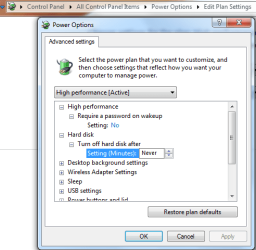
There may be a way but I can't say for sure what that is. You might try turning off sleep for your network adaptor in power settings.
 

Attachments

  • power plan settings harddrive off-on.PNG
    power plan settings harddrive off-on.PNG
    18.8 KB · Views: 2

My Computer My Computer

At a glance

Windows 7 Ult, Windows 8.1 Pro,Q9650-4.275GHz, E8600 4.5GHz, E6750-3.8GHzG.Skill PC2 9600 1200Mhz 5 5 5 15 2TGTX480
Computer type
PC/Desktop
Computer Manufacturer/Model Number
Home built
OS
Windows 7 Ult, Windows 8.1 Pro,
CPU
Q9650-4.275GHz, E8600 4.5GHz, E6750-3.8GHz
Motherboard
Evga 780i FTW
Memory
G.Skill PC2 9600 1200Mhz 5 5 5 15 2T
Graphics Card(s)
GTX480
Sound Card
Asus Xonar D2
Monitor(s) Displays
HannsG
Screen Resolution
1680X1050
Hard Drives
GSkill Phoenix Pro 120GB SSD
PSU
ThermalTake Toughpower 1000Watt modular
Case
ThermalTake XaserV
Cooling
Xigmatek S1283
Keyboard
Logitech G15
Mouse
Logitech G9
Internet Speed
T1
Back
Top