Allow the use of blank passwords on network share?!

SouthSeaPirate

New member
Local time
2:57 PM
Messages
29
When trying to access a share on an XP machine 7 keeps asking for the password (which the account does not have). I have 'Limit local account use of blank passwords to console logon only' in Group Policy disabled on both machines. I have selected 'Turn off password protected sharing' on 7 as well, along with disableing homegroup. Whats left?
 
Last edited:

My Computer

OS
Windows 7, XP, 2003
Welcome to the forum SouthSeaPirate,

Homegroup shouldn't be an option if you have an XP machine on the LAN. I believe that you set up Homegroups on the Windows 7 machine which requires a password to connect with.

The problem is that XP can't be a part of a Homegroup network. You need to use either Workgroup or Public file sharing options when you set up the network with different Op systems.

You need to leave the Homegroup you created on the Windows 7 machine then set up Workgroups on it. After that run the network set up wizard on the XP machine and allow for file sharing which will allow you to share files with your Win 7 machine.

http://www.sevenforums.com/tutorials/43980-homegroup-leave.html?filter

http://www.sevenforums.com/tutorials/43629-network-location-set-home-work-public-network.html?filter

http://windows.microsoft.com/en-US/...mputers-running-different-versions-of-Windows
 

My Computer

Computer type
PC/Desktop
Computer Manufacturer/Model Number
Home built
OS
Windows 7 Ult, Windows 8.1 Pro,
CPU
Q9650-4.275GHz, E8600 4.5GHz, E6750-3.8GHz
Motherboard
Evga 780i FTW
Memory
G.Skill PC2 9600 1200Mhz 5 5 5 15 2T
Graphics Card(s)
GTX480
Sound Card
Asus Xonar D2
Monitor(s) Displays
HannsG
Screen Resolution
1680X1050
Hard Drives
GSkill Phoenix Pro 120GB SSD
PSU
ThermalTake Toughpower 1000Watt modular
Case
ThermalTake XaserV
Cooling
Xigmatek S1283
Keyboard
Logitech G15
Mouse
Logitech G9
Internet Speed
T1
Homegroup shouldn't be an option if you have an XP machine on the LAN. I believe that you set up Homegroups on the Windows 7 machine which requires a password to connect with.

The problem is that XP can't be a part of a Homegroup network. You need to use either Workgroup or Public file sharing options when you set up the network.

You need to leave the Homegroup you created on the Windows 7 machine then set up Workgroups on it. After that run the network set up wizard on the XP machine and allow for file sharing which will allow you to share files with your Win 7 machine.

http://www.sevenforums.com/tutorials/43980-homegroup-leave.html?filter

http://www.sevenforums.com/tutorials/43629-network-location-set-home-work-public-network.html?filter

Homegroup is disabled...

There is no issue connecting to the shares. Its just that it is requireing a password. I even have another 7 machine, starter edition at that, and it connects just fine.

They are all part of the same workgroup as well. Network is set to 'Home Network', all machines are trusted...
 

My Computer

OS
Windows 7, XP, 2003
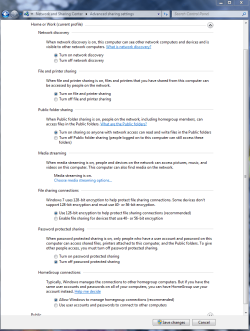
Take a look at these settings. Try toggling the password protected sharing on and off in this window. The on position will sometimes turn off the password prompt. Check this settings on all machines.

I noticed you changed the wording in your original post and removed reference to Homegroup? This confused me quite a bit because you mentioned using the Homegroup in your first post.

You shouldn't have had to do anything in Group Policy or disable Homegroup for it to work. I'm not sure why you would need to disable Homegroups if you aren't using it.

You might want to try setting up the network using the 'Work" network instead of Home, although either is supposed to work you may have better luck starting with the Work network option.
 

Attachments

  • Home or work homegroup enable.PNG
    Home or work homegroup enable.PNG
    45 KB · Views: 3,203

My Computer

Computer type
PC/Desktop
Computer Manufacturer/Model Number
Home built
OS
Windows 7 Ult, Windows 8.1 Pro,
CPU
Q9650-4.275GHz, E8600 4.5GHz, E6750-3.8GHz
Motherboard
Evga 780i FTW
Memory
G.Skill PC2 9600 1200Mhz 5 5 5 15 2T
Graphics Card(s)
GTX480
Sound Card
Asus Xonar D2
Monitor(s) Displays
HannsG
Screen Resolution
1680X1050
Hard Drives
GSkill Phoenix Pro 120GB SSD
PSU
ThermalTake Toughpower 1000Watt modular
Case
ThermalTake XaserV
Cooling
Xigmatek S1283
Keyboard
Logitech G15
Mouse
Logitech G9
Internet Speed
T1
Take a look at these settings. Try toggling the password protected sharing on and off in this window. The on position will sometimes turn off the password prompt. Check this settings on all machines. You shouldn't have had to do anything in Group Policy.

Yep, normal thing for XP. Its a requirement of that policy (which is enabled by default) that a password is required when not logging onto that machine physically. This is difficult when you dont have a password.

I tried changing all the settings around multiple times.

What I find strange is that this worked fine until I switched the HD into another PC. Hmmm, maybe I need to reactivate... Still says activated though...
 

My Computer

OS
Windows 7, XP, 2003
You might want to try setting up the network using the 'Work" network instead of Home, although either is supposed to work you may have better luck starting with the Work network option.

Hmm good idea. Maybe I should toggle between the two... This is one thing Ill try as soon as I get back home. Anymore ideas?

One thing about the IT feild I hate is doing everything right and it still doesnt work... :mad:

I noticed you changed the wording in your original post and removed reference to Homegroup? This confused me quite a bit because you mentioned using the Homegroup in your first post.

Yeah sorry about that. I corrected it to what it was intended to be. Sometimes I get mixed up when editing and reediting a post that some of it just doesnt come out right LOL. Tried to correct my wording for something else and then screwup the rest of it entirely.
 

My Computer

OS
Windows 7, XP, 2003
Well there is quite a learning curve with this new Networking system that Windows 7 is using. It's really a great system once you get to know it but it's so much different that any previous Op system that it takes some time to get used to it.

In general the "Home" network option is geared towards the Homegroup but it can be used to set up a Workgroup also. It's probably best to start with the "Work" network option when setting up a Workgroup type of network.
 

My Computer

Computer type
PC/Desktop
Computer Manufacturer/Model Number
Home built
OS
Windows 7 Ult, Windows 8.1 Pro,
CPU
Q9650-4.275GHz, E8600 4.5GHz, E6750-3.8GHz
Motherboard
Evga 780i FTW
Memory
G.Skill PC2 9600 1200Mhz 5 5 5 15 2T
Graphics Card(s)
GTX480
Sound Card
Asus Xonar D2
Monitor(s) Displays
HannsG
Screen Resolution
1680X1050
Hard Drives
GSkill Phoenix Pro 120GB SSD
PSU
ThermalTake Toughpower 1000Watt modular
Case
ThermalTake XaserV
Cooling
Xigmatek S1283
Keyboard
Logitech G15
Mouse
Logitech G9
Internet Speed
T1
Well there is quite a learning curve with this new Networking system that Windows 7 is using. It's really a great system once you get to know it but it's so much different that any previous Op system that it takes some time to get used to it.

In general the "Home" network option is geared towards the Homegroup but it can be used to set up a Workgroup also. It's probably best to start with the "Work" network option when setting up a Workgroup type of network.

Will switch to 'work' and see what happens. I dont think I have any probs getting used to it. From what I can tell it should work 100%, just as it did earlier... Believe me, networking isnt new to me, Im in IT myself and working with muliple Domains and DCs over WAN's daily.

Thanks for helping out the 7 noob. Ill post my findings as soon as I get a chance to change it.
 

My Computer

OS
Windows 7, XP, 2003
I'm just saying that this new network system that Windows 7 is using will take some time to get used too pretty much no matter what your level of expertise is. No doubt you will have it figured out in no time at all with your IT background and all.

With all the passwords off you shouldn't be seeing any password prompts at all unless you unintentionally set up Homegroups on the Windows 7 machine.

If you can upgrade all of your machines to Win 7 you might appreciate the Homegroup Library's sharing feature. It really comes in handy for me. ;)
 

My Computer

Computer type
PC/Desktop
Computer Manufacturer/Model Number
Home built
OS
Windows 7 Ult, Windows 8.1 Pro,
CPU
Q9650-4.275GHz, E8600 4.5GHz, E6750-3.8GHz
Motherboard
Evga 780i FTW
Memory
G.Skill PC2 9600 1200Mhz 5 5 5 15 2T
Graphics Card(s)
GTX480
Sound Card
Asus Xonar D2
Monitor(s) Displays
HannsG
Screen Resolution
1680X1050
Hard Drives
GSkill Phoenix Pro 120GB SSD
PSU
ThermalTake Toughpower 1000Watt modular
Case
ThermalTake XaserV
Cooling
Xigmatek S1283
Keyboard
Logitech G15
Mouse
Logitech G9
Internet Speed
T1
No change. I think I need to reinstall...

I'm just saying that this new network system that Windows 7 is using will take some time to get used too pretty much no matter what your level of expertise is. No doubt you will have it figured out in no time at all with your IT background and all.

Hey now, I wasnt trying to be arrogant. Just trying to save you some time from having to explain the little stuff. And yes, I know Im the noob now so the IT background wont help here LOL
 
Last edited:

My Computer

OS
Windows 7, XP, 2003
LMAO even after reinstalling 7, my issue still wasnt fixed...

I thought wth, Ill try some updates.... But I got an error code instead of my updates... Looked up the error code and the fix was to correct the date/year!

Thats right! The wrong date will cause password issues among shares LOL

It was set to 2002 because I forgot that I pulled the BIOS battery when I switched everything over to the new mobo (when I start from scratch, I start from scratch). And ofcourse win7 will adjust to the BIOS until manually set.
 

My Computer

OS
Windows 7, XP, 2003
I shall have to remember that. Usually the bios time will wreck havoc with Windows Update making it obvious there is a time problem. I'm surprized you didn't notice a problem with Windows updates.

I never heard of it causing a problem with passwords, that is nuts. Glad you got it fixed.
 

My Computer

Computer type
PC/Desktop
Computer Manufacturer/Model Number
Home built
OS
Windows 7 Ult, Windows 8.1 Pro,
CPU
Q9650-4.275GHz, E8600 4.5GHz, E6750-3.8GHz
Motherboard
Evga 780i FTW
Memory
G.Skill PC2 9600 1200Mhz 5 5 5 15 2T
Graphics Card(s)
GTX480
Sound Card
Asus Xonar D2
Monitor(s) Displays
HannsG
Screen Resolution
1680X1050
Hard Drives
GSkill Phoenix Pro 120GB SSD
PSU
ThermalTake Toughpower 1000Watt modular
Case
ThermalTake XaserV
Cooling
Xigmatek S1283
Keyboard
Logitech G15
Mouse
Logitech G9
Internet Speed
T1
Back
Top