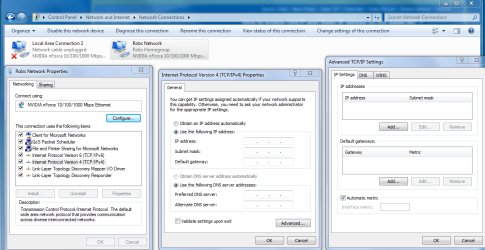
If you go to your network connections window like in the picture below.Then choose IPv4 properties then choose "Use the following IP address". At that point you can click the advanced tab for advanced TCP-IP settings. You can then bind a secondary IP to your NIC by using the "Add" tab. You can add a secondary IP, Default Gateway,DNS,WINS, and easily bind them to a single NIC.
Attachments
TCP-IP ADVANCED SETTINGS.PNG
64.3 KB
· Views: 362
My Computer
At a glance
Windows 7 Ult, Windows 8.1 Pro,Q9650-4.275GHz, E8600 4.5GHz, E6750-3.8GHzG.Skill PC2 9600 1200Mhz 5 5 5 15 2TGTX480