Need to change local security policy on Win7 starter

starter

New member
Local time
3:55 AM
Messages
4
How can I change "Send NTLMv2 Response only" to "Send LM & NTLM -- Use NTLMv2 session security if negotiated" on my windows 7 starter to be able to access my network drive?

I been made to understand that this can be accomplished through secpol.msc, but it does not exist on my win7 starter machine.

Here's what my network drive's tech support told me:
"
Windows networking fails to connect to the Network Space 2 due to the version of samba on drive. Windows 7 defaults to using NTLMv2 for its security policy. The drive uses Samba v.3.0.9, which only supports NTLM.

To fix this, the LAN Authentication level must be reconfigured using the "secpol" program to log in.
Click Start, then Run (or press [windows button] + [R] on the keyboard), then type "secpol.msc" This should bring up the Security Policy system window.
On the left, select Local Policies > Security Options.
On the right, scroll down to and double-click on "Network Security: LAN Manager"
Change the setting from "Send NTLMv2 Response only" to "Send LM & NTLM -- Use NTLMv2 session security if negotiated"
"

how can I accomplish this?
 

My Computer My Computer

Computer Manufacturer/Model Number
samsung n220
OS
win 7 starter
The Local Security Policy Editor will only be available in the Windows 7 Professional, Ultimate, and Enterpise editions. You will not have the Local Security Policy Editor available in the Windows 7 Starter and Home Premium editions.

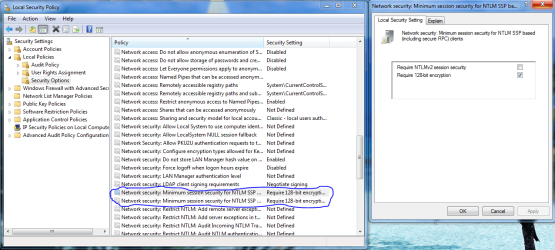
Unfortunately you don't have this option using Windows 7 starter. I did have this picture handy though. We even have a tutorial that shows you how to edit it.
http://www.sevenforums.com/tutorials/7357-local-security-policy-editor-open.html
 

Attachments

  • MINIMUM SESSION SECURITY SETTINGS FOR OLD SERVERS.PNG
    MINIMUM SESSION SECURITY SETTINGS FOR OLD SERVERS.PNG
    67 KB · Views: 2,952
Last edited:

My Computer My Computer

Computer type
PC/Desktop
Computer Manufacturer/Model Number
Home built
OS
Windows 7 Ult, Windows 8.1 Pro,
CPU
Q9650-4.275GHz, E8600 4.5GHz, E6750-3.8GHz
Motherboard
Evga 780i FTW
Memory
G.Skill PC2 9600 1200Mhz 5 5 5 15 2T
Graphics Card(s)
GTX480
Sound Card
Asus Xonar D2
Monitor(s) Displays
HannsG
Screen Resolution
1680X1050
Hard Drives
GSkill Phoenix Pro 120GB SSD
PSU
ThermalTake Toughpower 1000Watt modular
Case
ThermalTake XaserV
Cooling
Xigmatek S1283
Keyboard
Logitech G15
Mouse
Logitech G9
Internet Speed
T1
You are not seriously telling me that this one little setting is preventing me from using my network drive on my home network, and the only option would be to upgrade my windows 7? Because that would be just totally incomprehensibly ridiculous.


How about changing the setting by editing the registry like described here:

You may experience authentication issues when you access a network-attached storage device after you upgrade to Windows Server 2008, to Windows Vista, to Windows Server 2003, or to Windows XP

There doesn't seem to be a registry key called LMCompatibilityLevel on my win7 starter like it's described in the article... any help with that?
 

My Computer My Computer

Computer Manufacturer/Model Number
samsung n220
OS
win 7 starter
Like I mentioned before there isn't an adjustment for NTLM authentication on Win 7 starter but the registry might work for this.

I'm not sure this can be done with Win 7 starter but it's worth a try.

If the key doesn't exist you need to create it. There needs to be a DWORD named LmCompatibilityLevel set to value of 1(one) at
HKLM\SYSTEM\CurrentControlSet\Control\Lsa

So open regedit and navigate to HKLM\SYSTEM\CurrentControlSet\Control\Lsa then choose to create DWORD named LmCompatibilityLevel then set the value to 2.

Hope this helps. ;)

I just helped someone else with a similar problem the other day but it was because Win server 2000 doesn't have any type of NTLM authentication, before it's time I guess.
http://www.sevenforums.com/network-...p-drive-advance-server-2000-a.html#post821952

There are also some other registry adjustments that might help with Samba 3.3.4 to work with Windows 7.
http://social.technet.microsoft.com...g/thread/dfd79bc1-cf36-42b7-9911-346912f4def6

It might also be worth mentioning that to access network drives located on a Windows 7 machine you need adjust both the sharing permissions and also the Security permissions need to be set correctly. It's easy once you get there.
 
Last edited:

My Computer My Computer

Computer type
PC/Desktop
Computer Manufacturer/Model Number
Home built
OS
Windows 7 Ult, Windows 8.1 Pro,
CPU
Q9650-4.275GHz, E8600 4.5GHz, E6750-3.8GHz
Motherboard
Evga 780i FTW
Memory
G.Skill PC2 9600 1200Mhz 5 5 5 15 2T
Graphics Card(s)
GTX480
Sound Card
Asus Xonar D2
Monitor(s) Displays
HannsG
Screen Resolution
1680X1050
Hard Drives
GSkill Phoenix Pro 120GB SSD
PSU
ThermalTake Toughpower 1000Watt modular
Case
ThermalTake XaserV
Cooling
Xigmatek S1283
Keyboard
Logitech G15
Mouse
Logitech G9
Internet Speed
T1
Maybe I don't understand the problem fully or Windows 7 Starter works completely different than Windows 7 Professional, Windows 7 Ultimate and Windows 7 Enterprise, but I connect to many many samba devices that don't use NTLMv2 and Windows 7 is smart enough to try NTLMv2 and then back down to NTLM when it cannot connect. I have had no issues connecting to all types of NAS, SAN and *IX systems
 

My Computer My Computer

Computer type
PC/Desktop
Computer Manufacturer/Model Number
Dell OP7010
OS
Windows 7 Enterprise (x64); Windows Server 2008 R2 (x64)
Memory
16GB
Monitor(s) Displays
4 Dell 24" LCD
Screen Resolution
1280x1024
Keyboard
Dell
Mouse
Dell Optical
Internet Speed
40meg
I found that on my Windows 7 starter I needed to change the registry entry:
HKEY_LOCAL_MACHINE\SOFTWARE\Microsoft\Windows NT\CurrentVersion\SeCEdit\Reg Values\MACHINE/System/CurrentControlSet/Control/Lsa/LmCompatibilityLevel

key "Value type" from 4 to 2

As described here: LmCompatibilityLevel

A reboot and a quick test showed that I can now write files to my NAS from my windows 7 machine over a wlan connection. Thanks for your help =)
 

My Computer My Computer

Computer Manufacturer/Model Number
samsung n220
OS
win 7 starter
I found that on my Windows 7 starter I needed to change the registry entry:
HKEY_LOCAL_MACHINE\SOFTWARE\Microsoft\Windows NT\CurrentVersion\SeCEdit\Reg Values\MACHINE/System/CurrentControlSet/Control/Lsa/LmCompatibilityLevel

key "Value type" from 4 to 2

As described here: LmCompatibilityLevel

A reboot and a quick test showed that I can now write files to my NAS from my windows 7 machine over a wlan connection. Thanks for your help =)

Thanks for reporting the fix starter. I'll mark as solved. ;)
 

My Computer My Computer

Computer type
PC/Desktop
Computer Manufacturer/Model Number
Home built
OS
Windows 7 Ult, Windows 8.1 Pro,
CPU
Q9650-4.275GHz, E8600 4.5GHz, E6750-3.8GHz
Motherboard
Evga 780i FTW
Memory
G.Skill PC2 9600 1200Mhz 5 5 5 15 2T
Graphics Card(s)
GTX480
Sound Card
Asus Xonar D2
Monitor(s) Displays
HannsG
Screen Resolution
1680X1050
Hard Drives
GSkill Phoenix Pro 120GB SSD
PSU
ThermalTake Toughpower 1000Watt modular
Case
ThermalTake XaserV
Cooling
Xigmatek S1283
Keyboard
Logitech G15
Mouse
Logitech G9
Internet Speed
T1
Yeah, it seems like I reported success too early. I also had to add:

HKEY_LOCAL_MACHINE\SYSTEM\CurrentControlSet\Control\Lsa

key LmCompatibilityLevel with value 2 that did not exist. It helped, but of the problems still persist. Writing a whole folder to my NAS doesn't seem to work and the copying file dialog just hangs there forever like it did before.

Something's still not right even though adding the new key definately helped some.
 

My Computer My Computer

Computer Manufacturer/Model Number
samsung n220
OS
win 7 starter
Back
Top