Microsoft to users: You'll download Windows 10, and you'll like it

The original licence doesn't get fully deactivated/wiped out.
You should still be able to go back to your previous OS after the 30 day rollback period. Unless MS has changed something in the EULA for the free upgrade?
You "should" be able to go back to your older OS whenever you like, but you can't use both original licence and upgrade licence at the same time. Only one can be in use as the upgrade licence replaces the original licence when in use.
 

My Computer My Computer

At a glance

Win 7 Ultimate, Win 8.1 Pro, Linux Mint 19 Ci...Intel i5 4690KCorsair Vengeance LP 32GB DDR3MSI GTX 1060 GAMING X 6GB
Computer type
PC/Desktop
Computer Manufacturer/Model Number
Custom Build
OS
Win 7 Ultimate, Win 8.1 Pro, Linux Mint 19 Cinnamon (All 64-Bit)
CPU
Intel i5 4690K
Motherboard
Gigabyte Z97X-UD3H
Memory
Corsair Vengeance LP 32GB DDR3
Graphics Card(s)
MSI GTX 1060 GAMING X 6GB
Sound Card
Onboard
Hard Drives
Samsung 850 EVO 250GB SSD (x2)
Samsung 860 EVO 1TB SSD (x2)
Crucial MX300 525GB SSD
WD Blue 2TB 5400rpm Intellipark Disabled (x2)
PSU
Corsair HX750i
Case
Phanteks Enthoo Pro
Cooling
CM Hyper 212 EVO on CPU, Noctua Redux NF-P14S 1500rpm (x6)
Keyboard
Corsair K70 RGB LUX
Mouse
Corsair Sabre RGB
Antivirus
Avast Free, MalwareBytes, SAS & CryptoPrevent
Browser
Chrome
Other Info
StarTech PEXESAT322I 2 Port PCI-E SATA Card
ASUS PCE-AC56 Dual-band AC1300 Wireless Card
Akasa FC.Six Manual Fan Controller
And a Partridge in a Pear Tree!
You talk about update settings, they mean nothing. MS can over ride them, they did on mine. They did not install W 10 but other updates did when I set it to "never". They can even enable updates if you disable them in services. Been there, done that. I tried W 10, reformatted back to W 7.
 

My Computer My Computer

At a glance

W 7 Home Premium
Computer type
PC/Desktop
Computer Manufacturer/Model Number
HP
OS
W 7 Home Premium
Browser
IE and Firefox

My Computer My Computer

At a glance

W7 Pro SP1 64biti78GBIntel HD Graphics
Computer type
Laptop
Computer Manufacturer/Model Number
Employer provided Dell Latitude
OS
W7 Pro SP1 64bit
CPU
i7
Memory
8GB
Graphics Card(s)
Intel HD Graphics
Hard Drives
crappy SSD
Antivirus
Employer mandated Symantec Endpoint Protection
Browser
Pale Moon 64bit, IE11 64bit & Chrome 64bit
You talk about update settings, they mean nothing. MS can over ride them, they did on mine. They did not install W 10 but other updates did when I set it to "never". They can even enable updates if you disable them in services. Been there, done that. I tried W 10, reformatted back to W 7.

Emmar,
There are two services you have to disable, to prevent widows update from running at all and you need to reboot after doing that. I never came across an issue were Microsoft re-stared the service.
 

My Computer My Computer

At a glance

W10 32 bit, XUbuntu 18.xx 64 bitIntel(R) Celeron(R) CPU G1620T @ 2.40GHz, 240...4GBIntel HD graphics
Computer type
PC/Desktop
Computer Manufacturer/Model Number
Dell All in one Inspiron 2020
OS
W10 32 bit, XUbuntu 18.xx 64 bit
CPU
Intel(R) Celeron(R) CPU G1620T @ 2.40GHz, 2400 Mhz
Motherboard
Dell
Memory
4GB
Graphics Card(s)
Intel HD graphics
Sound Card
High Definition Audio Device
Monitor(s) Displays
20 inch Screen
Screen Resolution
W7=1280 x 720 & Linux Mint Xfce=1360 x 768
Hard Drives
500 GB hard drive
Keyboard
Usb
Mouse
Usb
Internet Speed
High-Speed
Antivirus
MSE
Browser
Main Browser Firefox
Other Info
I have done a clean install of Windows 7 using Dell re-installation disk (Dell sent me one). I also use Free Macrium reflect backup and restore.
I did and they did enable them. I went to components/services, disabled them and went to the recovery section and opted for "take no action". I check those settings and one time they have been enabled again.

If there is something else please tell me what it is. I have not updated in a couple of years and my PC is working like it should.
 

My Computer My Computer

At a glance

W 7 Home Premium
Computer type
PC/Desktop
Computer Manufacturer/Model Number
HP
OS
W 7 Home Premium
Browser
IE and Firefox
You talk about update settings, they mean nothing. MS can over ride them, they did on mine. They did not install W 10 but other updates did when I set it to "never". They can even enable updates if you disable them in services. Been there, done that. I tried W 10, reformatted back to W 7.

Of course that they DON'T have any way to possibly change anything on your computer. Nothing, nobody can ever change any setting or file or anything else on your computer from the outside, not even MS.
Every change made to your computer (if there was really one to begin with) is made from within your own computer, so if the update settings changed, that was done by something running locally.

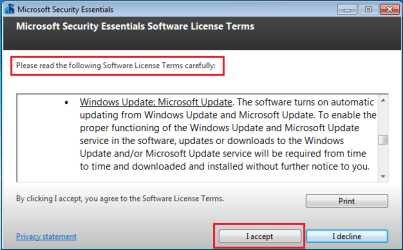
An example of this is the MSE installer that enables Windows Updates without user knowledge or consent. Another thing could be that the Windows 10 gets downloaded and your computer downgraded to it against your instructions, but that once again is done by software running on your computer (the GWX malware in this case), not something external to it.
 

My Computer My Computer

At a glance

Windows 7 Ultimate x64Intel Core i7-740QM8 GB DDR3NVIDIA GeForce 330GT
Computer type
Laptop
Computer Manufacturer/Model Number
Toshiba Sattelite A665-S6092
OS
Windows 7 Ultimate x64
CPU
Intel Core i7-740QM
Memory
8 GB DDR3
Graphics Card(s)
NVIDIA GeForce 330GT
Screen Resolution
1366x768
Hard Drives
Samsung 840 SSD 500GB
1TB USB3 external HD
Cooling
Coolermaster Notepal U3 notebook cooling pad
Internet Speed
3mbps ASDL
Antivirus
ClamWin 0.98.7
Browser
Opera 12.17 x86 (main), Firefox 38 (sec), IE11 (last resort)

My Computer My Computer

At a glance

W7 Pro SP1 64biti78GBIntel HD Graphics
Computer type
Laptop
Computer Manufacturer/Model Number
Employer provided Dell Latitude
OS
W7 Pro SP1 64bit
CPU
i7
Memory
8GB
Graphics Card(s)
Intel HD Graphics
Hard Drives
crappy SSD
Antivirus
Employer mandated Symantec Endpoint Protection
Browser
Pale Moon 64bit, IE11 64bit & Chrome 64bit
Another good reason not to use MSE ;)
I imagine just switching the updates settings would a better options to insure Optional/ Recommended updates were excluded from being mixed in with real Important updates.
 

My Computer My Computer

At a glance

Win-7-Pro64bit 7-H-Prem-64biti7-5930K 2nd i9-9940x both water blocked VRM'...Trident-z 3200C14 2nd Trident-z 3600C16EVGA 1080ti ftw3 2nd Titan Xp both water blocked
Computer type
PC/Desktop
Computer Manufacturer/Model Number
Custom assembled by me :}
OS
Win-7-Pro64bit 7-H-Prem-64bit
CPU
i7-5930K 2nd i9-9940x both water blocked VRM's too
Motherboard
ASUS SABERTOOTH X99 2nd ASUS x299 Apex
Memory
Trident-z 3200C14 2nd Trident-z 3600C16
Graphics Card(s)
EVGA 1080ti ftw3 2nd Titan Xp both water blocked
Sound Card
Built-in Realtek
Monitor(s) Displays
1-AOC G2460PG 24"G-Sync 144Hz/ 2nd 1-ASUS VG248QE 24" 144Hz
Screen Resolution
1920 x 1080 144Hz
Hard Drives
2-Samsung M.2 Evo & Evo Plus
2-Samsung 850 EVO 500GB SSD's/ 3-2.5 W.D. Black 1tb-&3-1tb/3-3.5 WD Black 1tb hdd's
PSU
EVGA SuperNOVA 1000-P2 2nd 1200-P2
Case
2-Corsair Obsidian Series 450D Black ATX Mid Tower
Cooling
Custom water loops
Keyboard
Logitech G710+/ 2nd Logitech G910
Mouse
2-RedDragon M901 Perdition 16400 dpi Gaming mouse = wired
Internet Speed
Comcast Ping 19ms 89.31mbps download speed 6.12mbps upload
Antivirus
Malwarebytes Pro/ Superantispyware Pro
Browser
FireFox & Pale moon
Other Info
2nd ASUS X299 Apex/Intel i9-9940x with Custom water loop/7H-Prem-x64/Corsair 450D case/Ram Trident-z 3600C16 4x8gb / Samsung970Evo plus 500gb SSD/Dual ssd EZ swap evo/PSU EVGA SuperNova 1200w-P2 80+Platinum/GPU Titan Xp /8-ML-140 on push-pull on 2-280GTX rads
I think that is just saying it a different way. MS does it whether it is done internally by an MS software or sent to my PC directly and they do it without my permission. Is the MSE you are speaking of the same one you use to get email, messenger, etc.? I use that software to route my Cox email to my computer. If it is I just need to get rid of it and use Cox's online email.
 

My Computer My Computer

At a glance

W 7 Home Premium
Computer type
PC/Desktop
Computer Manufacturer/Model Number
HP
OS
W 7 Home Premium
Browser
IE and Firefox
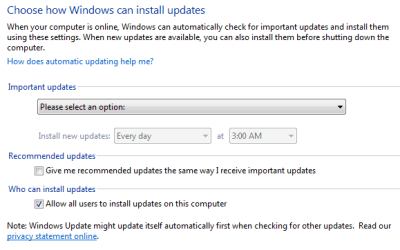
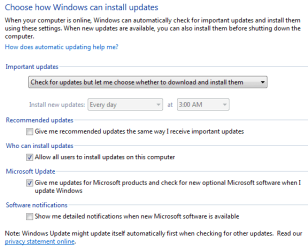
I've used MSE for several years without it affecting my update setting (notify but do not download or install). You might have to check it on first installation of MSE but I've never heard of MSE changing the setting after that.

The way to avoid the update settings being changed without your knowing is to install GWX Control Panel and enable its monitor, that way if there is any attempt to alter the settings you will be prompted.
 

My Computer My Computer

At a glance

Windows 7 Home Premium 64AMD Phenom II X4 9558GB Corsair XMS3 DDR3Gigabyte Geforce GTX 960 2GB
Computer type
PC/Desktop
Computer Manufacturer/Model Number
Custom build by PC Specialist
OS
Windows 7 Home Premium 64
CPU
AMD Phenom II X4 955
Motherboard
Asus M4A78T-E
Memory
8GB Corsair XMS3 DDR3
Graphics Card(s)
Gigabyte Geforce GTX 960 2GB
Sound Card
SB Audigy
Monitor(s) Displays
BenQ 24"
Screen Resolution
1920 x 1080
Hard Drives
500GB Serial ATA
PSU
1010W Quiet Quad Rail
Case
Antec 900
Cooling
Fenrir
Keyboard
Corsair
Mouse
Logitech
Internet Speed
20mbps
Antivirus
MSE plus MBAM 2.x Free
Browser
Chrome
Other Info
Second desktop different spec but similar level.
I thought for a minute that could have been what happened, but if MSE is the same one I use for Windows Live Mail, then there must be another reason. After I reformatted last year I installed MS Office Student from a disk I purchased retail and forgot I had turned off windows update while I set up my PC. MS over rode my settings and installed "only" the updated the things I needed to use Office. Then I installed MSE and it update the things I needed. Maybe the disk gave the order to update instead of something on my PC.
 

My Computer My Computer

At a glance

W 7 Home Premium
Computer type
PC/Desktop
Computer Manufacturer/Model Number
HP
OS
W 7 Home Premium
Browser
IE and Firefox
MSE is nothing to do directly with Windows Live Mail, it is Microsoft Security Essentials, a free-standing anti-virus program.
 

My Computer My Computer

At a glance

Windows 7 Home Premium 64AMD Phenom II X4 9558GB Corsair XMS3 DDR3Gigabyte Geforce GTX 960 2GB
Computer type
PC/Desktop
Computer Manufacturer/Model Number
Custom build by PC Specialist
OS
Windows 7 Home Premium 64
CPU
AMD Phenom II X4 955
Motherboard
Asus M4A78T-E
Memory
8GB Corsair XMS3 DDR3
Graphics Card(s)
Gigabyte Geforce GTX 960 2GB
Sound Card
SB Audigy
Monitor(s) Displays
BenQ 24"
Screen Resolution
1920 x 1080
Hard Drives
500GB Serial ATA
PSU
1010W Quiet Quad Rail
Case
Antec 900
Cooling
Fenrir
Keyboard
Corsair
Mouse
Logitech
Internet Speed
20mbps
Antivirus
MSE plus MBAM 2.x Free
Browser
Chrome
Other Info
Second desktop different spec but similar level.
That's right, I forgot all of that. I don't use it anymore. Thank you for your patience with me.
 

My Computer My Computer

At a glance

W 7 Home Premium
Computer type
PC/Desktop
Computer Manufacturer/Model Number
HP
OS
W 7 Home Premium
Browser
IE and Firefox
Another good reason not to use MSE ;)
I imagine just switching the updates settings would a better options to insure Optional/ Recommended updates were excluded from being mixed in with real Important updates.
The MSE install does not change the "recommended" setting.

before
1before.PNG

after
2after.PNG


before
3before-check.PNG

after
4after-check.PNG
 

My Computer My Computer

At a glance

W7 Pro SP1 64biti78GBIntel HD Graphics
Computer type
Laptop
Computer Manufacturer/Model Number
Employer provided Dell Latitude
OS
W7 Pro SP1 64bit
CPU
i7
Memory
8GB
Graphics Card(s)
Intel HD Graphics
Hard Drives
crappy SSD
Antivirus
Employer mandated Symantec Endpoint Protection
Browser
Pale Moon 64bit, IE11 64bit & Chrome 64bit
I recommend "BlockGWXetcFINAL.bat" - it will eliminate all Win10-related updates and files. As was suggested above, it will also reset the manner in which future updates are downloaded and/or installed.
 

My Computer My Computer

At a glance

Windows 7 Ultimate 64 biti7 Intel8 GBnVidia GeForce
Computer type
PC/Desktop
Computer Manufacturer/Model Number
Dell
OS
Windows 7 Ultimate 64 bit
CPU
i7 Intel
Memory
8 GB
Graphics Card(s)
nVidia GeForce
Hard Drives
Seagate; WesternDigital
Antivirus
Panda
Browser
Firefox
I don't have w 10 but would like to know for possible future use, how do you use "BlockGWXetcFINAL.bat"?
 

My Computer My Computer

At a glance

W 7 Home Premium
Computer type
PC/Desktop
Computer Manufacturer/Model Number
HP
OS
W 7 Home Premium
Browser
IE and Firefox

My Computer My Computer

At a glance

Windows 7 Ultimate 64 biti7 Intel8 GBnVidia GeForce
Computer type
PC/Desktop
Computer Manufacturer/Model Number
Dell
OS
Windows 7 Ultimate 64 bit
CPU
i7 Intel
Memory
8 GB
Graphics Card(s)
nVidia GeForce
Hard Drives
Seagate; WesternDigital
Antivirus
Panda
Browser
Firefox
Windows 10 is great when manicured to look like Windows 7 :)
 

My Computer My Computer

At a glance

Microsoft Windows 7 Home Premium 64-bit 7601 ...AMD Athlon(tm) Processor 2850e4.00 GBNVIDIA GeForce 6150SE nForce 430
Computer type
PC/Desktop
Computer Manufacturer/Model Number
eMachines EL 1333G-01W
OS
Microsoft Windows 7 Home Premium 64-bit 7601 Multiprocessor Free Service Pack 1
CPU
AMD Athlon(tm) Processor 2850e
Motherboard
eMachines WMCP61M
Memory
4.00 GB
Graphics Card(s)
NVIDIA GeForce 6150SE nForce 430
Sound Card
Realtek High Definition Audio
Monitor(s) Displays
Samsung 730B
Screen Resolution
1280 x 1024 x 32 bits (4294967296 colors) @ 60 Hz
Hard Drives
(1) ST332041 8AS SCSI Disk Device (2) Generic- Compact Flash USB Device (3) Multiple Flash Reader USB Device
Back
Top