KB4055532 Security and Quality Rollup for .NET Framework in Windows 7

Brink

Administrator
Staff member
Local time
3:26 AM
Messages
74,892
Location
Oklahoma
Security and Quality Rollup for .NET Framework 3.5.1, 4.5.2, 4.6, 4.6.1, 4.6.2, 4.7, and 4.7.1 updates for Windows 7 SP1 and Server 2008 R2 SP1 (KB 4055532)

Applies to: Microsoft .NET Framework 4.7.1, Microsoft .NET Framework 4.7, Microsoft .NET Framework 4.6.2, Microsoft .NET Framework 4.6.1, Microsoft .NET Framework 4.6, Microsoft .NET Framework 4.5.2, Microsoft .NET Framework 3.5.1


   Note
Notice
On January 18, 2018, update 4055532 was re-released to include an update for .NET Framework 4.6, 4.6.1, 4.6.2, 4.7, and 4.7.1 for Windows 7 SP1 and Windows Server 2008 R2 SP1 (KB4074880). Update 4074880 replaces update 4055002 for this configuration, and prevents the issue that is described in the following Knowledge Base article:

4074906 - "TypeInitializationException" or "FileFormatException" error in WPF applications that request fallback fonts after you install the January 9, 2018, .NET Security and Quality Rollup (KB4055002)

This update has been released as part of the January 2018 Security and Quality Rollup for .NET Framework 3.5.1, 4.5.2, 4.6, 4.6.1, 4.6.2, 4.7, and 4.7.1 for Windows 7 SP1 and Windows Server 2008 R2 SP1.

Important

If you have not been offered this security update, you may be running incompatible antivirus software, and you should contact the software vendor. We are working closely with antivirus software partners to make sure that all customers receive the January Windows security updates as soon as possible. For more information, go to Important: Windows security updates released January 3, 2018, and antivirus software. Also, see the "Additional information about this security update" section in this article.

Summary

This security update resolves a security feature bypass vulnerability that exists when Microsoft .NET Framework and .NET Core components do not completely validate certificates. This security update addresses the vulnerability by helping to make sure that .NET Framework and .NET Core components completely validate certificates. To learn more about this vulnerability, see Microsoft Common Vulnerabilities and Exposures CVE-2018-0786.

Additionally, this security update resolves a denial of service vulnerability that exists when .NET Framework and .NET Core components improperly process XML documents. This update addresses the vulnerability by correcting how .NET Framework and .NET Core component applications handle XML document processing. To learn more about this vulnerability, see Microsoft Common Vulnerabilities and Exposures CVE-2018-0764.

Important

  • All updates for .NET Framework 4.6, 4.6.1, 4.6.2, 4.7, and 4.7.1 require that the d3dcompiler_47.dll is installed. We recommend that you install the included d3dcompiler_47.dll before you apply this update. For more information about the d3dcompiler_47.dll, see KB 4019990.
  • If you install a language pack after you install this update, you must reinstall this update. Therefore, we recommend that you install any language packs that you need before you install this update. For more information, see Add language packs to Windows.
Additional information about this security update

  • Enhanced Key Usage (EKU) is described in section 4.2.1.12 of RFC 5280. This extension indicates one or more purposes for which the certified public key may be used in addition to or instead of the basic purposes that are indicated in the key usage extension. For example, a certificate that is used for the authentication of a client to a server must be configured for Client Authentication. Similarly, a certificate that is used for the authentication of a server must be configured for Server Authentication. This update changes this process so that the certificate chain validation fails if the root certificate is disabled. This is in addition to requiring the appropriate client or server EKU on certificates.

    If certificates are used for authentication, the authenticator examines the certificate that is provided by the remote endpoint and looks for the correct purpose object identifier in Application Policies extensions. If a certificate is used for client authentication, the object identifier for Client Authentication must be present in the EKU extensions of the certificate, or authentication fails. The object identifier for Client Authentication is 1.3.6.1.5.5.7.3.2. Likewise, when a certificate is used for server authentication, the object identifier for Server Authentication must be present in the EKU extensions of the certificate, or authentication fails. The object identifier for Server Authentication is 1.3.6.1.5.5.7.3.1. Certificates that have no EKU extension continue to authenticate correctly.

    Consider making changes to your component’s certificates to make sure that they are using the correct EKU OID attributes and are secured correctly. If you temporarily cannot access correctly reissued certificates, you can choose to opt in or out of the security change to avoid any connectivity effects. To do this, specify the following appsetting value in the configuration file:

    Code:
    <appSettings>
        <add key="wcf:useLegacyCertificateApplicationPolicy" value="true" />
    </appSettings>

    Note Setting the value to “true” will opt out of the security changes.
  • The following articles contain additional information about this security update as it relates to individual product versions. The articles may contain known issue information.
    • 4074880 Description of the Security and Quality Rollup for .NET Framework 4.6, 4.6.1, 4.6.2, 4.7, and 4.7.1 for Windows 7 SP1 and Server 2008 R2 SP1 (KB 4074880)
    • 4054995 Description of the Security and Quality Rollup for .NET Framework 4.5.2 for Windows 7 SP1, Server 2008 R2 SP1, and Server 2008 SP2 (KB 4054995)
    • 4054998 Description of the Security and Quality Rollup for .NET Framework 3.5.1 for Windows 7 SP1 and Server 2008 R2 SP1 (KB 4054998)
  • Windows 10, Windows 8.1, Windows Server 2012 R2, and Windows Server 2016 customers
    We recommend that all customers protect their devices by running compatible and supported antivirus software. Customers can take advantage of built-in antivirus protection, Windows Defender Antivirus, for Windows 8.1 and Windows 10 devices or a compatible third-party antivirus application. The antivirus software must set a registry key as described in the "Setting the registry key" section in this article to receive the January 2018 security updates.
  • Windows 7 SP1 and Windows Server 2008 R2 SP1 customers
    A default installation of Windows 7 SP1 or Windows Server 2008 R2 SP1 will not have an antivirus application installed. In these situations, we recommend installing a compatible and supported antivirus application such as Microsoft Security Essentials or a third-party antivirus application. The antivirus software must set a registry key as described in the "Setting the registry key" section for you to receive the January 2018 security updates.
  • Customers without antivirus
    If you cannot install or run antivirus software, we recommend manually setting the registry key as described in the "Setting the registry key" section to receive the January 2018 security updates.
  • Setting the registry key

    Caution Using Registry Editor incorrectly can cause serious problems that may require you to reinstall your operating system. Microsoft cannot guarantee that problems resulting from the incorrect use of Registry Editor can be solved. Use Registry Editor at your own risk. For information about how to edit the registry, see the "Changing keys and values" help topic in Registry Editor or see the "Add and delete information in the registry" and "Edit registry data" help topics in Regedt32.exe.

    Note You will not receive the January 2018 security updates (or any successive security updates) and will not be protected from security vulnerabilities unless your antivirus software sets the following registry key:
    Key="HKEY_LOCAL_MACHINE" Subkey="SOFTWARE\Microsoft\Windows\CurrentVersion\QualityCompat" Value="cadca5fe-87d3-4b96-b7fb-a231484277cc" Type="REG_DWORD”
    Data="0x00000000”​
How to obtain help and support for this security update


Source: https://support.microsoft.com/en-us/help/4055532/security-and-quality-rollup-for-net-framework-3-5-1-4-5-2-4-6-4-6-1-4
 
Last edited:

My Computer My Computer

At a glance

64-bit Windows 11 Pro for WorkstationsIntel i7-8700K OC'd to 5 GHz64 GB (4x16GB) G.SKILL TridentZ RGB DDR4 3600...ASUS ROG-STRIX-GTX1080TI-O11G-GAMING
Computer type
PC/Desktop
Computer Manufacturer/Model Number
Self built custom
OS
64-bit Windows 11 Pro for Workstations
CPU
Intel i7-8700K OC'd to 5 GHz
Motherboard
ASUS ROG Maximus XI Formula Z390
Memory
64 GB (4x16GB) G.SKILL TridentZ RGB DDR4 3600 MHz
Graphics Card(s)
ASUS ROG-STRIX-GTX1080TI-O11G-GAMING
Sound Card
Integrated
Monitor(s) Displays
2 x Samsung Odyssey G7 27"
Screen Resolution
2560x1440
Hard Drives
1TB Samsung 990 PRO M.2,
4TB Samsung 990 PRO PRO M.2,
TerraMaster F8 SSD Plus NAS
PSU
Seasonic Prime Titanium 850W
Case
Thermaltake Core P3
Cooling
Corsair Hydro H115i
Keyboard
Logitech wireless K800
Mouse
Logitech MX Master 4
Internet Speed
2 Gb/s Download and 100 Mb/s Upload
Antivirus
Malwarebyte Anti-Malware Premium
Browser
Google Chrome
Other Info
Logitech Z625 speaker system,
Logitech BRIO 4K Pro webcam,
HP Color LaserJet Pro MFP M477fdn,
APC SMART-UPS RT 1000 XL - SURT1000XLI,
Galaxy S23 Plus phone
So all Windows 7 machines need the "d3dcompiler_47.dll"?

Is this what I'm supposed to understand, who at MS is writing that garbage?
"Notes
The MANIFEST files (.manifest) and the MUM files (.mum) that are installed for each environment are listed in the "Additional file information" section. MUM, MANIFEST, and the associated security catalog (.cat) files, are very important to maintain the state of the updated components. The security catalog files, for which the attributes are not listed, are signed with a Microsoft digital signature."

Looks like the file was created on "12-Apr-2017", so will need to look for it as being installed, can someone tell me in English where to find it, or in any other language but MS, yes this must be some kind of new language MS?

Thanks Brink
 

My Computer My Computer

At a glance

Windows 7 Home Premium 64bitAMD A8-3520M6.00GB DDR3 @ 674MHz (9-9-9-24)512MB ATI AMD Radeon HD 6620G
Computer type
Laptop
Computer Manufacturer/Model Number
HP Pavilion dv7-6c23cl
OS
Windows 7 Home Premium 64bit
CPU
AMD A8-3520M
Motherboard
Hewlett-Packard 180B (Socket FS1)
Memory
6.00GB DDR3 @ 674MHz (9-9-9-24)
Graphics Card(s)
512MB ATI AMD Radeon HD 6620G
Sound Card
IDT High Definition Audio CODEC
Monitor(s) Displays
Generic PnP Monitor
Screen Resolution
(1600x900@60Hz)
Hard Drives
Samsung 850 EVO 250GB SSD
Mouse
Logitec M525
Internet Speed
30-75Mbps
Antivirus
Avast Free, Unfortunately
Browser
Google Chrome, Firefox, IE
Hello Nasty7,

If you get KB4055532 via Windows Update, then you should install it. Otherwise, you don't need to worry about it.
 

My Computer My Computer

At a glance

64-bit Windows 11 Pro for WorkstationsIntel i7-8700K OC'd to 5 GHz64 GB (4x16GB) G.SKILL TridentZ RGB DDR4 3600...ASUS ROG-STRIX-GTX1080TI-O11G-GAMING
Computer type
PC/Desktop
Computer Manufacturer/Model Number
Self built custom
OS
64-bit Windows 11 Pro for Workstations
CPU
Intel i7-8700K OC'd to 5 GHz
Motherboard
ASUS ROG Maximus XI Formula Z390
Memory
64 GB (4x16GB) G.SKILL TridentZ RGB DDR4 3600 MHz
Graphics Card(s)
ASUS ROG-STRIX-GTX1080TI-O11G-GAMING
Sound Card
Integrated
Monitor(s) Displays
2 x Samsung Odyssey G7 27"
Screen Resolution
2560x1440
Hard Drives
1TB Samsung 990 PRO M.2,
4TB Samsung 990 PRO PRO M.2,
TerraMaster F8 SSD Plus NAS
PSU
Seasonic Prime Titanium 850W
Case
Thermaltake Core P3
Cooling
Corsair Hydro H115i
Keyboard
Logitech wireless K800
Mouse
Logitech MX Master 4
Internet Speed
2 Gb/s Download and 100 Mb/s Upload
Antivirus
Malwarebyte Anti-Malware Premium
Browser
Google Chrome
Other Info
Logitech Z625 speaker system,
Logitech BRIO 4K Pro webcam,
HP Color LaserJet Pro MFP M477fdn,
APC SMART-UPS RT 1000 XL - SURT1000XLI,
Galaxy S23 Plus phone
Will do Brink, I thought as much, but MS want's to make things seem more complicated than they are. Some kind of secret language lol.
 

My Computer My Computer

At a glance

Windows 7 Home Premium 64bitAMD A8-3520M6.00GB DDR3 @ 674MHz (9-9-9-24)512MB ATI AMD Radeon HD 6620G
Computer type
Laptop
Computer Manufacturer/Model Number
HP Pavilion dv7-6c23cl
OS
Windows 7 Home Premium 64bit
CPU
AMD A8-3520M
Motherboard
Hewlett-Packard 180B (Socket FS1)
Memory
6.00GB DDR3 @ 674MHz (9-9-9-24)
Graphics Card(s)
512MB ATI AMD Radeon HD 6620G
Sound Card
IDT High Definition Audio CODEC
Monitor(s) Displays
Generic PnP Monitor
Screen Resolution
(1600x900@60Hz)
Hard Drives
Samsung 850 EVO 250GB SSD
Mouse
Logitec M525
Internet Speed
30-75Mbps
Antivirus
Avast Free, Unfortunately
Browser
Google Chrome, Firefox, IE
I installed it this morning and when I tried to boot up about two hours ago, my computer would not start normally. After I put in my windows password, my screen went black and stayed that way for a half hour until l I gave up on it and turned the power off. I started the computer in safe mode and used the restore point from prior to the update, thinking that would fix it, but it didn't -- the same thing happened again. I am writing this in safe mode with networking. I don't know what to try next.
 

My Computer My Computer

At a glance

Win7 Home PremiumIntel Core I5-24304 GBIntel HD Graphics 3000
Computer type
Laptop
Computer Manufacturer/Model Number
Acer
OS
Win7 Home Premium
CPU
Intel Core I5-2430
Memory
4 GB
Graphics Card(s)
Intel HD Graphics 3000
Hard Drives
640 GB
I've also received this '532' update.

What is d3dcompiler_47.dll? Is it supposed to be a part of the windows software to begin with? I can't find anything on the net as to where to look for it. I've noticed a lot of posts saying their computers are giving an error message that the file is missing but I've never had that message.

Where do I look to see if it's on my computer?

LevelBest
 

My Computer My Computer

At a glance

Windows 7 Home Premium 64 Bit (Service Pack 1)Premium Dual Core P62004 GBIntel (R) HD Graphic
Computer type
Laptop
Computer Manufacturer/Model Number
Samsung S3511
OS
Windows 7 Home Premium 64 Bit (Service Pack 1)
CPU
Premium Dual Core P6200
Motherboard
Samsung S3511
Memory
4 GB
Graphics Card(s)
Intel (R) HD Graphic
Sound Card
Realtek High Definition Audio
Screen Resolution
1366 x 768
Hard Drives
C: D: E: (NTFS)
Cooling
Drive temperature: 38 / 100
Mouse
Wired Logitech B100
Antivirus
McAfee Total Protection
Browser
Supermium Portable and r3dfox
ConnieB, sorry to hear that Connie, this is what I was afraid of. Apparently this should not come through if you don't have the proper prerequisites, but perhaps in your case it did anyhow.

Here is the Link to the subject and the link to the Update in the Catalog. I searched for the D3dcompiler_47.dll and it is attached to all kinds of Folders like Chrome, Firefox, Spotify etc, like Fifteen Folders.
https://support.microsoft.com/en-us/help/4019990/update-for-the-d3dcompiler-47-dll-component-on-windows

Microsoft Update Catalog

LevelBeast, I think you could do a search for the "KB4019990" to see if you have it. This also requires SP1, which I can only assume everyone has, though should not assume anything LOL.

You can also go into File Explorer C: Drive and so a search for d3dcompiler_47.dll just to see if it is there, and see how it is attached to many Folders.

Fortunately I did not have any problems with it, but because it's something to do with mitigating the Meltdown, Spectre issue (at least that is what I thought) I was thinking it may be problematic, but may well be wrong.
 

My Computer My Computer

At a glance

Windows 7 Home Premium 64bitAMD A8-3520M6.00GB DDR3 @ 674MHz (9-9-9-24)512MB ATI AMD Radeon HD 6620G
Computer type
Laptop
Computer Manufacturer/Model Number
HP Pavilion dv7-6c23cl
OS
Windows 7 Home Premium 64bit
CPU
AMD A8-3520M
Motherboard
Hewlett-Packard 180B (Socket FS1)
Memory
6.00GB DDR3 @ 674MHz (9-9-9-24)
Graphics Card(s)
512MB ATI AMD Radeon HD 6620G
Sound Card
IDT High Definition Audio CODEC
Monitor(s) Displays
Generic PnP Monitor
Screen Resolution
(1600x900@60Hz)
Hard Drives
Samsung 850 EVO 250GB SSD
Mouse
Logitec M525
Internet Speed
30-75Mbps
Antivirus
Avast Free, Unfortunately
Browser
Google Chrome, Firefox, IE
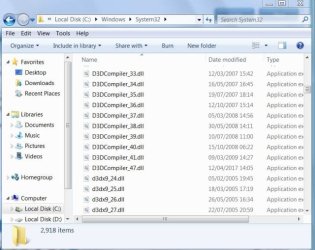
The new d3dcompiler_47.dll is needed for .NET 4.7 installation. If you already are running 4.7 and have installed previously .NET security monthly rollups, odds are you already received the latest d3dcompiler_47.dll. It's located in your sys32 directory on your system drive. Version: 6.3.9600.18611
 

My Computer My Computer

At a glance

Windows 7 Home 64-bit
Computer type
PC/Desktop
OS
Windows 7 Home 64-bit
A picture saves a thousand words.
Capture.JPG
 

My Computer My Computer

At a glance

Microsoft Windows 7 Professional 64-bit SP1Intel(R) Core(TM) i7-4790K CPU @ 4.00GHz8 GBNVIDIA GeForce GTX 970
Computer type
PC/Desktop
Computer Manufacturer/Model Number
(custom shop build)
OS
Microsoft Windows 7 Professional 64-bit SP1
CPU
Intel(R) Core(TM) i7-4790K CPU @ 4.00GHz
Motherboard
Gigabyte Z97X-SLI
Memory
8 GB
Graphics Card(s)
NVIDIA GeForce GTX 970
Sound Card
Realtek High Definition Audio
Monitor(s) Displays
Dell 2007FP
Screen Resolution
1600 1200 (native)
Hard Drives
(1)Crucial M500 480GB SATA 6Gbps 2.5"
(2)Crucial M500 480GB SATA 6Gbps 2.5"
PSU
EVGA 1000W
Case
Antec
Cooling
CoolerMaster
Keyboard
Logitech
Mouse
Logitech
Antivirus
Microsoft Security Essentials
Browser
Internet Explorer 11
Tpau, I wonder why I only have the #47, is it because of running Cleaning Tools or something? And you got yours way back in December...hmmm interesting?
 

My Computer My Computer

At a glance

Windows 7 Home Premium 64bitAMD A8-3520M6.00GB DDR3 @ 674MHz (9-9-9-24)512MB ATI AMD Radeon HD 6620G
Computer type
Laptop
Computer Manufacturer/Model Number
HP Pavilion dv7-6c23cl
OS
Windows 7 Home Premium 64bit
CPU
AMD A8-3520M
Motherboard
Hewlett-Packard 180B (Socket FS1)
Memory
6.00GB DDR3 @ 674MHz (9-9-9-24)
Graphics Card(s)
512MB ATI AMD Radeon HD 6620G
Sound Card
IDT High Definition Audio CODEC
Monitor(s) Displays
Generic PnP Monitor
Screen Resolution
(1600x900@60Hz)
Hard Drives
Samsung 850 EVO 250GB SSD
Mouse
Logitec M525
Internet Speed
30-75Mbps
Antivirus
Avast Free, Unfortunately
Browser
Google Chrome, Firefox, IE
Update Saturday morning: I did a normal shutdown from Safe Mode last night, not seeing the reply in this forum (thank you, Nasty7). I figured I'd try using the "windows repair" program from my hard drive in the morning. But, this morning, I decided to try one more time and so I did a normal boot up and it worked perfectly! My regular desktop was back and everything seems to be ok. The restore point had rolled me back to the time immediately prior to the install of the windows update yesterday. Of course, a few minutes after I logged on, that update was back, begging to be installed. I "hid" it and will be careful about uploading any new windows updates until I can research whether or not they are causing problems.
 

My Computer My Computer

At a glance

Win7 Home PremiumIntel Core I5-24304 GBIntel HD Graphics 3000
Computer type
Laptop
Computer Manufacturer/Model Number
Acer
OS
Win7 Home Premium
CPU
Intel Core I5-2430
Memory
4 GB
Graphics Card(s)
Intel HD Graphics 3000
Hard Drives
640 GB
Connie, look at Post#8 by Sky Ranch to see manually if you have the prerequisites.
KB4055532 Security and Quality Rollup for .NET Framework in Windows 7 - Windows 7 Help Forums

You can open File Explorer, go to C: Drive>Windows\System32 and browse way down below all the Folders, in alphabetical order, to d3dcompiler_47.dll, to see if it is there.

You can also look in your Updates to see if you have been installing .NET 4.7 installations. They will look something like this, this is the last one I got, before the offending one that may have caused you problems.

Code:
2017-09 Security and Quality Rollup for .NET Framework 3.5.1, 4.5.2, 4.6, 4.6.1, 4.6.2, 4.7 on Windows 7 and Server 2008 R2 for x64 (KB4041083) Installation date: ‎9/‎15/‎2017 12:09 AM
 

My Computer My Computer

At a glance

Windows 7 Home Premium 64bitAMD A8-3520M6.00GB DDR3 @ 674MHz (9-9-9-24)512MB ATI AMD Radeon HD 6620G
Computer type
Laptop
Computer Manufacturer/Model Number
HP Pavilion dv7-6c23cl
OS
Windows 7 Home Premium 64bit
CPU
AMD A8-3520M
Motherboard
Hewlett-Packard 180B (Socket FS1)
Memory
6.00GB DDR3 @ 674MHz (9-9-9-24)
Graphics Card(s)
512MB ATI AMD Radeon HD 6620G
Sound Card
IDT High Definition Audio CODEC
Monitor(s) Displays
Generic PnP Monitor
Screen Resolution
(1600x900@60Hz)
Hard Drives
Samsung 850 EVO 250GB SSD
Mouse
Logitec M525
Internet Speed
30-75Mbps
Antivirus
Avast Free, Unfortunately
Browser
Google Chrome, Firefox, IE
Thank you, TPau - that picture allowed me to find the d3d compiler in a few seconds. I do have this compiler, the final '47' version, so I went ahead and installed this '532' update. It installed with no problem and I switched off and logged on again just to make sure and all is OK.

Many thanks to all for the help.
 

My Computer My Computer

At a glance

Windows 7 Home Premium 64 Bit (Service Pack 1)Premium Dual Core P62004 GBIntel (R) HD Graphic
Computer type
Laptop
Computer Manufacturer/Model Number
Samsung S3511
OS
Windows 7 Home Premium 64 Bit (Service Pack 1)
CPU
Premium Dual Core P6200
Motherboard
Samsung S3511
Memory
4 GB
Graphics Card(s)
Intel (R) HD Graphic
Sound Card
Realtek High Definition Audio
Screen Resolution
1366 x 768
Hard Drives
C: D: E: (NTFS)
Cooling
Drive temperature: 38 / 100
Mouse
Wired Logitech B100
Antivirus
McAfee Total Protection
Browser
Supermium Portable and r3dfox
Another update on my situation: After my post saying everything was back to normal after I'd used system restore to roll back to the point before the lasted .NET update, I had more (different) problems.

When I tried to start my computer later that same day, the start-up process hung up on the "Wecome" screen. I waited and waited and finally used the power button to shut it down. I tried to start in Safe Mode with Networking but the exact same hang up happened there, too. Used the power button to shut down, and did successfully start up in plain Safe Mode. Tried various things, including rolling back to an even earlier restore point (before the huge update on 1/16) eventually using the F8 key to get to the "Startup Repair" option. Ran that twice, both times it said the OS was starting without problem. So, I restarted normally and again got hung up on the Welcome screen. I walked away and watched some TV. When I came back about 40 minutes later, there was my desktop! I have not shut the computer down since. I just let it sleep and it's working fine. But, I know this is only temporary because eventually I will have to shut down and restart. Plus, if there is a vulnerability, I need to fix it.

This morning, I examined two things per Nasty7's suggestion:

(1) Windows Update history. I have been installing the usual "2017-xx Security and Quality Rollup for .NET Framework..." updates monthly, last one being mid-December, 2017.
(2) I have the "d3dcompiler_47.dll" file installed, but it's dated April 2017.

I've seen some things which indicate what my antivirus company is doing matters. I use WebRoot and they say their next version will include an automatic change to the regkey to allow the windows update and they also provide now a manual way to do that immediately. Do you think I should wait for them, or do it manually? Or, in theory, do I not have to do that because I have a '47' file installed already? I'm just not that knowledgeable about this stuff and have become more confused. So, I appreciate your patience.

Also, are these windows update fixes different from getting fixes from the computer manufacturer for the actual flaws in the chips? I saw what looked like very complicated instructions from another site to fix the chips themselves. HELP!
 

My Computer My Computer

At a glance

Win7 Home PremiumIntel Core I5-24304 GBIntel HD Graphics 3000
Computer type
Laptop
Computer Manufacturer/Model Number
Acer
OS
Win7 Home Premium
CPU
Intel Core I5-2430
Memory
4 GB
Graphics Card(s)
Intel HD Graphics 3000
Hard Drives
640 GB
ConnieB, first off, I'm not the least bit worried about this security problem, at least anytime soon, so don't get into a rush a make things worse, believe me I've done that before. And Webroot has not released a date for this fix, though as you said there is a tool they provide to do it manually.

When you do a System Restore, make sure you Update all your programs before you shut down just to be safe. I think sometimes these out of date programs cause problems after a System Restore.

I would back up all my files before you have more issues, if that's possible. You can do this with an inexpensive USB Flash Drive. This way if you have a major problem you won't have to go to the local repair shop to retrieve your files, and then you could reinstall yourself if you are capable of something like that.

Unfortunately we don't know how good of shape your pc is in now? Have you created Recovery Media? I would get a few of these things done before you shutdown again. Finding Recovery Media for Windows 7 is not easy, unless you buy it from your pc manufacturer.

I would at least manually check the Webroot daily to see if they pushed an update, if not multiple times a day. Or use the Tool They provided. And Update all you Programs. Webroot may have a program Updater Checker, if not someone may suggest one.
Webroot Support

You could also Set Windows 7 Updates to Not Check for Updates at all for now. I use "Check for Updates but let me decide whether to download and Install" Setting myself.

It seems to me the "d3dcompiler_47.dll" is just a prerequisite to the latest MS Update, and the "ALLOW REGKEY" registry key is different.

Nasty7
 

My Computer My Computer

At a glance

Windows 7 Home Premium 64bitAMD A8-3520M6.00GB DDR3 @ 674MHz (9-9-9-24)512MB ATI AMD Radeon HD 6620G
Computer type
Laptop
Computer Manufacturer/Model Number
HP Pavilion dv7-6c23cl
OS
Windows 7 Home Premium 64bit
CPU
AMD A8-3520M
Motherboard
Hewlett-Packard 180B (Socket FS1)
Memory
6.00GB DDR3 @ 674MHz (9-9-9-24)
Graphics Card(s)
512MB ATI AMD Radeon HD 6620G
Sound Card
IDT High Definition Audio CODEC
Monitor(s) Displays
Generic PnP Monitor
Screen Resolution
(1600x900@60Hz)
Hard Drives
Samsung 850 EVO 250GB SSD
Mouse
Logitec M525
Internet Speed
30-75Mbps
Antivirus
Avast Free, Unfortunately
Browser
Google Chrome, Firefox, IE
Nasty7, Thank you for the detailed ideas.


[Nasty7] "ConnieB, first off, I'm not the least bit worried about this security problem, at least anytime soon, so don't get into a rush a make things worse, believe me I've done that before. And Webroot has not released a date for this fix, though as you said there is a tool they provide to do it manually.

--- From what I had been reading, it seemed to me this was not an urgent matter, which is why I hadn't taken any action. I didn't anticipate it would be forced on me. But, I agree, I am trying to act slowly. ---

When you do a System Restore, make sure you Update all your programs before you shut down just to be safe. I think sometimes these out of date programs cause problems after a System Restore.

---Thank you for this suggestion. I will do that.---

I would back up all my files before you have more issues, if that's possible. You can do this with an inexpensive USB Flash Drive. This way if you have a major problem you won't have to go to the local repair shop to retrieve your files, and then you could reinstall yourself if you are capable of something like that.

---Yes, I do have an external back-up drive and the first thing I did when I originally thought my problem was solved was bring that up-to-date, and I will re-do whenever I create new important files (like taxes, ha ha).---

Unfortunately we don't know how good of shape your pc is in now? Have you created Recovery Media? I would get a few of these things done before you shutdown again. Finding Recovery Media for Windows 7 is not easy, unless you buy it from your pc manufacturer.

---I have to find my package of back up discs I made when I bought this laptop. I think I did everything suggested by the manufacturer but it was several years ago so I don't recall exactly ... ---

I would at least manually check the Webroot daily to see if they pushed an update, if not multiple times a day. Or use the Tool They provided. And Update all you Programs. Webroot may have a program Updater Checker, if not someone may suggest one.
Webroot Support

--- Good idea. I'll do that.---

You could also Set Windows 7 Updates to Not Check for Updates at all for now. I use "Check for Updates but let me decide whether to download and Install" Setting myself.

--- Yes, I did that but found the setting changed with all the fooling around I was doing. It actually had re-downloaded, but not installed, the latest big updates. I discovered I could "hide" even already downloaded updates. Now they are listed, unchecked, in the "optional" updates. (I did re-install the Windows Defender update.) I am checking my settings daily to make sure they stay to "notify, but not download." ---

It seems to me the "d3dcompiler_47.dll" is just a prerequisite to the latest MS Update, and the "ALLOW REGKEY" registry key is different.

Nasty7[/QUOTE]
 

My Computer My Computer

At a glance

Win7 Home PremiumIntel Core I5-24304 GBIntel HD Graphics 3000
Computer type
Laptop
Computer Manufacturer/Model Number
Acer
OS
Win7 Home Premium
CPU
Intel Core I5-2430
Memory
4 GB
Graphics Card(s)
Intel HD Graphics 3000
Hard Drives
640 GB
Hello Nasty7,

If you get KB4055532 via Windows Update, then you should install it. Otherwise, you don't need to worry about it.

OMG :rolleyes: Nice way to bury the lead - I read that whole thing, as I was reading I was checking my puter for updates and check again for another update KB (whatever #), did a search for .dll file - OK - I think I'm OK, I think I understand ;)

I didn't realize there was a Readers Digest Condensed Version - I wish you had posted this FIRST - :banghead:
 

My Computer My Computer

At a glance

Windows 7 Home Premium Service Pack 1 64bitIntel Core i5-2320 [email protected], 3001Mhz, 4Cor...8.00 GBIntel(R) HD Graphics
Computer type
PC/Desktop
Computer Manufacturer/Model Number
Dell Inspiron 620
OS
Windows 7 Home Premium Service Pack 1 64bit
CPU
Intel Core i5-2320 [email protected], 3001Mhz, 4Core(s), 4 Logical
Motherboard
Dell Inc. 0GDG8Y
Memory
8.00 GB
Graphics Card(s)
Intel(R) HD Graphics
Sound Card
(1) Conexant HD Audio (2) Intel(R) Display Audio (3) Raz
Monitor(s) Displays
ASUS ProArt Display PA278QV
Screen Resolution
2048x1152
Hard Drives
ST3500413AS ATA Device
Keyboard
K660 ARC
Mouse
Microsoft Mobile Wireless 3500
Internet Speed
Broadband
Antivirus
Panda Dome & Malwarbytes
Browser
Firefox
Back
Top