Solved HAF X SHort/Static on front USB Panel

1strail

New member
Member
Local time
10:32 PM
Messages
41
Location
Atlanta, Georgia
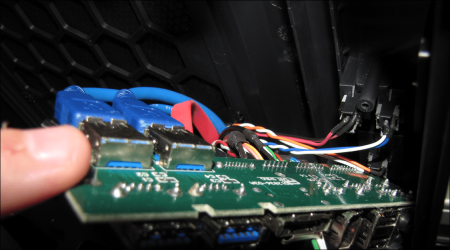
I have a fairly new (3 weeks old) HAF X chassis with Crosshair IV wAMD 1090T BE, Corsair 850W PS and the other usual suspects, OPtical, WD 600GB Raptor, etc.. I have recently been using the front panel USB 2 port and for some reason, as I attempt to plug in a memory stick, as soon as it comes into contact with the metal outer shield of the USB port, I lose video, the sound system thumps and it just sits there. Sometimes I will get a restart beep and it reboots, sometimes it just sits there until I hold down the power button to restart. It never loses power which leads be to believe that I am introducing enough voltage to provide an arc to a shorted wire which is then causing the MB to flip out. Kind of a whacky hunch, but that is what it seems like.

After inserting the stick into a laptop and using the "safely remove" feature, if I move to the front panel of the HAF straight way, it will occur. If I ground out the stick, meaning I touch it to something made of metal that allows it to discharge, it does not happen. I've tried two completely different memory sticks, same thing.

So far, I have not been able to replicate just using my finger, so I suspect the mem stick is holding a bit more of a charge, but not sure. This is a very aggrevating problem. I have seen posts on other firums where it is also happening to folks when plugging in the HD audio headphones, but I just did that with a pair of powered dr. dre's and no problems.

Any help would be greatly appreciated. I did send CoolerMaster an E-mail. If they respond with "give us your address so that we can ship you an new front I/O panel", then I will pretty much know it is the HAF X front panel that is defective.

:sarc:
 

My Computer My Computer

At a glance

Windows 7 Home Premium x64AMD Phenom II X6 1090T Black Edition8 GbXFX Radeon 5870
Computer Manufacturer/Model Number
Myself
OS
Windows 7 Home Premium x64
CPU
AMD Phenom II X6 1090T Black Edition
Motherboard
Asus Crosshair IV
Memory
8 Gb
Graphics Card(s)
XFX Radeon 5870
Sound Card
MB Sound w/Sound Blaster Xfi Platinum Drivers and Console
Monitor(s) Displays
HP w2207
Screen Resolution
1680 x 1050
Hard Drives
2 WD 600 Mg SATA 6G Raptors - No Raid
PSU
Corsair - Pro 850W
Case
Cooler Master HAF X
Cooling
Cooler Master H50 - Push/Pull
Keyboard
Thin Backlit Logitech
Mouse
Logitech G9x Laser - Wired
Internet Speed
12mb
I'm inclined to go with the shorting out theory. First thing I would do is open the case and retrace every piece of wiring to make sure it's seated correctly and securely. Then following the same process, check for any wires that may have a rip/tear or cut in it. It doesn't take much to nick a wire inside a case with all those sharp metal edges. If a nicked wire is making contact or close proximity to metal, there is your arch and your problem.
 

My Computer My Computer

At a glance

Windows 7 Ultimate 64 bitAMD Phenom II X4 965 Black EditionGSkill 4 X 2 GB PC 8500XFX Radeon HD 6790 D
Computer Manufacturer/Model Number
Custom built
OS
Windows 7 Ultimate 64 bit
CPU
AMD Phenom II X4 965 Black Edition
Motherboard
Gigabyte GA-MA790X-DS4
Memory
GSkill 4 X 2 GB PC 8500
Graphics Card(s)
XFX Radeon HD 6790 D
Sound Card
On board RealTek HD
Monitor(s) Displays
Dual monitors:Samsung SyncMaster S20B300
Screen Resolution
1600 X 900
Hard Drives
Seagate Barracuda 1TB (primary)
Seagate Barracuda 2 X 320 GB
PSU
Ultra X4 750 watt fully modular
Case
Thermaltake Overseer RX 1 full tower
Cooling
Core-Contact 92 mm CPU Cooler
Keyboard
Logitech G510
Mouse
Razor DeathAdder
Internet Speed
50/5 Mbps UL/DL
Other Info
Optical: Super Muliti DVD burner w/lightscribe, Hauppauge WinTV HVR-1800
Thanks Bass, I kind of knew that would be the next step in the process, but was hoping for miracale answer I guess :) - I'll update once I get through that, I am suspecting a pinched or poked wire around the front panel board as I've seen in other forums. Just wanted to bounce the problem off of the forum that I trust.
 

My Computer My Computer

At a glance

Windows 7 Home Premium x64AMD Phenom II X6 1090T Black Edition8 GbXFX Radeon 5870
Computer Manufacturer/Model Number
Myself
OS
Windows 7 Home Premium x64
CPU
AMD Phenom II X6 1090T Black Edition
Motherboard
Asus Crosshair IV
Memory
8 Gb
Graphics Card(s)
XFX Radeon 5870
Sound Card
MB Sound w/Sound Blaster Xfi Platinum Drivers and Console
Monitor(s) Displays
HP w2207
Screen Resolution
1680 x 1050
Hard Drives
2 WD 600 Mg SATA 6G Raptors - No Raid
PSU
Corsair - Pro 850W
Case
Cooler Master HAF X
Cooling
Cooler Master H50 - Push/Pull
Keyboard
Thin Backlit Logitech
Mouse
Logitech G9x Laser - Wired
Internet Speed
12mb
You know, I've had this problem on my HAF932. It has happened a time or two using flash drives, but it happens a lot when I used a USB device that requires external power. If the power is connected to the device before inserting the USB cord, then my pc will immediately reboot. Therefore, I have to always remember to hook up the USB cable first.

I was always too lazy to try to figure out what was wrong, but maybe there is a defect of some sort in that connector.
 

My Computer My Computer

At a glance

Windows 7 Ultimate x64AMD Phenom II X4 940 Black Edition @ 3.4GHz (...Corsair CM2X4096-8500C5 (4 X 2GB)XFX Radeon HD 5770 / Diamond Radeon HD 5770 C...
Computer Manufacturer/Model Number
Rig 1
OS
Windows 7 Ultimate x64
CPU
AMD Phenom II X4 940 Black Edition @ 3.4GHz (AM2+)
Motherboard
Gigabyte GA-MA790X-UD4P (AM2+)
Memory
Corsair CM2X4096-8500C5 (4 X 2GB)
Graphics Card(s)
XFX Radeon HD 5770 / Diamond Radeon HD 5770 CrossFireX
Sound Card
Asus Xonar DS (PCI)
Monitor(s) Displays
Samsung SyncMaster 932bw+ (3)
Screen Resolution
4320x900
Hard Drives
OCZ Vertex 2 80 GB - Windows 7 System --
WD Caviar Black 1TB - Music, Movies, Vids, Pics --
WD Caviar Black 640GB - User Profiles & Games --
WD My Book 320GB external
PSU
Corsair CMPSU-750TX
Case
Cooler Master HAF 932
Cooling
Corsair Hydro Series H50
Keyboard
Logitech Desktop Wave
Mouse
Logitech LX8 Laser
Internet Speed
20 down / 2 up
Other Info
LG GGC-H20L Blu-Ray / HDDVD combo --
Hauppauge HVR-1250 --
Silverstone MFP-51 --
Logitech Webcam C600
The potential for a short is highly possible in the front/top panel board area, especially if you've installed the "optional" 2nd 200mm fan. The front panel cable set runs right along the outer edge of where the additional fan must rest. To say that it is a tight fit is an understatement, it is more like you have to force the front/top panel back into place, so I fully expect to find something screwed up in that area as I did install the extra fan.
 

My Computer My Computer

At a glance

Windows 7 Home Premium x64AMD Phenom II X6 1090T Black Edition8 GbXFX Radeon 5870
Computer Manufacturer/Model Number
Myself
OS
Windows 7 Home Premium x64
CPU
AMD Phenom II X6 1090T Black Edition
Motherboard
Asus Crosshair IV
Memory
8 Gb
Graphics Card(s)
XFX Radeon 5870
Sound Card
MB Sound w/Sound Blaster Xfi Platinum Drivers and Console
Monitor(s) Displays
HP w2207
Screen Resolution
1680 x 1050
Hard Drives
2 WD 600 Mg SATA 6G Raptors - No Raid
PSU
Corsair - Pro 850W
Case
Cooler Master HAF X
Cooling
Cooler Master H50 - Push/Pull
Keyboard
Thin Backlit Logitech
Mouse
Logitech G9x Laser - Wired
Internet Speed
12mb
Yeah, I would definitely check for a short or pinched wire somewhere. I've had my HAF X case for about 5 months and haven't had any issues myself.

Again, check for a short or pinched wire.

Let us know
 

My Computer My Computer

At a glance

Windows 10 ProIntel Core i7-4770K (3.5Ghz)32 gig Corsair Dominator Platinum (4x8Gig)Sapphire Tri-X R9 Fury
Computer type
PC/Desktop
Computer Manufacturer/Model Number
Custom built by me.
OS
Windows 10 Pro
CPU
Intel Core i7-4770K (3.5Ghz)
Motherboard
Gigabyte G1 Sniper 5 (F10 Bios)
Memory
32 gig Corsair Dominator Platinum (4x8Gig)
Graphics Card(s)
Sapphire Tri-X R9 Fury
Sound Card
Soundblaster ZXR
Monitor(s) Displays
NEC PA242W 24" LCD Monitor
Screen Resolution
1920 x 1200
Hard Drives
Primary - Samsung 850 Pro (512gig), Samsung 840 Pro (256gig), 2TB WD Caviar Black.
PSU
EVGA Supernova 1000 G2
Case
Cooler Master HAF X
Cooling
Corsair H100i with Corsair Air Series SP120 Quiet Fans
Keyboard
Logitech Wireless Wave
Mouse
Logitech Performance MX
Internet Speed
High Speed Cable
Antivirus
Norton Security
Browser
IE11
Other Info
Memory Timings - 1866MHz @ 9-9-9-27-1T @ 1.5 volts
Ok - Took it all apart and did not find any exposed or damaged wires. Re-routed the wires back around the fan housing and put the top on, clicked into place without forcing anything. The problem is that I am extremely hesitant to test it again since it involves shocking the MB into a restart. So I put in a request with Cooler Master for another I/O panel board. Once I get that and replace it, I'll test and update.
 

My Computer My Computer

At a glance

Windows 7 Home Premium x64AMD Phenom II X6 1090T Black Edition8 GbXFX Radeon 5870
Computer Manufacturer/Model Number
Myself
OS
Windows 7 Home Premium x64
CPU
AMD Phenom II X6 1090T Black Edition
Motherboard
Asus Crosshair IV
Memory
8 Gb
Graphics Card(s)
XFX Radeon 5870
Sound Card
MB Sound w/Sound Blaster Xfi Platinum Drivers and Console
Monitor(s) Displays
HP w2207
Screen Resolution
1680 x 1050
Hard Drives
2 WD 600 Mg SATA 6G Raptors - No Raid
PSU
Corsair - Pro 850W
Case
Cooler Master HAF X
Cooling
Cooler Master H50 - Push/Pull
Keyboard
Thin Backlit Logitech
Mouse
Logitech G9x Laser - Wired
Internet Speed
12mb
That's probably a good move.

Thanks for the update.
 

My Computer My Computer

At a glance

Windows 10 ProIntel Core i7-4770K (3.5Ghz)32 gig Corsair Dominator Platinum (4x8Gig)Sapphire Tri-X R9 Fury
Computer type
PC/Desktop
Computer Manufacturer/Model Number
Custom built by me.
OS
Windows 10 Pro
CPU
Intel Core i7-4770K (3.5Ghz)
Motherboard
Gigabyte G1 Sniper 5 (F10 Bios)
Memory
32 gig Corsair Dominator Platinum (4x8Gig)
Graphics Card(s)
Sapphire Tri-X R9 Fury
Sound Card
Soundblaster ZXR
Monitor(s) Displays
NEC PA242W 24" LCD Monitor
Screen Resolution
1920 x 1200
Hard Drives
Primary - Samsung 850 Pro (512gig), Samsung 840 Pro (256gig), 2TB WD Caviar Black.
PSU
EVGA Supernova 1000 G2
Case
Cooler Master HAF X
Cooling
Corsair H100i with Corsair Air Series SP120 Quiet Fans
Keyboard
Logitech Wireless Wave
Mouse
Logitech Performance MX
Internet Speed
High Speed Cable
Antivirus
Norton Security
Browser
IE11
Other Info
Memory Timings - 1866MHz @ 9-9-9-27-1T @ 1.5 volts
Wouldn't be the first Cooler Master case with that sort of problem,

HAF-X issues with dead mobo and burned firewire chip - Overclock.net - Overclocking.net

Coolermaster 932 HAF-X serious issues

http://www.sevenforums.com/hardware-devices/66190-pc-reboots-if-someone-walk.html

The problem is that I am extremely hesitant to test it again since it involves shocking the MB into a restart.

Good idea till you get a new one from CM, as the first link indicates the possibility of killing the motherboard from it.
 

My Computer My Computer

At a glance

Win 7 Ultimate x64FX-8350 @ 4.6 GHz so farADATA XPG V1 Series Black 8GB DDR3 1600Sapphire R9 270x Dual-X
Computer type
PC/Desktop
Computer Manufacturer/Model Number
Me
OS
Win 7 Ultimate x64
CPU
FX-8350 @ 4.6 GHz so far
Motherboard
Asus M5A97 EVO
Memory
ADATA XPG V1 Series Black 8GB DDR3 1600
Graphics Card(s)
Sapphire R9 270x Dual-X
Sound Card
Xonar DGX w/ Corsair Vengence 1300
Monitor(s) Displays
Acer S232HL Abid
Screen Resolution
1920x1080
Hard Drives
120 GB OCZ Vertex 3
500 GB Seagate 7200.12
PSU
Antec Earthwatts 650W Green
Case
Antec Three Hundred
Cooling
Cooler Master 212 EVO
Keyboard
Logitech G510
Mouse
Logitech G500s
Internet Speed
35000/3000
Best to disconnect the power to the panel and unplug all the header wires to same till you get replacement.
 

My Computer My Computer

At a glance

Windows 7 Ultimate 64i7 3770k OC'd 4.6 @ 1.17v, also FX 8120 & i5 ...32 gb G.Skill Sniper DDR3 10-12-12-31 @ 2133XFX Radeon 7870 2GB DDR5
Computer type
PC/Desktop
Computer Manufacturer/Model Number
A blend of brains, brawn and dumb luck.
OS
Windows 7 Ultimate 64
CPU
i7 3770k OC'd 4.6 @ 1.17v, also FX 8120 & i5 miniITX
Motherboard
MSI P67A-GD80 b3
Memory
32 gb G.Skill Sniper DDR3 10-12-12-31 @ 2133
Graphics Card(s)
XFX Radeon 7870 2GB DDR5
Sound Card
Sound Blaster Z Series Card
Monitor(s) Displays
(2) LG LED 23" 1920 x 1080 2ms Monitors via mini d-port
Screen Resolution
1680 X 1050 p
Hard Drives
Samsung 256 gb 830 SSD sata III
(1) 1 tb WD Black
(2) 1 tb Hitachi deskmates/sata II
(2) 1 tb WD green/sata II
(2) 3 tb Seagate Barracuda
(1) 120 gb OCZ Vertex SS
(1) Drobo 5N w/5 Seagate 3tb
PSU
EVGA modular 1000G2 80% gold rating & APC 1200 RS
Case
CoolerMaster Storm Styker
Cooling
7 case fans 140mm & 120mm, NZXT Kraken X60
Keyboard
(2) Logitech Illuminated Keyboards (1) usb (1) wireless
Mouse
Logitech G700 & T-BC21 - nano nx for the laptop
Internet Speed
Basic 120mbps down
Antivirus
Trend Micro Titanium Max Security & Malwarebytes Premium
Browser
Chrome and IE 10
Other Info
5 Noctua case fans + 3 Noctua in p/p on NZXT cooler
Integrated hot swap drive bays for 2.5" Drives
(2) Lite-on dvd/cd/Blu Ray optical 22X
Integrated fan controller and led on/off
HP Officejet Pro 8630 all-n-one
Hot-swappable 3.5" hard drive bay
Netgear Nighthawk router
Asus USB 3 & sata 6 PCIe card
Vantec IDE to sata adptr./Ultra sata adptr
Lenovo L420 i5 lappy with m sata
Drobo 5N advanced NAS
Wouldn't be the first Cooler Master case with that sort of problem,

HAF-X issues with dead mobo and burned firewire chip - Overclock.net - Overclocking.net

Coolermaster 932 HAF-X serious issues

http://www.sevenforums.com/hardware-devices/66190-pc-reboots-if-someone-walk.html

The problem is that I am extremely hesitant to test it again since it involves shocking the MB into a restart.

Good idea till you get a new one from CM, as the first link indicates the possibility of killing the motherboard from it.

I just looked at the links you provided and will definitely be doing an inspection of this area. For now though I have no issues with my FireWire connector as I use it all the time because I have a Nikon scanner that requires this connection, however I use the one on the back panel of the MB.

Thus far no issues with using the USB ports on the front panel, but I'll see what my inspection reveals and take precautionary measures if needed. BTW I do have the fan’s LED turned on.

Will post results when done.

Thanks for the info.
 

My Computer My Computer

At a glance

Windows 10 ProIntel Core i7-4770K (3.5Ghz)32 gig Corsair Dominator Platinum (4x8Gig)Sapphire Tri-X R9 Fury
Computer type
PC/Desktop
Computer Manufacturer/Model Number
Custom built by me.
OS
Windows 10 Pro
CPU
Intel Core i7-4770K (3.5Ghz)
Motherboard
Gigabyte G1 Sniper 5 (F10 Bios)
Memory
32 gig Corsair Dominator Platinum (4x8Gig)
Graphics Card(s)
Sapphire Tri-X R9 Fury
Sound Card
Soundblaster ZXR
Monitor(s) Displays
NEC PA242W 24" LCD Monitor
Screen Resolution
1920 x 1200
Hard Drives
Primary - Samsung 850 Pro (512gig), Samsung 840 Pro (256gig), 2TB WD Caviar Black.
PSU
EVGA Supernova 1000 G2
Case
Cooler Master HAF X
Cooling
Corsair H100i with Corsair Air Series SP120 Quiet Fans
Keyboard
Logitech Wireless Wave
Mouse
Logitech Performance MX
Internet Speed
High Speed Cable
Antivirus
Norton Security
Browser
IE11
Other Info
Memory Timings - 1866MHz @ 9-9-9-27-1T @ 1.5 volts
We'll hope the news isn't shocking !
 

My Computer My Computer

At a glance

Windows 7 Ultimate 64i7 3770k OC'd 4.6 @ 1.17v, also FX 8120 & i5 ...32 gb G.Skill Sniper DDR3 10-12-12-31 @ 2133XFX Radeon 7870 2GB DDR5
Computer type
PC/Desktop
Computer Manufacturer/Model Number
A blend of brains, brawn and dumb luck.
OS
Windows 7 Ultimate 64
CPU
i7 3770k OC'd 4.6 @ 1.17v, also FX 8120 & i5 miniITX
Motherboard
MSI P67A-GD80 b3
Memory
32 gb G.Skill Sniper DDR3 10-12-12-31 @ 2133
Graphics Card(s)
XFX Radeon 7870 2GB DDR5
Sound Card
Sound Blaster Z Series Card
Monitor(s) Displays
(2) LG LED 23" 1920 x 1080 2ms Monitors via mini d-port
Screen Resolution
1680 X 1050 p
Hard Drives
Samsung 256 gb 830 SSD sata III
(1) 1 tb WD Black
(2) 1 tb Hitachi deskmates/sata II
(2) 1 tb WD green/sata II
(2) 3 tb Seagate Barracuda
(1) 120 gb OCZ Vertex SS
(1) Drobo 5N w/5 Seagate 3tb
PSU
EVGA modular 1000G2 80% gold rating & APC 1200 RS
Case
CoolerMaster Storm Styker
Cooling
7 case fans 140mm & 120mm, NZXT Kraken X60
Keyboard
(2) Logitech Illuminated Keyboards (1) usb (1) wireless
Mouse
Logitech G700 & T-BC21 - nano nx for the laptop
Internet Speed
Basic 120mbps down
Antivirus
Trend Micro Titanium Max Security & Malwarebytes Premium
Browser
Chrome and IE 10
Other Info
5 Noctua case fans + 3 Noctua in p/p on NZXT cooler
Integrated hot swap drive bays for 2.5" Drives
(2) Lite-on dvd/cd/Blu Ray optical 22X
Integrated fan controller and led on/off
HP Officejet Pro 8630 all-n-one
Hot-swappable 3.5" hard drive bay
Netgear Nighthawk router
Asus USB 3 & sata 6 PCIe card
Vantec IDE to sata adptr./Ultra sata adptr
Lenovo L420 i5 lappy with m sata
Drobo 5N advanced NAS
First off I HIGHLY recommend anyone using a HAF X to check your header cables, or if you're having front header issues, contact Coolermaster!!!

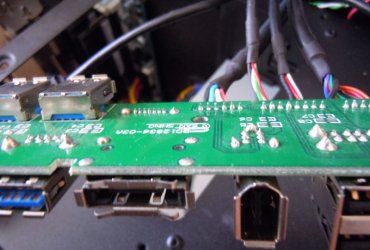
OK, I just did an inspection of my HAF X’s front header panel and did find slight evidence of chaffing on the red LED wire, which is just above the FireWire solder points, though the wire casing wasn't pierced through.

LED-Wire-with-nick.jpg
Notice the nick on the red (pink) wire

Solder-joints.jpg
Notice how high the solder joints are.

Do not attemp if you are uncomfortable with this.... cut or chaffed wires can casue major damage or harm!!!

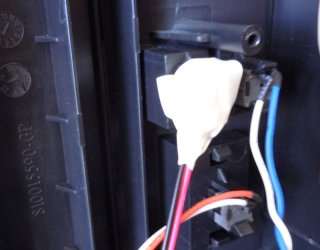
Anyway I decided to do a little patchwork myself by moving the wires around and pushing them further into the recess of the switch holder and then covering the holder with electrical tape.

LED-Wire-taped-off.jpg
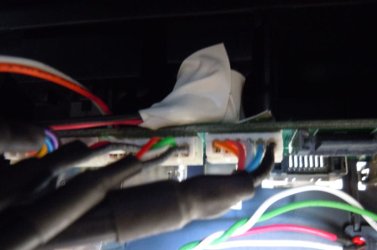
I then made a small pad out of electrical tape and put that on top of the PCB board solder contacts and connected the board back to the top panel. This ensures there is no contact between the LED wires and the PCB board’s solder joints and helps eliminate the chaffing problem as well.

Final-Assembly-with-tape.jpg
Notice small white tape pad sticking up

I also called Coolermaster’s tech support and spoke to one of their tech reps and informed them of my findings and was immediately told that they would replace the defective part free of charge…. That means no shipping them the old part first, or shipping the old part back.

All you do is fill out the RMA form they send you through e-mail. After that you’ll get an e-mail confirmation telling you the status of the item.

I also asked them what the procedure is concerning possible damage done to the MB due to these chaffed wires and their answer is if your board is damaged due to this issue, send them the MB with a description of what happened, and if it is determined that the board was damaged due to them, the board will be replaced.

Bear in mind that the evidence needs to show that the board was damaged from their product through no fault of your own. Key word being evidence (proof).

Anyways a couple of suggestions here….

First.... If you have this issue, Coolermaster recommends you not use the front header and remove all cables and disconnect the LED wire well until a replacement is recieved. Or you could do what I did.... at you own risk!!!

Also.... Whenever you hook wires/connectors up to the motherboard….. Check to see they are the right connectors going to the right place. In short…. RTFM (Read The F…… Manual). I can clearly state that the header wires for most cases are marked or idiot proof. I know the HAF X is….

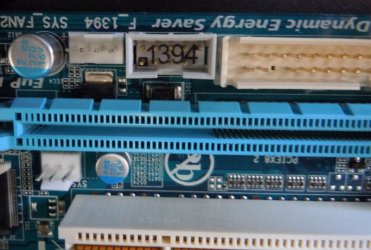
1394-Connector.jpg
This is the 1394 connector on the HAF X case

1394-MB-Connection.jpg
Motherboard connection

- Double check all wires/connections for chaffing, binding, pinching or cuts during and after installation.

- When removing, or installing, wire ties, make sure you’re not cutting of stressing wires. If you do accidentally pierce the wire covering, use some electrical tape to cover cut, or if possible, replace the wire(s).

Coolermaster was very professional in my dealings with the questions I asked and was quick to provide me a replacement. Now all I have to do is wait.

That’s my two cents worth of info :)

Peace.
 

My Computer My Computer

At a glance

Windows 10 ProIntel Core i7-4770K (3.5Ghz)32 gig Corsair Dominator Platinum (4x8Gig)Sapphire Tri-X R9 Fury
Computer type
PC/Desktop
Computer Manufacturer/Model Number
Custom built by me.
OS
Windows 10 Pro
CPU
Intel Core i7-4770K (3.5Ghz)
Motherboard
Gigabyte G1 Sniper 5 (F10 Bios)
Memory
32 gig Corsair Dominator Platinum (4x8Gig)
Graphics Card(s)
Sapphire Tri-X R9 Fury
Sound Card
Soundblaster ZXR
Monitor(s) Displays
NEC PA242W 24" LCD Monitor
Screen Resolution
1920 x 1200
Hard Drives
Primary - Samsung 850 Pro (512gig), Samsung 840 Pro (256gig), 2TB WD Caviar Black.
PSU
EVGA Supernova 1000 G2
Case
Cooler Master HAF X
Cooling
Corsair H100i with Corsair Air Series SP120 Quiet Fans
Keyboard
Logitech Wireless Wave
Mouse
Logitech Performance MX
Internet Speed
High Speed Cable
Antivirus
Norton Security
Browser
IE11
Other Info
Memory Timings - 1866MHz @ 9-9-9-27-1T @ 1.5 volts
Excellent detective work.

I'm going to check mine today (although it's a 932)... Never hurts to check.
 

My Computer My Computer

At a glance

Windows 7 Ultimate x64AMD Phenom II X4 940 Black Edition @ 3.4GHz (...Corsair CM2X4096-8500C5 (4 X 2GB)XFX Radeon HD 5770 / Diamond Radeon HD 5770 C...
Computer Manufacturer/Model Number
Rig 1
OS
Windows 7 Ultimate x64
CPU
AMD Phenom II X4 940 Black Edition @ 3.4GHz (AM2+)
Motherboard
Gigabyte GA-MA790X-UD4P (AM2+)
Memory
Corsair CM2X4096-8500C5 (4 X 2GB)
Graphics Card(s)
XFX Radeon HD 5770 / Diamond Radeon HD 5770 CrossFireX
Sound Card
Asus Xonar DS (PCI)
Monitor(s) Displays
Samsung SyncMaster 932bw+ (3)
Screen Resolution
4320x900
Hard Drives
OCZ Vertex 2 80 GB - Windows 7 System --
WD Caviar Black 1TB - Music, Movies, Vids, Pics --
WD Caviar Black 640GB - User Profiles & Games --
WD My Book 320GB external
PSU
Corsair CMPSU-750TX
Case
Cooler Master HAF 932
Cooling
Corsair Hydro Series H50
Keyboard
Logitech Desktop Wave
Mouse
Logitech LX8 Laser
Internet Speed
20 down / 2 up
Other Info
LG GGC-H20L Blu-Ray / HDDVD combo --
Hauppauge HVR-1250 --
Silverstone MFP-51 --
Logitech Webcam C600
Thanks. It's a good thing I checked this thread :eek:
 

My Computer My Computer

At a glance

Windows 10 ProIntel Core i7-4770K (3.5Ghz)32 gig Corsair Dominator Platinum (4x8Gig)Sapphire Tri-X R9 Fury
Computer type
PC/Desktop
Computer Manufacturer/Model Number
Custom built by me.
OS
Windows 10 Pro
CPU
Intel Core i7-4770K (3.5Ghz)
Motherboard
Gigabyte G1 Sniper 5 (F10 Bios)
Memory
32 gig Corsair Dominator Platinum (4x8Gig)
Graphics Card(s)
Sapphire Tri-X R9 Fury
Sound Card
Soundblaster ZXR
Monitor(s) Displays
NEC PA242W 24" LCD Monitor
Screen Resolution
1920 x 1200
Hard Drives
Primary - Samsung 850 Pro (512gig), Samsung 840 Pro (256gig), 2TB WD Caviar Black.
PSU
EVGA Supernova 1000 G2
Case
Cooler Master HAF X
Cooling
Corsair H100i with Corsair Air Series SP120 Quiet Fans
Keyboard
Logitech Wireless Wave
Mouse
Logitech Performance MX
Internet Speed
High Speed Cable
Antivirus
Norton Security
Browser
IE11
Other Info
Memory Timings - 1866MHz @ 9-9-9-27-1T @ 1.5 volts
Excellent work tracing down the issues and solving the problem. Sometimes the best fix is the one you've figured out yourself. Chances are the replacement parts will have a similar profile and without sorting out the problem you install only have the same or worse down the road happen again. When I first saw the underside of the circuit board I thought why would you leave those leads so proud? If it was me I might carefully clip them down with sharp wire cutters.
board.PNG
Check out the leads on this board that had the same issue!
 

My Computer My Computer

At a glance

Windows 7 Ultimate 64i7 3770k OC'd 4.6 @ 1.17v, also FX 8120 & i5 ...32 gb G.Skill Sniper DDR3 10-12-12-31 @ 2133XFX Radeon 7870 2GB DDR5
Computer type
PC/Desktop
Computer Manufacturer/Model Number
A blend of brains, brawn and dumb luck.
OS
Windows 7 Ultimate 64
CPU
i7 3770k OC'd 4.6 @ 1.17v, also FX 8120 & i5 miniITX
Motherboard
MSI P67A-GD80 b3
Memory
32 gb G.Skill Sniper DDR3 10-12-12-31 @ 2133
Graphics Card(s)
XFX Radeon 7870 2GB DDR5
Sound Card
Sound Blaster Z Series Card
Monitor(s) Displays
(2) LG LED 23" 1920 x 1080 2ms Monitors via mini d-port
Screen Resolution
1680 X 1050 p
Hard Drives
Samsung 256 gb 830 SSD sata III
(1) 1 tb WD Black
(2) 1 tb Hitachi deskmates/sata II
(2) 1 tb WD green/sata II
(2) 3 tb Seagate Barracuda
(1) 120 gb OCZ Vertex SS
(1) Drobo 5N w/5 Seagate 3tb
PSU
EVGA modular 1000G2 80% gold rating & APC 1200 RS
Case
CoolerMaster Storm Styker
Cooling
7 case fans 140mm & 120mm, NZXT Kraken X60
Keyboard
(2) Logitech Illuminated Keyboards (1) usb (1) wireless
Mouse
Logitech G700 & T-BC21 - nano nx for the laptop
Internet Speed
Basic 120mbps down
Antivirus
Trend Micro Titanium Max Security & Malwarebytes Premium
Browser
Chrome and IE 10
Other Info
5 Noctua case fans + 3 Noctua in p/p on NZXT cooler
Integrated hot swap drive bays for 2.5" Drives
(2) Lite-on dvd/cd/Blu Ray optical 22X
Integrated fan controller and led on/off
HP Officejet Pro 8630 all-n-one
Hot-swappable 3.5" hard drive bay
Netgear Nighthawk router
Asus USB 3 & sata 6 PCIe card
Vantec IDE to sata adptr./Ultra sata adptr
Lenovo L420 i5 lappy with m sata
Drobo 5N advanced NAS
Chances are the replacement parts will have a similar profile and without sorting out the problem you install only have the same or worse down the road happen again.

Let's hope that's not the case as that would be embarrassing for Coolermaster. Anyway you can be sure I'll do full inspection and post the results here, and with Coolermaster ;)

With regards to my self-help I'm pretty good with stuff like that so there's no intimidation factor there.

When I first saw the underside of the circuit board I thought why would you leave those leads so proud? If it was me I might carefully clip them down with sharp wire cutters.
View attachment 121247
Check out the leads on this board that had the same issue!

Yeah, they are quite long considering how close the wires from the switch are to the board itself. Definitely poor thought process.

As for cutting them down, that's a good idea as well. Though you'd have to be careful not to loosen the solder joints.

Anyway we'll see what the replacement looks like when I get it in.
 

My Computer My Computer

At a glance

Windows 10 ProIntel Core i7-4770K (3.5Ghz)32 gig Corsair Dominator Platinum (4x8Gig)Sapphire Tri-X R9 Fury
Computer type
PC/Desktop
Computer Manufacturer/Model Number
Custom built by me.
OS
Windows 10 Pro
CPU
Intel Core i7-4770K (3.5Ghz)
Motherboard
Gigabyte G1 Sniper 5 (F10 Bios)
Memory
32 gig Corsair Dominator Platinum (4x8Gig)
Graphics Card(s)
Sapphire Tri-X R9 Fury
Sound Card
Soundblaster ZXR
Monitor(s) Displays
NEC PA242W 24" LCD Monitor
Screen Resolution
1920 x 1200
Hard Drives
Primary - Samsung 850 Pro (512gig), Samsung 840 Pro (256gig), 2TB WD Caviar Black.
PSU
EVGA Supernova 1000 G2
Case
Cooler Master HAF X
Cooling
Corsair H100i with Corsair Air Series SP120 Quiet Fans
Keyboard
Logitech Wireless Wave
Mouse
Logitech Performance MX
Internet Speed
High Speed Cable
Antivirus
Norton Security
Browser
IE11
Other Info
Memory Timings - 1866MHz @ 9-9-9-27-1T @ 1.5 volts
THanks - That is exactly what cooler master said!
 

My Computer My Computer

At a glance

Windows 7 Home Premium x64AMD Phenom II X6 1090T Black Edition8 GbXFX Radeon 5870
Computer Manufacturer/Model Number
Myself
OS
Windows 7 Home Premium x64
CPU
AMD Phenom II X6 1090T Black Edition
Motherboard
Asus Crosshair IV
Memory
8 Gb
Graphics Card(s)
XFX Radeon 5870
Sound Card
MB Sound w/Sound Blaster Xfi Platinum Drivers and Console
Monitor(s) Displays
HP w2207
Screen Resolution
1680 x 1050
Hard Drives
2 WD 600 Mg SATA 6G Raptors - No Raid
PSU
Corsair - Pro 850W
Case
Cooler Master HAF X
Cooling
Cooler Master H50 - Push/Pull
Keyboard
Thin Backlit Logitech
Mouse
Logitech G9x Laser - Wired
Internet Speed
12mb
Update on my post here - http://www.sevenforums.com/overcloc...ort-static-front-usb-panel-2.html#post1115986

So my part request was sent in Monday, 6 Dec 2010...

RMA request.JPG

Yesterday (9 Dec) I check the status and find the request was still "pending". I phone them, they process the request, tell me it'll be shipped the next day - But as of today...

"Part will be sent out 3-5 business days depending on stock availability"

CM Part request staus.JPG

As a reminder, 3-5 business days does not include weekends and holidays :(

This seems a bit slow for such a critical item. Me being a Mr. Fixit, I can wait, but for those who aren't or can't.... you could be looking at at least a two week wait for this part :eek:
 

My Computer My Computer

At a glance

Windows 10 ProIntel Core i7-4770K (3.5Ghz)32 gig Corsair Dominator Platinum (4x8Gig)Sapphire Tri-X R9 Fury
Computer type
PC/Desktop
Computer Manufacturer/Model Number
Custom built by me.
OS
Windows 10 Pro
CPU
Intel Core i7-4770K (3.5Ghz)
Motherboard
Gigabyte G1 Sniper 5 (F10 Bios)
Memory
32 gig Corsair Dominator Platinum (4x8Gig)
Graphics Card(s)
Sapphire Tri-X R9 Fury
Sound Card
Soundblaster ZXR
Monitor(s) Displays
NEC PA242W 24" LCD Monitor
Screen Resolution
1920 x 1200
Hard Drives
Primary - Samsung 850 Pro (512gig), Samsung 840 Pro (256gig), 2TB WD Caviar Black.
PSU
EVGA Supernova 1000 G2
Case
Cooler Master HAF X
Cooling
Corsair H100i with Corsair Air Series SP120 Quiet Fans
Keyboard
Logitech Wireless Wave
Mouse
Logitech Performance MX
Internet Speed
High Speed Cable
Antivirus
Norton Security
Browser
IE11
Other Info
Memory Timings - 1866MHz @ 9-9-9-27-1T @ 1.5 volts
Sygnus21 - This is weird, I ordered the same part on almost the same day. Here is the e-mail string from CM.

Me:
I did that. Can you find out why after 6 days, my parts request is still pending? My erma # is XXXXXXXXXXX and the retrieval code is XXXXXX.


Cooler Master:
That is incorrect; you need to just send the request in. You don’t need to send anything back to us.

Respectfully,

Support Specialist
Cooler Master RPBU
4820 Schaefer Ave.
Chino CA, 91710
Live Chat


Me:

According to eRMA instructions, I would have to send in my I/O panel in order to receive a replacement part. Doing this would render my computer useless. How can I receive an I/O board for Haf X without sending in the original?


Cooler Master:

I highly suggest you remove any cable coming from the top panel and connect only the Power SW for the time being. File a part request for the top panel under warranty here:

http://www.coolermaster-usa.com/partrequest.php

If you have any other questions, please let us know.

Respectfully,

Support Specialist
Cooler Master RPBU
4820 Schaefer Ave.
Chino CA, 91710
Live Chat


Hi,

I have a new (3 weeks old) HAF X chassis with a ASUS Crosshair IV MB, Corsair 850W PS, 1 hard drive and 1 optical drive. When I plug a memory stick into the front USB panel, I loose video and I can hear my sound system (which is plugged into the MB onboard sound jack) make a thump. Then I have to hold down the power button to get the system to completely turn off, then it restarts OK.

I have tried 2 separate/different brand USB memory sticks and it happens. If I discharge the stick by touching it to a grounded source, it does not happen. I also do not have to plug it in all the way, just brush the metal surrounding the USB memory stick to the metal outside of the USB 2.0 front panel port and it happens. I love this case, but I cannot deal with this issue as I am constantly using these USB ports.

I also have a HAF 932 and have no problems at all with it.
 

My Computer My Computer

At a glance

Windows 7 Home Premium x64AMD Phenom II X6 1090T Black Edition8 GbXFX Radeon 5870
Computer Manufacturer/Model Number
Myself
OS
Windows 7 Home Premium x64
CPU
AMD Phenom II X6 1090T Black Edition
Motherboard
Asus Crosshair IV
Memory
8 Gb
Graphics Card(s)
XFX Radeon 5870
Sound Card
MB Sound w/Sound Blaster Xfi Platinum Drivers and Console
Monitor(s) Displays
HP w2207
Screen Resolution
1680 x 1050
Hard Drives
2 WD 600 Mg SATA 6G Raptors - No Raid
PSU
Corsair - Pro 850W
Case
Cooler Master HAF X
Cooling
Cooler Master H50 - Push/Pull
Keyboard
Thin Backlit Logitech
Mouse
Logitech G9x Laser - Wired
Internet Speed
12mb
Back
Top