Solved SFC cannot repair member file

chermesh

New member
Hi,
I ran SFC/SCANNOW on my Win7 Ultimate system (Hebrew version, English GUI), and ended up with the following single unsolved problem:

2011-03-21 10:19:30, Info CSI 000000d5 [SR] Cannot repair member file [l:22{11}]"inetcpl.cpl" of Microsoft-Windows-IE-InternetControlPanel, Version = 8.0.7600.16385, pA = PROCESSOR_ARCHITECTURE_INTEL (0), Culture neutral, VersionScope = 1 nonSxS, PublicKeyToken = {l:8 b:31bf3856ad364e35}, Type neutral, TypeName neutral, PublicKey neutral in the store, file cannot be checked
2011-03-21 10:19:31, Info CSI 000000d6 [SR] Cannot repair member file [l:22{11}]"inetcpl.cpl" of Microsoft-Windows-IE-InternetControlPanel, Version = 8.0.7600.16385, pA = PROCESSOR_ARCHITECTURE_INTEL (0), Culture neutral, VersionScope = 1 nonSxS, PublicKeyToken = {l:8 b:31bf3856ad364e35}, Type neutral, TypeName neutral, PublicKey neutral in the store, file cannot be checked
2011-03-21 10:19:31, Info CSI 000000d7 [SR] This component was referenced by [l:202{101}]"Microsoft-Windows-InternetExplorer-Package~31bf3856ad364e35~x86~~8.0.7600.16385.Internet-Explorer-x86"

What can I do to solve this "inetcpl.cpl" problem?
 

My Computer

Computer type
PC/Desktop
OS
Triple boot: WinXP Pro + Win7 Ultimate + Win10 Ultimate
CPU
Intel Core 2 Duo 3.0GHz
Motherboard
Gigabyte GA-P43-ES3G
Memory
Transcend 2GB DDR2 800
Graphics Card(s)
NVIDIA GeForce 9500 GT
Sound Card
Realtek High Definition Audio
Monitor(s) Displays
Dell P2314H
Hard Drives
Samsung 1TB 32 MB 7200RPM
PSU
seasonic ss-500et active pfc
Case
Compucase 6A19 Black
Hi,
I ran SFC/SCANNOW on my Win7 Ultimate system (Hebrew version, English GUI), and ended up with the following single unsolved problem:

2011-03-21 10:19:30, Info CSI 000000d5 [SR] Cannot repair member file [l:22{11}]"inetcpl.cpl" of Microsoft-Windows-IE-InternetControlPanel, Version = 8.0.7600.16385, pA = PROCESSOR_ARCHITECTURE_INTEL (0), Culture neutral, VersionScope = 1 nonSxS, PublicKeyToken = {l:8 b:31bf3856ad364e35}, Type neutral, TypeName neutral, PublicKey neutral in the store, file cannot be checked
2011-03-21 10:19:31, Info CSI 000000d6 [SR] Cannot repair member file [l:22{11}]"inetcpl.cpl" of Microsoft-Windows-IE-InternetControlPanel, Version = 8.0.7600.16385, pA = PROCESSOR_ARCHITECTURE_INTEL (0), Culture neutral, VersionScope = 1 nonSxS, PublicKeyToken = {l:8 b:31bf3856ad364e35}, Type neutral, TypeName neutral, PublicKey neutral in the store, file cannot be checked
2011-03-21 10:19:31, Info CSI 000000d7 [SR] This component was referenced by [l:202{101}]"Microsoft-Windows-InternetExplorer-Package~31bf3856ad364e35~x86~~8.0.7600.16385.Internet-Explorer-x86"

What can I do to solve this "inetcpl.cpl" problem?

Repair install from win 7 dvd.
 

My Computer

Computer Manufacturer/Model Number
HP Pavillion dv-7 1005 Tx
OS
Win 8 Release candidate 8400
CPU
[email protected]
Memory
4 gigs
Graphics Card(s)
Nvidia 9600M
Sound Card
HD built-in
Monitor(s) Displays
17" Wxga
Screen Resolution
1440x900
Cooling
none
Internet Speed
45Mb down 5Mb up
Hi,

Did you remember to select Run as Administrator when you opened Command Prompt, it's the only way that the system will grant complete access to ALL files.


OS
 

My Computer

Computer Manufacturer/Model Number
Compaq Desktop
OS
Windows 7 Ultimate x64
CPU
AMD Sempron Dual Core
Memory
3GB
Graphics Card(s)
NVIDIA GeForce 6150SE nForce 430
Screen Resolution
1024x768
Hard Drives
150GB Sata
Hi,

In addition to zigzag and OS's suggestions, it may also be worth running SFC a few times (say 3 times)...it has been know to effect a repair on some files if you run it more than once. Don't forget to run SFC as administrator as per OS's suggestion.

Regards,
Golden
 

My Computer

Computer type
PC/Desktop
Computer Manufacturer/Model Number
Golden Mk. I.4
OS
Windows 10 Pro x64 ; Xubuntu x64
CPU
Intel i7 860 @ 2.80 GHz O/C'ed to 4.0GHz
Motherboard
Gigabyte P55A-UD3R Rev.1. Award BIOS F13
Memory
16GB Corsair Vengance DDR3 @ 661 MHz Dual Channel (9-9-9-24)
Graphics Card(s)
EVGA NVidia GTX 560 1024MB
Sound Card
Realtek Integrated
Monitor(s) Displays
Dual Samsung SyncMaster 2494HS
Screen Resolution
1920*1080 and 1920*1080
Hard Drives
1*Samsung 840 EVO 120GB SSD;
1*OCZ Vertex 2 60GB SSD;
2*Samsung F3 SpinPoint 1TB in RAID0;
1*Samsung F1 SpinPoint 1TB;
2*Western Digital 1TB External USB 3.0
1*Western Digital 500GB External USB 3.0
1*Seagate 500GB External USB 2.0
PSU
Thermaltake ToughPower QFan 750W
Case
Thermaltake Element S VK60001W2Z
Cooling
Corsair H60 Water Cooling, 2*230mm and 2*80mm case fans
Keyboard
Logitech G110
Mouse
Logitech MX518
Hello.


Here is another method to run an sfc /scan that runs from WinRE and may be better because the system will not be "in use" for the scan and repair; have a look at this tutorial at the link below and be sure to post back with any further questions you may have and to keep us informed.

SFC /SCANNOW : Run in Command Prompt at Boot


If that doesn't help do the repair install as suggested.

How to Do a Repair Install to Fix Windows 7
 

My Computer

Computer Manufacturer/Model Number
* BFK Customs *
OS
W 7 64-bit Ultimate
CPU
Intel Q9550 Yorkfield
Motherboard
ASUS P5Q Pro
Memory
8GB Dominator 8500C5D
Graphics Card(s)
ATI : XFX 5870
Sound Card
Realtek HD Audio 7-1
Monitor(s) Displays
1x 47" LCD HDMI & 3x 26" LCD HDMI
Screen Resolution
1920x1080P & 1920x1200
Hard Drives
1x 80GB Intel X25-M G2 SSD : 1x 500GB & 1x 640GB WD Caviar Black(s)
PSU
Corsair 620HX
Case
Cooler Master RC-690
Cooling
Tuniq Tower 120, 2x 140mm and 3x 120mm case fans
Keyboard
Microsoft 500
Mouse
Razer Diamondback 3G
Internet Speed
14 Mb/s
Other Info
1x Koutech 3Gb/s SATA HDD Hot Swap Rack
Instead I've replace the file

Repair install from win 7 dvd.[/QUOTE said:
Fllowing the instruction on this forum http://www.sevenforums.com/tutorials/42776-extract-files-windows-7-installation-dvd.html and http://www.sevenforums.com/performance-maintenance/51585-how-repair-files-sfc-cannot-fix.html I replace the problematic file with the original (from my DVD)' but the problem stayed unsolved.

I'm quite reluctant to follow your repair reinstall suggestion since it will anull all updating of the system.
 

My Computer

Computer type
PC/Desktop
OS
Triple boot: WinXP Pro + Win7 Ultimate + Win10 Ultimate
CPU
Intel Core 2 Duo 3.0GHz
Motherboard
Gigabyte GA-P43-ES3G
Memory
Transcend 2GB DDR2 800
Graphics Card(s)
NVIDIA GeForce 9500 GT
Sound Card
Realtek High Definition Audio
Monitor(s) Displays
Dell P2314H
Hard Drives
Samsung 1TB 32 MB 7200RPM
PSU
seasonic ss-500et active pfc
Case
Compucase 6A19 Black
Hi,

Did you remember to select Run as Administrator when you opened Command Prompt, it's the only way that the system will grant complete access to ALL files.


OS

I used my Elevated Command Prompt instead. Isn't it an eqvivalent?

And if running sfc with administrator's status is required, how to I do it? (since I run it from a command prompt window)?
 

My Computer

Computer type
PC/Desktop
OS
Triple boot: WinXP Pro + Win7 Ultimate + Win10 Ultimate
CPU
Intel Core 2 Duo 3.0GHz
Motherboard
Gigabyte GA-P43-ES3G
Memory
Transcend 2GB DDR2 800
Graphics Card(s)
NVIDIA GeForce 9500 GT
Sound Card
Realtek High Definition Audio
Monitor(s) Displays
Dell P2314H
Hard Drives
Samsung 1TB 32 MB 7200RPM
PSU
seasonic ss-500et active pfc
Case
Compucase 6A19 Black
Hi,

The Repair Install works as an in-place upgrade and as such should not affect your application & user files.

Please read carefully through the tutorial to make sure that you understand the benefits of the process.


OS
 

My Computer

Computer Manufacturer/Model Number
Compaq Desktop
OS
Windows 7 Ultimate x64
CPU
AMD Sempron Dual Core
Memory
3GB
Graphics Card(s)
NVIDIA GeForce 6150SE nForce 430
Screen Resolution
1024x768
Hard Drives
150GB Sata
I used my Elevated Command Prompt instead. Isn't it an eqvivalent?

And if running sfc with administrator's status is required, how to I do it? (since I run it from a command prompt window)?

Elevated Command Prompt is the same as it was run as Administrator (Start > All Programs > Accessories [right-click Command Prompt] > Run as Administrator)
 

My Computer

Computer Manufacturer/Model Number
Compaq Desktop
OS
Windows 7 Ultimate x64
CPU
AMD Sempron Dual Core
Memory
3GB
Graphics Card(s)
NVIDIA GeForce 6150SE nForce 430
Screen Resolution
1024x768
Hard Drives
150GB Sata
Run in Command Prompt at Boot

Hello.


Here is another method to run an sfc /scan that runs from WinRE and may be better because the system will not be "in use" for the scan and repair; have a look at this tutorial at the link below and be sure to post back with any further questions you may have and to keep us informed.

SFC /SCANNOW : Run in Command Prompt at Boot


If that doesn't help do the repair install as suggested.

How to Do a Repair Install to Fix Windows 7

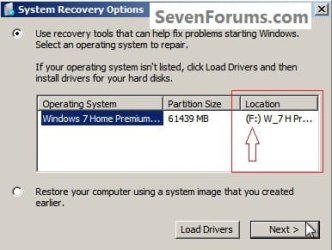
I tried to follow instruction as to running sfc at boot and reached phase 7 ((7) In the command window that opens type this command below and hit the <enter> key, be sure to use your drive letter, where mine is F: for this demonstration yours probably will not be the same), but failed to activate SFC.

The response I got was:

"Windows Resource Protection could not start the repair service"

Might I have made an error while identifying the relevant drive? When you write "be sure to use your drive letter", which drive do you refer to? I've referred to my DVD drive. Were I wrong?
 

My Computer

Computer type
PC/Desktop
OS
Triple boot: WinXP Pro + Win7 Ultimate + Win10 Ultimate
CPU
Intel Core 2 Duo 3.0GHz
Motherboard
Gigabyte GA-P43-ES3G
Memory
Transcend 2GB DDR2 800
Graphics Card(s)
NVIDIA GeForce 9500 GT
Sound Card
Realtek High Definition Audio
Monitor(s) Displays
Dell P2314H
Hard Drives
Samsung 1TB 32 MB 7200RPM
PSU
seasonic ss-500et active pfc
Case
Compucase 6A19 Black
You were to use the drive letter identified here during the WinRE setup, not the DVD drive.


click to enlarge
let.jpg
 

My Computer

Computer Manufacturer/Model Number
* BFK Customs *
OS
W 7 64-bit Ultimate
CPU
Intel Q9550 Yorkfield
Motherboard
ASUS P5Q Pro
Memory
8GB Dominator 8500C5D
Graphics Card(s)
ATI : XFX 5870
Sound Card
Realtek HD Audio 7-1
Monitor(s) Displays
1x 47" LCD HDMI & 3x 26" LCD HDMI
Screen Resolution
1920x1080P & 1920x1200
Hard Drives
1x 80GB Intel X25-M G2 SSD : 1x 500GB & 1x 640GB WD Caviar Black(s)
PSU
Corsair 620HX
Case
Cooler Master RC-690
Cooling
Tuniq Tower 120, 2x 140mm and 3x 120mm case fans
Keyboard
Microsoft 500
Mouse
Razer Diamondback 3G
Internet Speed
14 Mb/s
Other Info
1x Koutech 3Gb/s SATA HDD Hot Swap Rack

My Computer

Computer type
PC/Desktop
OS
Triple boot: WinXP Pro + Win7 Ultimate + Win10 Ultimate
CPU
Intel Core 2 Duo 3.0GHz
Motherboard
Gigabyte GA-P43-ES3G
Memory
Transcend 2GB DDR2 800
Graphics Card(s)
NVIDIA GeForce 9500 GT
Sound Card
Realtek High Definition Audio
Monitor(s) Displays
Dell P2314H
Hard Drives
Samsung 1TB 32 MB 7200RPM
PSU
seasonic ss-500et active pfc
Case
Compucase 6A19 Black
Hello again, you're welcome; good to see you got it sorted and thanks for the update.
 

My Computer

Computer Manufacturer/Model Number
* BFK Customs *
OS
W 7 64-bit Ultimate
CPU
Intel Q9550 Yorkfield
Motherboard
ASUS P5Q Pro
Memory
8GB Dominator 8500C5D
Graphics Card(s)
ATI : XFX 5870
Sound Card
Realtek HD Audio 7-1
Monitor(s) Displays
1x 47" LCD HDMI & 3x 26" LCD HDMI
Screen Resolution
1920x1080P & 1920x1200
Hard Drives
1x 80GB Intel X25-M G2 SSD : 1x 500GB & 1x 640GB WD Caviar Black(s)
PSU
Corsair 620HX
Case
Cooler Master RC-690
Cooling
Tuniq Tower 120, 2x 140mm and 3x 120mm case fans
Keyboard
Microsoft 500
Mouse
Razer Diamondback 3G
Internet Speed
14 Mb/s
Other Info
1x Koutech 3Gb/s SATA HDD Hot Swap Rack
Back
Top