Chkdsk runs everytime I restart

mediaman09

New member
Member
VIP
Local time
9:46 PM
Messages
260
Location
Toronto
I never had this issue before, but following my Windows 7 rebuild, chkdsk now runs everytime I restart (right after the Starting Windows page)

QUESTION : How do I stop chkdsk run everytime I restart?. Sometimes it does the C drive, sometimes the D. Sometimes it finds things, sometime not. Never find any bad sectors. Seem to rebuild indexes a lot. The drives are 10 months old. Please dont suggest a reformat. I would sooner throw the machine in the garbage. Did rebuilds a 100 times already.

SIDEBAR : I really cant take too much more of my Windows 7 machines. Such a drain on my time and patience. Problem after problem after problem, Rebuild after rebuild. Been on DOS/Windows since the beginning, and I have invested so much energy and knowledge into it, but I really hate it now. Too many problems - all new or recent machines. All new software. Spend more time fixing them than using them. Its so unfair. Very tempted to buy my first Mac and run to the Apple store as needed. I bet anything to would take less time and effort to run and wait at the Apple store than the collective time I spend now. I really dont know for sure though if Apple is any better. I suspect it is.
 
Last edited:

My Computer My Computer

At a glance

DELL Win 7 Home Premium 64 BitIntel Core i7-930 (8MB L2, 2.8GHz) // ntel Co...16GB // 18GB DDR3 SDRAM 1333Mhhz 6 DIMMS (3x2...AMD HD7570 // AMD Radeon HD6750 // ATI Radeon...
Computer type
PC/Desktop
Computer Manufacturer/Model Number
DELL XPS 8500 // DELL XPS Studio 9100 // DELL Dim 9200
OS
DELL Win 7 Home Premium 64 Bit
CPU
Intel Core i7-930 (8MB L2, 2.8GHz) // ntel Core 2 Quad Q6600
Motherboard
?? // Dell A02 BIOS // ??
Memory
16GB // 18GB DDR3 SDRAM 1333Mhhz 6 DIMMS (3x2, 3x4) //4 GB
Graphics Card(s)
AMD HD7570 // AMD Radeon HD6750 // ATI Radeon HD5670 1 GB GD
Sound Card
?? // THX TruStudio PC //?
Monitor(s) Displays
Dual Dell 2405 WFP-HC24 //SAmsung 27" // Triple 19" LCD
Screen Resolution
1900 x 1200
Hard Drives
Main :WD Caviar Black 1 TB SATA WD1002FAEX
Backup :WD Caviar Black 1 TB SATA WD1002FAEX
PSU
?? // Ultra 900W // ??
Sidebar: I have 7 different machines, a mixture of old (more than 3 years) laptops and desktops (three Atoms, a Fusion, and a Core i3), all of them running Windows 7 rock solid. I've also installed 7 on a ton of laptops and desktops at work (32 and 64 bit, with and without manufacturer Windows 7 drivers), and they also work fine. Without more information on which computer is having problems for you (complete system specs, what drivers, what software) I can only guess that you either have serious hardware or software problems, none of which are related to the actual Windows OS.

Question: Have you done any troubleshooting on your drive? Have you taken it out and slaved it into another computer and run a full diagnostics on it? The age of a drive sometimes has nothing to do with it failing. If you have, and it only has issues on the Windows 7 computer, then I believe it's a driver (motherboard, chipset, etc) issue or possibly a power issue - have you checked the power supply?
 

My Computer My Computer

At a glance

Windows 7 Ultimate x64 SP1Core i7-2670QM8GB DDR3 PC3-10600Intel HD Graphics 3000 + GeForce GT 540M
Computer Manufacturer/Model Number
Dell XPS 15 L502x
OS
Windows 7 Ultimate x64 SP1
CPU
Core i7-2670QM
Memory
8GB DDR3 PC3-10600
Graphics Card(s)
Intel HD Graphics 3000 + GeForce GT 540M
Screen Resolution
1920x1080
Hard Drives
1TB 5400RPM Seagate
Well, all I can say is that EVERY problem I had since adopting Win 7 on two machines , every one of them, has been solved with the help of this and others forums...only becaase others have reported the same issue. ie known problems. With all due respect, I highly doubt its my hardware or my software.

The issue were solved with resintalls, regsitry, hacks, workarounds etc. All I am saying is, its a very frustrating process. When it runs, it runs well, but it's no fun getting there.

Anyway, it is what it is.
 

My Computer My Computer

At a glance

DELL Win 7 Home Premium 64 BitIntel Core i7-930 (8MB L2, 2.8GHz) // ntel Co...16GB // 18GB DDR3 SDRAM 1333Mhhz 6 DIMMS (3x2...AMD HD7570 // AMD Radeon HD6750 // ATI Radeon...
Computer type
PC/Desktop
Computer Manufacturer/Model Number
DELL XPS 8500 // DELL XPS Studio 9100 // DELL Dim 9200
OS
DELL Win 7 Home Premium 64 Bit
CPU
Intel Core i7-930 (8MB L2, 2.8GHz) // ntel Core 2 Quad Q6600
Motherboard
?? // Dell A02 BIOS // ??
Memory
16GB // 18GB DDR3 SDRAM 1333Mhhz 6 DIMMS (3x2, 3x4) //4 GB
Graphics Card(s)
AMD HD7570 // AMD Radeon HD6750 // ATI Radeon HD5670 1 GB GD
Sound Card
?? // THX TruStudio PC //?
Monitor(s) Displays
Dual Dell 2405 WFP-HC24 //SAmsung 27" // Triple 19" LCD
Screen Resolution
1900 x 1200
Hard Drives
Main :WD Caviar Black 1 TB SATA WD1002FAEX
Backup :WD Caviar Black 1 TB SATA WD1002FAEX
PSU
?? // Ultra 900W // ??
And the hard drive? Have you run any diagnostics on it? Tried it in a different computer?

When you reinstall the OS, do you install the drivers from the Dell website, or do you let Windows find and update them automatically? Just wondering, as I reviewed one of your threads just now and you didn't mention where you get your drivers from, other than a Windows NIC update killed your computer - which I'm assuming is this same computer.

There are some that say you should let Windows take care of all of the drivers. I do not believe in the philosophy. Unlike a Mac, which totally controls all hardware that you can basically attach to it, a Windows machine has millions of pieces of hardware, and they can't be expected to get everything correct - especially drivers for laptops made by Dell, HP, etc.
 

My Computer My Computer

At a glance

Windows 7 Ultimate x64 SP1Core i7-2670QM8GB DDR3 PC3-10600Intel HD Graphics 3000 + GeForce GT 540M
Computer Manufacturer/Model Number
Dell XPS 15 L502x
OS
Windows 7 Ultimate x64 SP1
CPU
Core i7-2670QM
Memory
8GB DDR3 PC3-10600
Graphics Card(s)
Intel HD Graphics 3000 + GeForce GT 540M
Screen Resolution
1920x1080
Hard Drives
1TB 5400RPM Seagate
Thanks for the follow-up..

PC: Yes this is for the DELL Studio XPS 9100.

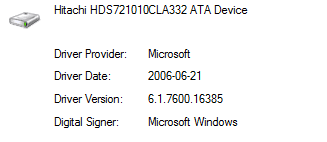
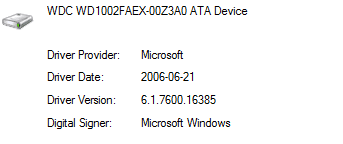
DRIVERS: Yes, I always check the DELL site for updated drivers, bios updates etc. For the hard drive, there is no specfic driver posted on the Dell site. Its an Hitachi - see below . So I had to let Windows initially pick the driver . Same with the second drive is a WDC I TB drive. But you are correct, it could be the drivers. which would explain why both drives are affected. Where would I obtain better drivers? I could not find any on the Hitachi web site or on the Western Digital site.

REMOVAL : No I did not remove the drive and install it in another computer . I hope this is not the expectation of Windows 7 users. I would only do that if it were not working at all.

DIAGNOSTICS : As to diagnostics, no, I have not run any yet, but I can. Haven't done that in a while given the current generation of drives are MTBF of a millenium or so. I think DELL may have diagnostic software for this, but again I have not run them in a while. For the Hitachi drive, their site only has formatting and alignment tools. For the WDC drive, I will try the diagnostic software here. Is there a generic one you can suggest.
 

Attachments

  • HD1.PNG
    HD1.PNG
    2.7 KB · Views: 9
  • HD2.PNG
    HD2.PNG
    2.7 KB · Views: 6

My Computer My Computer

At a glance

DELL Win 7 Home Premium 64 BitIntel Core i7-930 (8MB L2, 2.8GHz) // ntel Co...16GB // 18GB DDR3 SDRAM 1333Mhhz 6 DIMMS (3x2...AMD HD7570 // AMD Radeon HD6750 // ATI Radeon...
Computer type
PC/Desktop
Computer Manufacturer/Model Number
DELL XPS 8500 // DELL XPS Studio 9100 // DELL Dim 9200
OS
DELL Win 7 Home Premium 64 Bit
CPU
Intel Core i7-930 (8MB L2, 2.8GHz) // ntel Core 2 Quad Q6600
Motherboard
?? // Dell A02 BIOS // ??
Memory
16GB // 18GB DDR3 SDRAM 1333Mhhz 6 DIMMS (3x2, 3x4) //4 GB
Graphics Card(s)
AMD HD7570 // AMD Radeon HD6750 // ATI Radeon HD5670 1 GB GD
Sound Card
?? // THX TruStudio PC //?
Monitor(s) Displays
Dual Dell 2405 WFP-HC24 //SAmsung 27" // Triple 19" LCD
Screen Resolution
1900 x 1200
Hard Drives
Main :WD Caviar Black 1 TB SATA WD1002FAEX
Backup :WD Caviar Black 1 TB SATA WD1002FAEX
PSU
?? // Ultra 900W // ??

My Computer My Computer

At a glance

Windows 7 Ultimate x64Intel Pentium Dual Core E5200 2.5GHz (3.77GHz...Corsair 4GB DDR2 (4x1GB CM2X1024-6400C4)Palit GeForce GTS 250 (1024MB)
Computer Manufacturer/Model Number
Self built
OS
Windows 7 Ultimate x64
CPU
Intel Pentium Dual Core E5200 2.5GHz (3.77GHz OC)
Motherboard
Asus P5Q-E
Memory
Corsair 4GB DDR2 (4x1GB CM2X1024-6400C4)
Graphics Card(s)
Palit GeForce GTS 250 (1024MB)
Sound Card
On Board (ADI AD2000B 8ch HD)
Monitor(s) Displays
Samsung 32in LCD TV
Screen Resolution
1360x768
Hard Drives
2 x 1TB Samsung 103SJ (Raid0)
2 x External 500GB Samsung 502IJ (NexStar 3 HD Enclosures)
PSU
550W Antec Neo HE 550
Case
Antec P180
Cooling
Xigmatex Red Scorpion CPU Cooler. 3x120mm Fans
Keyboard
Logitech MX5000 Laser (Combo)
Mouse
Logitech MX5000 Laser (Combo)
Internet Speed
ADSL2+ (avg 10 Mbps Down, 0.80 Mbps up)
Other Info
Gigabyte GN-WP01GS 54g Wireless Lan Card
Besides running the Hitachi DFT extended CD scan from boot, boot the Win7 DVD Repair console or Repair CD to run Disk Check from Command line: Disk Check.

This way Disk Check doesn't depend upon possibly corrupt system files which are apparently looping, and will often allow it to actually complete.

Use this opportunity to also run Dell Diagnostics from boot using the Fkey given on first boot screen, or trigger it to run at reboot from All Programs.
 
I ran through the WIndows Disk Check process ( Computer/Properties/Tools/Errors/ Automatically fix. etc) and on a reboot it went though all 5 stages without incident. Could not tell what it fixed as I did not wait around while it processed and it do not stay on the screen when it was done... but it appeared to have worked, Next few reboots worked good.

I ran the Dell Diagnostic utilities, it too passed every test I ran.

I downloaded the Hitachi Fitness test , burned to DVD , booted with it, it ran, but after that was useless as it could not even find any drive - must be some incompatibilty somewhere... but I felt confident as the other tests were positive.

I then rebooted again -still good - but then that ugly popup came up reminding me of 14 updates ready to install - I confirmed none were NIC related and let it rip.

And right back to square one... frozen screen, failed windows updates and check dsk on reboot.

So I give up (again)

Perhaps its just a 'dirty' attribute that needed to be reset?? No harm trying to reset that I suppose.

Other than that, look like I am back to a reformat again, if I have the patience.

Either way, format or not, I am just going to leave it when I'm done, as at this point I am just chasing errors. There is no end game here. No finish line. I've seen a few hundred posts on the topic of "chksdsk on restart following a win 7 install" . I really highly doubt that all those user simulatenaeous;y had hard drive problems...just like I highly doubt that I do.
 
Last edited:

My Computer My Computer

At a glance

DELL Win 7 Home Premium 64 BitIntel Core i7-930 (8MB L2, 2.8GHz) // ntel Co...16GB // 18GB DDR3 SDRAM 1333Mhhz 6 DIMMS (3x2...AMD HD7570 // AMD Radeon HD6750 // ATI Radeon...
Computer type
PC/Desktop
Computer Manufacturer/Model Number
DELL XPS 8500 // DELL XPS Studio 9100 // DELL Dim 9200
OS
DELL Win 7 Home Premium 64 Bit
CPU
Intel Core i7-930 (8MB L2, 2.8GHz) // ntel Core 2 Quad Q6600
Motherboard
?? // Dell A02 BIOS // ??
Memory
16GB // 18GB DDR3 SDRAM 1333Mhhz 6 DIMMS (3x2, 3x4) //4 GB
Graphics Card(s)
AMD HD7570 // AMD Radeon HD6750 // ATI Radeon HD5670 1 GB GD
Sound Card
?? // THX TruStudio PC //?
Monitor(s) Displays
Dual Dell 2405 WFP-HC24 //SAmsung 27" // Triple 19" LCD
Screen Resolution
1900 x 1200
Hard Drives
Main :WD Caviar Black 1 TB SATA WD1002FAEX
Backup :WD Caviar Black 1 TB SATA WD1002FAEX
PSU
?? // Ultra 900W // ??
Roll back the Updates using the System Restore point which is always set first, if necessary from
System Recovery Options.

Then install the Updates one at a time or in smaller groups to isolate the one which is failing, open a Support case on Windows Updates webpage where all support is free but handled via email.

You may also need to go back through the steps which solved the issue earlier.
 
Rollback dont help. Even when I update one or two updates, its hit and miss as to whether it takes it.

And I cannot figure out a way to stop the "CHKDSK on bootup problem" ( even though FSUTIL tells me disk is NOT dirty).

So I only have two paths from here:

One is cut my losses and live with it. I am exhuasted trying to fix the endless array of problems. Let it check disk every reboot, who cares. And as for the endless array of Windows Security updates, what a joke - they will never end anyway. One is therefore always vulnerable. So I will turn windows update OFF. Problwm solved. No more crashes. All my drivers are finally working. All settings the way I like them. Backups in place. Win 7 Terminator wins , I lose ( even though I am Advanced on the scale of Beginner / Intermediate / Advanced / Expert).

The other route, if I give up yet another weekend is reformat and try again - with absolutely no guarranty of any different result.

Really torn what to do here. I hate giving up but its enough already You know what they say .. " A man who trys the same thing twice and expects a different result is a fool".

I better sleep on it. I've seen this movie before. I usually cave-in in the morning :)
 

My Computer My Computer

At a glance

DELL Win 7 Home Premium 64 BitIntel Core i7-930 (8MB L2, 2.8GHz) // ntel Co...16GB // 18GB DDR3 SDRAM 1333Mhhz 6 DIMMS (3x2...AMD HD7570 // AMD Radeon HD6750 // ATI Radeon...
Computer type
PC/Desktop
Computer Manufacturer/Model Number
DELL XPS 8500 // DELL XPS Studio 9100 // DELL Dim 9200
OS
DELL Win 7 Home Premium 64 Bit
CPU
Intel Core i7-930 (8MB L2, 2.8GHz) // ntel Core 2 Quad Q6600
Motherboard
?? // Dell A02 BIOS // ??
Memory
16GB // 18GB DDR3 SDRAM 1333Mhhz 6 DIMMS (3x2, 3x4) //4 GB
Graphics Card(s)
AMD HD7570 // AMD Radeon HD6750 // ATI Radeon HD5670 1 GB GD
Sound Card
?? // THX TruStudio PC //?
Monitor(s) Displays
Dual Dell 2405 WFP-HC24 //SAmsung 27" // Triple 19" LCD
Screen Resolution
1900 x 1200
Hard Drives
Main :WD Caviar Black 1 TB SATA WD1002FAEX
Backup :WD Caviar Black 1 TB SATA WD1002FAEX
PSU
?? // Ultra 900W // ??
I would not turn Windows Updates off - you need the security updates and the issue you have is likely not caused by them. You may have OS corruption which we should troubleshoot first.

Again a frequent fix for the Disk Check loop is to run Disk check from the Win7 DVD or Repair CD Command line: Disk Check

Try running SFC -SCANNOW Command.

If it finds corruption run it several times to see if it can fix the files. If not consider a Repair Install
using the Win7 installation DVD which you may have gotten along with your Dell, or you can start looking for now to borrow from a friend or other source. You may need to uninstall SP1 to run the Repair Install.

If this fails then I would strongly consider running Dell Factory Recovery from its partition: Dell Restoring Your Computer´s Software to the Factory Settings.
Be sure you have the Recovery Disks or make/order them as a backup.

Or you can use the Win7 Installation DVD to clean reinstall following these steps to get a perfect reinstall unburdened by all of the factory preinstalled bloatware: Reinstalling Windows 7
 
One Solution Maybe

This would be worth looking into. If you disk has shown it self to be good. This was for Vista but I think it still applies to Win 7.


Run regedit
Edit: HKEY_LOCAL_MACHINE\SYSTEM\ CurrentControlSet\ Control\ Session Manager
Change the BootExecute entry from:
autocheck autochk * /.
To:
autocheck autochk *

Or else try this :
Start> Run> bring up a command prompt by typing in “CMD” and type ” fsutil dirty query g: “. This queries the drive, and more than likely it will tell you that it is dirty. Next, type “CHKNTFS /X G:”. The X tells Windows to NOT check that particular drive (G) on the next reboot. At this time, manually reboot your computer, it should not do a Chkdsk and take you directly to Windows.


Once Windows has fully loaded, bring up another CMD prompt and type and now you want to do a Chkdsk manually by typing “Chkdsk /f /r g:”. This should take you through 5 stages of the scan and will unset that dirty bit. Finally, type “fsutil dirty query g:” and Windows will confirm that the dirty bit is not set on that drive.

You can run the chkdsk /r command or the chkdsk /f command to check a hard disk for errors. But if The “chkdsk /r” command and the “chkdsk /f” command take a long time to run on a Windows Vista-based computer see this KB943974 Article

Once Windows has fully loaded, bring up another CMD prompt and type and now you want to do a Chkdsk manually by typing “Chkdsk /f /r g:”. This should take you through 5 stages of the scan and will unset that dirty bit. Finally, type “fsutil dirty query g:” and Windows will confirm that the dirty bit is not set on that drive.

You can run the chkdsk /r command or the chkdsk /f command to check a hard disk for errors. But if The “chkdsk /r” command and the “chkdsk /f” command take a long time to run on a Windows Vista-based computer see this KB943974 Article.
 

My Computer My Computer

At a glance

win 7 X64 Ultimate SP1I3770KG Skill F3-14900CL9-4GBXL x 4NVIDIA GeForce GTX670 + Intel 4000
Computer Manufacturer/Model Number
BGC (Bob's Garage Crew)
OS
win 7 X64 Ultimate SP1
CPU
I3770K
Motherboard
Asus P8Z77-V Deluxe
Memory
G Skill F3-14900CL9-4GBXL x 4
Graphics Card(s)
NVIDIA GeForce GTX670 + Intel 4000
Sound Card
Realtek HD 5.1 (MOB)
Monitor(s) Displays
Asus VW224T (1)
Screen Resolution
1920 x 1080
Hard Drives
SATA Corsair Force GT 2.5" 180GB (System) Sata 3
OCZ Vertex3 120GB
OCZ Vertex 2 120GB 2.5" SATA II
ST31000524AS 1000.2GB
WD15EARS (External)
PSU
CoolerMaster 1000 Watt
Case
CoolerMaster HAF X
Cooling
CPU -- CoolerMaster 520N
Keyboard
MS Wireless 3000 V2
Mouse
MS Wireless 3000 V2
Internet Speed
Cable
Antivirus
Norton Internet Security
Browser
IE9
Other Info
AMI Bios 1805
OC'd 3%
I would not turn Windows Updates off - you need the security updates and the issue you have is likely not caused by them. You may have OS corruption which we should troubleshoot first.

Appreciate all the help here.


I already ran the Disk Check . No real help.


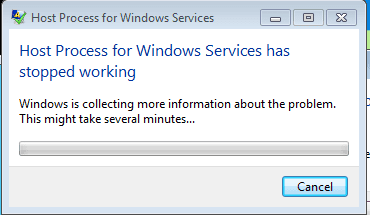
SFC /scannow. Fair enough and easy enough. Running it now. At some point one needs to laugh in the midst of misery.. as I am running it, it is is popoing up error windows - see files the attached I did let it finish though and it said Windows Resoeuce Protction found corrupt files but was unable to dix some of them
I ran it a few times. Same erro. I checked the CBS log file. Huge.


Dell Recovery partition - ah the gool ol days - That option is long gone.. it caused its ow bset of isseud with split boot/system parttions. Never going back there.


Win7 Installation DVD to clean reinstall - yup thats last and likely nexy on the list, perhaps in the morning. There are other suggestion re DISKPART but I am not going there ; partitions are staying just the way they are. I need to be selective now in waht I ahve the temperment to try - too much jumpring for one quicksand patch to another.
I will reprot back how I make out.
 

Attachments

  • sfc_error.PNG
    sfc_error.PNG
    4.8 KB · Views: 2
  • sfc_error2.PNG
    sfc_error2.PNG
    5.8 KB · Views: 2

My Computer My Computer

At a glance

DELL Win 7 Home Premium 64 BitIntel Core i7-930 (8MB L2, 2.8GHz) // ntel Co...16GB // 18GB DDR3 SDRAM 1333Mhhz 6 DIMMS (3x2...AMD HD7570 // AMD Radeon HD6750 // ATI Radeon...
Computer type
PC/Desktop
Computer Manufacturer/Model Number
DELL XPS 8500 // DELL XPS Studio 9100 // DELL Dim 9200
OS
DELL Win 7 Home Premium 64 Bit
CPU
Intel Core i7-930 (8MB L2, 2.8GHz) // ntel Core 2 Quad Q6600
Motherboard
?? // Dell A02 BIOS // ??
Memory
16GB // 18GB DDR3 SDRAM 1333Mhhz 6 DIMMS (3x2, 3x4) //4 GB
Graphics Card(s)
AMD HD7570 // AMD Radeon HD6750 // ATI Radeon HD5670 1 GB GD
Sound Card
?? // THX TruStudio PC //?
Monitor(s) Displays
Dual Dell 2405 WFP-HC24 //SAmsung 27" // Triple 19" LCD
Screen Resolution
1900 x 1200
Hard Drives
Main :WD Caviar Black 1 TB SATA WD1002FAEX
Backup :WD Caviar Black 1 TB SATA WD1002FAEX
PSU
?? // Ultra 900W // ??
This would be worth looking into. .....

Thanks for the tips. I have already been thri the 5 stages. And fsutil dirty query cam up NOT dirty.

At this stage I am beyond regsitry fixes... WIn 7 resintall with format is all thats left now for me. Might be for the best if I can get through it quickly...

Apprecitie the input though, thank you. Good to have friends here to vent with and who can offer guidance.
 

My Computer My Computer

At a glance

DELL Win 7 Home Premium 64 BitIntel Core i7-930 (8MB L2, 2.8GHz) // ntel Co...16GB // 18GB DDR3 SDRAM 1333Mhhz 6 DIMMS (3x2...AMD HD7570 // AMD Radeon HD6750 // ATI Radeon...
Computer type
PC/Desktop
Computer Manufacturer/Model Number
DELL XPS 8500 // DELL XPS Studio 9100 // DELL Dim 9200
OS
DELL Win 7 Home Premium 64 Bit
CPU
Intel Core i7-930 (8MB L2, 2.8GHz) // ntel Core 2 Quad Q6600
Motherboard
?? // Dell A02 BIOS // ??
Memory
16GB // 18GB DDR3 SDRAM 1333Mhhz 6 DIMMS (3x2, 3x4) //4 GB
Graphics Card(s)
AMD HD7570 // AMD Radeon HD6750 // ATI Radeon HD5670 1 GB GD
Sound Card
?? // THX TruStudio PC //?
Monitor(s) Displays
Dual Dell 2405 WFP-HC24 //SAmsung 27" // Triple 19" LCD
Screen Resolution
1900 x 1200
Hard Drives
Main :WD Caviar Black 1 TB SATA WD1002FAEX
Backup :WD Caviar Black 1 TB SATA WD1002FAEX
PSU
?? // Ultra 900W // ??
You have serious corruption of the OS.

I would back up my files, boot the DVD, use Custom>Drive Options to delete all partitions, create new as you wish, then format before installing Win7 following the steps I gave to get a perfect install.

There is no reason to save the old partitions, especially if they have caused you problems in the past. Start over clean to get the 100mb System Reserved partition which conveniently places the Repair console on the F8 Advanced Boot Options. You may want a separate data or storage partition as well.

There is also a slight chance you have boot sector corruption that can only be elminated by wiping the HD before reinstall: SSD - HDD Optimize for Windows Reinstallation
 

My Computer My Computer

At a glance

win 7 X64 Ultimate SP1I3770KG Skill F3-14900CL9-4GBXL x 4NVIDIA GeForce GTX670 + Intel 4000
Computer Manufacturer/Model Number
BGC (Bob's Garage Crew)
OS
win 7 X64 Ultimate SP1
CPU
I3770K
Motherboard
Asus P8Z77-V Deluxe
Memory
G Skill F3-14900CL9-4GBXL x 4
Graphics Card(s)
NVIDIA GeForce GTX670 + Intel 4000
Sound Card
Realtek HD 5.1 (MOB)
Monitor(s) Displays
Asus VW224T (1)
Screen Resolution
1920 x 1080
Hard Drives
SATA Corsair Force GT 2.5" 180GB (System) Sata 3
OCZ Vertex3 120GB
OCZ Vertex 2 120GB 2.5" SATA II
ST31000524AS 1000.2GB
WD15EARS (External)
PSU
CoolerMaster 1000 Watt
Case
CoolerMaster HAF X
Cooling
CPU -- CoolerMaster 520N
Keyboard
MS Wireless 3000 V2
Mouse
MS Wireless 3000 V2
Internet Speed
Cable
Antivirus
Norton Internet Security
Browser
IE9
Other Info
AMI Bios 1805
OC'd 3%
You have serious corruption of the OS. I would back up my files, boot the DVD, use Custom>Drive Options to delete all partitions, create new as you wish, then format before installing Win7 following the steps I gave to get a perfect install.

Not sure deleting anything was such a good idea. I should have just formatted what I had.

Regardless my worst nighmare is now here. Win 7 clean install , my last resort, has failed. I am dead in the water. No system. I am freaking out now as for the first time I see no path out of this.

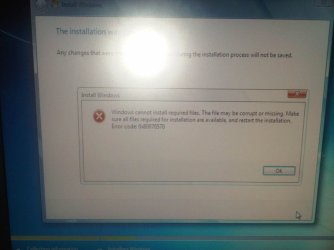
1) WIN 7 CLEAN INSTALL - FAILED Booted up with the Win 7 DVD and deleted(rather than simply formatted) the C druve partion. Perhaps I misunderstood the advice above. The Win 7 clean install failed. It complained fiels were missing ( duh , likely from the partition I deleted)

2) BIOS - At this point the system would not longer boot. BOOTMGR missing. So I chgnes the BIOS to boot from CD/DVD.

3) SYSTEM REPAIR - I booted from the Win 7 'System Repair Disc'. No luck see screen shot

4) RESTORE PARTITION - For my EaseUS emergency disk, I thought I try to restore that deleted partion by cloning from a backup...Its doing that now but I dont think it will work as it not a 'system' partition.

5) SYSTEM RECOVERY - I have two DVDs labled "FACTORY SYSTEM RECOVERY - I guess I will try those next.

6) MORE ADVICE - I will post status at that point seek some more help. I simply need a lifeline back to something close to normal.

7) DELL ??? - I have 80 days left under warranty before my year is up.. If this all happened from a hard dirve failure, perhaps they can get me going. but I dont know how that process would work. They cant fix this over the phone or on line. I think year one is on-site warranty so I guess they send a tech. If even they cant help me then I can proceed with Step 8

8) For sale : New Dell XPS Studio 9100, i7core CPU, 2TB Drives, 16 GB Ram, Win 7 64 BIT. Still under warranty : $1 or best offer. Any takers? Meet me at the Apple store.
 

Attachments

  • win7-failed.jpg
    win7-failed.jpg
    53.1 KB · Views: 8
  • win7-error.jpg
    win7-error.jpg
    47.4 KB · Views: 4

My Computer My Computer

At a glance

DELL Win 7 Home Premium 64 BitIntel Core i7-930 (8MB L2, 2.8GHz) // ntel Co...16GB // 18GB DDR3 SDRAM 1333Mhhz 6 DIMMS (3x2...AMD HD7570 // AMD Radeon HD6750 // ATI Radeon...
Computer type
PC/Desktop
Computer Manufacturer/Model Number
DELL XPS 8500 // DELL XPS Studio 9100 // DELL Dim 9200
OS
DELL Win 7 Home Premium 64 Bit
CPU
Intel Core i7-930 (8MB L2, 2.8GHz) // ntel Core 2 Quad Q6600
Motherboard
?? // Dell A02 BIOS // ??
Memory
16GB // 18GB DDR3 SDRAM 1333Mhhz 6 DIMMS (3x2, 3x4) //4 GB
Graphics Card(s)
AMD HD7570 // AMD Radeon HD6750 // ATI Radeon HD5670 1 GB GD
Sound Card
?? // THX TruStudio PC //?
Monitor(s) Displays
Dual Dell 2405 WFP-HC24 //SAmsung 27" // Triple 19" LCD
Screen Resolution
1900 x 1200
Hard Drives
Main :WD Caviar Black 1 TB SATA WD1002FAEX
Backup :WD Caviar Black 1 TB SATA WD1002FAEX
PSU
?? // Ultra 900W // ??
Are you saying the HDD is dead and cannot be used at all to even reinstall Windows?

If the machine still has warranty, Dell will replace the HDD for free.
 

My Computer My Computer

At a glance

Windows 7 Ultimate 64BitGenuineIntel Intel(R) Core(TM) DuoCore T2400 ...2.00 GBMobile Intel(R) 945 Express Chipset
Computer Manufacturer/Model Number
Lenovo ThinkPad T60
OS
Windows 7 Ultimate 64Bit
CPU
GenuineIntel Intel(R) Core(TM) DuoCore T2400 @ 1.83GHz
Motherboard
Intel(R) 82801G (ICH7 Family)
Memory
2.00 GB
Graphics Card(s)
Mobile Intel(R) 945 Express Chipset
Sound Card
SoundMAX Integrated Digital HD Audio
Monitor(s) Displays
ThinkPad Display
Screen Resolution
1400x1050
Hard Drives
100Gb SATA
Keyboard
Standard Keyboard
Mouse
HID-compliant Mouse
Internet Speed
Cable Broadband - 54Mbps
Other Info
Intel(R) PRO/1000 PL Network Connection
11a/b/g Wireless LAN Mini PCI Express Adapter
My experience tells me that one of your disks is slowly undergoing serious corruption. Thankfully most modern disks have a built-in hardware monitoring system called SMART and special programs are able to read this SMART info (even for external USB disks).

Therefore I'd recommend downloading a trial version of Hard Disk Sentinel (Hard Disk Sentinel - HDD health and temperature monitoring) and performing tests on your disks. Only if HDSentinel says their health is 100%, then it makes sense to look for software (Windows) problems.
 

My Computer My Computer

At a glance

Windows 7 Professional x64
OS
Windows 7 Professional x64
Are you saying the HDD is dead and cannot be used at all to even reinstall Windows?

If the machine still has warranty, Dell will replace the HDD for free.

Not so much the HDD ( although that is still in question), but more dead in terms of messed up files/partitions and not being able to intsall anything.

UPDATE : I FOUND MY LIFELINE

Steps 3 and 4 were useless, but Step 5 actually worked.


It of course puts me back to January 2011 factory settings, but beggars cant be choosers. I have a lot of 'easy' work ahead of me re:
  • resizing/spliting up partitions ( re system vs data)
  • 10,000 window updates
  • s/w resintalls as etup
  • s/w removals re factory trials
  • numerous config/setup changes
  • restoring data
..but at least I have something to work with, and this is low stress work.. And I will leave the partion as they are interms of one having 'system' files and the other having 'boot' files.

The HDD is an unknown. It works, and it passes every test I throw at it. Dell likely would not replace it, and its not worth my time to even try. I think as a sepeaete project, once I give my brain some down time, I will:
  • purchase a new one (eg $55 at Tiger :WD drive)
  • remove my backup drive
  • install the new drive
  • clone failing drive to new drive
  • test that it boots to windows
  • zero out the old master
  • remove the old master
  • put back the backup drive
 
Last edited:

My Computer My Computer

At a glance

DELL Win 7 Home Premium 64 BitIntel Core i7-930 (8MB L2, 2.8GHz) // ntel Co...16GB // 18GB DDR3 SDRAM 1333Mhhz 6 DIMMS (3x2...AMD HD7570 // AMD Radeon HD6750 // ATI Radeon...
Computer type
PC/Desktop
Computer Manufacturer/Model Number
DELL XPS 8500 // DELL XPS Studio 9100 // DELL Dim 9200
OS
DELL Win 7 Home Premium 64 Bit
CPU
Intel Core i7-930 (8MB L2, 2.8GHz) // ntel Core 2 Quad Q6600
Motherboard
?? // Dell A02 BIOS // ??
Memory
16GB // 18GB DDR3 SDRAM 1333Mhhz 6 DIMMS (3x2, 3x4) //4 GB
Graphics Card(s)
AMD HD7570 // AMD Radeon HD6750 // ATI Radeon HD5670 1 GB GD
Sound Card
?? // THX TruStudio PC //?
Monitor(s) Displays
Dual Dell 2405 WFP-HC24 //SAmsung 27" // Triple 19" LCD
Screen Resolution
1900 x 1200
Hard Drives
Main :WD Caviar Black 1 TB SATA WD1002FAEX
Backup :WD Caviar Black 1 TB SATA WD1002FAEX
PSU
?? // Ultra 900W // ??
Back
Top