

SmithUnwesson
HEEDLESS REPRESSION
Hello 7,
This is how to create shortcuts for the Advanced Disk Cleanup feature. I keep mine in my Start Menu
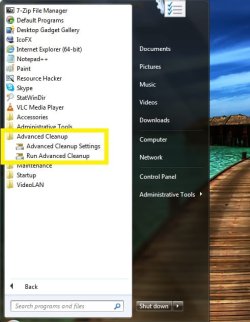
These shortcuts do not require batch files or command window, and they execute immediately. Just follow the steps below!
NOTE: You MUST be logged in as an administrator to complete this tutorial.
Advanced System Cleanup: Configure Options Shortcut
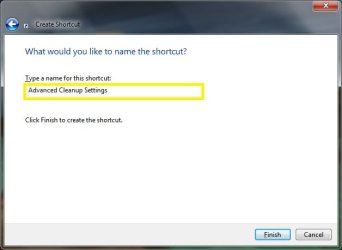
4. Name the shortcut anything you wish
5. Click Finish
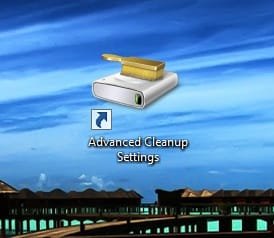
You should have a shortcut that looks like this
6. Right click on the shortcut and select 'Properties'
7. Customize the "hover" text by filling in the 'Comment' field.
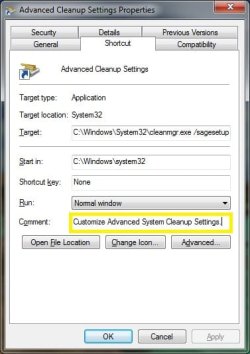
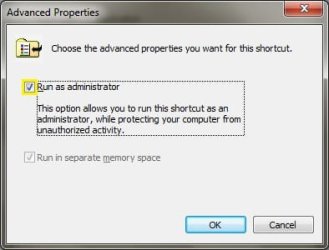
8. Click the 'Advanced' button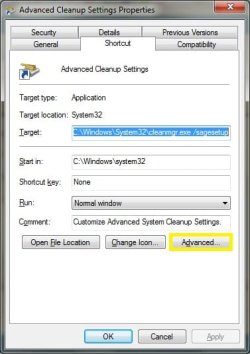 9. Select the option for 'Run as administrator'
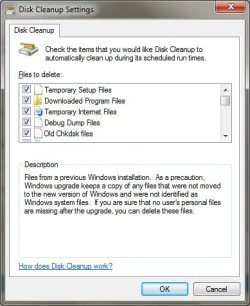
The shortcut is complete. Now when you double click it you will have a options dialog for configuring all of the advanced cleanup features.
Advanced System Cleanup: Run Cleanup Shortcut
Happy Travels,
Tim
I had to edit this a few times while trying to get my screenshots formatted correctly Sorry about that
This is how to create shortcuts for the Advanced Disk Cleanup feature. I keep mine in my Start Menu
NOTE: You MUST be logged in as an administrator to complete this tutorial.
Advanced System Cleanup: Configure Options Shortcut
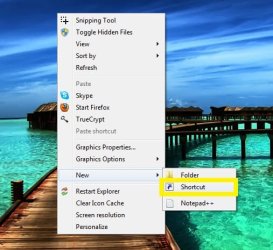
1. Right click on the desktop and select New/Shortcut
2. Insert this for the location
Code:
C:\Windows\System32\cleanmgr.exe /sagesetupNOTE: You MUST leave a space between 'cleanmgr.exe' and '/sagesetup' or this shortcut will not work.
3. Press Next
4. Name the shortcut anything you wish
You should have a shortcut that looks like this
7. Customize the "hover" text by filling in the 'Comment' field.
To create this shortcut follow the same steps as mentioned above, but change the 'Location' to
NOTE: You MUST leave a space between 'cleanmgr.exe' and '/sagerun' or this shortcut will not work.
Here is how I configured the 'Properties' for this shortcut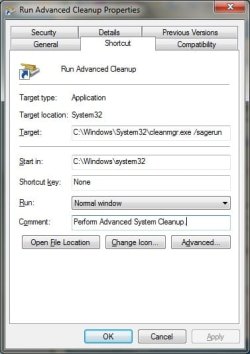
REMEMBER: Change the 'Advanced' setting to 'Run as administrator'
Thats it! I hope some of you find this as useful and convenient as I have!
Code:
C:\Windows\System32\cleanmgr.exe /sagerunHere is how I configured the 'Properties' for this shortcut
Happy Travels,
Tim
I had to edit this a few times while trying to get my screenshots formatted correctly
Sorry about that
Last edited:
My Computer
- Computer Manufacturer/Model Number
- Dell
- OS
- Windows 7 Ultimate 64bit
- CPU
- i3
- Memory
- 4Gb
- Graphics Card(s)
- Intel(R) HD Graphics
- Hard Drives
- 350G built-in, 1T Seagate External, 2T Buffalo External
- Case
- I prefer upper, but I will settle for lower
- Internet Speed
- Yes, I would like some please...
- Other Info
- Ham & Eggs - A days work for a chicken, but a lifetime of commitment for a pig.

