
You are using an out of date browser. It may not display this or other websites correctly.
You should upgrade or use an alternative browser.
You should upgrade or use an alternative browser.
How to clear events in viewer?
- Thread starter h2ofun
- Start date

Dinesh
Wonder Man
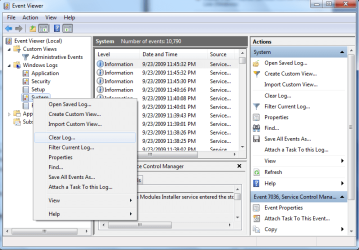
Right click and clear
My Computer
- Computer Manufacturer/Model Number
- Samsung NP530U4B-S02IN
- OS
- Windows® 8 Pro (64-bit)
- CPU
- Intel® Core™ i5 Processor 2467M (1.60GHz, 3MB L3 Cache)
- Motherboard
- Samsung Electronics
- Memory
- 6GB DDR3 System Memory at 1,333MHz (on BD 4GB + 2GB x 1)
- Graphics Card(s)
- AMD Radeon™ HD7550M 1GB DDR3 (Ext. Graphic)
- Sound Card
- Realtek High Definition Audio
- Monitor(s) Displays
- 35.56cm (14.0) SuperBright 300nit HD LED Display
- Screen Resolution
- 1366x768
- Hard Drives
- 1TB S-ATA II Hard Drive (5400RPM) with ExpressCache 16GB SSD
- Internet Speed
- sucks
- Antivirus
- Microsoft Security Essentials
- Browser
- Google Chrome (Sync enabled)
Dinesh
Wonder Man
Yes you have to do it at each level. 
My Computer
- Computer Manufacturer/Model Number
- Samsung NP530U4B-S02IN
- OS
- Windows® 8 Pro (64-bit)
- CPU
- Intel® Core™ i5 Processor 2467M (1.60GHz, 3MB L3 Cache)
- Motherboard
- Samsung Electronics
- Memory
- 6GB DDR3 System Memory at 1,333MHz (on BD 4GB + 2GB x 1)
- Graphics Card(s)
- AMD Radeon™ HD7550M 1GB DDR3 (Ext. Graphic)
- Sound Card
- Realtek High Definition Audio
- Monitor(s) Displays
- 35.56cm (14.0) SuperBright 300nit HD LED Display
- Screen Resolution
- 1366x768
- Hard Drives
- 1TB S-ATA II Hard Drive (5400RPM) with ExpressCache 16GB SSD
- Internet Speed
- sucks
- Antivirus
- Microsoft Security Essentials
- Browser
- Google Chrome (Sync enabled)

I checked these 2 log files. It were deleted by someone. Is it possible to do restore lost records? TerminalServices-LocalSessionManager (Operational File) TerminalServices-RemoteConnectionManager (Operation File)
My Computer
- Computer type
- PC/Desktop
- Computer Manufacturer/Model Number
- dell
- OS
- win 7 pro
- CPU
- i7
- Memory
- 8G

RolandJS
New member
There is another way to mass-clear all event logs. Paul Black has a batchfile, which when run from the desktop, does the job en toto. It's called Event_Viewer_Clear_ALL_Logs.bat. I do not know how to embed that bat file into a reply in this forum. And when you do run it, do not close the DOSbox nor let anything else interfere with the operations. It will very clearly let you know when it has done its job.
MENU driven BATCH PROGRAM to run programs and perform tasks.
Batch Scripts / Programs. - Windows 10 Forums
MENU driven BATCH PROGRAM to run programs and perform tasks.
Batch Scripts / Programs. - Windows 10 Forums
My Computer
- Computer type
- PC/Desktop
- Computer Manufacturer/Model Number
- Antec desktop; Acer Aspire laptops
- OS
- Windows 7 Professional 64-bit
- CPU
- Desktop i5; Acers i5 & i7
- Memory
- desktop 16GB; 1 Acer 8GB & 1 Acer 16GB
- Hard Drives
- 1TB split into 2 equal partitions [OS and data] usable by RJS
- Internet Speed
- AT&T DSL
- Browser
- FF, GChrome, msIE
- Other Info
- Windows 7 Firewall, Emsisoft AM/AV, MSE [scan-only], SpywareBlaster, Ruiware/BillP combine
RolandJS
New member
"...TerminalServices-LocalSessionManager (Operational File) TerminalServices-RemoteConnectionManager (Operation File)..." restore lost records? You can ask PaulBlack and Snick if that is possible.
MENU driven BATCH PROGRAM to run programs and perform tasks.
Batch Scripts / Programs. - Windows 10 Forums
MENU driven BATCH PROGRAM to run programs and perform tasks.
Batch Scripts / Programs. - Windows 10 Forums
My Computer
- Computer type
- PC/Desktop
- Computer Manufacturer/Model Number
- Antec desktop; Acer Aspire laptops
- OS
- Windows 7 Professional 64-bit
- CPU
- Desktop i5; Acers i5 & i7
- Memory
- desktop 16GB; 1 Acer 8GB & 1 Acer 16GB
- Hard Drives
- 1TB split into 2 equal partitions [OS and data] usable by RJS
- Internet Speed
- AT&T DSL
- Browser
- FF, GChrome, msIE
- Other Info
- Windows 7 Firewall, Emsisoft AM/AV, MSE [scan-only], SpywareBlaster, Ruiware/BillP combine