Solved How do I reboot my Laptop when the BIOS settings won't let me?

zilean0475

New member
Local time
1:37 AM
Messages
20
Alright so I have a Dell Laptop Latitude E5420 and I have Windows Home Premium 64 bit installed in it.
So far I am not enjoying it just because it's a 64 bit and I'm not a huge fan of it.
I'm deciding to switch to Windows 7 Pro 32 bit and I have a disc that I have bought at Microsoft's webpage.
Thing is my laptop won't boot from the CD and I want to clean my hard drive out and install a fresh files of Windows 7 onto it. So basically I want to replace the Windows Home Premium 64 bit with Windows 7 Pro 32 bit.
After shutting down my laptop, I power it back on and press F12 to get to the screen that asks me where do I want to go. I take myself to the BIOS Settings, find the boot settings and the selections are grayed out. :(
When I try to disable the security to let the selctions back up in white it asks me for this password?
I honestly don't remember putting a password on the BIOS settings and I did buy this laptop myself.
Any suggestions, comments, or instructions is helpful!

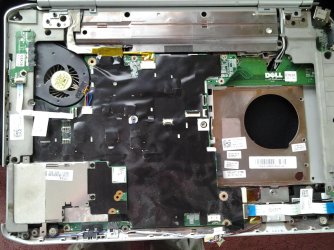
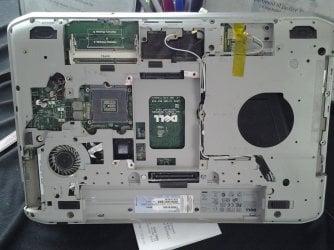
4/10/2013 - Opening Dell Latitude E5420 *Attempt to reboot Bios*

I have uploaded 3 pictures 1 is the CMOS unplugged....hopefully it is.
The other two pictures are the bottom of the laptop while the last picture is the top where I dissembled the keyboard part.
 

Attachments
  • 20130410_141325.jpg
    20130410_141325.jpg
    266.3 KB · Views: 3
  • 20130410_141309.jpg
    20130410_141309.jpg
    326.4 KB · Views: 2
  • 20130410_140911.jpg
    20130410_140911.jpg
    216.2 KB · Views: 2
Last edited:

My Computer My Computer

At a glance

Windows Home Premium 64 bit
Computer type
PC/Desktop
OS
Windows Home Premium 64 bit
I apologize for doing this, but why do you want to replace Windows 7 Home Premium 64-bit with Windows 7 Professional 32-bit?
 

My Computer My Computer

Computer type
PC/Desktop
You should be able to clear the password by resetting the BIOS settings. this can be done by removing the CMOS battery: (this is for 6420 but should be very similar)


Also,

I'm with TwoCables on this one. I would think x64 would run faster for you on the i5. only reason to stay with x32 is if you have old programs that are x16 (as x64 won't be able to run them as well) or if you have less than 4GB of RAM (if you have 2GB then stick with x32)

Also, you might be able to return the Pro version if you were only purchasing it thinking you needed it in order to get a x32 version. Each license allows you to install x32 or x64 so if you already have home x64, you could install home x32 with the same license that came with your laptop. If you are wanting Pro for some other reasons, you can install x32 or x64 with that purchased license.
 

My Computer My Computer

At a glance

Win7 Home Premium 64xIntel Core 2 Duo P7450 / 2.13 GHz (2.29 with ...4 GB PC-6400 Hyundai (2X2) at 800MhzNVIDIA GeForce GTX 260M 1GB DDR3 VRAM
Computer type
Laptop
Computer Manufacturer/Model Number
ASUS G60-RBBX05
OS
Win7 Home Premium 64x
CPU
Intel Core 2 Duo P7450 / 2.13 GHz (2.29 with Extreme Turbo)
Memory
4 GB PC-6400 Hyundai (2X2) at 800Mhz
Graphics Card(s)
NVIDIA GeForce GTX 260M 1GB DDR3 VRAM
Monitor(s) Displays
16" LED Backlit
Screen Resolution
1366 x 768 on laptop 1600x1050 max res on 22" external mon
Hard Drives
OCZ Agility 3 60GB SSD / 320 GB - Serial ATA-150 - 7200 rpm
PSU
6-cell Lithium ion { lasts 1.5 hours }
Case
ASUS G60 Laptop
Keyboard
Chicklet type back-lit (white light) keyboard
Mouse
Logitech G9 Laser Mouse 3200dpi and 1000 reports per minute
Internet Speed
Comcast 8.60mb/s up - 3.11mb/s down
Antivirus
MSE
Browser
Firefox
Other Info
General mid-budget gaming Comp. Low batterylife - High FrameRates - currently overheating problems :(

2nd Rig: Case: Rosewill BLACKHAWK Gaming ATX Mid Tower Computer Case

Mobo: GIGABYTE GA-990FXA-UD3
CPU: AMD FX-6200 Zambezi 3.8GHz (4.1GHz Turbo)
Heatsink: COOLER MASTER V8 CPU Cooler
RAM: Patriot Viper 3 8GB (2 x 4GB) 240-Pin DDR3 SDRAM 1866 (PC3 15000)
GPU: SAPPHIRE Radeon HD 6850 1GB 2
Do you remember getting a password from Dell with the media because there are a lot of Youtube videos mentioning passwords?

I found this if it is of nay help Unlock Dell Laptop with a Special Bios Password: DELL LATITUDE e5420 BIOS PASSWORD, Laptop unlock code solutions

otherwise why not contact Dell? if you have the model and serial number plus PART NO like a lot of Toshiba's have that denote region for use and / or build and get the password back form them.

Like Two Cables said why 32bit is a mystery as it limits you a bit and thta machine can support a fair bit mor RAM then 2GB!!
 

My Computer My Computer

At a glance

Desk1 7 Home Prem / Desk2 10 Pro / Main lap A...Desk1 i5 3750K / Laptop i7 GTX 860M / Desk2 i...Desk1 8GB (1866) / Desk2 16GB (1333) / Laptop...Desk 1& 2NVidia GTX 650 & Laptops on board Intel
Computer type
PC/Desktop
Computer Manufacturer/Model Number
Own build (new) Desk1 / Asus ROG Win 7 / Desk2 1st build
OS
Desk1 7 Home Prem / Desk2 10 Pro / Main lap Asus ROG 10 Pro 2 laptop Toshiba 7 Pro Asus P2520 7 & 10
CPU
Desk1 i5 3750K / Laptop i7 GTX 860M / Desk2 i5 2500
Motherboard
Desk1 Asus P877-V / Desk2 Gigabyte H67 UD3H / Laptop ?
Memory
Desk1 8GB (1866) / Desk2 16GB (1333) / Laptop 8Gb DDR3
Graphics Card(s)
Desk 1& 2NVidia GTX 650 & Laptops on board Intel
Sound Card
Desk 1 & 2 -XONAR DG Realtek High Def audio Laptop
Monitor(s) Displays
Desk 1 Benq HD 2450 / Desk2 Philips 24" / Laptop 17.5"
Screen Resolution
1920x1080 D1 & D2 & Laptop 1
Hard Drives
Desk1 Samsung 120GB 830 SSD
Asus ROG 256GB 850 Pro SSD
Desk2 Samsung 840 256 SSD
Toshiba 120GB EVO
PSU
Desk 1 Corsair HX 1050/ Laptop ? / Desk 2 Corsair HX 650
Case
Desk 1 Cooler HAF XM ? Toshiba laptop / Desk2 Coolermaster
Cooling
Fans on all Desk1 -2 Desk2 - all Coolermasters 5 Laptop ?
Keyboard
Desk 1 MS Sidewinder X6 Desk 2 MS Sidewinder X 4
Mouse
Desk 1&2 - Gigabyte MS 900 gamer - laptop - Logitec wireless
Internet Speed
ADSL2+
Other Info
One other Desktop (tester) and spare Toshba laptop both with SSD's
Running Kaspersky 2016 ISS on all machines config'd identically
Logitec audio stereo systems on each machine (x3)
Canon MG5250MFC
Router/modem TP-Link running WPA2SK
I apologize for doing this, but why do you want to replace Windows 7 Home Premium 64-bit with Windows 7 Professional 32-bit?


I believe 64 bit are faster than 32 bit but then again it takes alot of memory or RAM for the computer.
I've done research the difference between the two OS's and I used to have a Windows 7 Pro 32 bit before on my home PC and I enjoyed it much better than the 64 bit. In the following link is a discussion the difference the two OS's.

Windows 7 Home Premium vs. Windows 7 Professional - Windows 7 - PC World Australia

I prefer a 32 bit OS because of its liability, other resources that it provides, its ability to last longer than any other OS's and I'm just more used to 32 bit systems than 64 bit.

My laptop is used majority for school, online surfing, music downloading, and webcamming with friends.
 

My Computer My Computer

At a glance

Windows Home Premium 64 bit
Computer type
PC/Desktop
OS
Windows Home Premium 64 bit
You should be able to clear the password by resetting the BIOS settings. this can be done by removing the CMOS battery: (this is for 6420 but should be very similar)


Also,

I'm with TwoCables on this one. I would think x64 would run faster for you on the i5. only reason to stay with x32 is if you have old programs that are x16 (as x64 won't be able to run them as well) or if you have less than 4GB of RAM (if you have 2GB then stick with x32)

Also, you might be able to return the Pro version if you were only purchasing it thinking you needed it in order to get a x32 version. Each license allows you to install x32 or x64 so if you already have home x64, you could install home x32 with the same license that came with your laptop. If you are wanting Pro for some other reasons, you can install x32 or x64 with that purchased license.


I have one question for you. What does it really do for unplugging and replugging back in the CMOS battery?
I also have open my laptop before but didn't touch anything in there. Plus I have a picture that I took with my phone but I didn't bring my cord for it at the moment. Maybe later today I'll upload the picture and I have no clue where my CMOS battery is located. My Latitude E5420 is a two piece that can be taken off on the back, the hard drive is right in the middle while the CD drive is located on the left side. Therefore the cpu is located on the right along with the fan. So this leaves me clueless where the CMOS is located.
 

My Computer My Computer

At a glance

Windows Home Premium 64 bit
Computer type
PC/Desktop
OS
Windows Home Premium 64 bit
Hello again zilean,

the CMOS bettery should be fairly easy to find when opening the computer as replacing the cmos battery is needed if the battery dies.

For how it works: the BIOS has settings that are not hard coded in a chip so these settings need to be stored somewhere. since they are stored, they require a charge of electricity to hold their values. this includes any changes that have been made to the BIOS, password, system time, etc. when you turn off your computer, this stuff would be lost each time you power down if it didn't have a charge coming from this battery.

When you take out the battery, it clears out all those settings as there is no other way for it to store that info. You need to leave the battery out for about a minute to allow the charge to drain. you might have to hold the power button down as well to help drain the circuits of their charges.

here's a link to the Manual for your comp as well. I can't view it from my comp right now.... check to see if it has any info on how to reset the CMOS: ftp://ftp.dell.com/Manuals/all-products/esuprt_laptop/esuprt_latitude_laptop/latitude-e5420_Owner%27s%20Manual_en-us.pdf

Also you can take a look at the link ICit2lol posted. I also saw that while searching, but have not used it. Take caution when downloading anything (even reputable commonly known sites these days) in case there is some other software bundled with it.... but that looked like a common complaint from dell users and a possible fix...
 

My Computer My Computer

At a glance

Win7 Home Premium 64xIntel Core 2 Duo P7450 / 2.13 GHz (2.29 with ...4 GB PC-6400 Hyundai (2X2) at 800MhzNVIDIA GeForce GTX 260M 1GB DDR3 VRAM
Computer type
Laptop
Computer Manufacturer/Model Number
ASUS G60-RBBX05
OS
Win7 Home Premium 64x
CPU
Intel Core 2 Duo P7450 / 2.13 GHz (2.29 with Extreme Turbo)
Memory
4 GB PC-6400 Hyundai (2X2) at 800Mhz
Graphics Card(s)
NVIDIA GeForce GTX 260M 1GB DDR3 VRAM
Monitor(s) Displays
16" LED Backlit
Screen Resolution
1366 x 768 on laptop 1600x1050 max res on 22" external mon
Hard Drives
OCZ Agility 3 60GB SSD / 320 GB - Serial ATA-150 - 7200 rpm
PSU
6-cell Lithium ion { lasts 1.5 hours }
Case
ASUS G60 Laptop
Keyboard
Chicklet type back-lit (white light) keyboard
Mouse
Logitech G9 Laser Mouse 3200dpi and 1000 reports per minute
Internet Speed
Comcast 8.60mb/s up - 3.11mb/s down
Antivirus
MSE
Browser
Firefox
Other Info
General mid-budget gaming Comp. Low batterylife - High FrameRates - currently overheating problems :(

2nd Rig: Case: Rosewill BLACKHAWK Gaming ATX Mid Tower Computer Case

Mobo: GIGABYTE GA-990FXA-UD3
CPU: AMD FX-6200 Zambezi 3.8GHz (4.1GHz Turbo)
Heatsink: COOLER MASTER V8 CPU Cooler
RAM: Patriot Viper 3 8GB (2 x 4GB) 240-Pin DDR3 SDRAM 1866 (PC3 15000)
GPU: SAPPHIRE Radeon HD 6850 1GB 2
Just two cents worth again just remember some laptop CMOS batteries are soldered in;)
 

My Computer My Computer

At a glance

Desk1 7 Home Prem / Desk2 10 Pro / Main lap A...Desk1 i5 3750K / Laptop i7 GTX 860M / Desk2 i...Desk1 8GB (1866) / Desk2 16GB (1333) / Laptop...Desk 1& 2NVidia GTX 650 & Laptops on board Intel
Computer type
PC/Desktop
Computer Manufacturer/Model Number
Own build (new) Desk1 / Asus ROG Win 7 / Desk2 1st build
OS
Desk1 7 Home Prem / Desk2 10 Pro / Main lap Asus ROG 10 Pro 2 laptop Toshiba 7 Pro Asus P2520 7 & 10
CPU
Desk1 i5 3750K / Laptop i7 GTX 860M / Desk2 i5 2500
Motherboard
Desk1 Asus P877-V / Desk2 Gigabyte H67 UD3H / Laptop ?
Memory
Desk1 8GB (1866) / Desk2 16GB (1333) / Laptop 8Gb DDR3
Graphics Card(s)
Desk 1& 2NVidia GTX 650 & Laptops on board Intel
Sound Card
Desk 1 & 2 -XONAR DG Realtek High Def audio Laptop
Monitor(s) Displays
Desk 1 Benq HD 2450 / Desk2 Philips 24" / Laptop 17.5"
Screen Resolution
1920x1080 D1 & D2 & Laptop 1
Hard Drives
Desk1 Samsung 120GB 830 SSD
Asus ROG 256GB 850 Pro SSD
Desk2 Samsung 840 256 SSD
Toshiba 120GB EVO
PSU
Desk 1 Corsair HX 1050/ Laptop ? / Desk 2 Corsair HX 650
Case
Desk 1 Cooler HAF XM ? Toshiba laptop / Desk2 Coolermaster
Cooling
Fans on all Desk1 -2 Desk2 - all Coolermasters 5 Laptop ?
Keyboard
Desk 1 MS Sidewinder X6 Desk 2 MS Sidewinder X 4
Mouse
Desk 1&2 - Gigabyte MS 900 gamer - laptop - Logitec wireless
Internet Speed
ADSL2+
Other Info
One other Desktop (tester) and spare Toshba laptop both with SSD's
Running Kaspersky 2016 ISS on all machines config'd identically
Logitec audio stereo systems on each machine (x3)
Canon MG5250MFC
Router/modem TP-Link running WPA2SK

My Computer My Computer

At a glance

Win7 Home Premium 64xIntel Core 2 Duo P7450 / 2.13 GHz (2.29 with ...4 GB PC-6400 Hyundai (2X2) at 800MhzNVIDIA GeForce GTX 260M 1GB DDR3 VRAM
Computer type
Laptop
Computer Manufacturer/Model Number
ASUS G60-RBBX05
OS
Win7 Home Premium 64x
CPU
Intel Core 2 Duo P7450 / 2.13 GHz (2.29 with Extreme Turbo)
Memory
4 GB PC-6400 Hyundai (2X2) at 800Mhz
Graphics Card(s)
NVIDIA GeForce GTX 260M 1GB DDR3 VRAM
Monitor(s) Displays
16" LED Backlit
Screen Resolution
1366 x 768 on laptop 1600x1050 max res on 22" external mon
Hard Drives
OCZ Agility 3 60GB SSD / 320 GB - Serial ATA-150 - 7200 rpm
PSU
6-cell Lithium ion { lasts 1.5 hours }
Case
ASUS G60 Laptop
Keyboard
Chicklet type back-lit (white light) keyboard
Mouse
Logitech G9 Laser Mouse 3200dpi and 1000 reports per minute
Internet Speed
Comcast 8.60mb/s up - 3.11mb/s down
Antivirus
MSE
Browser
Firefox
Other Info
General mid-budget gaming Comp. Low batterylife - High FrameRates - currently overheating problems :(

2nd Rig: Case: Rosewill BLACKHAWK Gaming ATX Mid Tower Computer Case

Mobo: GIGABYTE GA-990FXA-UD3
CPU: AMD FX-6200 Zambezi 3.8GHz (4.1GHz Turbo)
Heatsink: COOLER MASTER V8 CPU Cooler
RAM: Patriot Viper 3 8GB (2 x 4GB) 240-Pin DDR3 SDRAM 1866 (PC3 15000)
GPU: SAPPHIRE Radeon HD 6850 1GB 2
Just two cents worth again just remember some laptop CMOS batteries are soldered in;)

lol that's a horrible idea....

It's alright, I'm fine with desodering in tight spaces.
I'm not really in a rush to get it out but what scares me is sodering it back in place. :confused:
 

My Computer My Computer

At a glance

Windows Home Premium 64 bit
Computer type
PC/Desktop
OS
Windows Home Premium 64 bit
Wait....

I think I went a bit too far...
 

My Computer My Computer

At a glance

Windows Home Premium 64 bit
Computer type
PC/Desktop
OS
Windows Home Premium 64 bit
I think I went a bit too far.....I could've just pulled it out of its slot where it was getting its electricity.
Oh well it was fun...now the hard part. PUtting it all back together. xD
 

My Computer My Computer

At a glance

Windows Home Premium 64 bit
Computer type
PC/Desktop
OS
Windows Home Premium 64 bit
lol hope it goes back together again and you don't have any parts left over (hate it when that happens)

and you didn't go too far.... it's a learning thing. now you know how to take apart your laptop. upgrading RAM and such will be easier should you choose to also it's good to open it up and clean out any dust with canned air.
 

My Computer My Computer

At a glance

Win7 Home Premium 64xIntel Core 2 Duo P7450 / 2.13 GHz (2.29 with ...4 GB PC-6400 Hyundai (2X2) at 800MhzNVIDIA GeForce GTX 260M 1GB DDR3 VRAM
Computer type
Laptop
Computer Manufacturer/Model Number
ASUS G60-RBBX05
OS
Win7 Home Premium 64x
CPU
Intel Core 2 Duo P7450 / 2.13 GHz (2.29 with Extreme Turbo)
Memory
4 GB PC-6400 Hyundai (2X2) at 800Mhz
Graphics Card(s)
NVIDIA GeForce GTX 260M 1GB DDR3 VRAM
Monitor(s) Displays
16" LED Backlit
Screen Resolution
1366 x 768 on laptop 1600x1050 max res on 22" external mon
Hard Drives
OCZ Agility 3 60GB SSD / 320 GB - Serial ATA-150 - 7200 rpm
PSU
6-cell Lithium ion { lasts 1.5 hours }
Case
ASUS G60 Laptop
Keyboard
Chicklet type back-lit (white light) keyboard
Mouse
Logitech G9 Laser Mouse 3200dpi and 1000 reports per minute
Internet Speed
Comcast 8.60mb/s up - 3.11mb/s down
Antivirus
MSE
Browser
Firefox
Other Info
General mid-budget gaming Comp. Low batterylife - High FrameRates - currently overheating problems :(

2nd Rig: Case: Rosewill BLACKHAWK Gaming ATX Mid Tower Computer Case

Mobo: GIGABYTE GA-990FXA-UD3
CPU: AMD FX-6200 Zambezi 3.8GHz (4.1GHz Turbo)
Heatsink: COOLER MASTER V8 CPU Cooler
RAM: Patriot Viper 3 8GB (2 x 4GB) 240-Pin DDR3 SDRAM 1866 (PC3 15000)
GPU: SAPPHIRE Radeon HD 6850 1GB 2
Your CMOS battery is not soldered. But a riproaring pain to get to.

Thorsen's link to your manual will give you a section for coin-cell battery removal.

You basically have to strip down the entire laptop until you get the motherboard off.

Print out the routine and put all the screws on a labeled section of your work table where each set came from. I like to put a white sheet down and use masking tape to write on (stuck to the sheet). DO NOT MIX UP THE SCREWS!!!

Leave the battery out for at least an hour. Have lunch or dinner. That will clear the BIOS password.
 

My Computer My Computer

At a glance

W7 Home Premium 32bit
Computer Manufacturer/Model Number
8 home-builds from the 80's into 2004
OS
W7 Home Premium 32bit
I wish I had found this thread sooner to advise you that removing the CMOS battery in a laptop will not reset the password. The BIOS in a laptop is different from what is in a desktop. Removing the battery will not reset the password. The chip that is used to store the passwords can retain its info even if the CMOS battery is removed. Its done that way on purpose so if the laptop is lost or stolen the password can't easily be bypassed.
 

My Computer My Computer

At a glance

Windows 10 Education 64 bitAMD Phenom II X4 980 Black Edition Deneb 3.7GHz8GB 4GBx2 Kingston PC10600 DDR3 1333 MemoryZotac NVIDIA Geforce GT640 2 Gig DDR3 PCIe
Computer type
PC/Desktop
Computer Manufacturer/Model Number
Home Built
OS
Windows 10 Education 64 bit
CPU
AMD Phenom II X4 980 Black Edition Deneb 3.7GHz
Motherboard
Asus M4N68T-M V2 µATX Motherboard
Memory
8GB 4GBx2 Kingston PC10600 DDR3 1333 Memory
Graphics Card(s)
Zotac NVIDIA Geforce GT640 2 Gig DDR3 PCIe
Sound Card
VIA VT1708s High Definition Audio 8-channel Onboard
Monitor(s) Displays
22" LG E2242 1080p and 2 19" I-INC AG191D
Screen Resolution
1280x1024 - 1920x1080 - 1280x1024
Hard Drives
Crucial M100 256 GB SSD and 500 GB WD Blue SATA
PSU
Thermaltake TR 620
Case
Power Up Black ATX Mid-Tower Case
Cooling
Stock heatsink and fan
Keyboard
Logitech Wireless K350 Wave
Mouse
Logitech Wireless M570 Trackman Wheel
Internet Speed
80 Mbps Down 30 Mbps Up
Antivirus
Windows Defender
Browser
Internet Explorer 11
Other Info
HP DVD1040e Lightscribe - External USB2
I think I went a bit too far...

I wish I had found this thread sooner to advise you that removing the CMOS battery in a laptop will not reset the password. The BIOS in a laptop is different from what is in a desktop. Removing the battery will not reset the password. The chip that is used to store the passwords can retain its info even if the CMOS battery is removed. Its done that way on purpose so if the laptop is lost or stolen the password can't easily be bypassed.

So in your words...the BIOS passwords' will not change? I didn't mind at all disassembling my laptop apart.
I have not reassemble my laptop together because I'm taking the process of installing every little part back the way it was according to my documentation.

Oh well I guess I'll live with Windows Home Premium 64 bit :|
 

My Computer My Computer

At a glance

Windows Home Premium 64 bit
Computer type
PC/Desktop
OS
Windows Home Premium 64 bit
I think I went a bit too far...

I wish I had found this thread sooner to advise you that removing the CMOS battery in a laptop will not reset the password. The BIOS in a laptop is different from what is in a desktop. Removing the battery will not reset the password. The chip that is used to store the passwords can retain its info even if the CMOS battery is removed. Its done that way on purpose so if the laptop is lost or stolen the password can't easily be bypassed.

So in your words...the BIOS passwords' will not change? I didn't mind at all disassembling my laptop apart.
I have not reassemble my laptop together because I'm taking the process of installing every little part back the way it was according to my documentation.

Oh well I guess I'll live with Windows Home Premium 64 bit :|

Its been my experience that no the BIOS passwords will not change in a laptop when you remove the cmos battery. If you call the manufacturers tech support, and you can prove ownership, they may be able to help you reset or bypass them.
 

My Computer My Computer

At a glance

Windows 10 Education 64 bitAMD Phenom II X4 980 Black Edition Deneb 3.7GHz8GB 4GBx2 Kingston PC10600 DDR3 1333 MemoryZotac NVIDIA Geforce GT640 2 Gig DDR3 PCIe
Computer type
PC/Desktop
Computer Manufacturer/Model Number
Home Built
OS
Windows 10 Education 64 bit
CPU
AMD Phenom II X4 980 Black Edition Deneb 3.7GHz
Motherboard
Asus M4N68T-M V2 µATX Motherboard
Memory
8GB 4GBx2 Kingston PC10600 DDR3 1333 Memory
Graphics Card(s)
Zotac NVIDIA Geforce GT640 2 Gig DDR3 PCIe
Sound Card
VIA VT1708s High Definition Audio 8-channel Onboard
Monitor(s) Displays
22" LG E2242 1080p and 2 19" I-INC AG191D
Screen Resolution
1280x1024 - 1920x1080 - 1280x1024
Hard Drives
Crucial M100 256 GB SSD and 500 GB WD Blue SATA
PSU
Thermaltake TR 620
Case
Power Up Black ATX Mid-Tower Case
Cooling
Stock heatsink and fan
Keyboard
Logitech Wireless K350 Wave
Mouse
Logitech Wireless M570 Trackman Wheel
Internet Speed
80 Mbps Down 30 Mbps Up
Antivirus
Windows Defender
Browser
Internet Explorer 11
Other Info
HP DVD1040e Lightscribe - External USB2
Actually alpha I did mention in #4 to contact Dell and zilean I didn't mean to frighten you with the soldering mate I have to own up to not watching that video.:o
 

My Computer My Computer

At a glance

Desk1 7 Home Prem / Desk2 10 Pro / Main lap A...Desk1 i5 3750K / Laptop i7 GTX 860M / Desk2 i...Desk1 8GB (1866) / Desk2 16GB (1333) / Laptop...Desk 1& 2NVidia GTX 650 & Laptops on board Intel
Computer type
PC/Desktop
Computer Manufacturer/Model Number
Own build (new) Desk1 / Asus ROG Win 7 / Desk2 1st build
OS
Desk1 7 Home Prem / Desk2 10 Pro / Main lap Asus ROG 10 Pro 2 laptop Toshiba 7 Pro Asus P2520 7 & 10
CPU
Desk1 i5 3750K / Laptop i7 GTX 860M / Desk2 i5 2500
Motherboard
Desk1 Asus P877-V / Desk2 Gigabyte H67 UD3H / Laptop ?
Memory
Desk1 8GB (1866) / Desk2 16GB (1333) / Laptop 8Gb DDR3
Graphics Card(s)
Desk 1& 2NVidia GTX 650 & Laptops on board Intel
Sound Card
Desk 1 & 2 -XONAR DG Realtek High Def audio Laptop
Monitor(s) Displays
Desk 1 Benq HD 2450 / Desk2 Philips 24" / Laptop 17.5"
Screen Resolution
1920x1080 D1 & D2 & Laptop 1
Hard Drives
Desk1 Samsung 120GB 830 SSD
Asus ROG 256GB 850 Pro SSD
Desk2 Samsung 840 256 SSD
Toshiba 120GB EVO
PSU
Desk 1 Corsair HX 1050/ Laptop ? / Desk 2 Corsair HX 650
Case
Desk 1 Cooler HAF XM ? Toshiba laptop / Desk2 Coolermaster
Cooling
Fans on all Desk1 -2 Desk2 - all Coolermasters 5 Laptop ?
Keyboard
Desk 1 MS Sidewinder X6 Desk 2 MS Sidewinder X 4
Mouse
Desk 1&2 - Gigabyte MS 900 gamer - laptop - Logitec wireless
Internet Speed
ADSL2+
Other Info
One other Desktop (tester) and spare Toshba laptop both with SSD's
Running Kaspersky 2016 ISS on all machines config'd identically
Logitec audio stereo systems on each machine (x3)
Canon MG5250MFC
Router/modem TP-Link running WPA2SK
Actually alpha I did mention in #4 to contact Dell and zilean I didn't mean to frighten you with the soldering mate I have to own up to not watching that video.:o

It's all good; let's just hope when I'm done with re-assembling with my laptop that it still works.
I'm expecting that wizard to realize some-hardware has changed and deal with that.
I am currently re-assembling my laptop.
 

My Computer My Computer

At a glance

Windows Home Premium 64 bit
Computer type
PC/Desktop
OS
Windows Home Premium 64 bit
Actually alpha I did mention in #4 to contact Dell and zilean I didn't mean to frighten you with the soldering mate I have to own up to not watching that video.:o

I skimmed though the posts a bit so I missed that.

Some laptop CMOS batteries are soldered in by the way. Most times you don't know until you get it all apart. I've seen instances where there are two or even three batteries used and then attached to the motherboard with wires. Two or three batteries lasting longer than one so you hopefully, never have to replace them.
 

My Computer My Computer

At a glance

Windows 10 Education 64 bitAMD Phenom II X4 980 Black Edition Deneb 3.7GHz8GB 4GBx2 Kingston PC10600 DDR3 1333 MemoryZotac NVIDIA Geforce GT640 2 Gig DDR3 PCIe
Computer type
PC/Desktop
Computer Manufacturer/Model Number
Home Built
OS
Windows 10 Education 64 bit
CPU
AMD Phenom II X4 980 Black Edition Deneb 3.7GHz
Motherboard
Asus M4N68T-M V2 µATX Motherboard
Memory
8GB 4GBx2 Kingston PC10600 DDR3 1333 Memory
Graphics Card(s)
Zotac NVIDIA Geforce GT640 2 Gig DDR3 PCIe
Sound Card
VIA VT1708s High Definition Audio 8-channel Onboard
Monitor(s) Displays
22" LG E2242 1080p and 2 19" I-INC AG191D
Screen Resolution
1280x1024 - 1920x1080 - 1280x1024
Hard Drives
Crucial M100 256 GB SSD and 500 GB WD Blue SATA
PSU
Thermaltake TR 620
Case
Power Up Black ATX Mid-Tower Case
Cooling
Stock heatsink and fan
Keyboard
Logitech Wireless K350 Wave
Mouse
Logitech Wireless M570 Trackman Wheel
Internet Speed
80 Mbps Down 30 Mbps Up
Antivirus
Windows Defender
Browser
Internet Explorer 11
Other Info
HP DVD1040e Lightscribe - External USB2
Back
Top