7.25GB RAM Usable?

haison

New member
Local time
12:56 PM
Messages
14
So I have had the MSDN AA version of Windows 7 64-bit for quite some time now and this has never shown up until after I did the latest update. Was wondering if this was out of the ordinary.
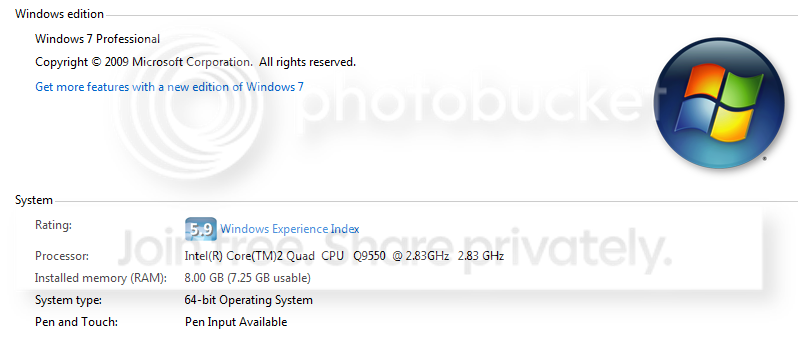
Capture-1.png
 

My Computer

OS
Windows 7 Professional
CPU
Intel Core2Quad Q9550
Motherboard
Asus Rampage Formula
Memory
Corsair 1066MHz DDR2 Dominator
Graphics Card(s)
Nvidia 9800GTX+
Monitor(s) Displays
Samsung SyncMaster 2053BW
Hard Drives
150GB Velociraptor
500GB Western Digital RE2
640GB x 2 Western Digital Caviar Black
PSU
Corsair TX750
Case
Cooler Master HAF 932
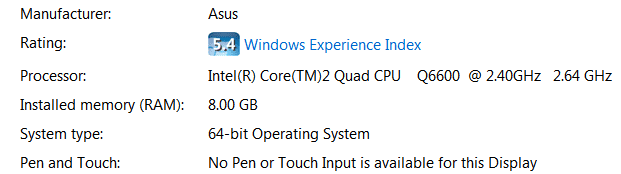
It's different than mine Memory.PNG
 

My Computer

Computer Manufacturer/Model Number
Self Built
OS
Windows 7 ultimate 64 bit / XP Home sp3
CPU
intel Core 2 Duo E8400 3.0ghz
Motherboard
Asus P5ND bios 1401
Memory
8 gigs 1066 OCZ Fata1ty
Graphics Card(s)
EVGA GTX 580 Call of Duty Black Ops Edition
Sound Card
Creative Soundblaster Audigy 2zs
Monitor(s) Displays
Asus 24in LCD's 2MS X2
Screen Resolution
1920x1080p @60Hz
Hard Drives
WD Caviar 500 Black/ WD Caviar 200 Blue
PSU
OCZ 700W GameXtreme
Case
NZXT Apollo
Cooling
Corsair H50 CPU/120mm x3 /60mm x2 /Corsair Dominator Ram
Keyboard
Logitech Bluetooth Wireless MX5000
Mouse
Logitech Bluetooth Wireless MX1000
Internet Speed
Download 19.83 Upload 0.97
Other Info
Logitech Z2300 Speakers/ Bose Noise Cancelling Headphones/Avermedia PCI-e Hybrid TV Bravo/Epson NX415 all in one/ 4 Port Powered USB Hub/ LG 10x Bluray Burner /TSST Corp DVDRW External
hye i've had this problem same as you ..

if you goto msconfig

-boot
-advanced options

then untick the maximum memory options

and it should be fixed! ^^

please get back to me if this has solved your problems ^^
 

My Computer

Computer Manufacturer/Model Number
The Perpetrator
OS
Windows 7 Ultimate x64
CPU
AMD Phenom II X4 B50 (3.62Ghz)
Motherboard
Gigabyte GA-MA790XT-UD4P
Memory
8GB(4x2GB) Mushkin XP DDR3-1600-CL7 (996657)
Graphics Card(s)
Galaxy Geforce 9600GT Factory OCed
Hard Drives
Western Digital Caviar Black 640GB
PSU
OCZ ModXstream-Pro 600W
Case
XION II Series Gaming PC Case

My Computer

Computer type
PC/Desktop
Computer Manufacturer/Model Number
Alienware Aurora ALX R4
OS
Windows 10 Pro (x64)
CPU
Intel Core i7-3930K (3.2GHz - 4.5GHz)
Motherboard
Alienware Aurora-R4 x79
Memory
4x Samsung 4GB PC3-12800 DDR3 (16GB 1600MHz)
Graphics Card(s)
Nvidia Geforce GTX 690
Sound Card
SteelSeries Siberia Elite
Monitor(s) Displays
Dell UltraSharp U3011
Screen Resolution
2560x1600
Hard Drives
Samsung 850 Pro 256 GB, Seagate 1TB Desktop Hybrid HDD, 2x Western Digital 4TB Green HDD
PSU
875W Some Dell PSU <.<
Case
Alienware Aurora ALX
Cooling
Custom Liquid Cooling (EK CPU & GPU blocks) dual EK 480RAD
Keyboard
Logitech G710+ Mechanical
Mouse
Logitech G700s
Internet Speed
Verizon Fios (50 mbps average)
Other Info
Server: Intel NUC D54250WYK: i5-4250U, 16GB, 256 GB mSATA, Windows Server 2012 R2
i got 4GB of estimated memory on my gpu according to dxdiag..

does this work??will it actually make a difference in games?
 

My Computer

Computer Manufacturer/Model Number
The Perpetrator
OS
Windows 7 Ultimate x64
CPU
AMD Phenom II X4 B50 (3.62Ghz)
Motherboard
Gigabyte GA-MA790XT-UD4P
Memory
8GB(4x2GB) Mushkin XP DDR3-1600-CL7 (996657)
Graphics Card(s)
Galaxy Geforce 9600GT Factory OCed
Hard Drives
Western Digital Caviar Black 640GB
PSU
OCZ ModXstream-Pro 600W
Case
XION II Series Gaming PC Case
hye i've had this problem same as you ..

if you goto msconfig

-boot
-advanced options

then untick the maximum memory options

and it should be fixed! ^^

please get back to me if this has solved your problems ^^

Jinny,

Thanks for the help. All 8GB RAM is usable again but my processor is overclocked to 3.4GHz but it doesn't show it.
 

My Computer

OS
Windows 7 Professional
CPU
Intel Core2Quad Q9550
Motherboard
Asus Rampage Formula
Memory
Corsair 1066MHz DDR2 Dominator
Graphics Card(s)
Nvidia 9800GTX+
Monitor(s) Displays
Samsung SyncMaster 2053BW
Hard Drives
150GB Velociraptor
500GB Western Digital RE2
640GB x 2 Western Digital Caviar Black
PSU
Corsair TX750
Case
Cooler Master HAF 932
sorry but i have never had troubles with that.

my cpu is overclocked to 3.55Ghz and it says 3.55GHZ next to my cpu name...even if i oc it more to 3.62GHZ it states 3.62GHZ
 

My Computer

Computer Manufacturer/Model Number
The Perpetrator
OS
Windows 7 Ultimate x64
CPU
AMD Phenom II X4 B50 (3.62Ghz)
Motherboard
Gigabyte GA-MA790XT-UD4P
Memory
8GB(4x2GB) Mushkin XP DDR3-1600-CL7 (996657)
Graphics Card(s)
Galaxy Geforce 9600GT Factory OCed
Hard Drives
Western Digital Caviar Black 640GB
PSU
OCZ ModXstream-Pro 600W
Case
XION II Series Gaming PC Case
If cool and quiet is turned on then it will not show the correct OC settings, it will show 200HT x your multiplier, in my case 3600mhz, although I am actually running 3.96Ghz, If I turn cool and quiet off it shows correct data, bit of a bug!
 

My Computer

Computer type
PC/Desktop
Computer Manufacturer/Model Number
Nomad Creative Solutions (Home build)
OS
Windows 7 64 bit
CPU
AMD hexa core AMD Phenom II X6 1090T BE processor 3.2ghz
Motherboard
ASUS M4N98TD EVO with sli NVIDIA 980a chipset
Memory
8gb 2 x 4gb Crucial Tactical Tracers Elite DDR3 1600mhz
Graphics Card(s)
MSI NVIDIA GTX660OC 2048MB AT 1215MHZ
Sound Card
Onboard VIA HD audio 1708S
Monitor(s) Displays
samsung 40 inch LED monitor
Screen Resolution
1920 X 1080 P
Hard Drives
1 TB Samsung f3 spinpoint
1 TB SATA WDC green
500GB SATA Seagate
250 GB IDE Samsung
PSU
800w PSU
Case
Coolermaster CM690 II Advanced
Cooling
1x140mm In, 2x120mm In, 2x140mm Out, 1x120mm Out
Keyboard
WIRELESS KEYBOARD/TOUCH PAD
Internet Speed
10.6MBPS
Other Info
WINDOWS 7 HOME PREMIUM 64 BIT SP1

Tuniq Tower 120 Extreme CPU cooler
Back
Top