Solved Registry Cleaners for Windows 7: Yay or Nay?

kathy025

New member
Pro User
VIP
Local time
1:21 AM
Messages
310
Hi guys,

I have been with Windows XP Pro for quite the time (10 years) and during which, I have always used registry cleaners. Personally, I did not really "feel" a noticeable boost in the performance of my previous machine (ASUS X80LE), but since registry cleaners became some sort of a fad back then, I kept one (switching between Wise Registry Cleaner and Eusing Registry Cleaner) along with my other PC maintenance staples--CCleaner, Auslogics DiskDefrag, and Revo Uninstaller. I faintly remember (from a short user review I wrote in 2009) Auslogics Registry Cleaner messing up my OS, to which it made amends by its rather dependable registry back up feature.

I have very recently moved on to Se7en, still exploring new features and learning new methods. From experience of 7eterans, would it be advisable to still keep a dedicated registry cleaner nowadays? I still have my usual staples and Wise, but I have not used the latter as much as I did before in XP. Currently, I am running CCleaner's built-in registry cleaner.

Advice and user experiences with registry cleaners in Windows 7 would be much appreciated. Thank you. :)
 

My Computer My Computer

At a glance

Windows 7 Professional SP1 x64 (OEM)Intel® Core™ i5 2430M/2410M ProcessorDDR3 1333 SODIMM (8GB)NVIDIA® GeForce® GT 555M (2GB)
Computer type
Laptop
Computer Manufacturer/Model Number
ASUS N45SF
OS
Windows 7 Professional SP1 x64 (OEM)
CPU
Intel® Core™ i5 2430M/2410M Processor
Motherboard
Intel® HM65 Express Chipset
Memory
DDR3 1333 SODIMM (8GB)
Graphics Card(s)
NVIDIA® GeForce® GT 555M (2GB)
Sound Card
Realtek High Definition Audio
Monitor(s) Displays
14.0" LED Backlight
Screen Resolution
16:9 HD (1366x768)
Hard Drives
640GB Seagate (internal), 1TB Toshiba Canvio Portable, 2TB x 2 WD My Book Essential (external)
Antivirus
Malwarebytes Anti-Malware Home (Premium)
Browser
Waterfox
Other Info
Optical Drive: Slimtype DVD A DS8A5SH (Super-Multi DVD);
Audio: Bang & Olufsen ICEpower®, SonicMaster
Hello Kathy025,

In short, nay!

Registry cleaners can, and in a lot of cases will, mess up the registry, causing way more problems than they fix. You can take a look at this thread where one of our gurus tested two registry cleaners (CCleaner and Auslogics) only to figure out that both damaged the registry on the very first scan!

I myself have CCleaner installed and frequently use it's cleaner function to clean my system. I never used the registry function, and learned the hard way to stay away from it (my mom installed CCleaner on her laptop, used the registry function and blam, unbootable. Had to reinstall Windows in order to fix it).

Regarding REVO Uninstaller and DiskDefrag, no problems! We actually recommend REVO a lot of the time and for as long as I've used it / recommended it, I haven't seen it mess up anything. If anything, it's more thorough and works better than Windows' native uninstaller.

DiskDefrag I don't use myself, so I wouldn't know. I use Defraggler, but I recon that both do the same.


Nommy
 

My Computer My Computer

At a glance

Microsoft Windows 8.1 64-bit ProfessionalIntel(R) Core(TM) i7-4510U CPU @ 2.00GHz8.00 GB (2 x 4.00 GB)AMD Radeon R7 M265
Computer type
Laptop
Computer Manufacturer/Model Number
Dell Inspiron 5547
OS
Microsoft Windows 8.1 64-bit Professional
CPU
Intel(R) Core(TM) i7-4510U CPU @ 2.00GHz
Motherboard
Dell Inc. 08KNCD
Memory
8.00 GB (2 x 4.00 GB)
Graphics Card(s)
AMD Radeon R7 M265
Screen Resolution
1366 x 768 x 4294967296 colors
Hard Drives
(1) 1TB ST1000LM024 HN-M101MBB (2) 2TB Western Digital external hard drive (3) 500GB Packard Bell external hard drive
Mouse
Corsair Vengeance M60
Antivirus
Windows Defender & Malwarebytes
Browser
Firefox, Chromium
Other Info
+ Acer TravelMate 7730G with 32bit Ubuntu 14.04 LTS Trusty Tahr.
Registry cleaners generally cause more problems than they solve and should be avoided. There is little evidence that regular registry cleaning benefits performance and much that it does not.

The problem is that it is rarely possible to determine with 100% certainty that a specific registry entry is unneeded or in error. As a result a registry cleaner must make frequent guesses. Most are correct, but some are not. The consequences of deleting or "repairing" a valid entry can be serious.
 

My Computer My Computer

At a glance

Windows 7 Pro 64 bitXeon W35208 GBNvidia Geforce 210
Computer type
PC/Desktop
Computer Manufacturer/Model Number
HP
OS
Windows 7 Pro 64 bit
CPU
Xeon W3520
Memory
8 GB
Graphics Card(s)
Nvidia Geforce 210
Hello Kathy,

I would vote NAY.

The problem is that most registry cleaners are too aggressive and can seriously corrupt and/or cripple a Windows installation if blindly allowed to delete all registry entries it thinks should be removed.

In addition, there are also these registry cleaners claiming to be a cure all for everything that ails your computer. These are nothing but snake oil, usually riddled with adware and malware, and should be avoided at all costs.

From my experience, save your money and Windows installation, and avoid them. :)
 

My Computer My Computer

At a glance

64-bit Windows 11 Pro for WorkstationsIntel i7-8700K OC'd to 5 GHz64 GB (4x16GB) G.SKILL TridentZ RGB DDR4 3600...ASUS ROG-STRIX-GTX1080TI-O11G-GAMING
Computer type
PC/Desktop
Computer Manufacturer/Model Number
Self built custom
OS
64-bit Windows 11 Pro for Workstations
CPU
Intel i7-8700K OC'd to 5 GHz
Motherboard
ASUS ROG Maximus XI Formula Z390
Memory
64 GB (4x16GB) G.SKILL TridentZ RGB DDR4 3600 MHz
Graphics Card(s)
ASUS ROG-STRIX-GTX1080TI-O11G-GAMING
Sound Card
Integrated
Monitor(s) Displays
2 x Samsung Odyssey G7 27"
Screen Resolution
2560x1440
Hard Drives
1TB Samsung 990 PRO M.2,
4TB Samsung 990 PRO PRO M.2,
TerraMaster F8 SSD Plus NAS
PSU
Seasonic Prime Titanium 850W
Case
Thermaltake Core P3
Cooling
Corsair Hydro H115i
Keyboard
Logitech wireless K800
Mouse
Logitech MX Master 4
Internet Speed
2 Gb/s Download and 100 Mb/s Upload
Antivirus
Malwarebyte Anti-Malware Premium
Browser
Google Chrome
Other Info
Logitech Z625 speaker system,
Logitech BRIO 4K Pro webcam,
HP Color LaserJet Pro MFP M477fdn,
APC SMART-UPS RT 1000 XL - SURT1000XLI,
Galaxy S23 Plus phone
My experience

Hi,

I'd say nay for those with little technical experience but yay for those users who can figure out what entries actually need to be kept when they're flagged for deletion by a registry cleaner.

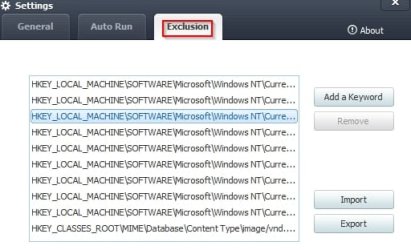
In my experience Ccleaner never bricked my system but these days I never use it for registry cleanup. I prefer Wise Registry Cleaner because it has the option to select only "safe to remove" entries but even then a lot of those entries need to be kept - at least that's the case on my machine.

WRC.jpg

Generally speaking registry cleaners aren't worth bothering with unless you've got serious problems.

You can read a well respected tech writer's test results and also the conclusion drawn here:

Putting Registry-/system-cleanup apps to the test

It puts things in perspective.


Scroll down to "Bottom-line conclusions and caveats" and read it then decide for yourself.

The best advice given is: "So don’t risk destabilizing a solid system for a trivial gain. Stay within your own comfort and skill zone — and always, always, always make a backup before using any cleaning tool."

Tip: Don't try using the jv16 PowerTools registry cleaner that's mentioned in the article. It's only good for advanced users who can decide which entries need removing from the scan results. If you run this one and remove every detection - it could well brick your machine.
 
Last edited:

My Computer My Computer

At a glance

Microsoft Windows 7 Home Premium 64-bit 7601 ...AMD C-60 APU with Radeon(tm) HD Graphics4.00 GBAMD Radeon HD 6290 Graphics
Computer type
Laptop
Computer Manufacturer/Model Number
ASUS
OS
Microsoft Windows 7 Home Premium 64-bit 7601 Multiprocessor Free Service Pack 1
CPU
AMD C-60 APU with Radeon(tm) HD Graphics
Motherboard
ASUSTeK COMPUTER INC. X501U
Memory
4.00 GB
Graphics Card(s)
AMD Radeon HD 6290 Graphics
Sound Card
(1) AMD High Definition Audio Device (2) Realtek High Defi
Screen Resolution
1366 x 768 x 32 bits (4294967296 colors) @ 60 Hz
Hard Drives
Hitachi HTS545050A7E380 SATA Disk Device
Antivirus
Comodo CIS & FW, SecureAplus App Whitelisting, Threatfire
Browser
Cyberfox 64bit, Opera 64bit, Airfox
Other Info
Spy-The-Spy, HitmanPro.Alert, Norton Connect Safe, MJRegWatcher, BitDefender TrafficLight, Voodoo Shield, Zemana AntiMalware

I used to use Defraggler with Win 7 but it was slower than a dead turtle with four broken legs. After it wonked up my main data drive, I switched to Win 7's defragging tool and, other than my drives staying at 0% fragmentation, I can't even tell it is working (unlike Defraggler).

Most registry cleaners are far too ambitious and can cause more problems than they fix. I use an older version of a program called Glary Utilities (2.52.0.1698; the newer versions are a bit to invasive for my tastes) that will, among other things, remove registry entries that don't point to anything. Whether removing unused entries will benefit or not is up for debate but, at least, it does no harm. Glary will also remove temp. files, broken shortcuts, and has an excellent startup manager among many other things.
 

My Computer My Computer

At a glance

Win 7 Ultimate 64 bitIntel i7-3930KKingston HyperX Genesis 32GB Kit (8x4GB Modul...MSI R7850 Twin Frozr 2GD5/OC Radeon HD 7850 2...
Computer type
PC/Desktop
Computer Manufacturer/Model Number
Custom Build
OS
Win 7 Ultimate 64 bit
CPU
Intel i7-3930K
Motherboard
ASUS P9X79 WS
Memory
Kingston HyperX Genesis 32GB Kit (8x4GB Modules) 1600MHz DDR
Graphics Card(s)
MSI R7850 Twin Frozr 2GD5/OC Radeon HD 7850 2GB 256-bit GDDR
Sound Card
Asus Xonar Essence STX
Monitor(s) Displays
3x Asus VG248QE 24", Vizio 32" TV
Screen Resolution
1920 x 1080, ?
Hard Drives
Samsung 128GB 840 Pro SSD (1),
Samsung 4TB 850 EVO SSDs (4)
Samsung 4TB 850 EVO SSDs (16) external backup drives used in 2.5" hot swap bays in the computer.
PSU
Corsair HX750w
Case
Antec Two Hundred v2 (modified)
Cooling
Cooler Master GeminII S524 120mm (fan replaced with a 140mm)
Keyboard
Logitech G510s
Mouse
Logitech M525 (two in use)
Internet Speed
=< 32Mbps down, 8Mbps up
Antivirus
AVAST!, MBAM, SAS, Spybot S&D (all but MBAM free) Glary Util
Browser
IE11
Other Info
LSI 9211-8i HBA card (8 SATA III ports), 2.5" & 3.5" Hot Swap Bays, HooToo HT-CR001 PCI-E to USB 3.0 Internal Hub + 6 Slot Card Reader, and LG Model CH12LS28 BD-ROM Optical Drive. Also, ScanSnap S1500 ADF duplexing scanner, Canon 9000F flat bed scanner, Corsair SP2500 2.1 speakers, Samsung CLP 415nw laser color printer, Cyberpower PP2200SW UPS
In this and other forums, I have never seen a post where someone has used a registry cleaner and it made their system go any better. At best it will do nothing. At the worst your computer will not boot. All the claims of optimizing, cleaning etc are BS.
 

My Computer My Computer

At a glance

Windows 7 pro x64 SP1Intel i7-2600k o/c to 4.6GHz8GB Mushkin 1866MHzNvidia GTX 750 Ti 2GB
Computer type
PC/Desktop
Computer Manufacturer/Model Number
self build
OS
Windows 7 pro x64 SP1
CPU
Intel i7-2600k o/c to 4.6GHz
Motherboard
MSI Z68-GD80
Memory
8GB Mushkin 1866MHz
Graphics Card(s)
Nvidia GTX 750 Ti 2GB
Sound Card
integrated
Monitor(s) Displays
Liyama ProLite 27"
Screen Resolution
1920*1080 px
Hard Drives
Seagate 2TB
PSU
Coolermaster GX 750W
Case
Antec 300 case + 5 fans
Cooling
Dark Rock Pro
Internet Speed
62Mbit down 18Mbit up
Antivirus
MSE
Browser
Firefox
Other Info
Blackgold BGT3650 Quad HD TV card. Also have various 3770 + 4770K render boxes.
I think the subject of registry cleaners has been answered. Not recommended.
I also recommend not using any programs that states it will Tune Up your computer or the like.
Windows 7 does not need such programs or want such programs.

As for defragging I haven't found anything better than the Windows 7 built in defrag program. You just don't get the pretty little colored boxes to watch.

There is no such thing as a one tick in a program that will fix computers. No one really knows what that one tick does or doesn't do. Because of that it makes computer very difficult to repair if their is a problem.

There are many good processes and methods in this Tutorial.
Most won't need or use all the methods in the Tutorial but reading through the Tutorial is a learning experience.

By Brink:
http://www.sevenforums.com/tutorials/11728-optimize-windows-7-a.html
 

My Computer My Computer

At a glance

Windows 10 Pro. 64/ version 1709 Windows 7 Pr...Intel i7-6800K @ 4.3Corsair Platinum 16 gig @2400EVGA GTX 1070 OC
Computer type
PC/Desktop
Computer Manufacturer/Model Number
Home made Desktop
OS
Windows 10 Pro. 64/ version 1709 Windows 7 Pro/64
CPU
Intel i7-6800K @ 4.3
Motherboard
ASUS X-99 Deluxe II
Memory
Corsair Platinum 16 gig @2400
Graphics Card(s)
EVGA GTX 1070 OC
Monitor(s) Displays
Asus 27" LED LCD/VE278Q
Screen Resolution
1920-1080 or 1280-720 HDMI
Hard Drives
INTEL SSD 730-240 Gb Sata 3.0/
PSU
EVGA Platium 1200W
Case
Phanteks Luxe Tempered Glass 8 fans/ one radiator
Cooling
XSPC/ Water Cooled CPU
Keyboard
Das 4 Professional
Mouse
Logitech M705/MX Anywhere 2-S
Internet Speed
100 mbits
Antivirus
Microsoft Security Essentials/ Malwarebytes Premium 3.0/ SAS
Browser
I.E. 11 default/Firefox/ ISP Time Warner Cable/Spectrum
Other Info
LG BluRay Burner/
Sound system-KLipsch-THX/
Icy Dock ssd Hot Swap bays.
...You just don't get the pretty little colored boxes to watch...

Oh darn! ;)

Actually, that was kinda like watching paint dry. I really don't miss it.
 

My Computer My Computer

At a glance

Win 7 Ultimate 64 bitIntel i7-3930KKingston HyperX Genesis 32GB Kit (8x4GB Modul...MSI R7850 Twin Frozr 2GD5/OC Radeon HD 7850 2...
Computer type
PC/Desktop
Computer Manufacturer/Model Number
Custom Build
OS
Win 7 Ultimate 64 bit
CPU
Intel i7-3930K
Motherboard
ASUS P9X79 WS
Memory
Kingston HyperX Genesis 32GB Kit (8x4GB Modules) 1600MHz DDR
Graphics Card(s)
MSI R7850 Twin Frozr 2GD5/OC Radeon HD 7850 2GB 256-bit GDDR
Sound Card
Asus Xonar Essence STX
Monitor(s) Displays
3x Asus VG248QE 24", Vizio 32" TV
Screen Resolution
1920 x 1080, ?
Hard Drives
Samsung 128GB 840 Pro SSD (1),
Samsung 4TB 850 EVO SSDs (4)
Samsung 4TB 850 EVO SSDs (16) external backup drives used in 2.5" hot swap bays in the computer.
PSU
Corsair HX750w
Case
Antec Two Hundred v2 (modified)
Cooling
Cooler Master GeminII S524 120mm (fan replaced with a 140mm)
Keyboard
Logitech G510s
Mouse
Logitech M525 (two in use)
Internet Speed
=< 32Mbps down, 8Mbps up
Antivirus
AVAST!, MBAM, SAS, Spybot S&D (all but MBAM free) Glary Util
Browser
IE11
Other Info
LSI 9211-8i HBA card (8 SATA III ports), 2.5" & 3.5" Hot Swap Bays, HooToo HT-CR001 PCI-E to USB 3.0 Internal Hub + 6 Slot Card Reader, and LG Model CH12LS28 BD-ROM Optical Drive. Also, ScanSnap S1500 ADF duplexing scanner, Canon 9000F flat bed scanner, Corsair SP2500 2.1 speakers, Samsung CLP 415nw laser color printer, Cyberpower PP2200SW UPS
@nommy the first:
The test cases for CCleaner and Auslogics Registry Cleaner were indeed helpful. Both are frequently the freeware of choice, so it was good to see their performance. To add to this, I tried Auslogics Registry Cleaner and after a few reboots, my Canon MX Printer drivers stopped working. Nero 8 was also corrupted. Now, I cannot 100% say Auslogics Registry Cleaner directly caused the problem, but it is highly likely. As usual, I had created several system restore points for recovery.

The problem is that it is rarely possible to determine with 100% certainty that a specific registry entry is unneeded or in error. As a result a registry cleaner must make frequent guesses. Most are correct, but some are not. The consequences of deleting or "repairing" a valid entry can be serious.
The best advice given is: "So don’t risk destabilizing a solid system for a trivial gain. Stay within your own comfort and skill zone — and always, always, always make a backup before using any cleaning tool."
Very sound insights, thank you.

@Lady Fitzgerald:
I have also stayed with Glary Utilities Pro 2.56.0.1822 (the latest V2 build). Regarding registry cleanup, again it has not shown any substantial loss or gain for my system during the months I used it, but the other tools that come with it are quite handy (file shredder, empty folder remover, startup manager, etc.). I keep the setup in case I would need its tools, though I do not install it as a staple.

And to everyone who have replied to this thread, thank you very much as your inputs are appreciated. Also thanks to Brink for the very informative tutorial on Windows 7 optimization.

As for me, I will follow the general consensus and I will stay away from registry cleaners (especially the aggressive ones) from now on as they seem to be more of a myth than fact.
 

My Computer My Computer

At a glance

Windows 7 Professional SP1 x64 (OEM)Intel® Core™ i5 2430M/2410M ProcessorDDR3 1333 SODIMM (8GB)NVIDIA® GeForce® GT 555M (2GB)
Computer type
Laptop
Computer Manufacturer/Model Number
ASUS N45SF
OS
Windows 7 Professional SP1 x64 (OEM)
CPU
Intel® Core™ i5 2430M/2410M Processor
Motherboard
Intel® HM65 Express Chipset
Memory
DDR3 1333 SODIMM (8GB)
Graphics Card(s)
NVIDIA® GeForce® GT 555M (2GB)
Sound Card
Realtek High Definition Audio
Monitor(s) Displays
14.0" LED Backlight
Screen Resolution
16:9 HD (1366x768)
Hard Drives
640GB Seagate (internal), 1TB Toshiba Canvio Portable, 2TB x 2 WD My Book Essential (external)
Antivirus
Malwarebytes Anti-Malware Home (Premium)
Browser
Waterfox
Other Info
Optical Drive: Slimtype DVD A DS8A5SH (Super-Multi DVD);
Audio: Bang & Olufsen ICEpower®, SonicMaster
FWIW: I also vote NAY on registry magic fixers..

Rich
 

My Computer My Computer

At a glance

Windows 7 Pro x64 SP1Intel Core I716 GigsNVIDIA GeForce GTX 670M
Computer type
Laptop
Computer Manufacturer/Model Number
Toshiba Laptop Qosimo X870
OS
Windows 7 Pro x64 SP1
CPU
Intel Core I7
Motherboard
Toshiba Qosmio
Memory
16 Gigs
Graphics Card(s)
NVIDIA GeForce GTX 670M
Monitor(s) Displays
17.7" laptop
Screen Resolution
1600 x 900
Hard Drives
256 Gig SanDisk SSD for C
256 Gig Intel SSD for D
Internet Speed
50/25 FIOS
Antivirus
Vipre (all you can eat for 10 machines)
Browser
IE and FF
Other Info
I have dos 6.22, wfwg 3.11, win98, 2000 and xp VHD's available for testing. MS's Virtual PC works great.
I don't use ANY system "optimizers," third party defragmenters, cleaners, etc. I use the built in Windows Disk Defragmenter, along with command line defrag tools (defrag.exe) and some common sense, as well as an ssd (solid state drive) to keep my installation fast. I used to use optimizers, but now I don't. I would rather use the Microsoft-designed tools to keep my system clean and optimized, rather than use some third party's tool. Microsoft knows their operating system better than anyone else.
 

My Computer My Computer

At a glance

Windows 7 Professional x64 Service Pack 1AMD Athlon X4 6456GB DDR3 1066Sapphire Radeon HD 5670 512MB GDDR5
Computer type
PC/Desktop
Computer Manufacturer/Model Number
HP Pavilion P7-1010
OS
Windows 7 Professional x64 Service Pack 1
CPU
AMD Athlon X4 645
Motherboard
Foxxcon N-Alvorix RS880
Memory
6GB DDR3 1066
Graphics Card(s)
Sapphire Radeon HD 5670 512MB GDDR5
Sound Card
Realtek Integrated Audio
Monitor(s) Displays
HP 2011x
Screen Resolution
1600x900
Hard Drives
1. Crucial M4 128GB SSD
2. 1TB Seagate Barracuda 7200.12 RPM
3. 1TB Western Digital Caviar Green 5400RPM
PSU
Seasonic S12 II Bronze 380 Watt
Case
HP OEM
Cooling
Coolermaster Heatsink, AVC Case Fan
Keyboard
HP OEM- Made by Chicony
Mouse
HP OEM- Made by Logitech
Internet Speed
20MBit Down/4 Up
Antivirus
Microsoft Security Essentials
Browser
Internet Explorer 10
...Microsoft knows their operating system better than anyone else.

And yet MSE is a POS and Macrium Reflect is way better than Windows Backup.
 

My Computer My Computer

At a glance

Win 7 Ultimate 64 bitIntel i7-3930KKingston HyperX Genesis 32GB Kit (8x4GB Modul...MSI R7850 Twin Frozr 2GD5/OC Radeon HD 7850 2...
Computer type
PC/Desktop
Computer Manufacturer/Model Number
Custom Build
OS
Win 7 Ultimate 64 bit
CPU
Intel i7-3930K
Motherboard
ASUS P9X79 WS
Memory
Kingston HyperX Genesis 32GB Kit (8x4GB Modules) 1600MHz DDR
Graphics Card(s)
MSI R7850 Twin Frozr 2GD5/OC Radeon HD 7850 2GB 256-bit GDDR
Sound Card
Asus Xonar Essence STX
Monitor(s) Displays
3x Asus VG248QE 24", Vizio 32" TV
Screen Resolution
1920 x 1080, ?
Hard Drives
Samsung 128GB 840 Pro SSD (1),
Samsung 4TB 850 EVO SSDs (4)
Samsung 4TB 850 EVO SSDs (16) external backup drives used in 2.5" hot swap bays in the computer.
PSU
Corsair HX750w
Case
Antec Two Hundred v2 (modified)
Cooling
Cooler Master GeminII S524 120mm (fan replaced with a 140mm)
Keyboard
Logitech G510s
Mouse
Logitech M525 (two in use)
Internet Speed
=< 32Mbps down, 8Mbps up
Antivirus
AVAST!, MBAM, SAS, Spybot S&D (all but MBAM free) Glary Util
Browser
IE11
Other Info
LSI 9211-8i HBA card (8 SATA III ports), 2.5" & 3.5" Hot Swap Bays, HooToo HT-CR001 PCI-E to USB 3.0 Internal Hub + 6 Slot Card Reader, and LG Model CH12LS28 BD-ROM Optical Drive. Also, ScanSnap S1500 ADF duplexing scanner, Canon 9000F flat bed scanner, Corsair SP2500 2.1 speakers, Samsung CLP 415nw laser color printer, Cyberpower PP2200SW UPS
...Microsoft knows their operating system better than anyone else.

True

If they wished, and there were no other factors to consider, Microsoft could supply with Windows utilities that could rival the best commercial products available. But there are factors that preclude this.

This may surprise some but Microsoft does not have unlimited resources. They must chose where the available resources are best used. Microsoft has chosen to concentrate on the OS itself and provide with Windows only basic utilities and other software.

If Microsoft were to provide first class utilities and other software with Windows this would leave many commercial organizations with no market for their products. Microsoft would be seen as having an unfair advantage, and the courts agreed. This has led to some very lengthy and expensive legal battles. This is why Microsoft was forced to create special N versions of Vista and later that left out Media player and related software. This was a requirement for the sale of Windows in the European Union.
 

My Computer My Computer

At a glance

Windows 7 Pro 64 bitXeon W35208 GBNvidia Geforce 210
Computer type
PC/Desktop
Computer Manufacturer/Model Number
HP
OS
Windows 7 Pro 64 bit
CPU
Xeon W3520
Memory
8 GB
Graphics Card(s)
Nvidia Geforce 210
Yay for Ccleaner, that`s it :)
 

My Computer My Computer

At a glance

Windows 10 Pro x64Intel Core i7 6700KGSkill TridentZ RGB 16GB 3600 16-16-16-36EVGA GTX 980 Ti SC x2
Computer type
PC/Desktop
Computer Manufacturer/Model Number
Skylake Special #666
OS
Windows 10 Pro x64
CPU
Intel Core i7 6700K
Motherboard
Asus Sabertooth Z170 Mark 1
Memory
GSkill TridentZ RGB 16GB 3600 16-16-16-36
Graphics Card(s)
EVGA GTX 980 Ti SC x2
Sound Card
Realtek High Definition
Monitor(s) Displays
AOC G2460PG
Screen Resolution
1920 x 1080 144Hz
Hard Drives
Samsung 860 Pro 256GB, Seagate Barracuda 4TB x2
PSU
EVGA 1000 P2, EVGA White Custom Braided Cables
Case
Corsair Vengeance C70 Gunmetal Black
Cooling
Corsair H100i v2, Corsair ML120 x2, Thermal Grizzly Kryonaut
Keyboard
Logitech G910 Orion Spectrum
Mouse
Logitech G700s
Internet Speed
Verizon Fios Quantum Gateway 75/75
Antivirus
Windows Defender, Malwarebytes Free 3.8.3
Browser
Chrome
Other Info
Corsair SP120 x4, LG Blu-ray Drive, Durabrand HT-395 100 Watt Dolby Digital Amp, Corsair H2100 Wireless 7.1 Headset

My Computer My Computer

At a glance

Win-7-Pro64bit 7-H-Prem-64biti7-5930K 2nd i9-9940x both water blocked VRM'...Trident-z 3200C14 2nd Trident-z 3600C16EVGA 1080ti ftw3 2nd Titan Xp both water blocked
Computer type
PC/Desktop
Computer Manufacturer/Model Number
Custom assembled by me :}
OS
Win-7-Pro64bit 7-H-Prem-64bit
CPU
i7-5930K 2nd i9-9940x both water blocked VRM's too
Motherboard
ASUS SABERTOOTH X99 2nd ASUS x299 Apex
Memory
Trident-z 3200C14 2nd Trident-z 3600C16
Graphics Card(s)
EVGA 1080ti ftw3 2nd Titan Xp both water blocked
Sound Card
Built-in Realtek
Monitor(s) Displays
1-AOC G2460PG 24"G-Sync 144Hz/ 2nd 1-ASUS VG248QE 24" 144Hz
Screen Resolution
1920 x 1080 144Hz
Hard Drives
2-Samsung M.2 Evo & Evo Plus
2-Samsung 850 EVO 500GB SSD's/ 3-2.5 W.D. Black 1tb-&3-1tb/3-3.5 WD Black 1tb hdd's
PSU
EVGA SuperNOVA 1000-P2 2nd 1200-P2
Case
2-Corsair Obsidian Series 450D Black ATX Mid Tower
Cooling
Custom water loops
Keyboard
Logitech G710+/ 2nd Logitech G910
Mouse
2-RedDragon M901 Perdition 16400 dpi Gaming mouse = wired
Internet Speed
Comcast Ping 19ms 89.31mbps download speed 6.12mbps upload
Antivirus
Malwarebytes Pro/ Superantispyware Pro
Browser
FireFox & Pale moon
Other Info
2nd ASUS X299 Apex/Intel i9-9940x with Custom water loop/7H-Prem-x64/Corsair 450D case/Ram Trident-z 3600C16 4x8gb / Samsung970Evo plus 500gb SSD/Dual ssd EZ swap evo/PSU EVGA SuperNova 1200w-P2 80+Platinum/GPU Titan Xp /8-ML-140 on push-pull on 2-280GTX rads
:what: For what purpose would one ever use a reg cleaner in Windows 7 ? That is as useful as a shot in the knee.
 

My Computer My Computer

At a glance

Vista, Windows7, Mint Mate, Zorin, Windows 8from 1.6GHz Duo to i7
Computer Manufacturer/Model Number
HP, Dell, Gateway, Toshiba - 4 laptops and 2 desktops
OS
Vista, Windows7, Mint Mate, Zorin, Windows 8
CPU
from 1.6GHz Duo to i7
Monitor(s) Displays
2x HP w2207
Hard Drives
5x HDD, 7x SSD, 12x Externals
Keyboard
with trackball - no mices
Mouse
Trackball mice
Internet Speed
DSL 6000
If Microsoft were to provide first class utilities and other software with Windows this would leave many commercial organizations with no market for their products. Microsoft would be seen as having an unfair advantage, and the courts agreed. This has led to some very lengthy and expensive legal battles. This is why Microsoft was forced to create special N versions of Vista and later that left out Media player and related software. This was a requirement for the sale of Windows in the European Union.
Legal squabbles are always interesting to know. :cool:

@whs:
Oh, just an old "trend" I was wondering if I should keep or not from XP days. I have been reading threads here and learning about Windows 7, considering I have just had it for 2 weeks or so. Informative threads around here as always, even the old threads. :)
 

My Computer My Computer

At a glance

Windows 7 Professional SP1 x64 (OEM)Intel® Core™ i5 2430M/2410M ProcessorDDR3 1333 SODIMM (8GB)NVIDIA® GeForce® GT 555M (2GB)
Computer type
Laptop
Computer Manufacturer/Model Number
ASUS N45SF
OS
Windows 7 Professional SP1 x64 (OEM)
CPU
Intel® Core™ i5 2430M/2410M Processor
Motherboard
Intel® HM65 Express Chipset
Memory
DDR3 1333 SODIMM (8GB)
Graphics Card(s)
NVIDIA® GeForce® GT 555M (2GB)
Sound Card
Realtek High Definition Audio
Monitor(s) Displays
14.0" LED Backlight
Screen Resolution
16:9 HD (1366x768)
Hard Drives
640GB Seagate (internal), 1TB Toshiba Canvio Portable, 2TB x 2 WD My Book Essential (external)
Antivirus
Malwarebytes Anti-Malware Home (Premium)
Browser
Waterfox
Other Info
Optical Drive: Slimtype DVD A DS8A5SH (Super-Multi DVD);
Audio: Bang & Olufsen ICEpower®, SonicMaster
Back
Top