
AOA n Hi
I have found that sleep and hibernate options are disabled with ShutDown Buttons. due to this, when lid is down, my laptop is still working.
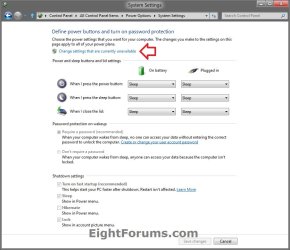
Also, when i go to controlPAnel<<Power Options << then ....there is options of "Change settings that are currently unavailable" when i click it, options becomes unvisible. Also in the Power Plan Options...(on the same window/tab), When i click ComboBox for Battery and Plugged in......There are no Options of Sleep or Hibernate, only "Do nothing" and "ShutDown" options are there.
Please help. Thanks in anticipation.
I have found that sleep and hibernate options are disabled with ShutDown Buttons. due to this, when lid is down, my laptop is still working.
Also, when i go to controlPAnel<<Power Options << then ....there is options of "Change settings that are currently unavailable" when i click it, options becomes unvisible. Also in the Power Plan Options...(on the same window/tab), When i click ComboBox for Battery and Plugged in......There are no Options of Sleep or Hibernate, only "Do nothing" and "ShutDown" options are there.
Please help. Thanks in anticipation.
Attachments
My Computer
At a glance
Windows 7 x64i56GBIntel
- Computer type
- Laptop
- Computer Manufacturer/Model Number
- HP
- OS
- Windows 7 x64
- CPU
- i5
- Motherboard
- intel
- Memory
- 6GB
- Graphics Card(s)
- Intel

