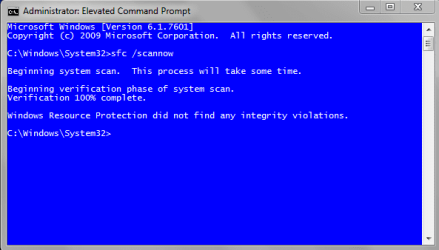
SFC found corrupt files after Windows update - never had any before

nine9s

New member
Local time
1:30 AM
Messages
22
I am wondering if this is a false result and there are not really any corrupted files.


My computer (Windows 7 x64) is about 2 years old, and has been a very clean computer. I update my image periodically with minimal applications on the image (Microsoft office, Chrome are only extra programs on the image) each time. My latest image is from late November of this year (updated to that point.)

I run SFC /scannow periodically just to monitor my system to see if any problems. I usually run it after Windows update. I had run it just yesterday as a periodic check, and no integrity violation were found. Today, after a fairly large Windows update (1 Internet Explorer update, 6 X64-based Systems updates, 1 Malicious Software tool for December 2014, 1 X64 security update, and 5 Microsoft Office updates), I ran sfc /scannow and it stated: Windows Resource Protection found corrupt files but was unable to fix some (or all) of them

Again, this was the first time I ever did not have the "Windows did not find any integrity violations" results and I do sfc /scannow at least once a month.

I extracted the CBS.log results with findstr /c:"[SR]" %windir%\Logs\CBS\CBS.log >"%userprofile%\Desktop\sfcdetails.txt"

It states:

2014-12-10 11:36:12, Info CSI 00000009 [SR] Verifying 100 (0x0000000000000064) components
2014-12-10 11:36:12, Info CSI 0000000a [SR] Beginning Verify and Repair transaction
2014-12-10 11:36:12, Info CSI 0000000c [SR] Verify complete

and repeats that (I assume - I did not count them) 100 times with the 3rd column changing each line but everything else is the same each time these three lines repeat (for example, no specific file is ever listed)

Then after all those (0x000..0064) 3 lines are repeated, it states only 1 time:

2014-12-10 11:38:53, Info CSI 00000309 [SR] Verifying 90 (0x000000000000005a) components
2014-12-10 11:38:53, Info CSI 0000030a [SR] Beginning Verify and Repair transaction
2014-12-10 11:38:54, Info CSI 0000030c [SR] Verify complete

Then after that single (0x000..005a) listing the sfcdetails.txt results end with:

2014-12-10 11:38:54, Info CSI 0000030d [SR] Repairing 0 components
2014-12-10 11:38:54, Info CSI 0000030e [SR] Beginning Verify and Repair transaction
2014-12-10 11:38:54, Info CSI 00000310 [SR] Repair complete


To me these results seem strange. On a past computer, which would have corrupted systems files from time to time, the same process above would usually list the exact file and whether it was repaired or not for each repair attempt. The above never list a single file and it states it is repairing 0 components as if it did not even try to repair anything.

Please note, I checked my drive (an SSD), and memory. No problems were found with either. So, I am pretty sure no system hardware is causing the Windows Update to corrupt files.

Any ideas?
 

My Computer My Computer

At a glance

Windows 7 x64
Computer type
PC/Desktop
OS
Windows 7 x64
Also, I want to add:

I did narrow it down to the WIndows Update causing these results.

I refreshed my latest image from 11-22-14. After getting back into the refreshed computer. I ran sfc /scannow and it reported Windows did not find any integrity violations.

I then ran Windows update, which install the same updates, I listed above. I then restarted my computer as the update suggested.

I then ran sfc /scannow and it found: Windows Resource Protection found corrupt files but was unable to fix some (or all) of them

I then extracted the cbs.log file and the results sfcdetails.txt seemed the same as before as described above. Note: I forgot to save the sfcdetails.txt file before I did a refresh of my image to compare verbatim but it seems exactly the same.

Has anyone else ran sfc /scannow since the Windows 7 update yesterday/today? I am wondering if the update is doing this for others.
 

My Computer My Computer

At a glance

Windows 7 x64
Computer type
PC/Desktop
OS
Windows 7 x64
Have you tried rebooting and re-running sfc scan, can sometimes take up to three scans to fix all problems
Generally it only needs three goes if you are suffering boot issues but worth a try
 

My Computer My Computer

At a glance

Win7 Ultimate X64Intel i5 3570K8GB DDR3 1600Onboard
Computer type
PC/Desktop
Computer Manufacturer/Model Number
Pauly Special
OS
Win7 Ultimate X64
CPU
Intel i5 3570K
Motherboard
Gigabyte Z77X-DS3H
Memory
8GB DDR3 1600
Graphics Card(s)
Onboard
Sound Card
Onboard
Screen Resolution
1280x1024
Hard Drives
Samsung 840 Evo SSD (OS)
1TB Spinner (Data)
PSU
800W Arctic
Case
Cooler Master
Cooling
3x120mm Fans
Keyboard
MS Wireless
Mouse
MS Wireless
Internet Speed
20M
Same here...

Has anyone else ran sfc /scannow since the Windows 7 update yesterday/today? I am wondering if the update is doing this for others.

My system is clean as a whistle, but after reading your posts I ran sfc /scannow & got same results...
investigating further.
View attachment 342729
 
Last edited:

My Computer My Computer

At a glance

Win 10 Pro x64, Win 7 Pro x64Intel Core i7-6700HQ Skylake16gb Crucial DDR4NVIDIA GeForce GTX 960M 2 GB
Computer type
Laptop
Computer Manufacturer/Model Number
MSI PE60 6QE
OS
Win 10 Pro x64, Win 7 Pro x64
CPU
Intel Core i7-6700HQ Skylake
Motherboard
MSI MS-16J5
Memory
16gb Crucial DDR4
Graphics Card(s)
NVIDIA GeForce GTX 960M 2 GB
Screen Resolution
1920 x 1080
Hard Drives
Samsung 850 EVO 250 GB M.2 SSD (MZ-N5E250BW)
HGST 1TB @7200 RPM HTS721010A9E630
Case
Plastic
Keyboard
Got one...
Mouse
Yep, one of those too.
Internet Speed
FIOS 75/75
Antivirus
Defender
Browser
Chrome/FFox/Ex-PLODE-r/(L)Edge
Other Info
Defender, Custom Hosts, uBlock, regular backups w/ Macrium (Free)
Have you tried rebooting and re-running sfc scan, can sometimes take up to three scans to fix all problems
Generally it only needs three goes if you are suffering boot issues but worth a try

Twice (same results.) ANd just did a third (same results.)

But I do not think SFC scan is doing anything as far as repairing because the sfcdetails.txt shows no repair attempt on any file (no file is every listed anywhere in the results), and the sfcdetails.txt ends with the following below, and that is the only time sfcdetails.txt ever states anything about repairing (in the Repairing 0 components is the only time the word "repairing" is in sfcdetails.txt.)

2014-12-10 11:38:54, Info CSI 0000030d [SR] Repairing 0 components
2014-12-10 11:38:54, Info CSI 0000030e [SR] Beginning Verify and Repair transaction
2014-12-10 11:38:54, Info CSI 00000310 [SR] Repair complete

This is why I am wondering if this is some kind of WIndows Update bug and there are not really any corrupted system files.
 

My Computer My Computer

At a glance

Windows 7 x64
Computer type
PC/Desktop
OS
Windows 7 x64
Has anyone else ran sfc /scannow since the Windows 7 update yesterday/today? I am wondering if the update is doing this for others.

My system is clean as a whistle, but after reading your posts I ran sfc /scannow & got same results...
investigating further.
View attachment 342729

Thank you for checking. Sorry it is happening to you, but I take it is a good news because it means I do not have an isolated problem, and it adds to evidence this is a false result from some Windows Update bug I assume. I guess I am the canary in coal mine on this, as I doubt many people run an sfc scan after every Windows Update as I do.

Did you extract sfcdetails from your cbs.log file? If so, is it same as mine as far as never listing a single corrupt file and not trying to repair anything?
 

My Computer My Computer

At a glance

Windows 7 x64
Computer type
PC/Desktop
OS
Windows 7 x64

My Computer My Computer

At a glance

Win 10 Pro x64, Win 7 Pro x64Intel Core i7-6700HQ Skylake16gb Crucial DDR4NVIDIA GeForce GTX 960M 2 GB
Computer type
Laptop
Computer Manufacturer/Model Number
MSI PE60 6QE
OS
Win 10 Pro x64, Win 7 Pro x64
CPU
Intel Core i7-6700HQ Skylake
Motherboard
MSI MS-16J5
Memory
16gb Crucial DDR4
Graphics Card(s)
NVIDIA GeForce GTX 960M 2 GB
Screen Resolution
1920 x 1080
Hard Drives
Samsung 850 EVO 250 GB M.2 SSD (MZ-N5E250BW)
HGST 1TB @7200 RPM HTS721010A9E630
Case
Plastic
Keyboard
Got one...
Mouse
Yep, one of those too.
Internet Speed
FIOS 75/75
Antivirus
Defender
Browser
Chrome/FFox/Ex-PLODE-r/(L)Edge
Other Info
Defender, Custom Hosts, uBlock, regular backups w/ Macrium (Free)
...I think it has to do with "C:\Windows\winsxs\Temp\PendingRenames": This folder contained over 2000 items shortly after running the sfc /scannow command. I vaguely remember reading about a bug in Win 7's sfc "scavenge" process which sometimes does not clean up after itself resulting in "Windows Resource Protection found corrupt files but was unable" message.

Looking for link...


My "C:\Windows\winsxs\Temp\PendingRenames" has 1792 files.

And when was checking it. I noticed I have no PendingDeletes folder at the same location (I am not sure if there should be one or not - perhaps that is part of problem.)
 

My Computer My Computer

At a glance

Windows 7 x64
Computer type
PC/Desktop
OS
Windows 7 x64
Just checked and mines the same, personally im not going to worry about it, if it was caused by WU then im sure MS will issue a fix
 

My Computer My Computer

At a glance

Win7 Ultimate X64Intel i5 3570K8GB DDR3 1600Onboard
Computer type
PC/Desktop
Computer Manufacturer/Model Number
Pauly Special
OS
Win7 Ultimate X64
CPU
Intel i5 3570K
Motherboard
Gigabyte Z77X-DS3H
Memory
8GB DDR3 1600
Graphics Card(s)
Onboard
Sound Card
Onboard
Screen Resolution
1280x1024
Hard Drives
Samsung 840 Evo SSD (OS)
1TB Spinner (Data)
PSU
800W Arctic
Case
Cooler Master
Cooling
3x120mm Fans
Keyboard
MS Wireless
Mouse
MS Wireless
Internet Speed
20M
I browsed through the cbs.log file, and for each one of those summarized sfcdetails.txt listing no file is listed as being repaired. Instead it keeps listing that it is "move file" in the pendingdelete folder.

Also, the word "repairing" is only listed twice in my entire cbs.log file and both times it states repairing 0 components. I assume this means the sfc scan did not attempt to repair anything which implies it really found nothing corrupted, no?
 

My Computer My Computer

At a glance

Windows 7 x64
Computer type
PC/Desktop
OS
Windows 7 x64
Just checked and mines the same, personally im not going to worry about it, if it was caused by WU then im sure MS will issue a fix

Same here, no "errors" or "repairs" in the cbs log...not going to sweat it, and further analysis is beyond my pay grade :p

@nine9: Welcome SevenForums BTW... stick around, it's a great site, well run/designed/maintained & lots of people MUCH smarter than me... it's my #1 go to for all things 7.
 
Last edited:

My Computer My Computer

At a glance

Win 10 Pro x64, Win 7 Pro x64Intel Core i7-6700HQ Skylake16gb Crucial DDR4NVIDIA GeForce GTX 960M 2 GB
Computer type
Laptop
Computer Manufacturer/Model Number
MSI PE60 6QE
OS
Win 10 Pro x64, Win 7 Pro x64
CPU
Intel Core i7-6700HQ Skylake
Motherboard
MSI MS-16J5
Memory
16gb Crucial DDR4
Graphics Card(s)
NVIDIA GeForce GTX 960M 2 GB
Screen Resolution
1920 x 1080
Hard Drives
Samsung 850 EVO 250 GB M.2 SSD (MZ-N5E250BW)
HGST 1TB @7200 RPM HTS721010A9E630
Case
Plastic
Keyboard
Got one...
Mouse
Yep, one of those too.
Internet Speed
FIOS 75/75
Antivirus
Defender
Browser
Chrome/FFox/Ex-PLODE-r/(L)Edge
Other Info
Defender, Custom Hosts, uBlock, regular backups w/ Macrium (Free)

My Computer My Computer

At a glance

Win 10 Pro x64, Win 7 Pro x64Intel Core i7-6700HQ Skylake16gb Crucial DDR4NVIDIA GeForce GTX 960M 2 GB
Computer type
Laptop
Computer Manufacturer/Model Number
MSI PE60 6QE
OS
Win 10 Pro x64, Win 7 Pro x64
CPU
Intel Core i7-6700HQ Skylake
Motherboard
MSI MS-16J5
Memory
16gb Crucial DDR4
Graphics Card(s)
NVIDIA GeForce GTX 960M 2 GB
Screen Resolution
1920 x 1080
Hard Drives
Samsung 850 EVO 250 GB M.2 SSD (MZ-N5E250BW)
HGST 1TB @7200 RPM HTS721010A9E630
Case
Plastic
Keyboard
Got one...
Mouse
Yep, one of those too.
Internet Speed
FIOS 75/75
Antivirus
Defender
Browser
Chrome/FFox/Ex-PLODE-r/(L)Edge
Other Info
Defender, Custom Hosts, uBlock, regular backups w/ Macrium (Free)
Seems KB3004394 is the culprit...

Uninstalled KB3004394, rebooted & ran sfc /scannow & Voila!

sfc_2.PNG
 

My Computer My Computer

At a glance

Win 10 Pro x64, Win 7 Pro x64Intel Core i7-6700HQ Skylake16gb Crucial DDR4NVIDIA GeForce GTX 960M 2 GB
Computer type
Laptop
Computer Manufacturer/Model Number
MSI PE60 6QE
OS
Win 10 Pro x64, Win 7 Pro x64
CPU
Intel Core i7-6700HQ Skylake
Motherboard
MSI MS-16J5
Memory
16gb Crucial DDR4
Graphics Card(s)
NVIDIA GeForce GTX 960M 2 GB
Screen Resolution
1920 x 1080
Hard Drives
Samsung 850 EVO 250 GB M.2 SSD (MZ-N5E250BW)
HGST 1TB @7200 RPM HTS721010A9E630
Case
Plastic
Keyboard
Got one...
Mouse
Yep, one of those too.
Internet Speed
FIOS 75/75
Antivirus
Defender
Browser
Chrome/FFox/Ex-PLODE-r/(L)Edge
Other Info
Defender, Custom Hosts, uBlock, regular backups w/ Macrium (Free)

My Computer My Computer

At a glance

Win 10 Pro x64, Win 7 Pro x64Intel Core i7-6700HQ Skylake16gb Crucial DDR4NVIDIA GeForce GTX 960M 2 GB
Computer type
Laptop
Computer Manufacturer/Model Number
MSI PE60 6QE
OS
Win 10 Pro x64, Win 7 Pro x64
CPU
Intel Core i7-6700HQ Skylake
Motherboard
MSI MS-16J5
Memory
16gb Crucial DDR4
Graphics Card(s)
NVIDIA GeForce GTX 960M 2 GB
Screen Resolution
1920 x 1080
Hard Drives
Samsung 850 EVO 250 GB M.2 SSD (MZ-N5E250BW)
HGST 1TB @7200 RPM HTS721010A9E630
Case
Plastic
Keyboard
Got one...
Mouse
Yep, one of those too.
Internet Speed
FIOS 75/75
Antivirus
Defender
Browser
Chrome/FFox/Ex-PLODE-r/(L)Edge
Other Info
Defender, Custom Hosts, uBlock, regular backups w/ Macrium (Free)
So uninstall that specific update and hide it, until Microsoft fixes it?
 

My Computer My Computer

At a glance

Windows 7 x64
Computer type
PC/Desktop
OS
Windows 7 x64
That's what I did. Just saw a thread @Wincert several users reporting that installing KB3004394 prevented ANY further updates from installing, so apparently you have to uninstall it anyway.
 
Last edited:

My Computer My Computer

At a glance

Win 10 Pro x64, Win 7 Pro x64Intel Core i7-6700HQ Skylake16gb Crucial DDR4NVIDIA GeForce GTX 960M 2 GB
Computer type
Laptop
Computer Manufacturer/Model Number
MSI PE60 6QE
OS
Win 10 Pro x64, Win 7 Pro x64
CPU
Intel Core i7-6700HQ Skylake
Motherboard
MSI MS-16J5
Memory
16gb Crucial DDR4
Graphics Card(s)
NVIDIA GeForce GTX 960M 2 GB
Screen Resolution
1920 x 1080
Hard Drives
Samsung 850 EVO 250 GB M.2 SSD (MZ-N5E250BW)
HGST 1TB @7200 RPM HTS721010A9E630
Case
Plastic
Keyboard
Got one...
Mouse
Yep, one of those too.
Internet Speed
FIOS 75/75
Antivirus
Defender
Browser
Chrome/FFox/Ex-PLODE-r/(L)Edge
Other Info
Defender, Custom Hosts, uBlock, regular backups w/ Macrium (Free)
That's what I did. Just saw a thread @Wincert reporting installing KB3004394 prevented ANY further updates from installing, so apparently you have to uninstall it anyway.

I uninstalled it, and now SFC scan finds no integrity violations.

I also checked event viewer and found:

The Cryptographic Services service failed to initialize the Catalog Database. The ESENT error was: -1305.

It was timed stamped at same time as my uninstall of KB 3004394.
 

My Computer My Computer

At a glance

Windows 7 x64
Computer type
PC/Desktop
OS
Windows 7 x64
That's what I did. Just saw a thread @Wincert several users reporting that installing KB3004394 prevented ANY further updates from installing, so apparently you have to uninstall it anyway.

Wonder how Microsoft will fix it for pretty much all WIndows users who update it if you cannot receive updates until you uninstall that one. No one, but a few isolated people, like in this message thread, are going to do that.
 

My Computer My Computer

At a glance

Windows 7 x64
Computer type
PC/Desktop
OS
Windows 7 x64
Someone in that Microsft answer site wrote that this update problem basically made all Windows files unsigned.

First thing that popped into my head is that some antivirus programs might start treating Windows system files as malware threats if they are unsigned.

This could be huge.
 

My Computer My Computer

At a glance

Windows 7 x64
Computer type
PC/Desktop
OS
Windows 7 x64
Back
Top