
Sfc/scannow failed C:/ is dirty chkdsk not working

Michigr

New member
I have a Dell inspiron 14z 5423 laptop with a series of problems that I think originate from disk failure.
I cannot use system restore to previous date due to disk errors.
The latest problem is that dvd recorder stoped recording but it is reading.
I run sfc through cmd with admin rights and it stops at 63%.
I tried to run chkdsk but the windows boot overrides the process, what can I do?
 

Attachments
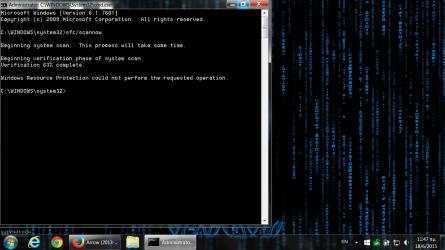
  • sfc fails.png
    sfc fails.png
    730.7 KB · Views: 1
Last edited:

My Computer

Computer type
Laptop
Computer Manufacturer/Model Number
Dell inspiron 5423
OS
Windows 7 Home Premium 64 bit
CPU
i5-3317U @ 1.70GHz
Motherboard
0DYHVH
Memory
8.00 GB
Graphics Card(s)
intel HD Ghraphics 4000
Screen Resolution
1366x768
Hard Drives
500GB
Antivirus
avast
Browser
mozilla firefox, chrome, opera, maxthon
Other Info
and I also use a canon PIXMA MG3250 WIRELLES prrinter/scanner
Scan with HDD manufacturer's disk health tool for errors.
 

My Computer

Computer type
PC/Desktop
Computer Manufacturer/Model Number
Custom Build
OS
Windows 7 Ultimate x64 SP1
CPU
AMD Phenom 2 1090T
Motherboard
Gigabyte GA-890FXA-UD5
Memory
2x8GB Kingston HyperX Fury Black 1600Mhz Unganged
Graphics Card(s)
MSI GTX 970 Gaming 4G
Sound Card
Realtek On-Board HD 7.1 Audio / Logitech G35
Monitor(s) Displays
3xAcer GD245HQ
Screen Resolution
1920x1080
Hard Drives
Samsung 850 Pro 512GB SSD - OS /
WD Caviar Black SATA 3 - 1 TBx2 - Dynamic RAID 0 /
WD Caviar Green SATA 2 - 640GBx2 - Dynamic RAID 0 /
WD Caviar Green SATA 2 - 640GB - Internal Backup /
Seagate Barracude SATA 3 - 3TB - External Backup/ Sync
PSU
HighPower 1000W
Case
Cooler Master HAF 932
Cooling
Noctua NH-D14
Keyboard
Logitech G19
Mouse
Logitech G500
Internet Speed
100/4 Mbit Cable (100GB quota)
Antivirus
ZoneAlarm Extreme Security / MBAM Pro / MBAE Free / SAS Free
Browser
IE 11 - Firefox - Chrome
Other Info
Logitech F710/ G27/ G940/ Z5500 // TrackIR 5 // Nvidia 3D Surround Vision
I did and they found nothing but windows insists that the disk has bad sectors
 

My Computer

Computer type
Laptop
Computer Manufacturer/Model Number
Dell inspiron 5423
OS
Windows 7 Home Premium 64 bit
CPU
i5-3317U @ 1.70GHz
Motherboard
0DYHVH
Memory
8.00 GB
Graphics Card(s)
intel HD Ghraphics 4000
Screen Resolution
1366x768
Hard Drives
500GB
Antivirus
avast
Browser
mozilla firefox, chrome, opera, maxthon
Other Info
and I also use a canon PIXMA MG3250 WIRELLES prrinter/scanner
Are you running chkdsk this way?

Press the Window key + the R key to open a Run box.
Type chkdsk c: /r and press Enter. You will see the following:

The type of the file system is NTFS.
Cannot lock current drive.

Chkdsk cannot run because the volume is in use by
process. Would you like to schedule this volume t
checked the next time the system restarts? (Y/N)


Type y and press Enter.
Reboot.

Chkdsk will start, let it run to completion.

If that doesn't work:

How to run chkdsk or System File Checker (SFC) from the Recovery Console
  • Boot your Vista or Windows 7 installation DVD
  • When you see "Press any key to boot from CD or DVD", press Enter.
  • At the "Install Windows" screen, click on Repair your computer at lower left
  • At the System Recovery Options screen, make note of the drive letter assigned to your boot drive (normally C: ) and click Next
  • At the Chose a Recovery Tool window, click on Command Prompt. You will be sitting at X:\Sources directory.
Run chkdsk or SFC
  • If you did not note the drive letter of your boot disk, you can enter bcdedit and look at the osdevice line to see what it is.
  • For chkdsk, type chkdsk c: /r and press Enter (use the letter from above if not C: ).
  • For sfc, type sfc /scannow /offbootdir=c:\ /offwindir=c:\windows and press Enter (use the letter from above)
  • Let either run to completion undisturbed.
 

My Computer

Computer type
PC/Desktop
Computer Manufacturer/Model Number
Lenovo IdeaCenter 450
OS
Windows 10 Pro X64
CPU
Intel Quad Core i7-4770 @ 3.4Ghz
Memory
16.0GB PC3-12800 DDR3 SDRAM 1600 MHz
Graphics Card(s)
Intel Integrated HD Graphics
Sound Card
Realtek HD Audio
Monitor(s) Displays
HP 22" LCD
Screen Resolution
1680 x 1050
Hard Drives
250GB Samsung EVO SATA-3 SSD
2TB Seagate ST2000DM001 SATA-2
1.5TB Seagate ST3150041AS SATA
Keyboard
Dell USB
Mouse
Lenovo USB
Internet Speed
Cable via Road Runner 3MB Upload, 30MB Download
Antivirus
Windows Defender, MBAM Pro, MBAE
Browser
Seamonkey
Other Info
UEFI/GPT
PLDS DVD-RW DH16AERSH
Are you running chkdsk this way?

Press the Window key + the R key to open a Run box.
Type chkdsk c: /r and press Enter. You will see the following:

The type of the file system is NTFS.
Cannot lock current drive.

Chkdsk cannot run because the volume is in use by
process. Would you like to schedule this volume t
checked the next time the system restarts? (Y/N)


Type y and press Enter.
Reboot.

Chkdsk will start, let it run to completion.

If that doesn't work:

How to run chkdsk or System File Checker (SFC) from the Recovery Console
  • Boot your Vista or Windows 7 installation DVD
  • When you see "Press any key to boot from CD or DVD", press Enter.
  • At the "Install Windows" screen, click on Repair your computer at lower left
  • At the System Recovery Options screen, make note of the drive letter assigned to your boot drive (normally C: ) and click Next
  • At the Chose a Recovery Tool window, click on Command Prompt. You will be sitting at X:\Sources directory.
Run chkdsk or SFC
  • If you did not note the drive letter of your boot disk, you can enter bcdedit and look at the osdevice line to see what it is.
  • For chkdsk, type chkdsk c: /r and press Enter (use the letter from above if not C: ).
  • For sfc, type sfc /scannow /offbootdir=c:\ /offwindir=c:\windows and press Enter (use the letter from above)
  • Let either run to completion undisturbed.

I thank you for your help !! the problem is that none of the installation disks I have recognises the hard drive whatsoever. I suspect that the Intel smart technology software has something to do with it! (An ssd accelerates the hhd.) I still struggle with it...
 

My Computer

Computer type
Laptop
Computer Manufacturer/Model Number
Dell inspiron 5423
OS
Windows 7 Home Premium 64 bit
CPU
i5-3317U @ 1.70GHz
Motherboard
0DYHVH
Memory
8.00 GB
Graphics Card(s)
intel HD Ghraphics 4000
Screen Resolution
1366x768
Hard Drives
500GB
Antivirus
avast
Browser
mozilla firefox, chrome, opera, maxthon
Other Info
and I also use a canon PIXMA MG3250 WIRELLES prrinter/scanner
If possible, move the windows drive to the first SATA port (SATA_0 or SATA_1), check motherboard manual to see which port is first.

Also, if installer doesn't see, yes, you need Intel Pre-Install drivers, whatever they may be called. Copy them to a USB stick and load them when asked.
 

My Computer

Computer type
PC/Desktop
Computer Manufacturer/Model Number
Custom Build
OS
Windows 7 Ultimate x64 SP1
CPU
AMD Phenom 2 1090T
Motherboard
Gigabyte GA-890FXA-UD5
Memory
2x8GB Kingston HyperX Fury Black 1600Mhz Unganged
Graphics Card(s)
MSI GTX 970 Gaming 4G
Sound Card
Realtek On-Board HD 7.1 Audio / Logitech G35
Monitor(s) Displays
3xAcer GD245HQ
Screen Resolution
1920x1080
Hard Drives
Samsung 850 Pro 512GB SSD - OS /
WD Caviar Black SATA 3 - 1 TBx2 - Dynamic RAID 0 /
WD Caviar Green SATA 2 - 640GBx2 - Dynamic RAID 0 /
WD Caviar Green SATA 2 - 640GB - Internal Backup /
Seagate Barracude SATA 3 - 3TB - External Backup/ Sync
PSU
HighPower 1000W
Case
Cooler Master HAF 932
Cooling
Noctua NH-D14
Keyboard
Logitech G19
Mouse
Logitech G500
Internet Speed
100/4 Mbit Cable (100GB quota)
Antivirus
ZoneAlarm Extreme Security / MBAM Pro / MBAE Free / SAS Free
Browser
IE 11 - Firefox - Chrome
Other Info
Logitech F710/ G27/ G940/ Z5500 // TrackIR 5 // Nvidia 3D Surround Vision
Back
Top