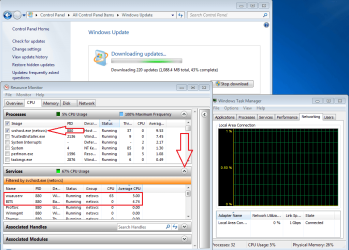
Actually I believe things are a bit better now this was after a clean install in a not so normal way to do it,
The little trick I used pulled up 159 Important updates in about 10 minutes plus another 60 in optional updates
By disconnecting from the internet and manually loading from a flash drive
KB3083710 and restarting after
Then KB3102810 and restarting
It was like magic after all the crap I've read about the long delays in searching for updates on a clean install

But it was short lived it seems,
Then I did this,
I ran winkey+R
eventvwr
Windows logs and expanded them and right clicked and cleared
Applications
Security
Setup
System
I almost regretted it
Then I ran cmd and sfc /scannow and it found and fixed an error or two.. on the first run
Then ran it a couple more time booting between runs and showed no errors
http://www.sevenforums.com/tutorials/1538-sfc-scannow-command-system-file-checker.html
Then I ran System update readiness tool
https://www.microsoft.com/en-us/download/details.aspx?id=20858
After an hour it popped up and said not for this operating system
But in the mean time 5 more important updates showed up
Really kind ones that should of been included in the first round of updates I had no failed update listings :/
kb3035126
kb3110329
kb3078601
kb3035132
kb3109094
After loading them and restarting things started rolling again and eventually all updates showed up and installed after manually checking for updates a couple times

The best thing is cpu load and temperatures are a lot better and our friend svchost.exe (netsvcs) is now in check
One little tip
kb3035126 kb3020369 will appear in the first round of updates
It needs to be installed all by it's self

Oops wrong update that needs to be installed all by it's self
https://support.microsoft.com/en-us/kb/3020369