35-60% of my memory is MIA.. help me find it!

jvincent08

New member
Local time
4:16 AM
Messages
6
So, according to my math (adding up the values shown in the task manager), I should only be using about 15% of my total memory. However, the system is reporting about 60% usage. Earlier, while installing a game, this shot up to 95-97%, when my math told me I should only have been using about 30%. I've tried clearing the memory cache and that made no difference. Where else could the problem lie?


TIA.
 

My Computer My Computer

At a glance

Windows 7Intel C2D E84002 GB DDR2-667ATI HD4650
OS
Windows 7
CPU
Intel C2D E8400
Memory
2 GB DDR2-667
Graphics Card(s)
ATI HD4650
How much memory does your video card have?
 

My Computer My Computer

At a glance

Windows 7 Pro & Vista Home PremiumAthlon 64 3800+ (Orleans) 2.40GHz2GB DDR2 RAM DIMMNVIDIA GeForce 8500 GT 512 MB memory HDMI out
Computer Manufacturer/Model Number
Cheap $399.00 E-Machine
OS
Windows 7 Pro & Vista Home Premium
CPU
Athlon 64 3800+ (Orleans) 2.40GHz
Motherboard
Winfast
Memory
2GB DDR2 RAM DIMM
Graphics Card(s)
NVIDIA GeForce 8500 GT 512 MB memory HDMI out
Sound Card
creative X-Fi Exteme 7..1 channel
Monitor(s) Displays
Acer V223W 22" widescreen DVI
Screen Resolution
1680x1050
Hard Drives
WDC WD5 500GB
WDC WD25 250GB
PSU
OCZ 550 watt
Case
Gateway
Cooling
2 fans
Keyboard
Dell
Mouse
Sony Vaio
Internet Speed
18MB/s down - .72MB /s up
512MB

But none of that should be used by normal processes.
 

My Computer My Computer

At a glance

Windows 7Intel C2D E84002 GB DDR2-667ATI HD4650
OS
Windows 7
CPU
Intel C2D E8400
Memory
2 GB DDR2-667
Graphics Card(s)
ATI HD4650
Yes, it does.
 

My Computer My Computer

At a glance

Windows 7 Pro & Vista Home PremiumAthlon 64 3800+ (Orleans) 2.40GHz2GB DDR2 RAM DIMMNVIDIA GeForce 8500 GT 512 MB memory HDMI out
Computer Manufacturer/Model Number
Cheap $399.00 E-Machine
OS
Windows 7 Pro & Vista Home Premium
CPU
Athlon 64 3800+ (Orleans) 2.40GHz
Motherboard
Winfast
Memory
2GB DDR2 RAM DIMM
Graphics Card(s)
NVIDIA GeForce 8500 GT 512 MB memory HDMI out
Sound Card
creative X-Fi Exteme 7..1 channel
Monitor(s) Displays
Acer V223W 22" widescreen DVI
Screen Resolution
1680x1050
Hard Drives
WDC WD5 500GB
WDC WD25 250GB
PSU
OCZ 550 watt
Case
Gateway
Cooling
2 fans
Keyboard
Dell
Mouse
Sony Vaio
Internet Speed
18MB/s down - .72MB /s up
Really? Why?

And regardless, why would this affect my main memory usage?
 

My Computer My Computer

At a glance

Windows 7Intel C2D E84002 GB DDR2-667ATI HD4650
OS
Windows 7
CPU
Intel C2D E8400
Memory
2 GB DDR2-667
Graphics Card(s)
ATI HD4650
Are you looking at all user's processes and adding those up or just your own users?
 

My Computer My Computer

At a glance

Windows 7 Ultimate 64bitPhenom II 1055T @ 3.1 Ghz (+.3 Ghz OC)8GB2x Nvidia GTX 260 core 216
Computer Manufacturer/Model Number
Custom Built
OS
Windows 7 Ultimate 64bit
CPU
Phenom II 1055T @ 3.1 Ghz (+.3 Ghz OC)
Motherboard
Asus
Memory
8GB
Graphics Card(s)
2x Nvidia GTX 260 core 216
Sound Card
Intergrated 7.1
Monitor(s) Displays
dual 23"
Screen Resolution
3840x1080
Hard Drives
C: 30GB intel ssd
D: 2x 500GB WD black raid 0
NAS: 6TB WB green raid 5
PSU
750w
Case
Black
Cooling
Oxygen, Nitrogen, other various gases.
Keyboard
QWERTY and clicky
Mouse
logitech wireless
Internet Speed
12Mbit down; 4Mbit up | 6Mbit down; 1Mbit up (Both DSL)
Other Info
blue led fans look nice
There are a few things that will suck up your memory while booting up, the largest is your vid card, followed by some of the drivers that get loaded. If you have a 2 gig vid card, 2 gigs of your system memory get “stolen”. Its just a fact of life that's the way PC hardware works, the video memory is mirrored in the system memory, and while ugly, and hackish, it is the way things are done.


Think of it as the system draws on a whiteboard the same size and shape as your vid card has, but your vid card has to look at this whiteboard from outside the room, and copy the picture to its own whiteboard for you to see.


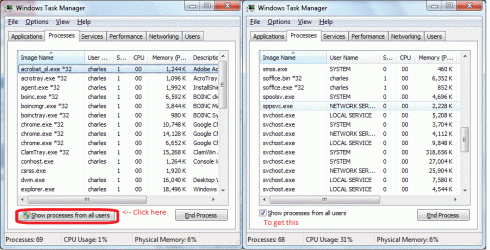
The next thing to take a look at is the following 3 views of the task manager. Note that on startup (from a fresh cold boot) I have almost 4 gig of memory in use, this is the single panel screen shot.


Now be sure to look at the second set of screen shots, note the button circled in red, click it to get the stuff that is “non user space” stuff, you should see LOCAL, SYSTEM, and NETWORK , with possibly some others.


The other thing to be aware of SI (1000x) units, vs "PC" units (1024x).


If you can show us the same 3 screen shots, we can get a better understanding of what is going on in your system.


-charlesView attachment 37810
 

Attachments

  • show-all.gif
    show-all.gif
    98 KB · Views: 70
  • startup.gif
    startup.gif
    41.1 KB · Views: 50
Last edited:

My Computer My Computer

At a glance

win 7, R24x 88564gbgeneric pny 9500gt
OS
win 7, R2
CPU
4x 885
Motherboard
uniwide
Memory
64gb
Graphics Card(s)
generic pny 9500gt
Sound Card
road7
Monitor(s) Displays
generic
Screen Resolution
80 columns
Hard Drives
4x 300gb raid0
PSU
3x500w , hot swap
Case
, nut
Cooling
, very
Keyboard
qwerty
Mouse
, eak, a!
Internet Speed
70 baud
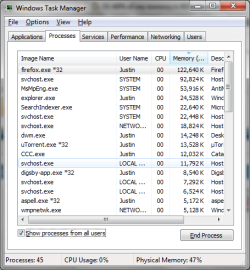
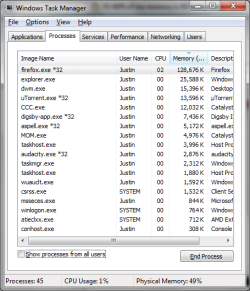
Thanks for your replies. Here are the screenshots. As you can see, this problem is occurring with an uptime of three days, so it's not just when booting up. I always have the "show processes from all users" box checked. These are the values that I added up.
 

Attachments

  • taskman.png
    taskman.png
    20.8 KB · Views: 16
  • taskman2.png
    taskman2.png
    15.5 KB · Views: 18
  • taskman3.png
    taskman3.png
    19.1 KB · Views: 12
Last edited:

My Computer My Computer

At a glance

Windows 7Intel C2D E84002 GB DDR2-667ATI HD4650
OS
Windows 7
CPU
Intel C2D E8400
Memory
2 GB DDR2-667
Graphics Card(s)
ATI HD4650
charles3,

I notice some weird about the svchost.exe is taking up 318,00K.

That's way off the scale . Do you know the reason why?
 

My Computer My Computer

At a glance

Windows 7 Pro & Vista Home PremiumAthlon 64 3800+ (Orleans) 2.40GHz2GB DDR2 RAM DIMMNVIDIA GeForce 8500 GT 512 MB memory HDMI out
Computer Manufacturer/Model Number
Cheap $399.00 E-Machine
OS
Windows 7 Pro & Vista Home Premium
CPU
Athlon 64 3800+ (Orleans) 2.40GHz
Motherboard
Winfast
Memory
2GB DDR2 RAM DIMM
Graphics Card(s)
NVIDIA GeForce 8500 GT 512 MB memory HDMI out
Sound Card
creative X-Fi Exteme 7..1 channel
Monitor(s) Displays
Acer V223W 22" widescreen DVI
Screen Resolution
1680x1050
Hard Drives
WDC WD5 500GB
WDC WD25 250GB
PSU
OCZ 550 watt
Case
Gateway
Cooling
2 fans
Keyboard
Dell
Mouse
Sony Vaio
Internet Speed
18MB/s down - .72MB /s up
jvincent08,

You need to remove some programs from startup, Go to Start > Run, and type msconfig. Uncheck all entries except for your anti-virus, spyware detector, and personal firewall if you have one.
 

My Computer My Computer

At a glance

Windows 7 Pro & Vista Home PremiumAthlon 64 3800+ (Orleans) 2.40GHz2GB DDR2 RAM DIMMNVIDIA GeForce 8500 GT 512 MB memory HDMI out
Computer Manufacturer/Model Number
Cheap $399.00 E-Machine
OS
Windows 7 Pro & Vista Home Premium
CPU
Athlon 64 3800+ (Orleans) 2.40GHz
Motherboard
Winfast
Memory
2GB DDR2 RAM DIMM
Graphics Card(s)
NVIDIA GeForce 8500 GT 512 MB memory HDMI out
Sound Card
creative X-Fi Exteme 7..1 channel
Monitor(s) Displays
Acer V223W 22" widescreen DVI
Screen Resolution
1680x1050
Hard Drives
WDC WD5 500GB
WDC WD25 250GB
PSU
OCZ 550 watt
Case
Gateway
Cooling
2 fans
Keyboard
Dell
Mouse
Sony Vaio
Internet Speed
18MB/s down - .72MB /s up
Also make sure you are not using any Virtual drives that are auto mounting an image or something, I mention this because you said you noticed 95% usage while installing a game and I have had the same thing with virtual drives when installing games from an ISO.
 

My Computer My Computer

At a glance

Windows 7 Ultimate Vista Ultimate x64Core 2 Duo E8500 3.16Ghz @ 3.8Ghz2x2Gigs Patriot PC2-6400 LLInno3D GeForce GTX260 216 SP
Computer Manufacturer/Model Number
Home Brew
OS
Windows 7 Ultimate Vista Ultimate x64
CPU
Core 2 Duo E8500 3.16Ghz @ 3.8Ghz
Motherboard
eVGA 750i FTW
Memory
2x2Gigs Patriot PC2-6400 LL
Graphics Card(s)
Inno3D GeForce GTX260 216 SP
Monitor(s) Displays
ASUS VW222U 22" 2ms Response time
Screen Resolution
1680x1050
Hard Drives
SATA 150GB
SATA II 250GB
USB IDE 750GB Ext.
PSU
HYTEC 600W & Thermaltake 650W Toughpower Power Exp
Case
Thermaltake Armor LCS (Liquid Cooling System)
Cooling
Liquid Cooling System
Keyboard
Logitech G15 Gaming Keyboard
Mouse
Logitech G9 Gaming Mouse
Just looking at your screen shots, things appear to be on the mark for a 2 gig system.


How much memory does your vid card have, about 512k?
When you totaled up (by hand) the memory usage, what was it?


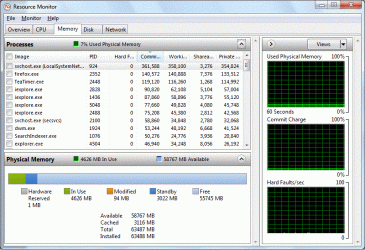
There are 2 more tools that you can use to see where your memory is going,
Windows Resource Monitor and Process Explorer by www.sysinternals.com .


If you take a look at my examples you can see that my drivers are using up 1gb of space, for more definitions in Windows Resource Monitor, hold your mouse over the color of the item in question.


If you feel that your running out of memory, get some more (physical) memory, or cut down on the things you are loading/running.


Windows also has a lot of “slop” in how it reports things, don't take any figures as gospel, depending on where I look, my system has 62 to 64 gig. I'm “missing” around the amount of memory you have installed in your system, its just the way windows works.


-Charles
 

Attachments

  • Windows Resource Monitor.gif
    Windows Resource Monitor.gif
    92 KB · Views: 26
  • Process Explorer.gif
    Process Explorer.gif
    183.4 KB · Views: 43

My Computer My Computer

At a glance

win 7, R24x 88564gbgeneric pny 9500gt
OS
win 7, R2
CPU
4x 885
Motherboard
uniwide
Memory
64gb
Graphics Card(s)
generic pny 9500gt
Sound Card
road7
Monitor(s) Displays
generic
Screen Resolution
80 columns
Hard Drives
4x 300gb raid0
PSU
3x500w , hot swap
Case
, nut
Cooling
, very
Keyboard
qwerty
Mouse
, eak, a!
Internet Speed
70 baud
charles3,

I notice some weird about the svchost.exe is taking up 318,00K.

That's way off the scale . Do you know the reason why?

superfetch.... at idle.... 64gb... you should see it when I do domething...
 

My Computer My Computer

At a glance

win 7, R24x 88564gbgeneric pny 9500gt
OS
win 7, R2
CPU
4x 885
Motherboard
uniwide
Memory
64gb
Graphics Card(s)
generic pny 9500gt
Sound Card
road7
Monitor(s) Displays
generic
Screen Resolution
80 columns
Hard Drives
4x 300gb raid0
PSU
3x500w , hot swap
Case
, nut
Cooling
, very
Keyboard
qwerty
Mouse
, eak, a!
Internet Speed
70 baud
jvincent08,

You need to remove some programs from startup, Go to Start > Run, and type msconfig. Uncheck all entries except for your anti-virus, spyware detector, and personal firewall if you have one.

With all due respect, no I don't. I only have the things I need/want running at start up, and none of those things can account for the hundreds upon hundreds of megabytes that are being unaccounted for. Even if there were unnecessary start-up programs running, they would be listed under the processes tab in the task manager.

Also make sure you are not using any Virtual drives that are auto mounting an image or something, I mention this because you said you noticed 95% usage while installing a game and I have had the same thing with virtual drives when installing games from an ISO.

Thanks for the suggestion. The particular game I was installing was from a self-extracting exe, not a virtual ISO, but I have used the former method before and will look out for it from now on.

How much memory does your vid card have, about 512k?
Yes.

When you totaled up (by hand) the memory usage, what was it?
I can't remember exactly. Somewhere around 350,000, I believe.

There are 2 more tools that you can use to see where your memory is going,
Windows Resource Monitor and Process Explorer by www.sysinternals.com .


If you take a look at my examples you can see that my drivers are using up 1gb of space, for more definitions in Windows Resource Monitor, hold your mouse over the color of the item in question.


If you feel that your running out of memory, get some more (physical) memory, or cut down on the things you are loading/running.


Windows also has a lot of “slop” in how it reports things, don't take any figures as gospel, depending on where I look, my system has 62 to 64 gig. I'm “missing” around the amount of memory you have installed in your system, its just the way windows works.


-Charles
Thanks for your help. I guess I'll have to chalk it up to drivers and Windows' bad reporting. IMO, *everything* taking up any resources should be listed in the task manager, including drivers. This would help clear up a lot of confusion, I think.

Thanks again. I'm off to buy another 2 gig stick of RAM :D
 

My Computer My Computer

At a glance

Windows 7Intel C2D E84002 GB DDR2-667ATI HD4650
OS
Windows 7
CPU
Intel C2D E8400
Memory
2 GB DDR2-667
Graphics Card(s)
ATI HD4650
No disrespect, but...........

Even if there were unnecessary start-up programs running, they would be listed under the processes tab in the task manager.

No they wouldn't because they would not be starting up.
 
Last edited:

My Computer My Computer

At a glance

Windows 7 Pro & Vista Home PremiumAthlon 64 3800+ (Orleans) 2.40GHz2GB DDR2 RAM DIMMNVIDIA GeForce 8500 GT 512 MB memory HDMI out
Computer Manufacturer/Model Number
Cheap $399.00 E-Machine
OS
Windows 7 Pro & Vista Home Premium
CPU
Athlon 64 3800+ (Orleans) 2.40GHz
Motherboard
Winfast
Memory
2GB DDR2 RAM DIMM
Graphics Card(s)
NVIDIA GeForce 8500 GT 512 MB memory HDMI out
Sound Card
creative X-Fi Exteme 7..1 channel
Monitor(s) Displays
Acer V223W 22" widescreen DVI
Screen Resolution
1680x1050
Hard Drives
WDC WD5 500GB
WDC WD25 250GB
PSU
OCZ 550 watt
Case
Gateway
Cooling
2 fans
Keyboard
Dell
Mouse
Sony Vaio
Internet Speed
18MB/s down - .72MB /s up
Thanks again. I'm off to buy another 2 gig stick of RAM :D


If the problem can be solved by throwing more memory at win7, great!

Just remember that memory should be installed in pairs, or triples for best performance. Let us know how things go.


If you must absolutely”I gots to hazz 2 orz ill splode” see what exactly is sucking up all your memory, and are willing to do a great deal of learning, you can examine the contents of, hiberfil.sys ( You could also do a core dump/memory dump and get the same flavor of file.) after you put your computer in hibernation, but do not reboot from hibernation (cold clean boot).


If you chose to do this, you will find out what is where, and why things are, BUT you are pretty much on your own, and it will take a long time to trace where a memory entry came from, if you not fluent in the ways of memory allocation in windows.


I (personally) would only go this route if there was something icky bad that was bugging the hell out of me, that I was being paid (very well) to fix.
 
Last edited:

My Computer My Computer

At a glance

win 7, R24x 88564gbgeneric pny 9500gt
OS
win 7, R2
CPU
4x 885
Motherboard
uniwide
Memory
64gb
Graphics Card(s)
generic pny 9500gt
Sound Card
road7
Monitor(s) Displays
generic
Screen Resolution
80 columns
Hard Drives
4x 300gb raid0
PSU
3x500w , hot swap
Case
, nut
Cooling
, very
Keyboard
qwerty
Mouse
, eak, a!
Internet Speed
70 baud
emm since when would you fit tripple dimms on a c2d setup ? or any board other than a core i7 (the ones that first came out) ??

even then it was proven on many many hardware sites to not have much of a performance gain , especially for the extra cost

and whats to say he was overclocking his memory ? by the looks of his system specs hes running his ram at standard spec so why would adding ram in pairs be of any benefit to him than perhaps adding to what he already has if he has a spare dimm socket ?

its nice and all to upgrade them in pairs but if he isnt using the full potential of his components then i doubt he would notice the difference if he just stuck in an extra dimm to work alongside what he currently uses.

also could you show a screenshot of your ram usage and how windows is allocating your ram when "you do something" ?
 

My Computer My Computer

At a glance

win 7 x64
OS
win 7 x64
There are a few things that will suck up your memory while booting up, the largest is your vid card, followed by some of the drivers that get loaded. If you have a 2 gig vid card, 2 gigs of your system memory get “stolen”. Its just a fact of life that's the way PC hardware works, the video memory is mirrored in the system memory, and while ugly, and hackish, it is the way things are done.


Think of it as the system draws on a whiteboard the same size and shape as your vid card has, but your vid card has to look at this whiteboard from outside the room, and copy the picture to its own whiteboard for you to see.


The next thing to take a look at is the following 3 views of the task manager. Note that on startup (from a fresh cold boot) I have almost 4 gig of memory in use, this is the single panel screen shot.


Now be sure to look at the second set of screen shots, note the button circled in red, click it to get the stuff that is “non user space” stuff, you should see LOCAL, SYSTEM, and NETWORK , with possibly some others.


The other thing to be aware of SI (1000x) units, vs "PC" units (1024x).


If you can show us the same 3 screen shots, we can get a better understanding of what is going on in your system.


-charlesView attachment 37810
First off, the system memory doesn't mirror the video. That's the whole point of having a video card with it's own GPU and RAM. So it's GPU can handle it's memory and manage the images without the CPU having to do any of that work. Otherwise what benifit would we have of adding a GFX card? Why not just have dual cores do every thing!? Right now my computer is using 64% RAM, and I've got a 64bit system going... What your saying is my 512MB GFX card gets mirrored? I only have 1G in the system right now, if I'm running a game that utalizes all 512MB of gfx, plus the 60% plus the 450MB the program is using... That's somewhere around 1.5 to 2G that's being used when I game.......... I know I've got a paige file but damn that doesn't have sound math there.

The reality? The GFX card was made so that it handles all of the drawing of the images and the "objects". So that the computer can be used to work on everything that's not Video related (though physics is technically a video related problem, it's not related to what you actually see, just how it works). What you see is supposed to be done by the GFX card, and that alone. Basically if your theory held true if you had a 2G video card and 2G onboard then where is the computers ram!? Gone because you have to mirror the video cards image so it knows what to see? It's independent, just as off board sound was created so the computer doesn't spend resources on sound. It's ingenious! adding external devices so that we don't have our CPU do the work!? What shall we call these devices? PCI!? GREAT!!!

[edit] Infact, what happens if you have a video card with more ram than the PC!? OMG We created a problem!
 

My Computer My Computer

At a glance

Windows 7, LinuxAMD Phemon II x2 3@37501G Crucial 16668800GT OC (custom OC)
Computer Manufacturer/Model Number
Custom
OS
Windows 7, Linux
CPU
AMD Phemon II x2 3@3750
Motherboard
ASRock M3A770DE
Memory
1G Crucial 1666
Graphics Card(s)
8800GT OC (custom OC)
Sound Card
Sound Blaster Live! (never changes!)
Monitor(s) Displays
Vivitron 22"
Screen Resolution
1600x1200
Hard Drives
Western Digital 120G/160G SATA
Maxtor 80G IDE
PSU
450w
Case
Unknown
Cooling
Custom Air cooled
Keyboard
Logitech
Mouse
Logitech M-BZ15A Laser
Internet Speed
Cable 10mbit
emm since when would you fit tripple dimms on a c2d setup ? or any board other than a core i7 (the ones that first came out) ??
the triple reference was mostly for some one trying who does have memory in triples who just happens to be looking through these forums later, perhaps 2 or 3 years from now (unlikely, but it would be nice if people looked through the forums before posting a question)


emm
why would adding ram in pairs be of any benefit to him than perhaps adding to what he already has if he has a spare dimm socket ?
Simple problem solving, you have memory and slots, if there is some part on the board that is not soldered correctly, the issue may not come up until both slots are filled. So in troubleshooting you eliminate the most likely things, until you get to the unlikely. Sometimes a stick and slot don't get along, but it works fine if you swap things around. Troubleshooting is a process of elimination, and since the big MB testers are at the factory, us regular people have to swap things around until we believe we know what the issue is.


I run into one or 2 boxes a year that just putting a different stick in the same slot results in ram happyness. (and the old stick works in another machine, or slot) We are here to offer some ways as to what/how this person can do to get the box up and running, right?


emm
its nice and all to upgrade them in pairs but if he isnt using the full potential of his components then i doubt he would notice the difference if he just stuck in an extra dimm to work alongside what he currently uses.
true, most people wouldn't notice slow memory from fast.


emm
also could you show a screenshot of your ram usage and how windows is allocating your ram when "you do something" ?
sure.
 

Attachments

  • start-of-work.gif
    start-of-work.gif
    13.8 KB · Views: 28

My Computer My Computer

At a glance

win 7, R24x 88564gbgeneric pny 9500gt
OS
win 7, R2
CPU
4x 885
Motherboard
uniwide
Memory
64gb
Graphics Card(s)
generic pny 9500gt
Sound Card
road7
Monitor(s) Displays
generic
Screen Resolution
80 columns
Hard Drives
4x 300gb raid0
PSU
3x500w , hot swap
Case
, nut
Cooling
, very
Keyboard
qwerty
Mouse
, eak, a!
Internet Speed
70 baud
Charles, could you provide a source to what you're saying about video card memory being mirrored against system memory? That bit seemed a little dubious to me, but I didn't care to ask before.
 

My Computer My Computer

At a glance

Windows 7Intel C2D E84002 GB DDR2-667ATI HD4650
OS
Windows 7
CPU
Intel C2D E8400
Memory
2 GB DDR2-667
Graphics Card(s)
ATI HD4650
Back
Top