Registry Hacks/Tweaks

xSeanBoi

PortableAppZ Creator
Not sure if this is the correct place to post this...

Does anyone know of some good registry hacks/tweaks that I can download and apply? Either available here on the forum or some other trusted source.

I do not want registry tweaks that can compromise my system and I would like tweaks that I can download so that I do not need to manually edit the registry and so that the tweaks can be easily applied on multiple machines.
 

My Computer

Computer Manufacturer/Model Number
Dell Inspiron 1545
OS
Windows 7 Professional Build 7601 (x64)
CPU
Intel Mobile Core 2 Duo T6600 @ 2.20GHz 56 °C
Motherboard
Dell Inc. 0G848F (Microprocessor)
Memory
4.0GB Dual-Channel DDR2 @ 399MHz (6-6-6-18)
Graphics Card(s)
Mobile Intel 4 Series Express Chipset Family
Sound Card
Realtek High Definition Audio Device
Screen Resolution
720p HD Resolution @ 1366 x 768
Hard Drives
320GB TOSHIBA TOSHIBA MK3265GSX (IDE)

My Computer

Computer type
PC/Desktop
Computer Manufacturer/Model Number
Dell XPS 420
OS
Windows 10, Home Clean Install
CPU
Intel Core2 processsor Q8200(2.33Ghz 1333FSB) Quad Core Tech
Motherboard
Dell
Memory
6 gb
Graphics Card(s)
ATI Radeon 256MB HD3650
Sound Card
Intergrated 7.1 Channel Audio
Monitor(s) Displays
Dell SP2009W 20"
Hard Drives
640 GB Serial ATA Hard drive
Cooling
Fan
Keyboard
Dell USB Keyboard
Mouse
Dell Premium Optical USB
Internet Speed
DSL 2.85
Sure there are thousands of reg hacks out there that all do various things.
But what is it exactly you want to do?

Best practice is to open any reg file in a text editor such as notepad, and see exactly what it does.

If your familiar with how registry and reg files work, you can also consolidate several into one, so you only need to apply one reg file which will do the lot. Otherwise, create a batch file to apply several reg files.
But again, it all depends on what exactly you want tweaked.
 

My Computer

OS
Windows 7 Enterprise
CPU
Intel Pentium Dual E2200 @2.2GHz
Motherboard
Gigabyte II-G31
Memory
4GB
Graphics Card(s)
Palit GForce 9500GT 1GB
Sound Card
onBoard
Hard Drives
WesternDigital: 250GB + 1TB + 1TB + 2TB
PSU
450W
Case
CoolerMaster CM690
Cooling
Corsair H50
Mouse
Logitech MX518
Welcome,

Dont have the anwer to your question, because that is not my pereferred method for best performace.
This is what I do:
http://www.sevenforums.com/tutorials/11728-optimize-windows-7-a.html?ltr=O

I wholeheartedly agree with Richard. Unless you are very knowledgeable about the registry, don't mess with it. The registry in Windows 7 is not like the registry in XP and the old XP knowledge does not apply. You stand a much greater chance of screwing up your system than improving it.
 

My Computer

Computer Manufacturer/Model Number
Home built
OS
Windows 7 Ultimate 32 bit
CPU
Intel(R) Pentium(R) 4 CPU 3.00GHz
Motherboard
ASUS P4P800-VM Motherboard Chipset: Intel 865G + ICH5
Memory
2.50 GB RAM
Graphics Card(s)
NVIDIA GeForce 7600 GS
Sound Card
SoundMax Integrated Digital Audio (Chip)
Monitor(s) Displays
ViewSonic VX 1962 wm
Screen Resolution
1680 X 1050
Hard Drives
Seagate Barracuda 7200.10 80 GB
ST380215A ATA Device 18.6 GB
Western Digital "My Book" external hard drive 750 GB
Cooling
Fan based
Keyboard
Microsoft Comfort Curve Keyboard 2000 v10 USB
Mouse
Logitec optic USB
Internet Speed
3.01 Mb/s download 0.64 Mb/s upload
I am very familiar with the Windows 7 registry, much thanks to my recently attained Bachelor's Degree in Information Technology. I do have a couple of registry tweaks already downloaded but they are just general tweaks. I have:

Enable Aero Shake
Disable Aero Shake
Install Take Ownership
Remove Take Ownership

Pretty self-explanatory, I'm sure. Does anyone know what this .reg file does? I haven't had a chance to take a look at the contents and divulge the intentions, but here is the .reg file:

Code:
[HKEY_CURRENT_USER\Software\Microsoft\Windows\CurrentVersion\Policies\Explorer]
"NoLowDiskSpaceChecks"=dword:00000001
"LinkResolveIgnoreLinkInfo"=dword:00000001
"NoResolveSearch"=dword:00000001
"NoResolveTrack"=dword:00000001
"NoInternetOpenWith"=dword:00000001

[HKEY_CLASSES_ROOT\AllFilesystemObjects\shellex\ContextMenuHandlers\Copy To]
@="{C2FBB630-2971-11D1-A18C-00C04FD75D13}"
 
[HKEY_CLASSES_ROOT\AllFilesystemObjects\shellex\ContextMenuHandlers\Move To]
@="{C2FBB631-2971-11D1-A18C-00C04FD75D13}"

[HKEY_CURRENT_USER\Control Panel\Desktop]
"AutoEndTasks"="1"
"HungAppTimeout"="1000"
"MenuShowDelay"="8"
"WaitToKillAppTimeout"="2000"
"LowLevelHooksTimeout"="1000"

[HKEY_LOCAL_MACHINE\SYSTEM\CurrentControlSet\Control]
"WaitToKillServiceTimeout"="1000"

[-HKEY_LOCAL_MACHINE\SOFTWARE\Microsoft\Windows\CurrentVersion\Explorer\RemoteComputer]

[HKEY_CLASSES_ROOT\*\shell\runas]
@="Take Ownership"
"NoWorkingDirectory"=""

[HKEY_CLASSES_ROOT\*\shell\runas\command]
@="cmd.exe /c takeown /f \"%1\" && icacls \"%1\" /grant administrators:F"
"IsolatedCommand"="cmd.exe /c takeown /f \"%1\" && icacls \"%1\" /grant administrators:F"

[HKEY_CLASSES_ROOT\Directory\shell\runas]
@="Take Ownership"
"NoWorkingDirectory"=""

[HKEY_CLASSES_ROOT\Directory\shell\runas\command]
@="cmd.exe /c takeown /f \"%1\" /r /d y && icacls \"%1\" /grant administrators:F /t"
"IsolatedCommand"="cmd.exe /c takeown /f \"%1\" /r /d y && icacls \"%1\" /grant administrators:F /t"
 

My Computer

Computer Manufacturer/Model Number
Dell Inspiron 1545
OS
Windows 7 Professional Build 7601 (x64)
CPU
Intel Mobile Core 2 Duo T6600 @ 2.20GHz 56 °C
Motherboard
Dell Inc. 0G848F (Microprocessor)
Memory
4.0GB Dual-Channel DDR2 @ 399MHz (6-6-6-18)
Graphics Card(s)
Mobile Intel 4 Series Express Chipset Family
Sound Card
Realtek High Definition Audio Device
Screen Resolution
720p HD Resolution @ 1366 x 768
Hard Drives
320GB TOSHIBA TOSHIBA MK3265GSX (IDE)
The reg file provided is pretty sure to use.

This will add to the Right Click context menu two options: Copy & Move to...
[HKEY_CLASSES_ROOT\AllFilesystemObjects\shellex\ContextMenuHandlers\Copy To]
@="{C2FBB630-2971-11D1-A18C-00C04FD75D13}"

[HKEY_CLASSES_ROOT\AllFilesystemObjects\shellex\ContextMenuHandlers\Move To]
@="{C2FBB631-2971-11D1-A18C-00C04FD75D13}"


This will speed up windows 7 :
[HKEY_CURRENT_USER\Control Panel\Desktop]
"AutoEndTasks"="1"
"HungAppTimeout"="1000"
"MenuShowDelay"="8"
"WaitToKillAppTimeout"="2000"
"LowLevelHooksTimeout"="1000"
[HKEY_LOCAL_MACHINE\SYSTEM\CurrentControlSet\Control]
"WaitToKillServiceTimeout"="1000"

NoLowDiskSpaceChecks = Low Disk Notification deactivated
LinkResolveIgnoreLinkInfo = Determines whether Windows traces shortcuts back to their sources when it cannot find the target on the user's system.
NoResolveSearch = Prevents the system from conducting a comprehensive search of the target drive to resolve a shortcut.
NoResolveTrack = Prevents the system from using NTFS tracking features to resolve a shortcut.
NoInternetOpenWith = Specifies whether to use the Microsoft Web service for finding an application to open a file with an unhandled file association.


----------------------------------------------------------------------


One more?

[HKEY_CURRENT_USER\Software\Microsoft\Windows\CurrentVersion\Policies\Explorer]
"DisableThumbnailsOnNetworkFolders"=dword:00000001

Clear Hide Inactive Icons History:
[HKEY_CURRENT_USER\Software\Classes\Local Settings\Software\Microsoft\Windows\CurrentVersion\TrayNotify]
"PastIconsStream"=-
"IconStreams"=-

Remove Shortcut Arrow on Desktop:
[HKEY_LOCAL_MACHINE\SOFTWARE\Microsoft\Windows\CurrentVersion\Explorer\Shell Icons]
"29"=hex(2):25,00,73,00,79,00,73,00,74,00,65,00,6d,00,72,00,6f,00,6f,00,74,00,\
25,00,5c,00,73,00,79,00,73,00,74,00,65,00,6d,00,33,00,32,00,5c,00,73,00,68,\
00,65,00,6c,00,6c,00,33,00,32,00,2e,00,64,00,6c,00,6c,00,2c,00,35,00,30,00,\
00,00

Clear Page File At Shutdown = Specifies whether inactive pages in the paging file are filled with zeros when the system stops.:
[HKEY_LOCAL_MACHINE\SYSTEM\CurrentControlSet\Control\SessionManager\MemoryManagement]
"ClearPageFileAtShutdown"=dword:00000001
 

My Computer

Computer type
PC/Desktop
Computer Manufacturer/Model Number
Custom Build
OS
Windows 7 Professional SP1 - x64 [Non-UEFI Boot]
CPU
Ivy Bridge Core i5 3570K (Delidded)
Motherboard
Asus P8Z77-V LE PLUS
Memory
G.Skill "Ares" DDR3 PC3-12800 - 1600MHz (16Gb)
Graphics Card(s)
Asus Dual-RX480-O4G
Sound Card
Creative Sound Blaster Z w/5.1 sound system
Monitor(s) Displays
Asus IPS 23"
Screen Resolution
16/9
Hard Drives
Internal:
500Go Sata 6Gb/s (x2)
500Go Sata 3Gb/s (x2)
SSD 60Go Sata 6Gb/s
PSU
In Win C 900W Series 80+ Platinum
Case
Thermaltake Chaser A71
Cooling
Custom Water Cooling Loop
Keyboard
Cooler Master QuickFire XTi
Mouse
Razer Imperator 2012 (4G)
Antivirus
MSE
Browser
IE 11.0.xxx Rtm
Other Info
"Raid0" with Intel Smart Response Technology (HDD/SSD)
Not sure if this is the correct place to post this...

Does anyone know of some good registry hacks/tweaks that I can download and apply? Either available here on the forum or some other trusted source.

I do not want registry tweaks that can compromise my system and I would like tweaks that I can download so that I do not need to manually edit the registry and so that the tweaks can be easily applied on multiple machines.

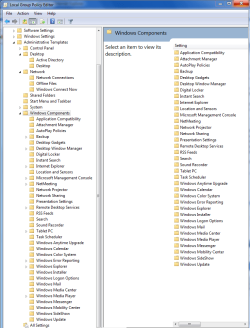
If you want to safely tweak your systems registry and want the same tweaks to apply to all the machines in your network then you should use the group policy editor's administrative templates.

You can do just about anything with it and it can apply these tweaks to all your networked machines at the same time. It does this by adjusting your registry keys but is much less likely to make a mistake. Not to mention it's easier and less problematic than playing with the registry and you can tweak things back just as easily. The picture below shows you a few examples of what can be done.

Just type gpedit.msc into the command prompt and hit enter.
The Local Group Policy Editor will only be available in the Windows 7 Professional, Ultimate, and Enterpise editions.

You can also adjust aero shake and install the ownership .exe without messing with the registry. ;)

http://www.sevenforums.com/tutorials/1911-take-ownership-shortcut.html?ltr=T
http://www.sevenforums.com/tutorials/74845-aero-shake-enable-disable.html?ltr=A
 

Attachments

  • GPE take your pick.PNG
    GPE take your pick.PNG
    139.2 KB · Views: 93
Last edited:

My Computer

Computer type
PC/Desktop
Computer Manufacturer/Model Number
Home built
OS
Windows 7 Ult, Windows 8.1 Pro,
CPU
Q9650-4.275GHz, E8600 4.5GHz, E6750-3.8GHz
Motherboard
Evga 780i FTW
Memory
G.Skill PC2 9600 1200Mhz 5 5 5 15 2T
Graphics Card(s)
GTX480
Sound Card
Asus Xonar D2
Monitor(s) Displays
HannsG
Screen Resolution
1680X1050
Hard Drives
GSkill Phoenix Pro 120GB SSD
PSU
ThermalTake Toughpower 1000Watt modular
Case
ThermalTake XaserV
Cooling
Xigmatek S1283
Keyboard
Logitech G15
Mouse
Logitech G9
Internet Speed
T1
I can honestly tell you that...

A. Win 7 on that system does not need tweaking. It will run fine and fast. There are no performance tweaks that can make it run any noticeable difference other than a hardware upgrade.


Clear Page File At Shutdown = Specifies whether inactive pages in the paging file are filled with zeros when the system stops.:
[HKEY_LOCAL_MACHINE\SYSTEM\CurrentControlSet\Control\SessionManager\MemoryManagement]
"ClearPageFileAtShutdown"=dword:00000001
While this can be considered a security tweak, it can actually slow down the shutdown/startup/restart times of the system.

Some of the other tweaks for auto killing tasks or shortening the kill times for services and apps can actually cause some issues with data loss (ie. you forget to save a document or something you are working on, the system shuts down and may not prompt you to save your data before killing the app).
I have seen this happen on more than several occasions and know that it is part of GeekSquads system performance tweaks for XP. And in the end, I can guarantee you that most of those people have lost data they were working on when they for got to save before shutting down. It's a bad tweak that is not necessary on todays systems (or any really).


"NoLowDiskSpaceChecks"=dword:00000001

I have never seen a point to this one, If you are keeping a drive that full for long periods of time, you need to get a larger drive. Your drive should never be that full constantly. Ever.
 

My Computer

Computer Manufacturer/Model Number
Self Built
OS
Win 7 Ultimate 32bit
CPU
C2D E6600 2.4Ghz
Motherboard
Intel D965WH
Memory
4G Kingston KHX5400D2
Graphics Card(s)
EVGA GTX 570 HD SC (012-P3-1573-KR)
Sound Card
On-Board
Monitor(s) Displays
Samsung 226BW
Screen Resolution
1680 x 1050
Hard Drives
2 x 250 Seagate Barracuda
2 x 500 Seagate Barracuda (Raid1)
PSU
Corsair TX750W
Case
In-Win C589
Cooling
Stock Intel Cooling
I can honestly tell you that...

A. Win 7 on that system does not need tweaking. It will run fine and fast. There are no performance tweaks that can make it run any noticeable difference other than a hardware upgrade.


Clear Page File At Shutdown = Specifies whether inactive pages in the paging file are filled with zeros when the system stops.:
[HKEY_LOCAL_MACHINE\SYSTEM\CurrentControlSet\Control\SessionManager\MemoryManagement]
"ClearPageFileAtShutdown"=dword:00000001
While this can be considered a security tweak, it can actually slow down the shutdown/startup/restart times of the system.

Humm, perhaps. Never encountered any issue yet.

Some of the other tweaks for auto killing tasks or shortening the kill times for services and apps can actually cause some issues with data loss (ie. you forget to save a document or something you are working on, the system shuts down and may not prompt you to save your data before killing the app).
I have seen this happen on more than several occasions and know that it is part of GeekSquads system performance tweaks for XP. And in the end, I can guarantee you that most of those people have lost data they were working on when they for got to save before shutting down. It's a bad tweak that is not necessary on todays systems (or any really

Might have to set in Power Plan Settings the Hybrid Mode to be Active.


"NoLowDiskSpaceChecks"=dword:00000001

I have never seen a point to this one, If you are keeping a drive that full for long periods of time, you need to get a larger drive. Your drive should never be that full constantly. Ever.

I have never applyed this one...on any of my systems.
 

My Computer

Computer type
PC/Desktop
Computer Manufacturer/Model Number
Custom Build
OS
Windows 7 Professional SP1 - x64 [Non-UEFI Boot]
CPU
Ivy Bridge Core i5 3570K (Delidded)
Motherboard
Asus P8Z77-V LE PLUS
Memory
G.Skill "Ares" DDR3 PC3-12800 - 1600MHz (16Gb)
Graphics Card(s)
Asus Dual-RX480-O4G
Sound Card
Creative Sound Blaster Z w/5.1 sound system
Monitor(s) Displays
Asus IPS 23"
Screen Resolution
16/9
Hard Drives
Internal:
500Go Sata 6Gb/s (x2)
500Go Sata 3Gb/s (x2)
SSD 60Go Sata 6Gb/s
PSU
In Win C 900W Series 80+ Platinum
Case
Thermaltake Chaser A71
Cooling
Custom Water Cooling Loop
Keyboard
Cooler Master QuickFire XTi
Mouse
Razer Imperator 2012 (4G)
Antivirus
MSE
Browser
IE 11.0.xxx Rtm
Other Info
"Raid0" with Intel Smart Response Technology (HDD/SSD)

My Computer

Computer Manufacturer/Model Number
Home built
OS
Windows 7 Ultimate 32 bit
CPU
Intel(R) Pentium(R) 4 CPU 3.00GHz
Motherboard
ASUS P4P800-VM Motherboard Chipset: Intel 865G + ICH5
Memory
2.50 GB RAM
Graphics Card(s)
NVIDIA GeForce 7600 GS
Sound Card
SoundMax Integrated Digital Audio (Chip)
Monitor(s) Displays
ViewSonic VX 1962 wm
Screen Resolution
1680 X 1050
Hard Drives
Seagate Barracuda 7200.10 80 GB
ST380215A ATA Device 18.6 GB
Western Digital "My Book" external hard drive 750 GB
Cooling
Fan based
Keyboard
Microsoft Comfort Curve Keyboard 2000 v10 USB
Mouse
Logitec optic USB
Internet Speed
3.01 Mb/s download 0.64 Mb/s upload

My Computer

Computer type
PC/Desktop
Computer Manufacturer/Model Number
Home built
OS
Windows 7 Ult, Windows 8.1 Pro,
CPU
Q9650-4.275GHz, E8600 4.5GHz, E6750-3.8GHz
Motherboard
Evga 780i FTW
Memory
G.Skill PC2 9600 1200Mhz 5 5 5 15 2T
Graphics Card(s)
GTX480
Sound Card
Asus Xonar D2
Monitor(s) Displays
HannsG
Screen Resolution
1680X1050
Hard Drives
GSkill Phoenix Pro 120GB SSD
PSU
ThermalTake Toughpower 1000Watt modular
Case
ThermalTake XaserV
Cooling
Xigmatek S1283
Keyboard
Logitech G15
Mouse
Logitech G9
Internet Speed
T1
On the other hand, I'd agree with Chev in regards to using group policy instead, as its faster and easier to deploy configuration settings to individual or a group of machines. And its all managed by a central location, instead of having to deploy the reg files to each PC, then all again when you want to change a setting again.

In Windows Server 2008, there is a (new?) option to to set registry keys via GPO.

Im actually trying to get my hands on WS2k8 at the moment too, to take advantage of these features...
 

My Computer

OS
Windows 7 Enterprise
CPU
Intel Pentium Dual E2200 @2.2GHz
Motherboard
Gigabyte II-G31
Memory
4GB
Graphics Card(s)
Palit GForce 9500GT 1GB
Sound Card
onBoard
Hard Drives
WesternDigital: 250GB + 1TB + 1TB + 2TB
PSU
450W
Case
CoolerMaster CM690
Cooling
Corsair H50
Mouse
Logitech MX518
Here is a revised .reg
What do you think? And is it all proper?

I do know what each of the entries will do. I would just like to have someone double-check to make sure that it is all typed properly so that there are no errors.

Code:
[HKEY_CURRENT_USER\Software\Microsoft\Windows\CurrentVersion\Policies\Explorer]
"NoLowDiskSpaceChecks"=dword:00000001
"LinkResolveIgnoreLinkInfo"=dword:00000001
"NoResolveSearch"=dword:00000001
"NoResolveTrack"=dword:00000001
"NoInternetOpenWith"=dword:00000001
"DisableThumbnails"=dword:00000001

[HKEY_CURRENT_USER\Software\Policies\Microsoft\Windows\Explorer]
"NoWindowMinimizingShortcuts"=dword:00000001

[HKEY_CLASSES_ROOT\AllFilesystemObjects\shellex\ContextMenuHandlers\Copy To]
@="{C2FBB630-2971-11D1-A18C-00C04FD75D13}"
 
[HKEY_CLASSES_ROOT\AllFilesystemObjects\shellex\ContextMenuHandlers\Move To]
@="{C2FBB631-2971-11D1-A18C-00C04FD75D13}"

[HKEY_CURRENT_USER\Control Panel\Desktop]
"AutoEndTasks"="1"
"HungAppTimeout"="1000"
"MenuShowDelay"="1"
"WaitToKillAppTimeout"="2000"
"LowLevelHooksTimeout"="1000"

[HKEY_CURRENT_USER\Control Panel\Mouse]
"MouseHoverTime"="30"

[HKEY_LOCAL_MACHINE\SYSTEM\CurrentControlSet\Control]
"WaitToKillServiceTimeout"="1000"

[-HKEY_LOCAL_MACHINE\SOFTWARE\Microsoft\Windows\CurrentVersion\Explorer\RemoteComputer]

[HKEY_LOCAL_MACHINE\SOFTWARE\Microsoft\Windows\CurrentVersion\Explorer\Shell Icons]
"29"=hex(2):25,00,73,00,79,00,73,00,74,00,65,00,6d,00,72,00,6f,00,6f,00,74,00,\
25,00,5c,00,73,00,79,00,73,00,74,00,65,00,6d,00,33,00,32,00,5c,00,73,00,68,\
00,65,00,6c,00,6c,00,33,00,32,00,2e,00,64,00,6c,00,6c,00,2c,00,35,00,30,00,\
00,00

[HKEY_CURRENT_USER\Software\Microsoft\Windows\CurrentVersion\Policies\Explorer]
"DisableThumbnailsOnNetworkFolders"=dword:00000001

[HKEY_CURRENT_USER\Software\Policies\Microsoft\Windows\AppCompat]
"DisablePCA"=dword:00000001

[HKEY_CLASSES_ROOT\*\shell\runas]
@="Take Ownership"
"NoWorkingDirectory"=""

[HKEY_CLASSES_ROOT\*\shell\runas\command]
@="cmd.exe /c takeown /f \"%1\" && icacls \"%1\" /grant administrators:F"
"IsolatedCommand"="cmd.exe /c takeown /f \"%1\" && icacls \"%1\" /grant administrators:F"

[HKEY_CLASSES_ROOT\Directory\shell\runas]
@="Take Ownership"
"NoWorkingDirectory"=""

[HKEY_CLASSES_ROOT\Directory\shell\runas\command]
@="cmd.exe /c takeown /f \"%1\" /r /d y && icacls \"%1\" /grant administrators:F /t"
"IsolatedCommand"="cmd.exe /c takeown /f \"%1\" /r /d y && icacls \"%1\" /grant administrators:F /t"
 

My Computer

Computer Manufacturer/Model Number
Dell Inspiron 1545
OS
Windows 7 Professional Build 7601 (x64)
CPU
Intel Mobile Core 2 Duo T6600 @ 2.20GHz 56 °C
Motherboard
Dell Inc. 0G848F (Microprocessor)
Memory
4.0GB Dual-Channel DDR2 @ 399MHz (6-6-6-18)
Graphics Card(s)
Mobile Intel 4 Series Express Chipset Family
Sound Card
Realtek High Definition Audio Device
Screen Resolution
720p HD Resolution @ 1366 x 768
Hard Drives
320GB TOSHIBA TOSHIBA MK3265GSX (IDE)
On a side note:

Though these will not make a noticeable difference on my machine, I am asking for tips because I am a computer technician and would like to do all I can to eek every bit of performance for my clients. There are several clients who do not need all the bells and whistles, and would just like it to run faster.
 

My Computer

Computer Manufacturer/Model Number
Dell Inspiron 1545
OS
Windows 7 Professional Build 7601 (x64)
CPU
Intel Mobile Core 2 Duo T6600 @ 2.20GHz 56 °C
Motherboard
Dell Inc. 0G848F (Microprocessor)
Memory
4.0GB Dual-Channel DDR2 @ 399MHz (6-6-6-18)
Graphics Card(s)
Mobile Intel 4 Series Express Chipset Family
Sound Card
Realtek High Definition Audio Device
Screen Resolution
720p HD Resolution @ 1366 x 768
Hard Drives
320GB TOSHIBA TOSHIBA MK3265GSX (IDE)
You can get rid off this one, today hard drive not really needs that one.

[HKEY_CURRENT_USER\Software\Microsoft\Windows\CurrentVersion\Policies\Explorer]
"NoLowDiskSpaceChecks"=dword:00000001

This one doesn't seems having any effect for me:

[HKEY_CURRENT_USER\Software\Microsoft\Windows\CurrentVersion\Policies\Explorer]
"DisableThumbnails"=dword:00000001


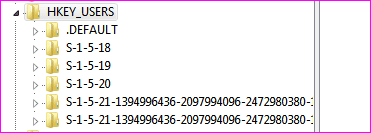
This as to be set in [HKEY_USER] aswell, in every accounts:

[HKEY_CURRENT_USER\Control Panel\Desktop]
"AutoEndTasks"="1"
"HungAppTimeout"="1000"
"MenuShowDelay"="1"
"WaitToKillAppTimeout"="2000"
"LowLevelHooksTimeout"="1000"
 

Attachments

  • Capture.PNG
    Capture.PNG
    6 KB · Views: 38

My Computer

Computer type
PC/Desktop
Computer Manufacturer/Model Number
Custom Build
OS
Windows 7 Professional SP1 - x64 [Non-UEFI Boot]
CPU
Ivy Bridge Core i5 3570K (Delidded)
Motherboard
Asus P8Z77-V LE PLUS
Memory
G.Skill "Ares" DDR3 PC3-12800 - 1600MHz (16Gb)
Graphics Card(s)
Asus Dual-RX480-O4G
Sound Card
Creative Sound Blaster Z w/5.1 sound system
Monitor(s) Displays
Asus IPS 23"
Screen Resolution
16/9
Hard Drives
Internal:
500Go Sata 6Gb/s (x2)
500Go Sata 3Gb/s (x2)
SSD 60Go Sata 6Gb/s
PSU
In Win C 900W Series 80+ Platinum
Case
Thermaltake Chaser A71
Cooling
Custom Water Cooling Loop
Keyboard
Cooler Master QuickFire XTi
Mouse
Razer Imperator 2012 (4G)
Antivirus
MSE
Browser
IE 11.0.xxx Rtm
Other Info
"Raid0" with Intel Smart Response Technology (HDD/SSD)
[HKEY_CURRENT_USER\Software\Policies\Microsoft\Windows\AppCompat]
"DisablePCA"=dword:00000001
Not sure this is a good so-called tweak to have as it could prevent or give no real indication as to why a particular software will not run on a system. In other words, you will get less information to be able to help resolve an issue with a program not starting.

http://www.sevenforums.com/tutorials/70829-program-compatibility-assistant-enable-disable.html


[HKEY_CLASSES_ROOT\*\shell\runas]
@="Take Ownership"
"NoWorkingDirectory"=""

[HKEY_CLASSES_ROOT\*\shell\runas\command]
@="cmd.exe /c takeown /f \"%1\" && icacls \"%1\" /grant administrators:F"
"IsolatedCommand"="cmd.exe /c takeown /f \"%1\" && icacls \"%1\" /grant administrators:F"

and

[HKEY_CLASSES_ROOT\Directory\shell\runas]
@="Take Ownership"
"NoWorkingDirectory"=""

[HKEY_CLASSES_ROOT\Directory\shell\runas\command]
@="cmd.exe /c takeown /f \"%1\" /r /d y && icacls \"%1\" /grant administrators:F /t"
"IsolatedCommand"="cmd.exe /c takeown /f \"%1\" /r /d y && icacls \"%1\" /grant administrators:F /t"

Should never be added to a system of someone who has no idea how to actually use it.


Honestly speaking, most of those tweaks are not necessary regardless of the speed of the system, some are dangerous and some just have no use at all.
There is no reason to do what you are doing on a 7 system.
 

My Computer

Computer Manufacturer/Model Number
Self Built
OS
Win 7 Ultimate 32bit
CPU
C2D E6600 2.4Ghz
Motherboard
Intel D965WH
Memory
4G Kingston KHX5400D2
Graphics Card(s)
EVGA GTX 570 HD SC (012-P3-1573-KR)
Sound Card
On-Board
Monitor(s) Displays
Samsung 226BW
Screen Resolution
1680 x 1050
Hard Drives
2 x 250 Seagate Barracuda
2 x 500 Seagate Barracuda (Raid1)
PSU
Corsair TX750W
Case
In-Win C589
Cooling
Stock Intel Cooling
[HKEY_CURRENT_USER\Software\Policies\Microsoft\Windows\AppCompat]
"DisablePCA"=dword:00000001

Not sure this is a good so-called tweak to have as it could prevent or give no real indication as to why a particular software will not run on a system. In other words, you will get less information to be able to help resolve an issue with a program not starting.

http://www.sevenforums.com/tutorials/70829-program-compatibility-assistant-enable-disable.html

I agree!

Some more info on it:
http://msdn.microsoft.com/en-us/library/bb756937.aspx

Well, the @="Take Ownership" is only good for the one who needs it, unless the client knows how to.

Getting faster is nice but i will also consider some security settings for your client.
 

My Computer

Computer type
PC/Desktop
Computer Manufacturer/Model Number
Custom Build
OS
Windows 7 Professional SP1 - x64 [Non-UEFI Boot]
CPU
Ivy Bridge Core i5 3570K (Delidded)
Motherboard
Asus P8Z77-V LE PLUS
Memory
G.Skill "Ares" DDR3 PC3-12800 - 1600MHz (16Gb)
Graphics Card(s)
Asus Dual-RX480-O4G
Sound Card
Creative Sound Blaster Z w/5.1 sound system
Monitor(s) Displays
Asus IPS 23"
Screen Resolution
16/9
Hard Drives
Internal:
500Go Sata 6Gb/s (x2)
500Go Sata 3Gb/s (x2)
SSD 60Go Sata 6Gb/s
PSU
In Win C 900W Series 80+ Platinum
Case
Thermaltake Chaser A71
Cooling
Custom Water Cooling Loop
Keyboard
Cooler Master QuickFire XTi
Mouse
Razer Imperator 2012 (4G)
Antivirus
MSE
Browser
IE 11.0.xxx Rtm
Other Info
"Raid0" with Intel Smart Response Technology (HDD/SSD)
Hm. Perhaps I will throw the registry tweaks out the window. Seems no need for them and I most definitely would not want to open security holes that could pose a risk to my clients. I am not one of those technicians who sets up a computer to "break" later on down the road, just to get more customers and money.
 

My Computer

Computer Manufacturer/Model Number
Dell Inspiron 1545
OS
Windows 7 Professional Build 7601 (x64)
CPU
Intel Mobile Core 2 Duo T6600 @ 2.20GHz 56 °C
Motherboard
Dell Inc. 0G848F (Microprocessor)
Memory
4.0GB Dual-Channel DDR2 @ 399MHz (6-6-6-18)
Graphics Card(s)
Mobile Intel 4 Series Express Chipset Family
Sound Card
Realtek High Definition Audio Device
Screen Resolution
720p HD Resolution @ 1366 x 768
Hard Drives
320GB TOSHIBA TOSHIBA MK3265GSX (IDE)
Most of the tweaking suites out there are simply a collection of registry hacks with a glossy user interface. Frankly, if you just can't resist, I'd stick with (a reputable) one of those. It's much easier to keep track of what you've monkeyed around with and the better ones often have a one-click option to "restore all settings to Windows default".

My experience is to change one or two things at a time and see how much difference you actually notice. Keep a critical eye and bear in mind the placebo effect which is all too common with these kind of programs.

Personally, unless I'm turning off a "feature" which annoys me, the standard settings usually are just fine. I'd also recommend backing up your registry before you get too ambitious - just in case things go horribly wrong. :)
 

My Computer

Computer Manufacturer/Model Number
Self
OS
Main - Windows 7 Pro SP1 64-Bit; 2nd - Windows Server 2008 R2
CPU
Main - Core i7 2600K; 2nd - Core i7 920
Motherboard
Main - Asus P8Z68-V Pro/Gen3; 2nd - Gigabyte GA-EX58-UDR3
Memory
Main - 16GB Corsair Vengeance; 2nd - 12GB Corsair Vengeance
Graphics Card(s)
Main - XFX Radeon 6870 1GB; 2nd - XFX Radeon 4870 1GB
Sound Card
Both: Onboard Realtek Azalia
Monitor(s) Displays
Main - Hann 25" + I-INC 25" + Acer 23"; 2nd - Upgrading Soon
Screen Resolution
Main - 1920x1080 (All Three Monitors); 2nd - Upgrading Soon
Hard Drives
Main - (1) Crucial M4 128GB (Boot)
Main - (1) Seagate 2TB 64MB Cache (Data)
Main - (1) Seagate 2TB 64MB Cache (Data Backup)
2nd - (1) Intel X25-M SSD 80GB (Boot)
2nd - (3) Seagate 1TB 32MB Cache (Data Backup)
2nd - (1) Seagate 320GB (Because)
PSU
Main - OCZ 600W Modular; 2nd - OCZ 600W
Case
Main - Thermaltake Element G; 2nd - NZXT something or other
Cooling
Main - Corsair H80; 2nd - Prolimatech Megahalems
Keyboard
Main - Razer Reclusa; 2nd - Old MS Keyboard
Mouse
Main - Logitech MX Revolution; 2nd - Old MS Mouse
Internet Speed
20Mbps Time-Warner Cable
Hm. Perhaps I will throw the registry tweaks out the window. Seems no need for them and I most definitely would not want to open security holes that could pose a risk to my clients. I am not one of those technicians who sets up a computer to "break" later on down the road, just to get more customers and money.

Not all have to be thrown away, but you'll see later during those posts which are suitable to optimize windows 7.

Again, long and durable tutorial:
http://www.sevenforums.com/tutorials/11728-optimize-windows-7-a.html
 

My Computer

Computer type
PC/Desktop
Computer Manufacturer/Model Number
Custom Build
OS
Windows 7 Professional SP1 - x64 [Non-UEFI Boot]
CPU
Ivy Bridge Core i5 3570K (Delidded)
Motherboard
Asus P8Z77-V LE PLUS
Memory
G.Skill "Ares" DDR3 PC3-12800 - 1600MHz (16Gb)
Graphics Card(s)
Asus Dual-RX480-O4G
Sound Card
Creative Sound Blaster Z w/5.1 sound system
Monitor(s) Displays
Asus IPS 23"
Screen Resolution
16/9
Hard Drives
Internal:
500Go Sata 6Gb/s (x2)
500Go Sata 3Gb/s (x2)
SSD 60Go Sata 6Gb/s
PSU
In Win C 900W Series 80+ Platinum
Case
Thermaltake Chaser A71
Cooling
Custom Water Cooling Loop
Keyboard
Cooler Master QuickFire XTi
Mouse
Razer Imperator 2012 (4G)
Antivirus
MSE
Browser
IE 11.0.xxx Rtm
Other Info
"Raid0" with Intel Smart Response Technology (HDD/SSD)
Back
Top