R click context menu options

Pleides2112

New member
Hello,
Where / how in the registry can I change/add/delete, especially add & delete to the options made available to me in the "SEND TO" portion of the right-click context menu??? Or, at the very least, where can I locate this in the registry???

Thanks,

Pleides2112
 

My Computer

Computer Manufacturer/Model Number
Compaq c60-615dx
OS
Windows 7
CPU
Intel Celeron 900 @ 2.20GHz
Motherboard
ACPIx64-based PC
Memory
2.00GB
Graphics Card(s)
Conexant Pebble High Definition SmartAudio
Sound Card
Conexant Pebble High Definition SmartAudio
Monitor(s) Displays
32" Vizio LCD HDTV
Hard Drives
ST9250410AS ATA 250GB
PSU
???
Case
???
Cooling
???
Last edited:

My Computer

Computer type
PC/Desktop
Computer Manufacturer/Model Number
Self Built
OS
Win 10 Pro x64
CPU
Intel I5-2500K @3.3GHz
Motherboard
Asrock P67 Extreme4
Memory
16GB G.Skill Ripjaws X (4x4GB)
Graphics Card(s)
EVGA GeForce 750 Ti SC 2GB
Sound Card
ASUS Xonar DG 5.1 Channels 24-bit 96KHz PCI Interface Sound
Monitor(s) Displays
auria eq2367
Screen Resolution
1920 x 1080
Hard Drives
250GB Samsung 850 EVO SSD
1TB WD Blue
1TB Hitachi
PSU
SeaSonic X 650W 80 Plus Gold
Case
Corsair Obsidian 750D
Cooling
Corsair H60, Three 140mm case fans
Keyboard
Logitech Wireless Keyboard K520
Mouse
Logitech Wireless Mouse M310
Internet Speed
Wave Broadband ~ 100 dn 5 up
Antivirus
Windows Defender, Malwarebytes Premium
Browser
Edge, IE11, Chrome
Other Info
Laptop specs: HP g7-1365dx /
CPU: AMD A6-3420M APU with Radeon(tm) HD Graphics /
RAM: Crucial 8Gb (2x4Gb) /
SSD: Crucial M4-CT128M4SSD2 ATA Device/ FW 000F /
GFX: AMD Radeon HD 6520G /
OS: Windows 10 Pro x64
This is actually one of the easiest things to do. No tools or reg edits. For this first method, you must have hidden folders showing, then navigate to C:\Users\username\AppData\Roaming\Microsoft\Windows\SendTo (where username is your actual user name)

Send To Context Menu - Vista Forums

Or you can type (or copy and paste)

%APPDATA%\Microsoft\Windows\SendTo

In the search box on start menu

That is where all the send to shortcuts are. You can just delete any there to remove them from the context menu. Conversely, you can drag any shortcuts there that you want to add. That's it. :)

A Guy
 
Last edited by a moderator:

My Computer

Computer type
PC/Desktop
OS
Windows 10 Home x64
CPU
INTEL Core i5-750 Quad-Core 3.37GHz
Motherboard
ASUS P7P55D
Memory
HyperX Fury Black Series 8GB (2 x 4GB) 1866Mhz
Graphics Card(s)
EVGA GeForce GTX 750 Superclocked 1GB 128-Bit GDDR5
Monitor(s) Displays
LG 32MA68HY 32" IPS
Screen Resolution
1920 x 1080
Hard Drives
Samsung 840 Evo 120GB, SEAGATE 500GB Barracuda® 7200.12, SATA 3 Gb/s, 7200 RPM, 16MB cache
PSU
ANTEC TruePower New TP-550, 80 PLUS, 550W
Case
ANTEC Three Hundred Illusion
Cooling
COOLER MASTER Hyper 212 Plus, 4 x 120mm 1 x 140mm Noctua's
Internet Speed
85 + Mbps
Antivirus
Avast
Browser
Vivaldi
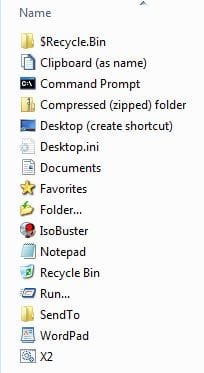
Another neat trick you can do is add a Send to to the Send to folder. Then any time you want to add something as a Send to target, just right click, select Send to then choose Send to as the target. Poof ... it's there. Mine looks like this:

Sendto.jpg
 

My Computer

Computer type
PC/Desktop
Computer Manufacturer/Model Number
Lenovo IdeaCenter 450
OS
Windows 10 Pro X64
CPU
Intel Quad Core i7-4770 @ 3.4Ghz
Memory
16.0GB PC3-12800 DDR3 SDRAM 1600 MHz
Graphics Card(s)
Intel Integrated HD Graphics
Sound Card
Realtek HD Audio
Monitor(s) Displays
HP 22" LCD
Screen Resolution
1680 x 1050
Hard Drives
250GB Samsung EVO SATA-3 SSD
2TB Seagate ST2000DM001 SATA-2
1.5TB Seagate ST3150041AS SATA
Keyboard
Dell USB
Mouse
Lenovo USB
Internet Speed
Cable via Road Runner 3MB Upload, 30MB Download
Antivirus
Windows Defender, MBAM Pro, MBAE
Browser
Seamonkey
Other Info
UEFI/GPT
PLDS DVD-RW DH16AERSH
How do you get the "Folder" in the send to menu? That's what I'm looking for - send (move/copy) to any folder.
 

My Computer

Computer Manufacturer/Model Number
Hewlett Packard dv4-1222nr
OS
Windows 7
CPU
AMD Turion X2 RM-72 2.10 GHz Dual-Core Mobile Processor
Memory
4GB
Graphics Card(s)
ATI Radeon HD 3200 Graphics RS780M
Monitor(s) Displays
14.1" LCD
Hard Drives
250GB (5400RPM)
Internet Speed
3.0 MBPS (down) / 1.0MBPS (up)
This is actually one of the easiest things to do. No tools or reg edits. For this first method, you must have hidden folders showing, then navigate to C:\Users\username\AppData\Roaming\Microsoft\Windows\SendTo (where username is your actual user name)

Send To Context Menu - Vista Forums

Or you can type (or copy and paste)

%APPDATA%\Microsoft\Windows\SendTo

In the search box on start menu

That is where all the send to shortcuts are. You can just delete any there to remove them from the context menu. Conversely, you can drag any shortcuts there that you want to add. That's it. :)

A Guy

Awesome tip, thanks for the help!!! :D
 

My Computer

OS
Windows 7 Ultimate N x64
CPU
Intel Core i7-3770K Ivy Bridge 3.5GHz
Motherboard
ASUS P8Z77-V PREMIUM LGA 1155 Intel Z77
Memory
G.SKILL Trident X Series 32GB (4 x 8GB)
Monitor(s) Displays
42" Westinghouse LCD monitor
Hard Drives
(1) 240GB OCZ REVO3 X2

(1) 250GB OCZ Colossus
PSU
CORSAIR HX Series HX850 850W
Case
COOLER MASTER HAF X RC-942-KKN1
Internet Speed
100 Mbps
This is actually one of the easiest things to do. No tools or reg edits. For this first method, you must have hidden folders showing, then navigate to C:\Users\username\AppData\Roaming\Microsoft\Windows\SendTo (where username is your actual user name)

Send To Context Menu - Vista Forums

Or you can type (or copy and paste)

%APPDATA%\Microsoft\Windows\SendTo

In the search box on start menu

That is where all the send to shortcuts are. You can just delete any there to remove them from the context menu. Conversely, you can drag any shortcuts there that you want to add. That's it. :)

A Guy

Awesome tip, thanks for the help!!! :D

My pleasure, thanks for saying so :)

A Guy
 

My Computer

Computer type
PC/Desktop
OS
Windows 10 Home x64
CPU
INTEL Core i5-750 Quad-Core 3.37GHz
Motherboard
ASUS P7P55D
Memory
HyperX Fury Black Series 8GB (2 x 4GB) 1866Mhz
Graphics Card(s)
EVGA GeForce GTX 750 Superclocked 1GB 128-Bit GDDR5
Monitor(s) Displays
LG 32MA68HY 32" IPS
Screen Resolution
1920 x 1080
Hard Drives
Samsung 840 Evo 120GB, SEAGATE 500GB Barracuda® 7200.12, SATA 3 Gb/s, 7200 RPM, 16MB cache
PSU
ANTEC TruePower New TP-550, 80 PLUS, 550W
Case
ANTEC Three Hundred Illusion
Cooling
COOLER MASTER Hyper 212 Plus, 4 x 120mm 1 x 140mm Noctua's
Internet Speed
85 + Mbps
Antivirus
Avast
Browser
Vivaldi

My Computer

Computer type
PC/Desktop
Computer Manufacturer/Model Number
Self Built
OS
Win 10 Pro x64
CPU
Intel I5-2500K @3.3GHz
Motherboard
Asrock P67 Extreme4
Memory
16GB G.Skill Ripjaws X (4x4GB)
Graphics Card(s)
EVGA GeForce 750 Ti SC 2GB
Sound Card
ASUS Xonar DG 5.1 Channels 24-bit 96KHz PCI Interface Sound
Monitor(s) Displays
auria eq2367
Screen Resolution
1920 x 1080
Hard Drives
250GB Samsung 850 EVO SSD
1TB WD Blue
1TB Hitachi
PSU
SeaSonic X 650W 80 Plus Gold
Case
Corsair Obsidian 750D
Cooling
Corsair H60, Three 140mm case fans
Keyboard
Logitech Wireless Keyboard K520
Mouse
Logitech Wireless Mouse M310
Internet Speed
Wave Broadband ~ 100 dn 5 up
Antivirus
Windows Defender, Malwarebytes Premium
Browser
Edge, IE11, Chrome
Other Info
Laptop specs: HP g7-1365dx /
CPU: AMD A6-3420M APU with Radeon(tm) HD Graphics /
RAM: Crucial 8Gb (2x4Gb) /
SSD: Crucial M4-CT128M4SSD2 ATA Device/ FW 000F /
GFX: AMD Radeon HD 6520G /
OS: Windows 10 Pro x64
Dockster, I don't remember doing anything special to have Folder as a Send to target. If I did, I don't remember what it was, sorry. The Copy to/Move to derekimo gave you is similar.
 

My Computer

Computer type
PC/Desktop
Computer Manufacturer/Model Number
Lenovo IdeaCenter 450
OS
Windows 10 Pro X64
CPU
Intel Quad Core i7-4770 @ 3.4Ghz
Memory
16.0GB PC3-12800 DDR3 SDRAM 1600 MHz
Graphics Card(s)
Intel Integrated HD Graphics
Sound Card
Realtek HD Audio
Monitor(s) Displays
HP 22" LCD
Screen Resolution
1680 x 1050
Hard Drives
250GB Samsung EVO SATA-3 SSD
2TB Seagate ST2000DM001 SATA-2
1.5TB Seagate ST3150041AS SATA
Keyboard
Dell USB
Mouse
Lenovo USB
Internet Speed
Cable via Road Runner 3MB Upload, 30MB Download
Antivirus
Windows Defender, MBAM Pro, MBAE
Browser
Seamonkey
Other Info
UEFI/GPT
PLDS DVD-RW DH16AERSH
Back
Top