active sync 4.0 won't install on w7

darklite

New member
Local time
1:52 PM
Messages
20
Does anyone know why I can't install active sync on my windows 7? I'm running 64-bit. I just got an HP ipaq HX2795 pda and need to install the software on my computer, but it won't take it--even after going to the properties and selecting compatibility mode. Thanks!
 

My Computer

OS
windows 7 64-bit
If you search for "sync" in the control panel, it'll pull up the sync center which should be able to sync your ipaq, hance no need for active sync
 

My Computer

Computer Manufacturer/Model Number
Self Built
OS
Win/7 x64 Professional
CPU
AMD FX 6300 @ 6x3.5Ghz
Motherboard
Gigabyte GA-970A-DS3
Memory
12GB DDR31600
Graphics Card(s)
Nvidia Geforce GTX 650Ti
Sound Card
Realtek HD audio
Monitor(s) Displays
HannsG HH241HPBE 24"
Screen Resolution
1920x1080
Hard Drives
Hitachi Ultrastar 7200RPM Storage (500GB)
Samsung SSD 840 boot (120GB)
PSU
XFX Pro 450W
Case
Cooler Master Silencio 550
Keyboard
M/S Wireless Keyboard 3000
Mouse
Logitech Lx7
Internet Speed
2.77 Mb down(slow) 0.3 Mb up(slower)
Active Sync doesn't work on Windows 7, or Vista for that matter. You need to use Windows Mobile Device Center. It replaces Active Sync. Windows Mobile Device Center 6.1 | Windows Vista Support

Download and install Windows Mobile Device Center 6.1 if you run Windows Vista or Windows 7 on your computer and you want to sync content between your mobile phone and your computer. Windows Mobile Device Center is only compatible with Windows Vista and Windows 7; if you run Windows XP or earlier, you have to download Microsoft ActiveSync.
 

My Computer

Computer type
PC/Desktop
Computer Manufacturer/Model Number
Custom built by me.
OS
Windows 10 Pro
CPU
Intel Core i7-4770K (3.5Ghz)
Motherboard
Gigabyte G1 Sniper 5 (F10 Bios)
Memory
32 gig Corsair Dominator Platinum (4x8Gig)
Graphics Card(s)
Sapphire Tri-X R9 Fury
Sound Card
Soundblaster ZXR
Monitor(s) Displays
NEC PA242W 24" LCD Monitor
Screen Resolution
1920 x 1200
Hard Drives
Primary - Samsung 850 Pro (512gig), Samsung 840 Pro (256gig), 2TB WD Caviar Black.
PSU
EVGA Supernova 1000 G2
Case
Cooler Master HAF X
Cooling
Corsair H100i with Corsair Air Series SP120 Quiet Fans
Keyboard
Logitech Wireless Wave
Mouse
Logitech Performance MX
Internet Speed
High Speed Cable
Antivirus
Norton Security
Browser
IE11
Other Info
Memory Timings - 1866MHz @ 9-9-9-27-1T @ 1.5 volts
Unfortunately I've tried both of these things. It still won't let me download the software. It's as if the Mobile Device Center 6.1 plug in never installed.
 

My Computer

OS
windows 7 64-bit
I'm not understanding why you can't "download" the software? What browser are you using? Is your copy of Windows legit?

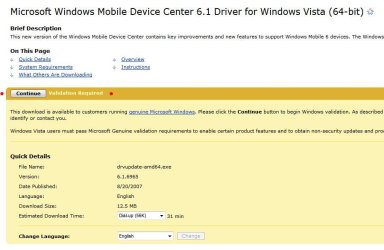
Capture.JPG


If Windows fails Vaildation... one of two things is going on.... It's not legit, or, and I've experienced this myself, If you're using IE 64, vailidation will fail! This is/was a known issue to Microsoft and I'm not sure they fixed it.

Anyway, if you're trying to vaildate Windows with IE 64-bit, switch to IE 32 bit.

Let me know.
 

My Computer

Computer type
PC/Desktop
Computer Manufacturer/Model Number
Custom built by me.
OS
Windows 10 Pro
CPU
Intel Core i7-4770K (3.5Ghz)
Motherboard
Gigabyte G1 Sniper 5 (F10 Bios)
Memory
32 gig Corsair Dominator Platinum (4x8Gig)
Graphics Card(s)
Sapphire Tri-X R9 Fury
Sound Card
Soundblaster ZXR
Monitor(s) Displays
NEC PA242W 24" LCD Monitor
Screen Resolution
1920 x 1200
Hard Drives
Primary - Samsung 850 Pro (512gig), Samsung 840 Pro (256gig), 2TB WD Caviar Black.
PSU
EVGA Supernova 1000 G2
Case
Cooler Master HAF X
Cooling
Corsair H100i with Corsair Air Series SP120 Quiet Fans
Keyboard
Logitech Wireless Wave
Mouse
Logitech Performance MX
Internet Speed
High Speed Cable
Antivirus
Norton Security
Browser
IE11
Other Info
Memory Timings - 1866MHz @ 9-9-9-27-1T @ 1.5 volts
No, I'm using firefox I try to avoid IE whenever possible. It's not that I can't download it, but all is seems to be is a plugin. And it just doesn't do anything. Whenever I try to install the software disc for the ipaq, windows still blocks me saying it's not compatible with this version.
 

My Computer

OS
windows 7 64-bit
Well If you want Windows Mobile Device Center use IE 32-bit, validate, get the program, solve your problem, then go back to firefox. And Windows Mobile Device Center is not a plug-in, it's a sync program.

Outside of that I have no further suggestions. Active Sync DOES NOT work on Windows 7. Please click the link I provided and read the details.

Sorry :(
 

My Computer

Computer type
PC/Desktop
Computer Manufacturer/Model Number
Custom built by me.
OS
Windows 10 Pro
CPU
Intel Core i7-4770K (3.5Ghz)
Motherboard
Gigabyte G1 Sniper 5 (F10 Bios)
Memory
32 gig Corsair Dominator Platinum (4x8Gig)
Graphics Card(s)
Sapphire Tri-X R9 Fury
Sound Card
Soundblaster ZXR
Monitor(s) Displays
NEC PA242W 24" LCD Monitor
Screen Resolution
1920 x 1200
Hard Drives
Primary - Samsung 850 Pro (512gig), Samsung 840 Pro (256gig), 2TB WD Caviar Black.
PSU
EVGA Supernova 1000 G2
Case
Cooler Master HAF X
Cooling
Corsair H100i with Corsair Air Series SP120 Quiet Fans
Keyboard
Logitech Wireless Wave
Mouse
Logitech Performance MX
Internet Speed
High Speed Cable
Antivirus
Norton Security
Browser
IE11
Other Info
Memory Timings - 1866MHz @ 9-9-9-27-1T @ 1.5 volts
Sounds good, I'll try IE. 2 questions though: how do I know if I'm using IE 32-bit, and how can I get it? I have IE 8 on my computer. When I click on "about internet explorer" it says I'm running 128-bit. Thanks for everything!
 

My Computer

OS
windows 7 64-bit
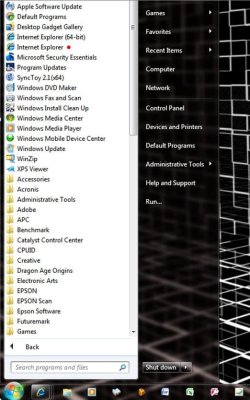
Simple way... Start, All Programs, look for two instances of IE and choose the one that doens't have 64 next to it :)

Programs.JPG

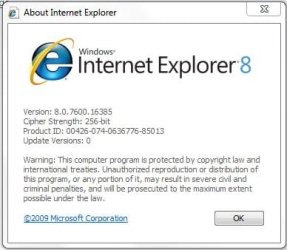
IE8 32-Bit
IE8-32bit.JPG

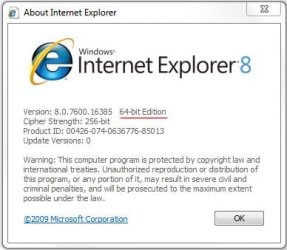
IE8 64-Bit
IE8-64bit.JPG
 

My Computer

Computer type
PC/Desktop
Computer Manufacturer/Model Number
Custom built by me.
OS
Windows 10 Pro
CPU
Intel Core i7-4770K (3.5Ghz)
Motherboard
Gigabyte G1 Sniper 5 (F10 Bios)
Memory
32 gig Corsair Dominator Platinum (4x8Gig)
Graphics Card(s)
Sapphire Tri-X R9 Fury
Sound Card
Soundblaster ZXR
Monitor(s) Displays
NEC PA242W 24" LCD Monitor
Screen Resolution
1920 x 1200
Hard Drives
Primary - Samsung 850 Pro (512gig), Samsung 840 Pro (256gig), 2TB WD Caviar Black.
PSU
EVGA Supernova 1000 G2
Case
Cooler Master HAF X
Cooling
Corsair H100i with Corsair Air Series SP120 Quiet Fans
Keyboard
Logitech Wireless Wave
Mouse
Logitech Performance MX
Internet Speed
High Speed Cable
Antivirus
Norton Security
Browser
IE11
Other Info
Memory Timings - 1866MHz @ 9-9-9-27-1T @ 1.5 volts
Okay, and thanks for going to all the trouble, it's very much appreciated.
 

My Computer

OS
windows 7 64-bit
Back
Top