Say "No" to burning bootable CDs, DVDs from ISOs

Ponmayilal

Banned
Local time
2:01 AM
Messages
441
Download and burn to CD the HD maker's diag/repair CD, boot and run full scan and you will have your answer: Hard Drive Diagnostics Tools and Utilities (Storage) - TACKtech Corp.
-- and so said our friend gregrocker elsewhere in this forum, a day ago.

Nothing wrong and we have been habitually burning bootable CDs and DVDs from ISO images supplied by various vendors and software authors. A month ago even me would have done it - in fact I did burn the Seatools DOS a month back:D. But not any longer - not after I came to know the power of EasyBCD.

And so here we take-off. Fasten your seat belts.

Download and install EasyBCD 2.0.2 from here .

Create a folder in any convenient location on your HDD and move all the bootable ISOs into that folder.

Here I have them on my H Drive.
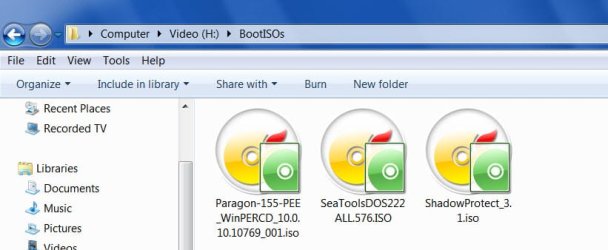
BootISOs on H drive.jpg

Now run EasyBCD.

1. Click on the "Add New Entry" tab on the left.

2. Select the "ISO Boot" Tab.

3. Give a name in the "Name" field.

4. In the "Mode" field select "Load from Memory"

5. Show it the path to the stored ISO which you would like to run on boot.

6. Click on "Add Entry"

You are done.
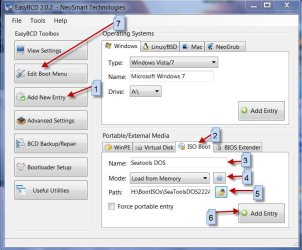
What to do .jpg

To check,

7. Click on "Edit Boot Menu" and you will find the bootable ISO name there.
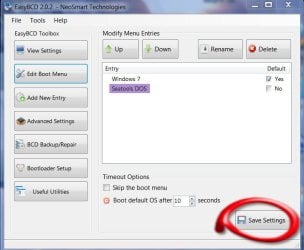
Done 1.jpg

If you want to rename or change the menu-show-time, do it and then click on "Save Settings". Close EasyBCD.

Next time you boot you will be presented with an option to boot into Windows or the bootable ISO.

Say goodbye to CD, DVD burning. :)
 

My Computer My Computer

At a glance

Windows 7 Ultimate 32bitAMD Phenom II X3 720 ProcessorTranscend DDR2 (PC2 6400) 4 X 1GBIntegrated + ATI Radeon 4550
Computer Manufacturer/Model Number
self-assembled
OS
Windows 7 Ultimate 32bit
CPU
AMD Phenom II X3 720 Processor
Motherboard
Gigabyte GA-MA78GM-S2H Revision 1.0
Memory
Transcend DDR2 (PC2 6400) 4 X 1GB
Graphics Card(s)
Integrated + ATI Radeon 4550
Sound Card
Integrated Realtek ALC 889A
Monitor(s) Displays
DELL 1704 FPT
Screen Resolution
1280 x 1024
Hard Drives
Western Digital Caviar SE16 250 GB x2 in RAID 0
PSU
Coolermaster 400 W
Case
Zebronics Cube
Cooling
stock
Keyboard
Microsoft - wired
Mouse
Microsoft - wired
Internet Speed
ADSL 256-512Kbps

My Computer My Computer

At a glance

Windows 7 x64 pro/ Windows 7 x86 Pro/ XP SP3 x86
Computer Manufacturer/Model Number
Too many to describe...
OS
Windows 7 x64 pro/ Windows 7 x86 Pro/ XP SP3 x86
Thanks for pointing out the existence of the tutorial on the subject by severedsolo.

I did do a search for "EasyBCD" but could not find anything to suggest it or I was too impatient to do a thorough search and so went on with it.

Of course, the system should be bootable and that is a basic requirement for using this method. But then how many times do we see people telling "download this bootable ISO and burn it to a a CD and carry on this test'' even when the system is bootable? I should have perhaps titled it " Say "NO" to burning bootable CDs and DVDs from ISOs when you need not.Try this first." :) .

I have now gone through the tutorial by severedsolo. IMO, tutorials of this nature need to be updated constantly using the current stable version instead of beta versions and I think my write-up fills that gap today. Even if I had encountered it, I would have gone through this write-up after referencing it to severedsolo and stating that this uses the current stable version.

Finally, I am not an expert but an ordinary user. I write from the user's perspective and from what I have learnt. The inspiration to use EasyBCD came after I read through the review on it in PC Magazine and then tried it, then started imaging my systems from the stored ISO.(My mini-PCs do not have optical drives) Seagate website tells burn the SeatoolsDOS ISO to a CD and I did it. Now I feel anguished. Experts tell burn it to a CD even when it need not be. I feel anguished. My write-up is a direct result of this anguish.
 

My Computer My Computer

At a glance

Windows 7 Ultimate 32bitAMD Phenom II X3 720 ProcessorTranscend DDR2 (PC2 6400) 4 X 1GBIntegrated + ATI Radeon 4550
Computer Manufacturer/Model Number
self-assembled
OS
Windows 7 Ultimate 32bit
CPU
AMD Phenom II X3 720 Processor
Motherboard
Gigabyte GA-MA78GM-S2H Revision 1.0
Memory
Transcend DDR2 (PC2 6400) 4 X 1GB
Graphics Card(s)
Integrated + ATI Radeon 4550
Sound Card
Integrated Realtek ALC 889A
Monitor(s) Displays
DELL 1704 FPT
Screen Resolution
1280 x 1024
Hard Drives
Western Digital Caviar SE16 250 GB x2 in RAID 0
PSU
Coolermaster 400 W
Case
Zebronics Cube
Cooling
stock
Keyboard
Microsoft - wired
Mouse
Microsoft - wired
Internet Speed
ADSL 256-512Kbps
sometimes a bootable cd is handy, for those occasions when your pc won't boot. ;)
 

My Computer My Computer

At a glance

ultimate 64 sp1i5 2500K [email protected]8 gigs GSkill Ripjaws 1600amd hd6950
Computer Manufacturer/Model Number
mickey megabyte 1234
OS
ultimate 64 sp1
CPU
i5 2500K [email protected]
Motherboard
MSI P67A-GD53
Memory
8 gigs GSkill Ripjaws 1600
Graphics Card(s)
amd hd6950
Sound Card
creative x-fi gamer
Monitor(s) Displays
samsung 24"
Screen Resolution
1920x1080
Hard Drives
ocz vertex 2e 60 gig, samsung f3 1tb, buffalo 2tb ext
PSU
antec 550
Case
antec three hundred
Cooling
i'm a cooling fan
Keyboard
saitek eclipse ii
Mouse
logitech g3
Internet Speed
about 4 Mbps
Other Info
i love win7
I do enjoy having a copy of bootable material on a readily bootable media that is compatible with probably 99% of computers that I might encounter that I would need to boot from a disc.
 

My Computer My Computer

At a glance

W7 Professional x64AMD Athlon II X3 445 Rana 3.10 GHzPNY XLR DDR3 1600 4x2GBNVIDIA GeForce GTS 450 (fermi) 1GB GDDR5
Computer Manufacturer/Model Number
Pugh Technologies
OS
W7 Professional x64
CPU
AMD Athlon II X3 445 Rana 3.10 GHz
Motherboard
MSI 870A-G54
Memory
PNY XLR DDR3 1600 4x2GB
Graphics Card(s)
NVIDIA GeForce GTS 450 (fermi) 1GB GDDR5
Sound Card
Realtek ALC892 onboard
Monitor(s) Displays
ASUS VE205t, Viewsonic VX2035WM
Screen Resolution
1600x900, 1600x1050
Hard Drives
977GB Hitachi Hitachi HDS721010CLA332
244GB Western Digital WDC WD2500AAJS-65B4A0
488GB Western Digital WDC WD5000AAJS-00A8B0
488GB Western Digital WDC WD5000AAKS-00UU3A0
PSU
Antec EarthWatts EA650 650W
Case
ThermalTake Armor A90 Mid Tower
Cooling
3x 120mm in, 1x 120mm & 200mm out, self built hydro-cooler
Keyboard
Logitec 55
Mouse
Razer Deathadder
Internet Speed
20 Mbps D/L, 9 Mbps U/L
Of course the nature of the beast usually requires you to run those bootable disks on somehow damaged Systems. The next best thing would be several ISOs on a DVD which boots into a menu first like a Swiss Army Knife for your friendly neighborhood technician.

options are always good.
I like options ;)

Thanks for bringing that to my attention.

-DG
 

My Computer My Computer

At a glance

Windows 7 Ultimate x86DualCore AMD Athlon 64 X2, 2600 MHz 5200+Samsung 2GB DDR2Onboard NVIDIA GeForce 6150SE nForce 430
Computer Manufacturer/Model Number
HP m8000n
OS
Windows 7 Ultimate x86
CPU
DualCore AMD Athlon 64 X2, 2600 MHz 5200+
Motherboard
Asus M2N68-LA (Narra)
Memory
Samsung 2GB DDR2
Graphics Card(s)
Onboard NVIDIA GeForce 6150SE nForce 430
Sound Card
Onboard nVIDIA nForce 6100-430 (MCP61P)
Monitor(s) Displays
Westinghouse 19" LED
Screen Resolution
1280x1024
Hard Drives
SATA II Seagate Barracuda 500GB
USB II WD Elements 500GB
USB II WD My Book 1TB
USB II WD My Book 2TB
PSU
Stock (HP)
Case
Stock (HP)
Cooling
Stock
Keyboard
Logitech Classic KB 200
Mouse
Standard HP opticle USB mouse
I can see where it might be useful to boot from an ISO stored on your HDD but for tools and other utilities that I may only use once in a great while, I'd still burn them to a CD. CD's are cheap, transportable and easyily stored so no big advantage to booting from the ISO.
 

My Computer My Computer

At a glance

W10 Pro desktop, W11 laptop, W11 Pro tablet (...3.7Ghz 8700K i7, i7-11800H, i7-1065G716G desktop, 16G laptop, 4G tabletAMD Radeon RX580, RTX 3060, Intel Iris Plus
Computer type
PC/Desktop
Computer Manufacturer/Model Number
Home Built desktop, Dell G15 5511 Gaming laptop,MS Surface Pro 7 tablet
OS
W10 Pro desktop, W11 laptop, W11 Pro tablet (all 64-bit)
CPU
3.7Ghz 8700K i7, i7-11800H, i7-1065G7
Motherboard
ASUS TUF Z370-Pro Gaming in desktop
Memory
16G desktop, 16G laptop, 4G tablet
Graphics Card(s)
AMD Radeon RX580, RTX 3060, Intel Iris Plus
Sound Card
High Definition Audio (Built-in to mobo)
Monitor(s) Displays
Samsung U32J59 32" (2x), 15.6", 12"
Screen Resolution
3840x2160, 3840x2160, 1920x1080, 2160x1440
Hard Drives
500G SSD for OS; 2T, 10T & 15T HDDs for Data on Desktop, 1TB SSD laptop, 128G SSD tablet.
PSU
Corsair CX 750M
Case
Antec 100
Cooling
CM 212+
Keyboard
IBM Model M - used continuously since 1986
Mouse
Microsoft Pro IntelliMouse
Internet Speed
400M down 8M up
Antivirus
Windows Defender
Browser
FireFox
Other Info
Built my first computer (8Mhz 8088cpu, 640K RAM, 20MB HDD, 2 360K floppy drives) in 1985 and have been building them for myself, relatives and friends ever since.
My simple question/s to all.

Why not a bootable pen drive? I did install Windows 7 using a pen drive. I did flash the bios using a bootable pen drive. ( of course after scrounging the net for hours on end :))

I still haven't put my heart into creating a bootable Paragon recovery pendrive and Shadow Protect recovery pendrive from their respective ISOs. It should be possible to create a bootable pendrive with any bootable ISO. True or false?

If true, then why not bootable pen drives? Aren't they more handy than CDs and DVDs? Should we be still burning CDs, DVDs and BDs and stack them up like we did with floppies?

I would like to be enlightened for I am not a geek. :)
 

My Computer My Computer

At a glance

Windows 7 Ultimate 32bitAMD Phenom II X3 720 ProcessorTranscend DDR2 (PC2 6400) 4 X 1GBIntegrated + ATI Radeon 4550
Computer Manufacturer/Model Number
self-assembled
OS
Windows 7 Ultimate 32bit
CPU
AMD Phenom II X3 720 Processor
Motherboard
Gigabyte GA-MA78GM-S2H Revision 1.0
Memory
Transcend DDR2 (PC2 6400) 4 X 1GB
Graphics Card(s)
Integrated + ATI Radeon 4550
Sound Card
Integrated Realtek ALC 889A
Monitor(s) Displays
DELL 1704 FPT
Screen Resolution
1280 x 1024
Hard Drives
Western Digital Caviar SE16 250 GB x2 in RAID 0
PSU
Coolermaster 400 W
Case
Zebronics Cube
Cooling
stock
Keyboard
Microsoft - wired
Mouse
Microsoft - wired
Internet Speed
ADSL 256-512Kbps
Peronally, I can't find a flash drive case that holds more than six. ;)
 

My Computer My Computer

At a glance

W7 Professional x64AMD Athlon II X3 445 Rana 3.10 GHzPNY XLR DDR3 1600 4x2GBNVIDIA GeForce GTS 450 (fermi) 1GB GDDR5
Computer Manufacturer/Model Number
Pugh Technologies
OS
W7 Professional x64
CPU
AMD Athlon II X3 445 Rana 3.10 GHz
Motherboard
MSI 870A-G54
Memory
PNY XLR DDR3 1600 4x2GB
Graphics Card(s)
NVIDIA GeForce GTS 450 (fermi) 1GB GDDR5
Sound Card
Realtek ALC892 onboard
Monitor(s) Displays
ASUS VE205t, Viewsonic VX2035WM
Screen Resolution
1600x900, 1600x1050
Hard Drives
977GB Hitachi Hitachi HDS721010CLA332
244GB Western Digital WDC WD2500AAJS-65B4A0
488GB Western Digital WDC WD5000AAJS-00A8B0
488GB Western Digital WDC WD5000AAKS-00UU3A0
PSU
Antec EarthWatts EA650 650W
Case
ThermalTake Armor A90 Mid Tower
Cooling
3x 120mm in, 1x 120mm & 200mm out, self built hydro-cooler
Keyboard
Logitec 55
Mouse
Razer Deathadder
Internet Speed
20 Mbps D/L, 9 Mbps U/L
.......But then again, theres comfort in cd/dvd because if the boot manager is corrupted etc., this method wont work.

Today I put my heart into it and as usual started scrounging on the net but then I suddenly remembered that I should have something on my PC itself. Months ago when I was grooming my Zotac Zbox and Zmag mini-PCs - which do not have optical drives -I have noted down anything connected with doing everything with the USB drive - and sure it was there. The Word document wherein I had cut and pasted something from some website read like this.

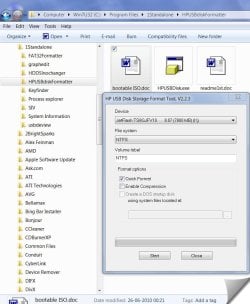
You need two utilities, the first is the HP USB Disk Storage Format Tool. The latest version of this utility is v2.1.8 - I downloaded a copy from here. If you know that your USB pen drive is bootable then you don't need this utility. [Note: Two out of the three USB sticks I tried failed to boot before I used this tool - now all three boot just fine.] If your PC fails to boot from your USB stick even when the BIOS is set to boot from 'USB-Zip' then format the stick as FAT / FAT32 using this HP utility.

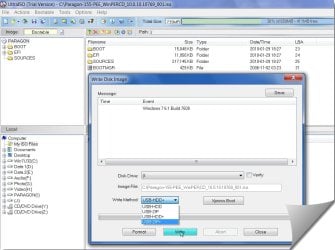
The second utility you need is UltraISO - the trial version of UltraISO can be downloaded from here. Simply open your bootable ISO image file in UltraISO and then from the menu select Bootable -> Write Disk Image... Make sure that your USB pen drive is selected as the 'Disk Drive:' and that the 'Write Method:' is set to USB-ZIP. Then just click on Write and in a few seconds you will have a bootable USB pen drive.

Voila - it really is that simple!

So what I did is here pictorially.(both the above utilities should be run as administrator)

1format.jpg

2Write Image.jpg

3writebootISO.jpg

The only hitch I faced was that when I selected the write method as USB Zip, the pendrive would not boot when USB zip was selected in the boot menu. So I wrote the bootable ISO again using USB HDD+.Selected USB HDD in the boot menu and voila my Paragon WinPE based recovery CD booted in full glory.
No more worries. Even if my hard disk bootsector is eaten away by any virus, I can boot from my USB pendrive and restore the system.

No more CD burning. :thumbsup:


Peronally, I can't find a flash drive case that holds more than six. ;)

Six is one too many (for me););););););)
 
Last edited:

My Computer My Computer

At a glance

Windows 7 Ultimate 32bitAMD Phenom II X3 720 ProcessorTranscend DDR2 (PC2 6400) 4 X 1GBIntegrated + ATI Radeon 4550
Computer Manufacturer/Model Number
self-assembled
OS
Windows 7 Ultimate 32bit
CPU
AMD Phenom II X3 720 Processor
Motherboard
Gigabyte GA-MA78GM-S2H Revision 1.0
Memory
Transcend DDR2 (PC2 6400) 4 X 1GB
Graphics Card(s)
Integrated + ATI Radeon 4550
Sound Card
Integrated Realtek ALC 889A
Monitor(s) Displays
DELL 1704 FPT
Screen Resolution
1280 x 1024
Hard Drives
Western Digital Caviar SE16 250 GB x2 in RAID 0
PSU
Coolermaster 400 W
Case
Zebronics Cube
Cooling
stock
Keyboard
Microsoft - wired
Mouse
Microsoft - wired
Internet Speed
ADSL 256-512Kbps
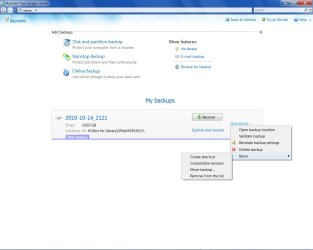
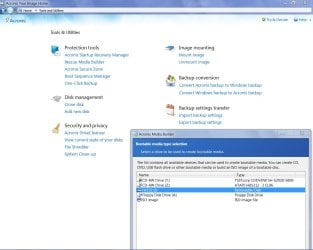
The recently released (09 Sep 2010) Acronis True Image Home 2011, with its tighter integration with Windows 7, is an altogether different visual treat.

It facilitates writing the bootable recovery module into a removable drive - perhaps a pointer to the way the world will go.

ATIH2011.jpg

rite2USB.jpg
 
Last edited:

My Computer My Computer

At a glance

Windows 7 Ultimate 32bitAMD Phenom II X3 720 ProcessorTranscend DDR2 (PC2 6400) 4 X 1GBIntegrated + ATI Radeon 4550
Computer Manufacturer/Model Number
self-assembled
OS
Windows 7 Ultimate 32bit
CPU
AMD Phenom II X3 720 Processor
Motherboard
Gigabyte GA-MA78GM-S2H Revision 1.0
Memory
Transcend DDR2 (PC2 6400) 4 X 1GB
Graphics Card(s)
Integrated + ATI Radeon 4550
Sound Card
Integrated Realtek ALC 889A
Monitor(s) Displays
DELL 1704 FPT
Screen Resolution
1280 x 1024
Hard Drives
Western Digital Caviar SE16 250 GB x2 in RAID 0
PSU
Coolermaster 400 W
Case
Zebronics Cube
Cooling
stock
Keyboard
Microsoft - wired
Mouse
Microsoft - wired
Internet Speed
ADSL 256-512Kbps
Have been using memory sticks for this type of thing for some time now.
Found this very good app from Corsair, makes it very easy.
Liberkey has a lot of non-bootable apps, with the Corsair app you can add any ISO, edit the menu and you can have hundreds of bootable apps on one memory stick.
Mine has over 300 on it now.


It's quick and easy to do, you can add many helpful apps to the bootable memory stick.

The Seven forums tuts are good.

MS-DOS Bootable Flash Drive - Create

Install Windows 7 from USB Pen Drive Using Grub4Dos

Using the same source and Grub method mentioned above, the Corsair site has a nice version: How to Create the Ultimate Bootable USB Flash Drive.
Select the utility you wish to use and it will be loaded. The versatility of this tool is apparent once you begin to use it. The two default utilities, Memtest86+ and FreeDOS, are invaluable during system builds and trouble shooting.

Your flash drive can become a virtual toolbox of utilities that you can carry in your pocket as opposed to carrying archaic floppy disks or bulky CDs and DVDs. You also have the option of far greater storage capacity when using a USB flash drive. Your USB flash drive will still be fully functional as a removable storage drive. This is a great tool for testing memory or running programs from a DOS prompt such as firmware or BIOS updaters. The only real limits are the drive size and your creativity.

After the bootable USB memory stick is prepared just add the program ISO file and do a quick edit of the menu, you'll have a menu list to choose from when you boot from it.
I added LiberKey (listed in FREE Great Programs for Windows 7) to mine, it has a lot of good support apps (305 applications) and a nice interface, not bootable but very nice selection of support programs.

You can add ISO files, edit the menu so they are listed.
Add any files/folders and still use you USB memory stick as you would normally.
 

My Computer My Computer

At a glance

Windows 7 Ult x64 - SP1/ Windows 8 Pro x64Intel Core i5-3570K 4.6GHz8GB (2X4GB) DDR3 1600 Corsair Vengeance CL8 1.5vSapphire HD 7770 Vapor-X OC 1GB DDR5
Computer type
PC/Desktop
Computer Manufacturer/Model Number
76~2.0
OS
Windows 7 Ult x64 - SP1/ Windows 8 Pro x64
CPU
Intel Core i5-3570K 4.6GHz
Motherboard
Gigabyte GA-Z77X UD3H, f18
Memory
8GB (2X4GB) DDR3 1600 Corsair Vengeance CL8 1.5v
Graphics Card(s)
Sapphire HD 7770 Vapor-X OC 1GB DDR5
Sound Card
Onboard VIA VT2021
Monitor(s) Displays
22" LCD Dell
Screen Resolution
1680x1050
Hard Drives
Samsung 840Pro 128GB SSD,
Seagate Barracuda 500GB SATA2 7200rpm 32MB cache, Seagate Barracuda 1TB SATA2 7200rpm 32MB cache,
PSU
Corsair HX650W
Case
Cooler Master Storm Scout
Cooling
Corsair H80 2x12cm Noctua NF P12 , 2x14cm case fans
Keyboard
Logitech Wave
Mouse
CM Sentinel
Internet Speed
Dismal
Antivirus
Avast
Browser
Opera Next
Other Info
Haswell laptop: HP Envy 17t-j, i7-4700MQ, GeForce 740M 2GB DDR3, 17.3" Full HD 1920x1080, 16GB RAM, Samsung 840 Pro 128GB, 1TB Hitachi 7200 HDD,
Desktop: eSATA ports,
External eSATA Seagate 500GB SATA2 7200rpm,
External WD USB 500GB
New Search

If you want to write an ISO to a pen drive. Do a search for "Universal-USB-Installer". It writes ISO"s to a pen drive makeing it bootable. I found a version at Ubuntu 10.10 site.
 

My Computer My Computer

At a glance

win 7 X64 Ultimate SP1I3770KG Skill F3-14900CL9-4GBXL x 4NVIDIA GeForce GTX670 + Intel 4000
Computer Manufacturer/Model Number
BGC (Bob's Garage Crew)
OS
win 7 X64 Ultimate SP1
CPU
I3770K
Motherboard
Asus P8Z77-V Deluxe
Memory
G Skill F3-14900CL9-4GBXL x 4
Graphics Card(s)
NVIDIA GeForce GTX670 + Intel 4000
Sound Card
Realtek HD 5.1 (MOB)
Monitor(s) Displays
Asus VW224T (1)
Screen Resolution
1920 x 1080
Hard Drives
SATA Corsair Force GT 2.5" 180GB (System) Sata 3
OCZ Vertex3 120GB
OCZ Vertex 2 120GB 2.5" SATA II
ST31000524AS 1000.2GB
WD15EARS (External)
PSU
CoolerMaster 1000 Watt
Case
CoolerMaster HAF X
Cooling
CPU -- CoolerMaster 520N
Keyboard
MS Wireless 3000 V2
Mouse
MS Wireless 3000 V2
Internet Speed
Cable
Antivirus
Norton Internet Security
Browser
IE9
Other Info
AMI Bios 1805
OC'd 3%
I think it depends completely of what you want to do with the .iso. If, e.g., you want to install it on a virtual machine, it is usually better to keep the .iso in the system and load it directly from there. However, if you need a data recovery option because your system is on the blink, a bootable CD of a Linux distro may be handy. The same for programs like Partition Wizard.
 

My Computer My Computer

At a glance

Vista, Windows7, Mint Mate, Zorin, Windows 8from 1.6GHz Duo to i7
Computer Manufacturer/Model Number
HP, Dell, Gateway, Toshiba - 4 laptops and 2 desktops
OS
Vista, Windows7, Mint Mate, Zorin, Windows 8
CPU
from 1.6GHz Duo to i7
Monitor(s) Displays
2x HP w2207
Hard Drives
5x HDD, 7x SSD, 12x Externals
Keyboard
with trackball - no mices
Mouse
Trackball mice
Internet Speed
DSL 6000
Thanks to Dave76 for his valuable inputs, I completed my trials with Multiboot pendrive today.

I used Multiboot ISOs-USB-Creator 2.1.3.5 from here . The advantage is that the menu includes Boot First Hard Drive (HDD), Restart and Shutdown options apart from the Custom Multiboot entries.

The screenshots:

the menu.jpg

multiboot iso.jpg

And thanks to everyone who contributed to this thread.
 

My Computer My Computer

At a glance

Windows 7 Ultimate 32bitAMD Phenom II X3 720 ProcessorTranscend DDR2 (PC2 6400) 4 X 1GBIntegrated + ATI Radeon 4550
Computer Manufacturer/Model Number
self-assembled
OS
Windows 7 Ultimate 32bit
CPU
AMD Phenom II X3 720 Processor
Motherboard
Gigabyte GA-MA78GM-S2H Revision 1.0
Memory
Transcend DDR2 (PC2 6400) 4 X 1GB
Graphics Card(s)
Integrated + ATI Radeon 4550
Sound Card
Integrated Realtek ALC 889A
Monitor(s) Displays
DELL 1704 FPT
Screen Resolution
1280 x 1024
Hard Drives
Western Digital Caviar SE16 250 GB x2 in RAID 0
PSU
Coolermaster 400 W
Case
Zebronics Cube
Cooling
stock
Keyboard
Microsoft - wired
Mouse
Microsoft - wired
Internet Speed
ADSL 256-512Kbps
I personally use the grub4dos method after creating a custom ISO with a driver folder added for just about every windows 7 install to older machines and custom builds.. It has saved me hundreds of hours in the past few months, and the process has gotten much quicker as I go.. and all it cost me was $52 for the retail version of poweriso and an 8GB flash drive.
 
Thanks to Dave76 for his valuable inputs, I completed my trials with Multiboot pendrive today.

I used Multiboot ISOs-USB-Creator 2.1.3.5 from here . The advantage is that the menu includes Boot First Hard Drive (HDD), Restart and Shutdown options apart from the Custom Multiboot entries.

The screenshots:

View attachment 105497

View attachment 105498

And thanks to everyone who contributed to this thread.

Your welcome.

That is a great program for memory sticks.
Really like the Boot First Hard Drive (HDD), Restart and Shutdown options, will add them to mine.

Thanks
 

My Computer My Computer

At a glance

Windows 7 Ult x64 - SP1/ Windows 8 Pro x64Intel Core i5-3570K 4.6GHz8GB (2X4GB) DDR3 1600 Corsair Vengeance CL8 1.5vSapphire HD 7770 Vapor-X OC 1GB DDR5
Computer type
PC/Desktop
Computer Manufacturer/Model Number
76~2.0
OS
Windows 7 Ult x64 - SP1/ Windows 8 Pro x64
CPU
Intel Core i5-3570K 4.6GHz
Motherboard
Gigabyte GA-Z77X UD3H, f18
Memory
8GB (2X4GB) DDR3 1600 Corsair Vengeance CL8 1.5v
Graphics Card(s)
Sapphire HD 7770 Vapor-X OC 1GB DDR5
Sound Card
Onboard VIA VT2021
Monitor(s) Displays
22" LCD Dell
Screen Resolution
1680x1050
Hard Drives
Samsung 840Pro 128GB SSD,
Seagate Barracuda 500GB SATA2 7200rpm 32MB cache, Seagate Barracuda 1TB SATA2 7200rpm 32MB cache,
PSU
Corsair HX650W
Case
Cooler Master Storm Scout
Cooling
Corsair H80 2x12cm Noctua NF P12 , 2x14cm case fans
Keyboard
Logitech Wave
Mouse
CM Sentinel
Internet Speed
Dismal
Antivirus
Avast
Browser
Opera Next
Other Info
Haswell laptop: HP Envy 17t-j, i7-4700MQ, GeForce 740M 2GB DDR3, 17.3" Full HD 1920x1080, 16GB RAM, Samsung 840 Pro 128GB, 1TB Hitachi 7200 HDD,
Desktop: eSATA ports,
External eSATA Seagate 500GB SATA2 7200rpm,
External WD USB 500GB
Bless you both, Ponmayilal and Dave76!! I have been looking for easy solutions for both bootable Pendrives and ISO's from HDD for a long time. In particular I want extremely flexible options for adding bootable ISO's to both places without a lot of command line annoyance.

As for booting ISO's without burning them to CD or even writing to USB, this is extremely handy and I don't know why everyone is not talking about it. With this option you basically have limitless OS options without having to install anything, and without extra partitions! I can simply treat any bootable ISO as another OS. (Great for defragmenting or virus scanning... and especially for telling Win7 who's boss.)

Having an easily customizable boot menu for the huge USB sticks that are available now (including your phone's micro SD card!) is a God-send. So tired of needing to reformat my USB drive for every new set of tools. Why can't I have them all in one, portable place? Now I can!

Thank you both very much. I'll report back what works best.
 

My Computer My Computer

At a glance

Windows 7/ UbuntuAMD Turion X2 1.6ghz1.5GbNvidia Geforce Go 6150
Computer Manufacturer/Model Number
HP Pavillion DV2000 Notebook
OS
Windows 7/ Ubuntu
CPU
AMD Turion X2 1.6ghz
Motherboard
Wistron 30B5
Memory
1.5Gb
Graphics Card(s)
Nvidia Geforce Go 6150
Sound Card
Conexant HD/ Creative Xmod USB
Monitor(s) Displays
Laptop Built in
Hard Drives
Fujitsu 120Gb
Cooling
GPU Runs Hot! Using NHC to cycle down cpu and keep cool.
Your welcome, glad you found the information useful.

It is a very useful way to use ISO's. Took some searching and trials to find a couple of easy to use options.

Hopefully some easier ones will be found soon ;)
 

My Computer My Computer

At a glance

Windows 7 Ult x64 - SP1/ Windows 8 Pro x64Intel Core i5-3570K 4.6GHz8GB (2X4GB) DDR3 1600 Corsair Vengeance CL8 1.5vSapphire HD 7770 Vapor-X OC 1GB DDR5
Computer type
PC/Desktop
Computer Manufacturer/Model Number
76~2.0
OS
Windows 7 Ult x64 - SP1/ Windows 8 Pro x64
CPU
Intel Core i5-3570K 4.6GHz
Motherboard
Gigabyte GA-Z77X UD3H, f18
Memory
8GB (2X4GB) DDR3 1600 Corsair Vengeance CL8 1.5v
Graphics Card(s)
Sapphire HD 7770 Vapor-X OC 1GB DDR5
Sound Card
Onboard VIA VT2021
Monitor(s) Displays
22" LCD Dell
Screen Resolution
1680x1050
Hard Drives
Samsung 840Pro 128GB SSD,
Seagate Barracuda 500GB SATA2 7200rpm 32MB cache, Seagate Barracuda 1TB SATA2 7200rpm 32MB cache,
PSU
Corsair HX650W
Case
Cooler Master Storm Scout
Cooling
Corsair H80 2x12cm Noctua NF P12 , 2x14cm case fans
Keyboard
Logitech Wave
Mouse
CM Sentinel
Internet Speed
Dismal
Antivirus
Avast
Browser
Opera Next
Other Info
Haswell laptop: HP Envy 17t-j, i7-4700MQ, GeForce 740M 2GB DDR3, 17.3" Full HD 1920x1080, 16GB RAM, Samsung 840 Pro 128GB, 1TB Hitachi 7200 HDD,
Desktop: eSATA ports,
External eSATA Seagate 500GB SATA2 7200rpm,
External WD USB 500GB
Glad that you found the answers to all your queries here in this thread and thanks for your appreciation.

This thread meandered through various stages before culminating in the multiboot ISO pendrive with inputs and comments from many heads here.

First, it was booting from ISOs stored in the HDD using EasyBCD.

Bill2 then provoked me for good ...*chuckles*

This is old stuff.... But then again, theres comfort in cd/dvd because if the boot manager is corrupted etc., this method wont work.

It then went on to writing a bootable ISO into a pendrive using UltraISO.

Out came the comment that there are only cases that can hold a maximum of six pendrives. :) (hmmm... each bootable ISO will require a pendrive)

Then came the multiboot ISO pendrive that can boot from as many ISOs as you can put or fit into the pendrive. The "breakthrough" here came from Dave76. I wonder whether even Dave76 knows what it was. Here it is.

...... You can add ISO files, edit the menu so they are listed......

Yes, though I had this program on my comp for over six months, the noob I was or still am, I had assumed that it will work only with the ISOs listed by the software author.*chuckles again*

That one line and a great leap for me. ( I thankfully remember Neil Armstrong. )

So then, here you have all that you need ( a three-in-one) as per your convenience and need, to boot from ISOs without writing them to any optical media.
 
Last edited:

My Computer My Computer

At a glance

Windows 7 Ultimate 32bitAMD Phenom II X3 720 ProcessorTranscend DDR2 (PC2 6400) 4 X 1GBIntegrated + ATI Radeon 4550
Computer Manufacturer/Model Number
self-assembled
OS
Windows 7 Ultimate 32bit
CPU
AMD Phenom II X3 720 Processor
Motherboard
Gigabyte GA-MA78GM-S2H Revision 1.0
Memory
Transcend DDR2 (PC2 6400) 4 X 1GB
Graphics Card(s)
Integrated + ATI Radeon 4550
Sound Card
Integrated Realtek ALC 889A
Monitor(s) Displays
DELL 1704 FPT
Screen Resolution
1280 x 1024
Hard Drives
Western Digital Caviar SE16 250 GB x2 in RAID 0
PSU
Coolermaster 400 W
Case
Zebronics Cube
Cooling
stock
Keyboard
Microsoft - wired
Mouse
Microsoft - wired
Internet Speed
ADSL 256-512Kbps
Back
Top