adobe reader X very slow to open some PDF under windows 7 64-bit

olive

New member
Local time
12:11 PM
Messages
1
It takes 2 minutes to open a one-page PDF. When double clicking on the PDF, Adobe reader opens but the PDF content doesn't display. It says 'Not responding' for about 2 minutes before it can display the content of the PDF. The PDF is just a one page file. It can be opened by other versions of adobe reader instantly. It can also be opened instantly on another PC which is also W7 64 and Adobe reader X.
WHat can be the possible conflict between reader and my W7?
 

My Computer My Computer

At a glance

Windows 7 64-bit
OS
Windows 7 64-bit
Try a program called nitroPDF. If that is slow too, then it is PDF's. If it is fast, then it is adobe, and I would recommend uninstalling/reinstalling.
 

My Computer My Computer

At a glance

W7 Professional x64AMD Athlon II X3 445 Rana 3.10 GHzPNY XLR DDR3 1600 4x2GBNVIDIA GeForce GTS 450 (fermi) 1GB GDDR5
Computer Manufacturer/Model Number
Pugh Technologies
OS
W7 Professional x64
CPU
AMD Athlon II X3 445 Rana 3.10 GHz
Motherboard
MSI 870A-G54
Memory
PNY XLR DDR3 1600 4x2GB
Graphics Card(s)
NVIDIA GeForce GTS 450 (fermi) 1GB GDDR5
Sound Card
Realtek ALC892 onboard
Monitor(s) Displays
ASUS VE205t, Viewsonic VX2035WM
Screen Resolution
1600x900, 1600x1050
Hard Drives
977GB Hitachi Hitachi HDS721010CLA332
244GB Western Digital WDC WD2500AAJS-65B4A0
488GB Western Digital WDC WD5000AAJS-00A8B0
488GB Western Digital WDC WD5000AAKS-00UU3A0
PSU
Antec EarthWatts EA650 650W
Case
ThermalTake Armor A90 Mid Tower
Cooling
3x 120mm in, 1x 120mm & 200mm out, self built hydro-cooler
Keyboard
Logitec 55
Mouse
Razer Deathadder
Internet Speed
20 Mbps D/L, 9 Mbps U/L
It takes 2 minutes to open a one-page PDF. When double clicking on the PDF, Adobe reader opens but the PDF content doesn't display. It says 'Not responding' for about 2 minutes before it can display the content of the PDF. The PDF is just a one page file. It can be opened by other versions of adobe reader instantly. It can also be opened instantly on another PC which is also W7 64 and Adobe reader X.
WHat can be the possible conflict between reader and my W7?

What is your computer's specs? That might also be an indicator so as to why that application responds too slow for you. .
 

My Computer My Computer

At a glance

Windows 7 Ultimate x64 (desktop) / x64 (laptop)AMD Phenom 2 X3 720 2.8 GHz (desktop) / AMD D...4 Gb DDR3 / 4Gb DD3Nvidia GeForce GTS 450 2048 Mb / AMD Radeon H...
OS
Windows 7 Ultimate x64 (desktop) / x64 (laptop)
CPU
AMD Phenom 2 X3 720 2.8 GHz (desktop) / AMD Dual-Core E-350
Motherboard
ASRock N68-VS3 UCC / Acer Aspire 5253
Memory
4 Gb DDR3 / 4Gb DD3
Graphics Card(s)
Nvidia GeForce GTS 450 2048 Mb / AMD Radeon HD 6310
Sound Card
High Definition Audio Device
Monitor(s) Displays
ViewSonic
Screen Resolution
1024 x 768 / 1366 x 768
Hard Drives
313GB Seagate ST332041 8AS SCSI Disk Device (ATA) / 500 Gb HDD
PSU
Electron ATX-600W
Case
Some Case
Cooling
AMD built-in cooling fan
Keyboard
Logitech Keyboard
Mouse
A4tech Infrared Mouse / Philips Infrared Mouse
Internet Speed
1 Mbps
Other Info
Information of the PC's specs courtesy of Speccy freeware. Lol.

My Computer My Computer

At a glance

Windows 7 Home Premium 64bitIntel(R)Core(TM)2 quad [email protected] 2.39GHz6GB DDR2 6400GeForce 8500/512MB
Computer Manufacturer/Model Number
HP M9077c
OS
Windows 7 Home Premium 64bit
CPU
Intel(R)Core(TM)2 quad [email protected] 2.39GHz
Motherboard
ASUSeK
Memory
6GB DDR2 6400
Graphics Card(s)
GeForce 8500/512MB
Sound Card
Realtek High Def Audio
Monitor(s) Displays
HP w2408 LCD 24" widescreen
Screen Resolution
1920x1200
Cooling
6 pack of Bud
Keyboard
MS wireless Inteli
Mouse
MS wireless Inteli

My Computer My Computer

At a glance

Win 7 64-biti3 Intel8GB
Computer Manufacturer/Model Number
HP notebook
OS
Win 7 64-bit
CPU
i3 Intel
Memory
8GB
Hard Drives
500GB
Yeah olive I'm on Windows 7x64 too and it IS slow. A one page text pdf takes ten seconds to open instead of one. After some playing around I discovered that it's slow at first. Once you open a few pdf files a few times everything becomes normal like Adobe Reader 9.

Kinda annoying, I do think that adobe took a step backwards with reader X. The buttons now look very sub par as far a graphics go. Hope something gets done about this when 10.1 comes out, I dislike using other pdf readers.
 

My Computer My Computer

At a glance

Windows 7x64 Home Premiumi7-720QM4GBATI Mobility Radeon 5730
Computer Manufacturer/Model Number
ASUS
OS
Windows 7x64 Home Premium
CPU
i7-720QM
Memory
4GB
Graphics Card(s)
ATI Mobility Radeon 5730
Same thing here. I have a Compaq 8510p with 4gb RAM and a SSD hard drive, running windows 7 x64. Adobe Reader X is SO slow opening up .PDF files that I went back to Adobe Reader 9. What's interesting is that I have Adobe Reader X on a Dell Latitude D630 with only 1gb RAM and a 7200 rpm HDD, running Windows XP, and it opens .PDF files just fine.
???
 

My Computer My Computer

At a glance

Windows 7 Ultimate x642.00 GHz Intel Pentium M2GB DDRATI MOBILITY RADEON 9700
Computer Manufacturer/Model Number
HP Compaq nc8000
OS
Windows 7 Ultimate x64
CPU
2.00 GHz Intel Pentium M
Motherboard
Hewlett-Packard 088C 8051 Version 1E.19
Memory
2GB DDR
Graphics Card(s)
ATI MOBILITY RADEON 9700
Sound Card
SoundMAX Integrated Digital Audio
Monitor(s) Displays
Integrated
Hard Drives
Seagate Momentus ST9160821A ATA
PSU
Integrated
Case
HP Compaq nc8000
Cooling
Integrated
Just Report,in Adobe Acrobat X Pro,opening a document is very fast,
almost take you 1-2 seconds to open a thousand pages documents,
but when using Reader X,is significantly slower than the Acrobat.
 

My Computer My Computer

At a glance

Windows 7 Ultimate SP1Intel Core 2 Duo P7450 2.13GHz4GB DDR2ATI Mobility Radeon HD 4650 Graphics
Computer Manufacturer/Model Number
Sony VGN-FW520D
OS
Windows 7 Ultimate SP1
CPU
Intel Core 2 Duo P7450 2.13GHz
Memory
4GB DDR2
Graphics Card(s)
ATI Mobility Radeon HD 4650 Graphics
Screen Resolution
1600x900
Hard Drives
500 GB SATA 5400 RPM
quick fix

Go to Edit / preferences / general - the uncheck box "Enable protected mode at startup" This got rid of the lag in opening adobe docs.
 

My Computer My Computer

At a glance

Windows 7 Home Premium 64bit.
OS
Windows 7 Home Premium 64bit.
Go to Edit / Preferences / 3D & Multimedia - then uncheck box "Enable hardware rendering for legacy video cards" This got rid of the lag in opening adobe docs.
 

My Computer My Computer

At a glance

Windows 7 x64
OS
Windows 7 x64
You know? Drop that thing, is bloated as hell... better use FoxIt Reader, it is lightweight and has better security tools than adobe reader...

See ya!!! :D
 

My Computer My Computer

At a glance

Microsoft Windows 7 Home Premium SP1 64-bit B...AMD Athlon 64 X2 5200+ Dual Core CPU @ 2.7 Gh...2x2 GB DDR2 PC-5300 (667 Mhz) Kingston ValueRAMXFX ATI Radeon HD 4350 GPU (512 MB + 512 MB HM)
Computer type
PC/Desktop
Computer Manufacturer/Model Number
Assembled Desktop PC
OS
Microsoft Windows 7 Home Premium SP1 64-bit Build 7600
CPU
AMD Athlon 64 X2 5200+ Dual Core CPU @ 2.7 Ghz (Brisbane)
Motherboard
PCChips A13G+ v3.0
Memory
2x2 GB DDR2 PC-5300 (667 Mhz) Kingston ValueRAM
Graphics Card(s)
XFX ATI Radeon HD 4350 GPU (512 MB + 512 MB HM)
Sound Card
Realtek High Definition Audio Driver ALC660 @ MCP61S
Monitor(s) Displays
HP S2031 20" LED HD Widescreen Display Monitor
Screen Resolution
1600 x 900 px
Hard Drives
Maxtor Diamond Max 10 (160 GB, 7200 RPM, SATA-II Hard Disk)
Western Digital Scorpion Blue (250 GB, 5400 RPM, SATA-II External Hard Disk - Personal Data)
Toshiba MQ01ABD050 (500 GB, 5400 RPM, SATA-II External Hard Disk - Software & ISOs)
PSU
Pixxo Transformer 850W 80+ Certification PSU
Case
Compaq 5BW353 Case
Cooling
Many solutions, see other info...
Keyboard
Green Leaf (Mitzu) Standard Keyboard
Mouse
Microsoft USB Lasser Pointing Device
Internet Speed
10 MB
Antivirus
Avast Antivirus Free
Browser
Firefox, Chrome, Internet Explorer
Other Info
Windows Experience Index Result: 3.8 of 7.9.

Cooling solutions:
- AVC @ 2000/5000 RPM Copper Heatpipes (For Athlon 64 X2 6000+ CPU used in an Athlon 64 X2 5200+)
- Rear Fan 80 mm @ 2700 RPM for heat extraction
- Manhatan Chipset Cooler @ 4700/7200 RPM (For nVidia Chipset in MoBo)
- Foxconn @ 2500 RPM (Old Pentium III heatsink fan) in XFX ATI Radeon HD 4350
I realize this is an old thread, but it came up high on the search, so I thought I'd contribute a solution.
I was having this problem very recently in Reader 10.1.8 and found that simply closing the Tools Pane sped it up immensely!
Hope this helps.
 

My Computer My Computer

At a glance

Windows 7 Ultimate x64Intel Core i5-3210M 2.5GHz8GBDedicated NVIDIA GT 620M & Integrated Intel H...
Computer type
Laptop
Computer Manufacturer/Model Number
ASUS U47VC
OS
Windows 7 Ultimate x64
CPU
Intel Core i5-3210M 2.5GHz
Motherboard
Intel Chief River Chipset HM76
Memory
8GB
Graphics Card(s)
Dedicated NVIDIA GT 620M & Integrated Intel HD Graphics 4000
Hard Drives
Samsung 850 Evo 500GB SSD
Antivirus
Windows Live Essentials
Browser
Google Chrome, Internet Explorer 11
I think you are all missing it

I bet Acro X Std (what I'm using) is "phoning home" every time it's opened, for the first time, during a login session. After I load the program the first time, I can quit and then re-launch and it opens back up fairly quickly. But that initial load, that's a pain. The app just sits there, either phoning home or loading some extraneous s__t. This lag happens even if you just launch the program without trying to open anything on my Win7 X64 Ent WS.

Of course I use Foxit, but Foxit can't edit and crop and secure the way a paid version of Acro does, so sometimes I am forced to launch it.

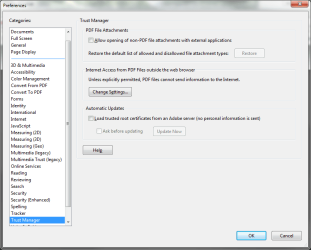
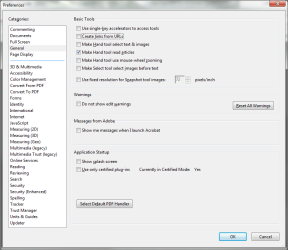
I could be wrong, but anyway, the control panel doesn't look the same as the advice given here so I'm posting a few shots of Acro X standard. I unchecked a few things,

*Use only certified plugins
*Allow opening of non-PDF extensions
*OF COURSE updater is turned off


but don't have the time right now to log off and back on to actually see if it made a difference. I see it says it's already in certified mode. I'll work on it a little more and see.
 

Attachments

  • AcroX_Std02.png
    AcroX_Std02.png
    24.5 KB · Views: 1
  • AcroX_Std01.png
    AcroX_Std01.png
    25.9 KB · Views: 1

My Computer My Computer

At a glance

Win7Pro 64bitIntel Core 2 Duo E8400, OC'd to 3GHz2G x2 CORSAIR DDR3SAPPHIRE 100248L HD3850 512M RT
Computer Manufacturer/Model Number
Custom
OS
Win7Pro 64bit
CPU
Intel Core 2 Duo E8400, OC'd to 3GHz
Motherboard
Gigabyte GA-EP45T-UD3P
Memory
2G x2 CORSAIR DDR3
Graphics Card(s)
SAPPHIRE 100248L HD3850 512M RT
Monitor(s) Displays
Hannspree
Screen Resolution
1920X1200
Hard Drives
Seagate Barracuda, 465G X2, RAID 0
PSU
PCP - WRCLS61EPS RT
Case
XCLIO Windtunnel ATX full tower, black, 1.0mm SECC
Keyboard
Logitech illuminated
Mouse
Logitech mouseman wheel
Internet Speed
broadband
Go to Edit / preferences / general - the uncheck box "Enable protected mode at startup" This got rid of the lag in opening adobe docs.

I am using Windows 8.1 but have the same issue with Adobe Reader XL.
I found the post that said to UNCHECK the Enable Protected Mode Check Box.
This Worked. Adobe Reader XL open quickly and the tools actually load quickly also!

The setting is now under the Security (Enhanced) Selection. Just uncheck the Protected mode and that will fix the SLOW ISSUE!

Thank you Spengler for the tip!
 

My Computer My Computer

At a glance

Microsoft Windows 7 Home Premium 64-bit 7601 ...Intel(R) Core(TM)2 Duo CPU T9800 @ 2.93GHz4.00 GB 2x 2.00 GB SODIMMATI Mobility Radeon HD 3670
Computer Manufacturer/Model Number
Dell Studio xps 1640 laptop
OS
Microsoft Windows 7 Home Premium 64-bit 7601 Multiprocessor Free Service Pack 1
CPU
Intel(R) Core(TM)2 Duo CPU T9800 @ 2.93GHz
Motherboard
Intel(R) Core(TM)2 Duo CPU T9800 @ 2.93GHz
Memory
4.00 GB 2x 2.00 GB SODIMM
Graphics Card(s)
ATI Mobility Radeon HD 3670
Sound Card
(1) High Definition Audio Device (2) IDT High Definition A
Monitor(s) Displays
Generic PNP Monitor
Screen Resolution
1920 x 1080 x 32 bits (4294967296 colors) @ 60 Hz
Hard Drives
TOSHIBA MK5055GSX ATA Device 465.76 GB
2 Logical Drives C: 450 GB D: Recovery patition 15GB
PSU
DELL 90W
Case
LAPTOP
Keyboard
DELL Keyboard (LAPTOP)
Mouse
DELL Touchpad (LAPTOP)
Internet Speed
DSL 8/3
Back
Top