when i open my Skype extras a message appears

hrachya

New member
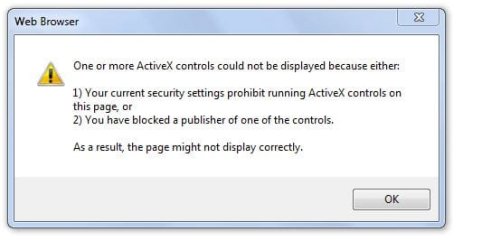
when i open my Skype extras (to play a game) a message appears:

/One or more ActiveX controls could not be displayed because either:
1) Your current security settings prohibit running ActiveX controls on this page, or
2) You have blocked a publisher of one of the controls.
As a result, the page might not be display correctly.\

could you help me??? :cry::cry:
 

Attachments

  • Capture.JPG
    Capture.JPG
    30.8 KB · Views: 70

My Computer

OS
Windows 7 Ultimate x32
Monitor(s) Displays
Generic PnP Monitor
Go to IE Tools\Internet Options\Security

Click on The Internet Icon
Click the custom level button
Look for "Download Unsigned ActiveX controls" select prompt
Click OK answer Yes
Click apply, click OK.

Just remember there can be hidden dangers in allowing unsigned ActiveX controls to load into your system. (malware)
 

My Computer

Computer type
PC/Desktop
Computer Manufacturer/Model Number
Gateway DX4831-01e (Mid-Tower Desktop)
OS
Originally Win 7 Hm Prem x64 Ver 6.1.7600 Build 7601-SP1 | Upgraded to Windows 10 December 14, 2019
CPU
Intel i3 530 2.93GHz, 2933MHz 2 Cores 4 Logical Processors
Motherboard
Gateway H57M01 133 megahertz
Memory
6GB of 1,333MHz DDR3 SDRAM
Graphics Card(s)
32MB Intel Graphics Media Accelerator HD IGChip
Sound Card
Realtek High Definition Audio
Monitor(s) Displays
Gateway HX2000 20inch TFT active matrix TN
Screen Resolution
1600 x 900 x 59 hertz
Hard Drives
WDC WD10EADS-00M2B0 [HDD] (1000.20 GB) -- drive 0,
HL-DT-ST DVDRAM GH41N [CD-ROM dr]
Four card readers, and Four USB 2.0
PSU
300watts.
Case
Mid-Tower Desktop
Cooling
Stock from Gateway
Keyboard
Natural Ergonomic Keyboard 4000, see Other Info
Mouse
Orig. Gateway wore out now using Insignia USB wired optical
Internet Speed
Vz FIOS 10ms png 57.64Mbps down 65.53Mbps up Speedtest.org
Antivirus
Zamana Anti-logger with Anti-malware, MSE, Windows Firewall,
Browser
IE11.0.9600.19399-Upd ver11.0.135, Firefox 68.0.1 x64
Other Info
System Specs by Belarc.

BIOS: American Megatrends Inc. P01-A0 11/17/2009

Replaced the MS 'Natural' Standard PS/2 Enhanced 101-102 Keyboard with a new Natural Ergonomic Keyboard 4000 on August 1st 2014.

Canon Pixma MG3222 Printer.

Updated to IE11 on 12102015 | Fios Quantum Router g1100

Additional AV: SpywareBlaster, manual Mbam, SAS
Yeah, that's pretty dangerous allowing unsigned active X controls for all web pages.

A better way would be to add the website that skype is trying to load into your "trusted sites" list and then allow unsigned active X controls to be loaded in the "Trusted Zone" rather than the normal internet zone.

The trick is you need to figure out what URL Skype is using for the "extras"...
 

My Computer

Computer Manufacturer/Model Number
Scratch built
OS
Windows 7 x64 Ultimate
CPU
i7 960
Motherboard
Asus P6X58D
Memory
12 Gig Corsair Dominator
Graphics Card(s)
Nvidia 480
Sound Card
Maudio Delta 44 + breakout box
Monitor(s) Displays
Dell UltraSharp U2410 24in and Samsung 21 dual monitors
Screen Resolution
1920x1200 and 1280x1024
Hard Drives
Primary: Intel X-25M G2 160G SSD
Secondary: Segate baracuda 1.0 TB
HDs in AHCI mode.
PSU
Corasair TX850
Case
Cooler Master HAF
Cooling
Corsair H50
Keyboard
Logitech G15 + N52 game pad
Mouse
Logitech MX518
Internet Speed
15kbs down 4.5kbps up
Other Info
WEI 7.6
CPU & RAM 7.6
Graphics 7.9
Hard disk 7.7
sorry, but it was already set promt
 

My Computer

OS
Windows 7 Ultimate x32
Monitor(s) Displays
Generic PnP Monitor
Help!!!!!!!

i can't fix it again with "gadget black error" you sent me. And one thing: when i open my Skype extras (to play a game) a message appears:

/One or more ActiveX controls could not be displayed because either:
1) Your current security settings prohibit running ActiveX controls on this page, or
2) You have blocked a publisher of one of the controls.
As a result, the page might not be display correctly.\

And one thing:
when i update opera, it closes. then i open it, but it's the old version again.

Please, help!!!:cry::cry::mad::confused:
 

Attachments

  • Capture.JPG
    Capture.JPG
    30.8 KB · Views: 24

My Computer

OS
Windows 7 Ultimate x32
Monitor(s) Displays
Generic PnP Monitor
hrachya, you are going to have to settle down, and concentrate on what you are doing!

By my count you have posted four problems across two threads with your machine.
This thread: http://www.sevenforums.com/software...skype-extras-message-appears.html#post1138446 that I'm posting in now has a problem with Skype, and I had to search for what you meant by:

i can't fix it again with "gadget black error" you sent me.
Which is in this thread. http://www.sevenforums.com/gadgets/127020-default-gadgets-have-turned-invisible-black.html

This thread has gadget, program access, firefox 4 beta 7, and Opera problems.

You pick the thread you want to concentrate on, and I'll help there.

For right now, your best course of action would be to stop fooling around with all the beta's, gadget's, and an Opera Version??? that is known to cause installation problems.

Un-install all the Bling, get back to basics, and when you have a stable system again, then start adding programs slowly, one at a time, and make sure they are stable before you add another!

What you should do.....


  • Un-install all the Bling, get back to the basic OS, and stay away from CCleaner, un-install it too!

  • Fill out your SystemSpecs. Use Speccy or Belarc to help you.


  • Make sure whatever anti-virius-malware program you have is up-to- date.

  • If you have them, run a System Restore Point from a month ago before all this started:

  • Go to Control Panel\All Control Panel Items\System, then click on System protection. At the top you will see instructions to start a system restore.

  • Run your Windows Update, and check for any missing updates.


I am posting in both threads so everyone will know where we stand.

Anak
 

My Computer

Computer type
PC/Desktop
Computer Manufacturer/Model Number
Gateway DX4831-01e (Mid-Tower Desktop)
OS
Originally Win 7 Hm Prem x64 Ver 6.1.7600 Build 7601-SP1 | Upgraded to Windows 10 December 14, 2019
CPU
Intel i3 530 2.93GHz, 2933MHz 2 Cores 4 Logical Processors
Motherboard
Gateway H57M01 133 megahertz
Memory
6GB of 1,333MHz DDR3 SDRAM
Graphics Card(s)
32MB Intel Graphics Media Accelerator HD IGChip
Sound Card
Realtek High Definition Audio
Monitor(s) Displays
Gateway HX2000 20inch TFT active matrix TN
Screen Resolution
1600 x 900 x 59 hertz
Hard Drives
WDC WD10EADS-00M2B0 [HDD] (1000.20 GB) -- drive 0,
HL-DT-ST DVDRAM GH41N [CD-ROM dr]
Four card readers, and Four USB 2.0
PSU
300watts.
Case
Mid-Tower Desktop
Cooling
Stock from Gateway
Keyboard
Natural Ergonomic Keyboard 4000, see Other Info
Mouse
Orig. Gateway wore out now using Insignia USB wired optical
Internet Speed
Vz FIOS 10ms png 57.64Mbps down 65.53Mbps up Speedtest.org
Antivirus
Zamana Anti-logger with Anti-malware, MSE, Windows Firewall,
Browser
IE11.0.9600.19399-Upd ver11.0.135, Firefox 68.0.1 x64
Other Info
System Specs by Belarc.

BIOS: American Megatrends Inc. P01-A0 11/17/2009

Replaced the MS 'Natural' Standard PS/2 Enhanced 101-102 Keyboard with a new Natural Ergonomic Keyboard 4000 on August 1st 2014.

Canon Pixma MG3222 Printer.

Updated to IE11 on 12102015 | Fios Quantum Router g1100

Additional AV: SpywareBlaster, manual Mbam, SAS
Back
Top