MKV and Blu-ray player

IntelCoreI3

♥ Deep Purple ♥
Member
VIP
Local time
1:01 AM
Messages
103
Location
Israel,Kfar Saba
Hello
I am looking for software to play my movies BLU-RAY and MKV format files of the best quality. Most importantly read subtitles - Support in Hebrew!

Thanks
Tom
 

My Computer

Computer Manufacturer/Model Number
H55M-D2H
OS
Windows 7 Ultimate x64
CPU
DualCore Intel Core i3 530, 2933 MHz (22 x 133)
Memory
6 GB DDR3
Graphics Card(s)
Nvidia GT430 1GB DDR3
Sound Card
Intel HDMI @ Intel Ibex Peak PCH - High Definition Audio Con
Monitor(s) Displays
CMC 22 W
Screen Resolution
1152 X 864
Hard Drives
Drive #1 - 500 GB
Drive #2 - 1 TB
Keyboard
Microsoft Wired Keyboard 600
Mouse
Microsoft Basic Optical Mouse
Internet Speed
20 mb download 1MB upload
Other Info
Microsoft® LifeCam HD-3000
The subtitle fly in the ointment for BluRay is usually PGS subtitle support. WMP 12 and VLC can both display PGS subtitles and embedded XSubs used in divx files.

PGS subs are an image format so the language shouldn't matter. Media Player Classic Home Cinema can display PGS also but I think you have to do some fiddling using Haali Media Splitter as DirectShow displayer of PGS subs to get it to work. Unless it's been updated recently to display them directly.

VLC is probably the easiest to try as it's self contained.
 

My Computer

Computer Manufacturer/Model Number
HP Media Center
OS
Windows 7 32 bit
CPU
AMD 5200+ dual core
Memory
2 GB
Graphics Card(s)
NVidia GeForce 6150SE 128 MB
Monitor(s) Displays
CRT
Screen Resolution
1280x1024
Hard Drives
500 GB Sata internal :

SIIG USB 3.0 docking stations w/WD Caviar Black 6 Gb/s drives
Keyboard
PS/2
Mouse
PS/2 Wheel Mouse
Other Info
SIIG USB 3.0 PCIexpress card.
The truth .. When I tried the POWER DVD I loved the sound but he did not put my address. You know why?
 

My Computer

Computer Manufacturer/Model Number
H55M-D2H
OS
Windows 7 Ultimate x64
CPU
DualCore Intel Core i3 530, 2933 MHz (22 x 133)
Memory
6 GB DDR3
Graphics Card(s)
Nvidia GT430 1GB DDR3
Sound Card
Intel HDMI @ Intel Ibex Peak PCH - High Definition Audio Con
Monitor(s) Displays
CMC 22 W
Screen Resolution
1152 X 864
Hard Drives
Drive #1 - 500 GB
Drive #2 - 1 TB
Keyboard
Microsoft Wired Keyboard 600
Mouse
Microsoft Basic Optical Mouse
Internet Speed
20 mb download 1MB upload
Other Info
Microsoft® LifeCam HD-3000
The truth .. When I tried the POWER DVD I loved the sound but he did not put my address. You know why?

I have no experience with Power DVD. Maybe somebody else can help with it. I use SPlayer quite a bit. But it doesn't have PGS subtitle support. I have to extract the subs and convert to idx/sub or .srt.
 

My Computer

Computer Manufacturer/Model Number
HP Media Center
OS
Windows 7 32 bit
CPU
AMD 5200+ dual core
Memory
2 GB
Graphics Card(s)
NVidia GeForce 6150SE 128 MB
Monitor(s) Displays
CRT
Screen Resolution
1280x1024
Hard Drives
500 GB Sata internal :

SIIG USB 3.0 docking stations w/WD Caviar Black 6 Gb/s drives
Keyboard
PS/2
Mouse
PS/2 Wheel Mouse
Other Info
SIIG USB 3.0 PCIexpress card.
my sub's all in SRT and sometimes idx/sub..
i will try splayer
 

My Computer

Computer Manufacturer/Model Number
H55M-D2H
OS
Windows 7 Ultimate x64
CPU
DualCore Intel Core i3 530, 2933 MHz (22 x 133)
Memory
6 GB DDR3
Graphics Card(s)
Nvidia GT430 1GB DDR3
Sound Card
Intel HDMI @ Intel Ibex Peak PCH - High Definition Audio Con
Monitor(s) Displays
CMC 22 W
Screen Resolution
1152 X 864
Hard Drives
Drive #1 - 500 GB
Drive #2 - 1 TB
Keyboard
Microsoft Wired Keyboard 600
Mouse
Microsoft Basic Optical Mouse
Internet Speed
20 mb download 1MB upload
Other Info
Microsoft® LifeCam HD-3000
my sub's all in SRT and sometimes idx/sub..
i will try splayer

I think you'll like it. It has automatic sub search. Plays .mp4 .mkv HD .avi etc.. and it's quite stable. It doesn't automatically load an .iso file like VLC does but if you mount the .iso with one of those virtual drive utilities it will load it using Open Disc.
 

My Computer

Computer Manufacturer/Model Number
HP Media Center
OS
Windows 7 32 bit
CPU
AMD 5200+ dual core
Memory
2 GB
Graphics Card(s)
NVidia GeForce 6150SE 128 MB
Monitor(s) Displays
CRT
Screen Resolution
1280x1024
Hard Drives
500 GB Sata internal :

SIIG USB 3.0 docking stations w/WD Caviar Black 6 Gb/s drives
Keyboard
PS/2
Mouse
PS/2 Wheel Mouse
Other Info
SIIG USB 3.0 PCIexpress card.
....Media Player Classic Home Cinema can display PGS also but I think you have to do some fiddling using Haali Media Splitter as DirectShow displayer of PGS subs to get it to work. Unless it's been updated recently to display them directly.

VLC is probably the easiest to try as it's self contained.

I have no difficulty in pulling out the subtitles when playing BDs on MPC-HC.

Does VLC play BDs? I am not aware since I do not use VLC.
 

My Computer

OS
Windows 7 Home Premium 32 bit
....Media Player Classic Home Cinema can display PGS also but I think you have to do some fiddling using Haali Media Splitter as DirectShow displayer of PGS subs to get it to work. Unless it's been updated recently to display them directly.

VLC is probably the easiest to try as it's self contained.

I have no difficulty in pulling out the subtitles when playing BDs on MPC-HC.

Does VLC play BDs? I am not aware since I do not use VLC.

It will play .m2ts .mkv .mp4

At least on my machines I've noticed VLC is much less stable since it added PGS and XSub support. Maybe it's just a coincidence but it seems like if I touch it, it just goes away. Up to 1.0 it was solid. Not sure what happened.

It may play BluRay disc off BDROM drive if you have one of those PassKey apps running, I'm not sure. It's too frustrating to try to use it. Mainly for that reason I found SPlayer.
 

My Computer

Computer Manufacturer/Model Number
HP Media Center
OS
Windows 7 32 bit
CPU
AMD 5200+ dual core
Memory
2 GB
Graphics Card(s)
NVidia GeForce 6150SE 128 MB
Monitor(s) Displays
CRT
Screen Resolution
1280x1024
Hard Drives
500 GB Sata internal :

SIIG USB 3.0 docking stations w/WD Caviar Black 6 Gb/s drives
Keyboard
PS/2
Mouse
PS/2 Wheel Mouse
Other Info
SIIG USB 3.0 PCIexpress card.

My Computer

Computer Manufacturer/Model Number
Self
OS
Main - Windows 7 Pro SP1 64-Bit; 2nd - Windows Server 2008 R2
CPU
Main - Core i7 2600K; 2nd - Core i7 920
Motherboard
Main - Asus P8Z68-V Pro/Gen3; 2nd - Gigabyte GA-EX58-UDR3
Memory
Main - 16GB Corsair Vengeance; 2nd - 12GB Corsair Vengeance
Graphics Card(s)
Main - XFX Radeon 6870 1GB; 2nd - XFX Radeon 4870 1GB
Sound Card
Both: Onboard Realtek Azalia
Monitor(s) Displays
Main - Hann 25" + I-INC 25" + Acer 23"; 2nd - Upgrading Soon
Screen Resolution
Main - 1920x1080 (All Three Monitors); 2nd - Upgrading Soon
Hard Drives
Main - (1) Crucial M4 128GB (Boot)
Main - (1) Seagate 2TB 64MB Cache (Data)
Main - (1) Seagate 2TB 64MB Cache (Data Backup)
2nd - (1) Intel X25-M SSD 80GB (Boot)
2nd - (3) Seagate 1TB 32MB Cache (Data Backup)
2nd - (1) Seagate 320GB (Because)
PSU
Main - OCZ 600W Modular; 2nd - OCZ 600W
Case
Main - Thermaltake Element G; 2nd - NZXT something or other
Cooling
Main - Corsair H80; 2nd - Prolimatech Megahalems
Keyboard
Main - Razer Reclusa; 2nd - Old MS Keyboard
Mouse
Main - Logitech MX Revolution; 2nd - Old MS Mouse
Internet Speed
20Mbps Time-Warner Cable
my friend tell me to try again splash player.
Anyway I'm wondering why POWERDVD not display the subtitles ....
 

My Computer

Computer Manufacturer/Model Number
H55M-D2H
OS
Windows 7 Ultimate x64
CPU
DualCore Intel Core i3 530, 2933 MHz (22 x 133)
Memory
6 GB DDR3
Graphics Card(s)
Nvidia GT430 1GB DDR3
Sound Card
Intel HDMI @ Intel Ibex Peak PCH - High Definition Audio Con
Monitor(s) Displays
CMC 22 W
Screen Resolution
1152 X 864
Hard Drives
Drive #1 - 500 GB
Drive #2 - 1 TB
Keyboard
Microsoft Wired Keyboard 600
Mouse
Microsoft Basic Optical Mouse
Internet Speed
20 mb download 1MB upload
Other Info
Microsoft® LifeCam HD-3000
Reply to profdlp:

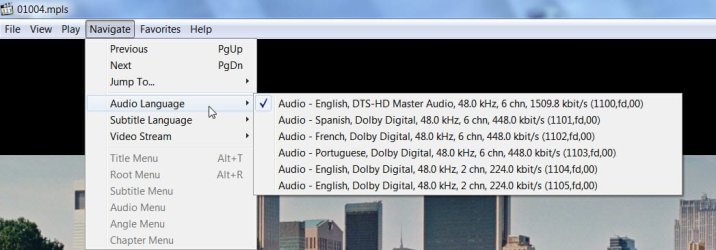
In MPC-HC

File > Open DVD > select your BDROM drive with BD in > OK. It automatically selects the main movie mpls and starts playing the movie from the beginning to end.

Navigate > choose Audio, subtitle, video stream.

MPC-HC.jpg

Copy protected BDs will require an on-the-fly decrypter like DVDFab Passkeylite (Freeware but updates for newer protection algorithms may take a month to three) / DVDFab Passkey for Blu-ray(subscription) / AnyDVDHD (subscription) running in the background. (Compliance with applicable local laws is the user's responsibility.)

( I have licensed PowerDVD 10, and TMT3 and use MPC-HC only to play mkvs on my Desktop. Of course home-made BDs and AVCHD disks I play on MPC-HC)
 
Last edited:

My Computer

OS
Windows 7 Home Premium 32 bit
Back
Top