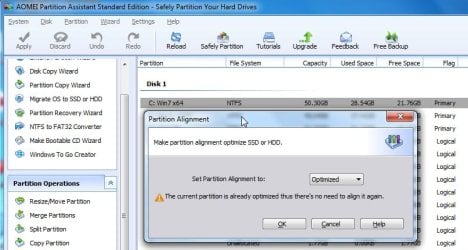
New Free AOMEI partition manager 32 and 64 bit

SIW2

YTS GEEK
Guru
Gold Member
SF Team
Local time
7:30 AM
Messages
16,790

My Computers My Computers

  • At a glance

    7 X64i5 84002x8gb 3200mhz
    Computer type
    PC/Desktop
    OS
    7 X64
    CPU
    i5 8400
    Motherboard
    gigabyte b365m ds3h
    Memory
    2x8gb 3200mhz
    Hard Drives
    various
    PSU
    pure power 11 400w cm
    Case
    Coolermaster
    Cooling
    cryorig m9i
  • At a glance

    7x64g54008gb ddr4 2400
    Computer type
    PC/Desktop
    OS
    7x64
    CPU
    g5400
    Motherboard
    ga b365m ds3h
    Memory
    8gb ddr4 2400
    PSU
    xfx pro 450w
Looks good Si, Thanks.
 

My Computer My Computer

At a glance

Win 10 Pro x64Intel I5-2500K @3.3GHz16GB G.Skill Ripjaws X (4x4GB)EVGA GeForce 750 Ti SC 2GB
Computer type
PC/Desktop
Computer Manufacturer/Model Number
Self Built
OS
Win 10 Pro x64
CPU
Intel I5-2500K @3.3GHz
Motherboard
Asrock P67 Extreme4
Memory
16GB G.Skill Ripjaws X (4x4GB)
Graphics Card(s)
EVGA GeForce 750 Ti SC 2GB
Sound Card
ASUS Xonar DG 5.1 Channels 24-bit 96KHz PCI Interface Sound
Monitor(s) Displays
auria eq2367
Screen Resolution
1920 x 1080
Hard Drives
250GB Samsung 850 EVO SSD
1TB WD Blue
1TB Hitachi
PSU
SeaSonic X 650W 80 Plus Gold
Case
Corsair Obsidian 750D
Cooling
Corsair H60, Three 140mm case fans
Keyboard
Logitech Wireless Keyboard K520
Mouse
Logitech Wireless Mouse M310
Internet Speed
Wave Broadband ~ 100 dn 5 up
Antivirus
Windows Defender, Malwarebytes Premium
Browser
Edge, IE11, Chrome
Other Info
Laptop specs: HP g7-1365dx /
CPU: AMD A6-3420M APU with Radeon(tm) HD Graphics /
RAM: Crucial 8Gb (2x4Gb) /
SSD: Crucial M4-CT128M4SSD2 ATA Device/ FW 000F /
GFX: AMD Radeon HD 6520G /
OS: Windows 10 Pro x64
I have made a little pebuilder in celebration. Not being partisan, it will also include other imaging/partitioning programs. Works on 7/8/8.1 32 and 64 bit versions.

EASYPE1.PNG
 

My Computers My Computers

  • At a glance

    7 X64i5 84002x8gb 3200mhz
    Computer type
    PC/Desktop
    OS
    7 X64
    CPU
    i5 8400
    Motherboard
    gigabyte b365m ds3h
    Memory
    2x8gb 3200mhz
    Hard Drives
    various
    PSU
    pure power 11 400w cm
    Case
    Coolermaster
    Cooling
    cryorig m9i
  • At a glance

    7x64g54008gb ddr4 2400
    Computer type
    PC/Desktop
    OS
    7x64
    CPU
    g5400
    Motherboard
    ga b365m ds3h
    Memory
    8gb ddr4 2400
    PSU
    xfx pro 450w
Last edited:

My Computers My Computers

  • At a glance

    7 X64i5 84002x8gb 3200mhz
    Computer type
    PC/Desktop
    OS
    7 X64
    CPU
    i5 8400
    Motherboard
    gigabyte b365m ds3h
    Memory
    2x8gb 3200mhz
    Hard Drives
    various
    PSU
    pure power 11 400w cm
    Case
    Coolermaster
    Cooling
    cryorig m9i
  • At a glance

    7x64g54008gb ddr4 2400
    Computer type
    PC/Desktop
    OS
    7x64
    CPU
    g5400
    Motherboard
    ga b365m ds3h
    Memory
    8gb ddr4 2400
    PSU
    xfx pro 450w
Hi SIW2

Great batch!

Sorry for some newbie questions. I was successful to create EFI bootable x64 USB stick with some tools with PEALLv11x64.zip. Just checked some other forums and I didn't quite got a clue - apologise if there is some tutorial somewhere. 2 questions:

a) If possible and how to start WIN8.1 x64 setup from PE on same USB stick (where to put the files).
b) how to add some other tools to PE - for example WinNTSetup3 or other portable ones (if is it possible to edit the launcher SIW2x64V.EXE ?).
WinNTSetup v3.1 - Install Windows from USB - MSFN Forum

Thanks in advance
 

My Computer My Computer

At a glance

Windows 8.1 64bit
Computer type
PC/Desktop
OS
Windows 8.1 64bit
Hi,

not really possible to edit the menu. I would have to create a new one. It needs to point at the exact location of the exe you want to fire up.

It is probably easier to rename WinNTSetup_x64.exe to match something you are not using on the menu.

e.g. If you are not using PGURU, that entry is pointing at Program files\PG\partitionguru.exe

I think winntsetup.exe needs to d/l some stuff into a "tools" folder, so you would need an internet connection to use it, unless you include the "tools" folder in the same directory as winntsetup.

For usb, you just put the contents of the "ISO" folder onto a usb stick formatted fat32. If you already have a bootable usb stick with windows on it, then just add bootx64.wim to the existing "sources folder on your usb stick, and add an entry for \SOURCES\BOOTX64.WIM to bcd in your usb stick EFI.

E.G. USBDRIVE:\EFI\MICROSOFT\BOOT\BCD
 

My Computers My Computers

  • At a glance

    7 X64i5 84002x8gb 3200mhz
    Computer type
    PC/Desktop
    OS
    7 X64
    CPU
    i5 8400
    Motherboard
    gigabyte b365m ds3h
    Memory
    2x8gb 3200mhz
    Hard Drives
    various
    PSU
    pure power 11 400w cm
    Case
    Coolermaster
    Cooling
    cryorig m9i
  • At a glance

    7x64g54008gb ddr4 2400
    Computer type
    PC/Desktop
    OS
    7x64
    CPU
    g5400
    Motherboard
    ga b365m ds3h
    Memory
    8gb ddr4 2400
    PSU
    xfx pro 450w

My Computers My Computers

  • At a glance

    7 X64i5 84002x8gb 3200mhz
    Computer type
    PC/Desktop
    OS
    7 X64
    CPU
    i5 8400
    Motherboard
    gigabyte b365m ds3h
    Memory
    2x8gb 3200mhz
    Hard Drives
    various
    PSU
    pure power 11 400w cm
    Case
    Coolermaster
    Cooling
    cryorig m9i
  • At a glance

    7x64g54008gb ddr4 2400
    Computer type
    PC/Desktop
    OS
    7x64
    CPU
    g5400
    Motherboard
    ga b365m ds3h
    Memory
    8gb ddr4 2400
    PSU
    xfx pro 450w
For usb, you just put the contents of the "ISO" folder onto a usb stick formatted fat32. If you already have a bootable usb stick with windows on it, then just add bootx64.wim to the existing "sources folder on your usb stick, and add an entry for \SOURCES\BOOTX64.WIM to bcd in your usb stick EFI.
E.G. USBDRIVE:\EFI\MICROSOFT\BOOT\BCD

Thank you very much - Winnt3 and other sw works great. Could you help me just to correctly add an entry into a bcd.
Not being familiar with command-line options I tried EasyBCD and Visualbcd but just made things worse...
After reading some examples ( BCDEdit Notes ) I'm still confused :confused:

After specifying the store on USB - e.g. bcdedit.exe /store g:\EFI\MICROSOFT\BOOT\BCD
how to add a correct (WinPE?) entry to this bcd assuming it's the one of win setup

Thanks again for your help.
 

My Computer My Computer

At a glance

Windows 8.1 64bit
Computer type
PC/Desktop
OS
Windows 8.1 64bit
Here you go:

Just unzip onto the root of your partition and run as admin on the PEALLv11-RUNASADMIN.cmd

View attachment 298240

View attachment 301473
Hi there, I'm a newbie on Win 8.1, 64Bit. Is there a way to use your solution as an USB bootstick, and if so, can you please explain (step by step) how?

Under XP I used to work with Ultimate Boot CD/USB stick and others, but now I can't get my system to boot from the USB.
I read something about safeboot etc., but whatever I tried it just didn't work. I even tried Hiren Boot CD as USB, but also without succes.

Thanks !
 

My Computer My Computer

At a glance

WIn 8.1 64biti4770K32GB DDR3
Computer type
PC/Desktop
Computer Manufacturer/Model Number
homebuild
OS
WIn 8.1 64bit
CPU
i4770K
Motherboard
Gigabyte GA-Z87X-D3H
Memory
32GB DDR3
Hard Drives
256 Mb SSD + various int/ext. disks

My Computers My Computers

  • At a glance

    7 X64i5 84002x8gb 3200mhz
    Computer type
    PC/Desktop
    OS
    7 X64
    CPU
    i5 8400
    Motherboard
    gigabyte b365m ds3h
    Memory
    2x8gb 3200mhz
    Hard Drives
    various
    PSU
    pure power 11 400w cm
    Case
    Coolermaster
    Cooling
    cryorig m9i
  • At a glance

    7x64g54008gb ddr4 2400
    Computer type
    PC/Desktop
    OS
    7x64
    CPU
    g5400
    Motherboard
    ga b365m ds3h
    Memory
    8gb ddr4 2400
    PSU
    xfx pro 450w

My Computers My Computers

  • At a glance

    7 X64i5 84002x8gb 3200mhz
    Computer type
    PC/Desktop
    OS
    7 X64
    CPU
    i5 8400
    Motherboard
    gigabyte b365m ds3h
    Memory
    2x8gb 3200mhz
    Hard Drives
    various
    PSU
    pure power 11 400w cm
    Case
    Coolermaster
    Cooling
    cryorig m9i
  • At a glance

    7x64g54008gb ddr4 2400
    Computer type
    PC/Desktop
    OS
    7x64
    CPU
    g5400
    Motherboard
    ga b365m ds3h
    Memory
    8gb ddr4 2400
    PSU
    xfx pro 450w
Hi SIW2

Great batch!

Sorry for some newbie questions. I was successful to create EFI bootable x64 USB stick with some tools with PEALLv11x64.zip. Just checked some other forums and I didn't quite got a clue - apologise if there is some tutorial somewhere. 2 questions:

a) If possible and how to start WIN8.1 x64 setup from PE on same USB stick (where to put the files).
b) how to add some other tools to PE - for example WinNTSetup3 or other portable ones (if is it possible to edit the launcher SIW2x64V.EXE ?).
WinNTSetup v3.1 - Install Windows from USB - MSFN Forum

Thanks in advance

Hi there

I'd suggest a probably much better and useful method.

It involves creating a smallish Linux distro, installing VMWARE VPLAYER (free) on it, installing a W7 / W8 Virtual Machine (or even both) and then you've got a FULLY functioning Windows portable system which will work on loads of different hardware without requiring re-activation and runs TOTALLY FROM THE EXTERNAL MEDIA.

You can also install decent programs like Ms office, Acronis backup / recovery etc etc. For Video playing you can install VLC either on the Host Linux system or the Windows VM's or both.

On USB3 the system is fast enough - on a decent computer even a USB2 device is OK. If you can install this stuff on an SSD you'll probably get better response time than from the built in HDD on a normal laptop. !!!

It can install on an old laptop HDD too if you have any of those --they are small enough to be portable and you don't need a separate power supply / container --simply connect to USB via a cheap USB==>SATA connector.

Here's what to do (and it's a lot easier than creating a PE environment too).

Note this is a FULL BLOWN windows system that runs totally from the external device and can have full access to all the disks etc on your LAN / laptop etc. This system works even if there's NO HDD in the laptop or its broken.

How to make Portable Windows system (any version)

You Will however need a Windows license for the Windows VM -- you could transfer your W7 one for example.

Cheers
jimbo
 

My Computer My Computer

At a glance

Linux CENTOS 7 / various Windows OS'es and se...Intel i7 Intel i58GB, 16GBOn Motherboard
Computer type
PC/Desktop
Computer Manufacturer/Model Number
Custom built, several laptops HP/ASUS
OS
Linux CENTOS 7 / various Windows OS'es and servers
CPU
Intel i7 Intel i5
Memory
8GB, 16GB
Graphics Card(s)
On Motherboard
Sound Card
Realtek HD audio
Monitor(s) Displays
Apple Cinema display, Samsung LCD
Screen Resolution
1920 X 1080
Hard Drives
4 X 1TB SATA
Mouse
Toshiba wireless laser
Internet Speed
> 20MB up
I don't see how that is easier than just running the batch file.

You Will however need a Windows license for the Windows VM -- you could transfer your Windows 7 one for example.

teeny weeny drawback there.
 

My Computers My Computers

  • At a glance

    7 X64i5 84002x8gb 3200mhz
    Computer type
    PC/Desktop
    OS
    7 X64
    CPU
    i5 8400
    Motherboard
    gigabyte b365m ds3h
    Memory
    2x8gb 3200mhz
    Hard Drives
    various
    PSU
    pure power 11 400w cm
    Case
    Coolermaster
    Cooling
    cryorig m9i
  • At a glance

    7x64g54008gb ddr4 2400
    Computer type
    PC/Desktop
    OS
    7x64
    CPU
    g5400
    Motherboard
    ga b365m ds3h
    Memory
    8gb ddr4 2400
    PSU
    xfx pro 450w
Yes, just run the cmd file to make an iso.

Hi, it finally worked, but I do have an issue. When I boot from the USB boot Stick (created with your New x64 version v12 PEALLv12x64.zip), I can start all the programs on the disc, such as notepad, Paragon HDM,Macrium etc., but unfortunately when I click on the buttons for AOMEI PA or AOMEI BU, nothing happens !

Any idea what I have done wrong? Are the new versions of the Aomei prgms, that were in the opening post in this thread included in New x64 version v12 PEALLv12x64.zip?

I would really like to have the Aomei including in my boot Stick, so any help is appreciated.
thanks
 

My Computer My Computer

At a glance

WIn 8.1 64biti4770K32GB DDR3
Computer type
PC/Desktop
Computer Manufacturer/Model Number
homebuild
OS
WIn 8.1 64bit
CPU
i4770K
Motherboard
Gigabyte GA-Z87X-D3H
Memory
32GB DDR3
Hard Drives
256 Mb SSD + various int/ext. disks
I tried PeAllx86. The creation was very easy. You must have spent a lot of time perfecting it.

When I boot from a USB I get a BSOD Stop: 0x0000000A
IRQL NOT LESS OR EQUAL

I'm guessing it's because it doesn't have the correct drivers for a:
ASUS
model x54c - bbk13

Does anyone know what drivers it may need and how I can find them?

The ASUS laptop is currently not booting into windows 7.

Thanks,

Docfxit
 

My Computer My Computer

At a glance

Win 7 Ultimate x32, x64, Win 7 Pro x32, x64 W...
Computer type
PC/Desktop
OS
Win 7 Ultimate x32, x64, Win 7 Pro x32, x64 Win 7 Home x64, XP Pro sp3

My Computer My Computer

At a glance

Windows 7 Ultimate 64-bit, Windows 8.1 64-bit...
Computer type
PC/Desktop
Computer Manufacturer/Model Number
Customs, Dell, Gateway, HP, Toshiba, Acer, ASUS
OS
Windows 7 Ultimate 64-bit, Windows 8.1 64-bit, Mac OS X 10.10, Linux Mint 17, Windows 10 Pro TP
Keyboard
Microsoft
Mouse
Microsoft
SIW2 looked at it an hour ago. We will see if he wants to reply.

Thanks,

Docfxit
 

My Computer My Computer

At a glance

Win 7 Ultimate x32, x64, Win 7 Pro x32, x64 W...
Computer type
PC/Desktop
OS
Win 7 Ultimate x32, x64, Win 7 Pro x32, x64 Win 7 Home x64, XP Pro sp3

My Computers My Computers

  • At a glance

    7 X64i5 84002x8gb 3200mhz
    Computer type
    PC/Desktop
    OS
    7 X64
    CPU
    i5 8400
    Motherboard
    gigabyte b365m ds3h
    Memory
    2x8gb 3200mhz
    Hard Drives
    various
    PSU
    pure power 11 400w cm
    Case
    Coolermaster
    Cooling
    cryorig m9i
  • At a glance

    7x64g54008gb ddr4 2400
    Computer type
    PC/Desktop
    OS
    7x64
    CPU
    g5400
    Motherboard
    ga b365m ds3h
    Memory
    8gb ddr4 2400
    PSU
    xfx pro 450w
SIW2: Thank you very much for the reply...

I wasn't able to run your create cmd on the same laptop that I need to run the bootable USB. At the moment I can't boot into windows on that laptop.
The problem laptop is X64
I ran your create cmd on a laptop that is x32. I don't think that the fact that it's 32bit should matter. Not having the correct drivers would defiantly matter.

I will try to get the USB, Network, video, mouse drivers and see if that helps.

Thank you,

Docfxit
 

My Computer My Computer

At a glance

Win 7 Ultimate x32, x64, Win 7 Pro x32, x64 W...
Computer type
PC/Desktop
OS
Win 7 Ultimate x32, x64, Win 7 Pro x32, x64 Win 7 Home x64, XP Pro sp3
It's so generous of ya'll to share your hard work with all of us. Thank you!

Before I embark on this project, just wondered if its partition manager will show and wipe a hidden VM placed in the C: partition by malware.

Thanks again, UG
 

My Computer My Computer

At a glance

Windows 7 Pro 64 bitAthlon II X2 B248 GBIntegrated Radeon HD4200
Computer type
PC/Desktop
Computer Manufacturer/Model Number
HP Pro 6005 SFF refurbished by Joy
OS
Windows 7 Pro 64 bit
CPU
Athlon II X2 B24
Motherboard
HP 3047-h
Memory
8 GB
Graphics Card(s)
Integrated Radeon HD4200
Hard Drives
GB0750C8047
Seagate Barracuda 7200.9 250GB
Browser
IE 11
Back
Top