Running Windows Explorer from Windows 2000 under Windows 7

Anixx

New member
Power User
VIP
Local time
11:26 AM
Messages
238
I am totally fed up with that handicapped deformity called "Windows Explorer" under Windows 7. Is there a way to start Windows Explorer from Win 2000 (both the panel and the file manager) under Win7?

I choose the Explorer from Win 2000 over that from Win XP because I like it more and also because the Explorer from Win XP calls some unimplemented function in ntdll on start (with an error) while the Explorer from Win 2000 in compatibilirty mode at least does not report any errors, just silently exits.
 

My Computer

Computer type
PC/Desktop
OS
Windows 7
You can run Win2000 under VMware Player. But you need a key.
 

My Computer

Computer Manufacturer/Model Number
HP, Dell, Gateway, Toshiba - 4 laptops and 2 desktops
OS
Vista, Windows7, Mint Mate, Zorin, Windows 8
CPU
from 1.6GHz Duo to i7
Monitor(s) Displays
2x HP w2207
Hard Drives
5x HDD, 7x SSD, 12x Externals
Keyboard
with trackball - no mices
Mouse
Trackball mice
Internet Speed
DSL 6000
I do not want Win 2000 under VM Ware. I want Windows Explorer from Windows 2000 as my file manager so to manage files on my computer.
 
Last edited by a moderator:

My Computer

Computer type
PC/Desktop
OS
Windows 7
why would you want to run something that was made a long time ago on Windows 7, even running something from 2001 on Windows 7 doesn't work anymore either so good luck with it
 

My Computer

Computer type
Laptop
Computer Manufacturer/Model Number
Toshiba Satellite C655-S5547
OS
Windows 7 Pro 64bit
CPU
Intel(R) Core(TM) i3-2350M CPU @ 2.30 GHZ
Memory
4.00 GB
Graphics Card(s)
Intel HD Graphiics
Sound Card
Conexant HD Audio
Monitor(s) Displays
Generic PnP Monitor
Screen Resolution
1366 x 768 x 32 bits (4294967296 colors) @ 60 Hz
Hard Drives
TI106321W0B(C:) 450GB
Keyboard
Standard PS/2 Keyboard
Mouse
Synaptics Pointing Device
Internet Speed
51.68 mb/s download and 12.08 mb/s upload as of 6/24/15
Antivirus
Webroot Secure Anywhere
Browser
IE11, Mozilla Firefox 41.1.01, and Google Chrome if I must
  • Like
Reactions: whs
The chances of making that work range from slim to none, but closer to the latter. Windows Explorer is not a stand alone application but is part of the explorer.exe process which also manages the desktop, start menu, taskbar, and more. You can't normally mix and match Windows components from different operating systems.

If you don't like Windows Explorer there are many alternatives available. An Internet search will turn up many.
 

My Computer

Computer type
PC/Desktop
Computer Manufacturer/Model Number
HP
OS
Windows 7 Pro 64 bit
CPU
Xeon W3520
Memory
8 GB
Graphics Card(s)
Nvidia Geforce 210
why would you want to run something that was made a long time ago on Windows 7

Because the modern Explorer is unusable, evidently.

- Impossible to remove the Navigation Bar, which takes 1/4 of the window (given that the similar panel in в Win 2000 would take twice less place and could be easily disabled). One can remove it only with Windows Style Editor, which is paid, and only for non-classical themes. And this makes the search unfunctional.
- Removing of the Command Bar is possible only Resource Hacker, and doing that you lose the ability to enable and disable the Navigation Pane (other than via Registry).
- The positions of the windows of Windows Explorer are no longer remembered. For it one needs to employ Shell Folder Fix always running (and even with it the windows appear first in wrong positions and get repositioned for about a second).
- When using Aero, there is no folder name and icon in the windows caption. Only keeping Shell Folder Fix running helps.
- The Explorer window cannot be made smaller than cerrtain size vertically.
- There is no frame arouns the file area of the Explorer window and other visual bugs (in the drop down list in the navbar there is no bottom border, and different styles of the pressed and unpressed button, in the search field the hint text is displayed on the white background irrespective of the badckground cvolor set in the theme etc)
- When using Aero, the Navbar, the taskbar and the menu do not respect the system font smoothing settings, always using grayscale (that is the worst thing) instead of ClearType. Disabling smoothing also does not work there.
- The file system tree is not usable, only running Classic Shell helps (and that does not matter because enebling the NavPane with Command Bar removed is impossible).
- When changing the folder view to the normal icons, they appear too large. It is impossible to set the default icon size for view mode switching.
- Ugly rectangular selection on the desktop (when using non-classical themes) and in the file manager (when using all themes)
- The shortcut icon is too huge compared to the dimensions of the file icons at standard size 32x32. One has to re-define the shortcut icon via registry.
- The file and folder icons are not shown when dragging them, only the mouse pointer.
- There is no classical Start Menu, one has to keep Classic Shell running.
- In the corner of the screen there is an ugly button "Show the desktop", which takes space and cannot be removed. Only keeping running 7 Taskbar Tweaker helps.
- The distance between icons in the system tray is too large, which takes taskbar space. Only keeping running 7 Taskbar Tweaker (and properly settging up it via registry) helps.
- The space for the clock is calculated wrongly, to include the seconds. This takes the additional space, only 7 Taskbar Tweaker helps.
- On the right click on the taskbar buttons something uncomprehensible appears instead of the context menu, only 7 Taskbar Tweaker helps.
- On the taskbar there is idiotic button groupping that cannot be disabled other than keeping 7 Taskbar Tweaker running.
- When using maximize/restore animations in the Classic theme, on the taskbar buttons often appear artefacts.
- The ugly Language Bar makes the taskbar thick and takes much of space, so one has use a third-party indicator, such as Punto Switcher or Ruslat95 (which I use).

Bottom line, I use 4 resident programs and 2 hack programs and still cannot make it satisfactory. For me the Win 7 explorer is totally unusable. If I could not find a way to start the Windows Explorer from Windows 2000 under Win 7, I will most likely roll back to Windows 2000.
 

My Computer

Computer type
PC/Desktop
OS
Windows 7
The chances of making that work range from slim to none, but closer to the latter. Windows Explorer is not a stand alone application but is part of the explorer.exe process which also manages the desktop, start menu, taskbar, and more. You can't normally mix and match Windows components from different operating systems.

Yes, I would like to replace the Explorer in all these roles with the one from Win 2000. I do not know who was in charge of this project in Microsoft, but he was definitely moving in the opposite direction at any function and feature. Besides the Explorer Win7 is satisfactory.
 

My Computer

Computer type
PC/Desktop
OS
Windows 7
If I could not find a way to start the Windows Explorer from Windows 2000 under Win 7, I will most likely roll back to Windows 2000.
It's a deal - because that's what you will have to do.
 

My Computer

Computer Manufacturer/Model Number
HP, Dell, Gateway, Toshiba - 4 laptops and 2 desktops
OS
Vista, Windows7, Mint Mate, Zorin, Windows 8
CPU
from 1.6GHz Duo to i7
Monitor(s) Displays
2x HP w2207
Hard Drives
5x HDD, 7x SSD, 12x Externals
Keyboard
with trackball - no mices
Mouse
Trackball mice
Internet Speed
DSL 6000
If I could not find a way to start the Windows Explorer from Windows 2000 under Win 7, I will most likely roll back to Windows 2000.
It's a deal - because that's what you will have to do.
Well, before that I will try to run the Explorer from Windows 98 and Windows 95. I appreciate any help on running Windows Explorer from any prevuous version of Windows before Vista (well, possibly the explorer from some Lonhorn betas will also be good).
 

My Computer

Computer type
PC/Desktop
OS
Windows 7
I think you are dreaming. It is certainly not that we don't want to be helpful with your problem. But the structure of Windows and Windows 7 in particular does not lend itself to what you want to do.

If you can seperate an Explorer out of a Win2000 .iso, you can try to slipstream it on a Windows 7 installation .iso and see what happens. But chances are extremely slim that this will really work.
 

My Computer

Computer Manufacturer/Model Number
HP, Dell, Gateway, Toshiba - 4 laptops and 2 desktops
OS
Vista, Windows7, Mint Mate, Zorin, Windows 8
CPU
from 1.6GHz Duo to i7
Monitor(s) Displays
2x HP w2207
Hard Drives
5x HDD, 7x SSD, 12x Externals
Keyboard
with trackball - no mices
Mouse
Trackball mice
Internet Speed
DSL 6000
If you can seperate an Explorer out of a Win2000 .iso, you can try to slipstream it on a Windows 7 installation .iso and see what happens. But chances are extremely slim that this will really work.
Sorry but I do not understand why one should be messing with the installation ISOs.
 

My Computer

Computer type
PC/Desktop
OS
Windows 7
I think you are dreaming. It is certainly not that we don't want to be helpful with your problem. But the structure of Windows and Windows 7 in particular does not lend itself to what you want to do.
Can you please cite the particular features odf the Win7 structure which do not allow this being done? I am asking this because I prevuously started the Explorer from Windows 95 under Windows 98, totally successfully (I got Win95 with all the hardware support of Win98, the only glitch being that the buttons looked somewhat more thick after the change, thicker than under either Win95 or Win98).
 

My Computer

Computer type
PC/Desktop
OS
Windows 7
Hi there

IF you run WIN2000 as a VM using VMware you can try a feature out called UNITY MODE (or at least in VMWARE). Then from the UNITY menu just copy the IE Icon (Create short cut ==>send to desktop)from Win2000 to your W7 desktop and then you can simply click on the icon and run it.

Not quite what you are after but as near to making no difference.

Cheers
jimbo
 

My Computer

Computer type
PC/Desktop
Computer Manufacturer/Model Number
Custom built, several laptops HP/ASUS
OS
Linux CENTOS 7 / various Windows OS'es and servers
CPU
Intel i7 Intel i5
Memory
8GB, 16GB
Graphics Card(s)
On Motherboard
Sound Card
Realtek HD audio
Monitor(s) Displays
Apple Cinema display, Samsung LCD
Screen Resolution
1920 X 1080
Hard Drives
4 X 1TB SATA
Mouse
Toshiba wireless laser
Internet Speed
> 20MB up
Windows Explorer in Windows 7 is vetter than Windows 2000 and XP
 

My Computer

Computer type
Laptop
Computer Manufacturer/Model Number
Toshiba Satellite C655-S5547
OS
Windows 7 Pro 64bit
CPU
Intel(R) Core(TM) i3-2350M CPU @ 2.30 GHZ
Memory
4.00 GB
Graphics Card(s)
Intel HD Graphiics
Sound Card
Conexant HD Audio
Monitor(s) Displays
Generic PnP Monitor
Screen Resolution
1366 x 768 x 32 bits (4294967296 colors) @ 60 Hz
Hard Drives
TI106321W0B(C:) 450GB
Keyboard
Standard PS/2 Keyboard
Mouse
Synaptics Pointing Device
Internet Speed
51.68 mb/s download and 12.08 mb/s upload as of 6/24/15
Antivirus
Webroot Secure Anywhere
Browser
IE11, Mozilla Firefox 41.1.01, and Google Chrome if I must
Hi there

IF you run WIN2000 as a VM using VMware you can try a feature out called UNITY MODE (or at least in VMWARE). Then from the UNITY menu just copy the IE Icon (Create short cut ==>send to desktop)from Win2000 to your W7 desktop and then you can simply click on the icon and run it.

Not quite what you are after but as near to making no difference.

Cheers
jimbo

I alreaedy sait, I am NOT interested in virtual machines. I want to manage files on MY computer, not on a virtual machine. And I want tyo remove the set of resident program I currently need to have running so to make the Explorer and the panel somewhat better.

Is it unclear? How many times ahould I rep[eat that I know than one CAN run a file manager under a virtual machine, but I do not need it?
 

My Computer

Computer type
PC/Desktop
OS
Windows 7
Windows Explorer in Windows 7 is vetter than Windows 2000 and XP

It is not better, it is TOTALLY unusable, brocken, buggy and unfinished.

- Impossible to remove the Navigation Bar, which takes 1/4 of the window (given that the similar panel in в Win 2000 would take twice less place and could be easily disabled). One can remove it only with Windows Style Editor, which is paid, and only for non-classical themes. And this makes the search unfunctional.
- Removing of the Command Bar is possible only Resource Hacker, and doing that you lose the ability to enable and disable the Navigation Pane (other than via Registry).
- The positions of the windows of Windows Explorer are no longer remembered. For it one needs to employ Shell Folder Fix always running (and even with it the windows appear first in wrong positions and get repositioned for about a second).
- When using Aero, there is no folder name and icon in the windows caption. Only keeping Shell Folder Fix running helps.
- The Explorer window cannot be made smaller than cerrtain size vertically.
- There is no frame arouns the file area of the Explorer window and other visual bugs (in the drop down list in the navbar there is no bottom border, and different styles of the pressed and unpressed button, in the search field the hint text is displayed on the white background irrespective of the badckground cvolor set in the theme etc)
- When using Aero, the Navbar, the taskbar and the menu do not respect the system font smoothing settings, always using grayscale (that is the worst thing) instead of ClearType. Disabling smoothing also does not work there.
- The file system tree is not usable, only running Classic Shell helps (and that does not matter because enebling the NavPane with Command Bar removed is impossible).
- When changing the folder view to the normal icons, they appear too large. It is impossible to set the default icon size for view mode switching.
- Ugly rectangular selection on the desktop (when using non-classical themes) and in the file manager (when using all themes)
- The shortcut icon is too huge compared to the dimensions of the file icons at standard size 32x32. One has to re-define the shortcut icon via registry.
- The file and folder icons are not shown when dragging them, only the mouse pointer.
- There is no classical Start Menu, one has to keep Classic Shell running.
- In the corner of the screen there is an ugly button "Show the desktop", which takes space and cannot be removed. Only keeping running 7 Taskbar Tweaker helps.
- The distance between icons in the system tray is too large, which takes taskbar space. Only keeping running 7 Taskbar Tweaker (and properly settging up it via registry) helps.
- The space for the clock is calculated wrongly, to include the seconds. This takes the additional space, only 7 Taskbar Tweaker helps.
- On the right click on the taskbar buttons something uncomprehensible appears instead of the context menu, only 7 Taskbar Tweaker helps.
- On the taskbar there is idiotic button groupping that cannot be disabled other than keeping 7 Taskbar Tweaker running.
- When using maximize/restore animations in the Classic theme, on the taskbar buttons often appear artefacts.
- The ugly Language Bar makes the taskbar thick and takes much of space, so one has use a third-party indicator, such as Punto Switcher or Ruslat95 (which I use).

- Add to the above that it is impossible to access the search field without resizing the window. In Win95 the menu would be continued on the next line, in Win98 you could access the invisible entries through a drop-down list (which is worse, but still a solution). In Win7 they just screwed any possibility to do so.

 
Last edited:

My Computer

Computer type
PC/Desktop
OS
Windows 7
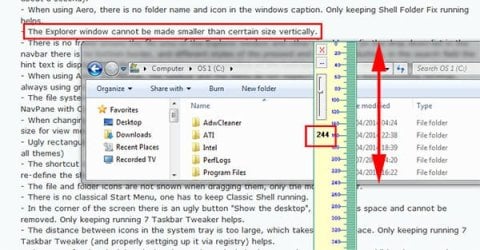
- The Explorer window cannot be made smaller than cerrtain size vertically.
The smallest vertical size I can get explorer is 244 pixels. How small do you want it ? Are you trying to run Windows 7 on a phone ?

explorer_min.jpg
 

My Computer

Computer type
PC/Desktop
Computer Manufacturer/Model Number
self build
OS
Windows 7 pro x64 SP1
CPU
Intel i7-2600k o/c to 4.6GHz
Motherboard
MSI Z68-GD80
Memory
8GB Mushkin 1866MHz
Graphics Card(s)
Nvidia GTX 750 Ti 2GB
Sound Card
integrated
Monitor(s) Displays
Liyama ProLite 27"
Screen Resolution
1920*1080 px
Hard Drives
Seagate 2TB
PSU
Coolermaster GX 750W
Case
Antec 300 case + 5 fans
Cooling
Dark Rock Pro
Internet Speed
62Mbit down 18Mbit up
Antivirus
MSE
Browser
Firefox
Other Info
Blackgold BGT3650 Quad HD TV card. Also have various 3770 + 4770K render boxes.
well how mamy times do we have to tell you Windows 2000 is unsupported and you can get many viruses, you need to come into the year 2014 and use current technology not something that was made back in 2000
 

My Computer

Computer type
Laptop
Computer Manufacturer/Model Number
Toshiba Satellite C655-S5547
OS
Windows 7 Pro 64bit
CPU
Intel(R) Core(TM) i3-2350M CPU @ 2.30 GHZ
Memory
4.00 GB
Graphics Card(s)
Intel HD Graphiics
Sound Card
Conexant HD Audio
Monitor(s) Displays
Generic PnP Monitor
Screen Resolution
1366 x 768 x 32 bits (4294967296 colors) @ 60 Hz
Hard Drives
TI106321W0B(C:) 450GB
Keyboard
Standard PS/2 Keyboard
Mouse
Synaptics Pointing Device
Internet Speed
51.68 mb/s download and 12.08 mb/s upload as of 6/24/15
Antivirus
Webroot Secure Anywhere
Browser
IE11, Mozilla Firefox 41.1.01, and Google Chrome if I must
well how mamy times do we have to tell you Windows 2000 is unsupported and you can get many viruses, you need to come into the year 2014 and use current technology not something that was made back in 2000
Well I do not have anything against current technology, unfortunately the Win7 Explorer makes using the current technology of Win7 a constant pain. That's why I am asking for a way to launch the Explorer from Win2000 under Win7. Otherwise I would already use Win2000.
 

My Computer

Computer type
PC/Desktop
OS
Windows 7
@Anixx

Windows explorer is more then usable for many people on windows 7. Some people do not like change.
Unfortunately that is life.

I suggest the following:

1.) Please Calm down a little, we are trying to help. No reason to be rude or angry.
2.) look at these alternatives to windows explorer: 3 Stable Alternatives to Windows Explorer
3.) If you decide you do not like windows 7 file structure, even after using a different program to manage your files, by all means go back to windows 2000. No one is stopping you.

There are many people out there who run dedicated support forums for windows 98 and windows 2000. Some have even released unofficial service packs to update them to run modern software.
 

My Computer

Computer type
PC/Desktop
Computer Manufacturer/Model Number
Custom Built
OS
Windows 10 Pro
CPU
AMD Ryzen 5 2400G Processor with Radeon RX Vega 11 Graphics
Motherboard
ASRock X470 Master SLI/AC AM4 AMD Promontory X470 SATA 6Gb/s
Memory
G.SKILL Ripjaws V Series 16GB (2 x 8GB) 288-Pin DDR4 SDRAM D
Graphics Card(s)
2047MB NVIDIA GeForce GTX 1060 6GB (EVGA)
Sound Card
Motherboard Built in
Monitor(s) Displays
Acer R240HY bidx 23.8-Inch IPS HDMI DVI VGA (1920 x 1080) Wi
Screen Resolution
1920 x 1080
Hard Drives
1TB Sandisk SSD PLUS (Main drive)
500 GB Seagate 7200 RPM (Games)
500 GB Western Digital 7200 RPM (Virtual Machines)
PSU
CORSAIR TX Series TX650M 650W 80+ Gold Modular Power Supply
Case
CORSAIR CARBIDE SPEC-02 Mid-Tower Gaming Case, Red LED Fan
Cooling
220mm, two 120mm, and four 60mm fans
Keyboard
Wired Dell keyboard
Mouse
Wireless Logitech mouse
Internet Speed
250mb down, 30mb up
Antivirus
Panda Cloud Antivirus
Browser
Chrome-ish x64
Other Info
Your awesome for reading this.
  • Like
Reactions: whs
Back
Top