Whenever I save a file or WANT to save a file to the desktop, I go to "Save As" and it always wants to revert to saving to the documents folder instead of the desktop making me have to take the extra step to choose desktop instead of the computer just realizing thats where I want it to go.
In the documents folder for Library Locations I have removed anything with the word "documents" so the one and only location listed in Documents Library now is "C:\Users\Username\Desktop".
Yet when I make a new document and go to "save as" it is still wanting to save to documents despite being removed from the library locations.
On more than 2 occasions now I was in a hurry and went to save as but didn't check the location assuming it was going to go to the desktop which is where its supposed to but instead had to waste time hunting down some random folder the file went to.
Is there any way to make it so the "Save As" option cannot see or does not realize there is a documents folder (Kind of like how malware can hide from AntiVirus) and default to saving my files to the desktop on the first try without having to manually select desktop location?
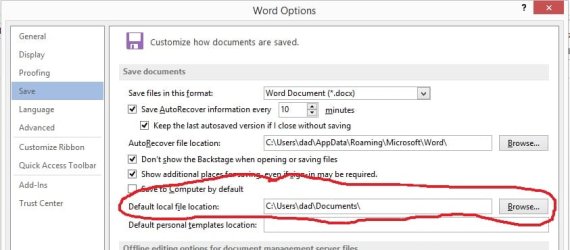
What program are you saving the document from? Many programs have a preference setting somewhere for you to tell it the default location to save or open documents.
For instance, here's the default Save location setting for Word 2013:
My Computer
Computer type
PC/Desktop
Computer Manufacturer/Model Number
Home Built desktop, Dell G15 5511 Gaming laptop,MS Surface Pro 7 tablet
OS
W10 Pro desktop, W11 laptop, W11 Pro tablet (all 64-bit)
CPU
3.7Ghz 8700K i7, i7-11800H, i7-1065G7
Motherboard
ASUS TUF Z370-Pro Gaming in desktop
Memory
16G desktop, 16G laptop, 4G tablet
Graphics Card(s)
AMD Radeon RX580, RTX 3060, Intel Iris Plus
Sound Card
High Definition Audio (Built-in to mobo)
Monitor(s) Displays
Samsung U32J59 32" (2x), 15.6", 12"
Screen Resolution
3840x2160, 3840x2160, 1920x1080, 2160x1440
Hard Drives
500G SSD for OS; 2T, 10T & 15T HDDs for Data on Desktop, 1TB SSD laptop, 128G SSD tablet.
PSU
Corsair CX 750M
Case
Antec 100
Cooling
CM 212+
Keyboard
IBM Model M - used continuously since 1986
Mouse
Microsoft Pro IntelliMouse
Internet Speed
400M down 8M up
Antivirus
Windows Defender
Browser
FireFox
Other Info
Built my first computer (8Mhz 8088cpu, 640K RAM, 20MB HDD, 2 360K floppy drives) in 1985 and have been building them for myself, relatives and friends ever since.
This is typically with notepad and paint. I use notepad to take "quick notes". Paint does it to as it wants to save to pictures instead of desktop. So as for "many programs have a preference" I guess I can see how basic Windows programs would save to the respective Windows folder.
When I use programs like Format Factory, I have it set in the options as your picture shows to have all my output files to the desktop. I like to have everything go to the desktop so its handy right there and sort later when finished with the file.
The windows basic programs like Notepad and Paint do not offer an option for default save folder however if I open a program that is already on the desktop and go to save as it will be at the desktop folder to resave but that would be expected behavior.
I see that Word 2013 is a paid program. I cannot even find an option in OpenOffice.org which is a free program I have. I would think that maybe that default save option is not available in free version of programs but then Format Factory is a free program so that rules out that idea. IDK I guess I'll have to be more careful where the save folder is but it would just be nice to eliminate that extra step.
Notepad and Paint are simple programs so don't have the ability to configure options.
As far as OpenOffice, you may be in luck. On the main OpenOffice menu, click on Tools, the Options and the select Paths.
I would change the My Documents path to point to your desktop and that should save all of your OpenOffice files to the desktop.
My Computer
Computer type
PC/Desktop
Computer Manufacturer/Model Number
Home Built desktop, Dell G15 5511 Gaming laptop,MS Surface Pro 7 tablet
OS
W10 Pro desktop, W11 laptop, W11 Pro tablet (all 64-bit)
CPU
3.7Ghz 8700K i7, i7-11800H, i7-1065G7
Motherboard
ASUS TUF Z370-Pro Gaming in desktop
Memory
16G desktop, 16G laptop, 4G tablet
Graphics Card(s)
AMD Radeon RX580, RTX 3060, Intel Iris Plus
Sound Card
High Definition Audio (Built-in to mobo)
Monitor(s) Displays
Samsung U32J59 32" (2x), 15.6", 12"
Screen Resolution
3840x2160, 3840x2160, 1920x1080, 2160x1440
Hard Drives
500G SSD for OS; 2T, 10T & 15T HDDs for Data on Desktop, 1TB SSD laptop, 128G SSD tablet.
PSU
Corsair CX 750M
Case
Antec 100
Cooling
CM 212+
Keyboard
IBM Model M - used continuously since 1986
Mouse
Microsoft Pro IntelliMouse
Internet Speed
400M down 8M up
Antivirus
Windows Defender
Browser
FireFox
Other Info
Built my first computer (8Mhz 8088cpu, 640K RAM, 20MB HDD, 2 360K floppy drives) in 1985 and have been building them for myself, relatives and friends ever since.
Ahh nice. I never saw that option because I open the programs directly on not though the main screen. Too me a bit to find that tools option.
After trying that though it is still wanting to save files to documents library and in the library locations it is still showing the 1 path I set it to which was the desktop.
Maybe the machine needs a restart before this change will take effect. I should be restarting in a few hours so I'll check back on it then.
I have folders on my desktop called geekNtech, RMS projects -- almost all my programs are not on the desktop [rather, reachable via geekNtech folder], all my downloads and created data files are within either RMS projects, or. simply reachable via Explorer.exe. I'm old school -- I remember not to have loads of stuff in the root directory [harkening back to DOS 3.3/Windows 3.1, DOS 6.22 & WFW 3.11]. I consider Desktop to be a "root directory" for each account, admin, mine, etc. If for some reason the Desktop icons & folder shortcuts disappear, it's no big deal to copy back the few, the proud, the Mar- uh, icons from a backup D-drive directory But hey, ya gotta go with whatever works best for ya!
My Computer
Computer type
PC/Desktop
Computer Manufacturer/Model Number
Antec desktop; Acer Aspire laptops
OS
Windows 7 Professional 64-bit
CPU
Desktop i5; Acers i5 & i7
Memory
desktop 16GB; 1 Acer 8GB & 1 Acer 16GB
Hard Drives
1TB split into 2 equal partitions [OS and data] usable by RJS
Internet Speed
AT&T DSL
Browser
FF, GChrome, msIE
Other Info
Windows 7 Firewall, Emsisoft AM/AV, MSE [scan-only], SpywareBlaster, Ruiware/BillP combine
Ahh nice. I never saw that option because I open the programs directly on not though the main screen. Too me a bit to find that tools option.
After trying that though it is still wanting to save files to documents library and in the library locations it is still showing the 1 path I set it to which was the desktop.
Maybe the machine needs a restart before this change will take effect. I should be restarting in a few hours so I'll check back on it then.
I set the My Documents path to point to my Desktop and when I selected Open or SaveAs the location it used was the Desktop. No reboot was necessary. Of course, if you opened a file that was originally stored in My Documents then attempt to save that file, it will still try to save it in My Documents and not the Desktop. Any program will save to the original location the file was opened from unless you manually override it.
My Computer
Computer type
PC/Desktop
Computer Manufacturer/Model Number
Home Built desktop, Dell G15 5511 Gaming laptop,MS Surface Pro 7 tablet
OS
W10 Pro desktop, W11 laptop, W11 Pro tablet (all 64-bit)
CPU
3.7Ghz 8700K i7, i7-11800H, i7-1065G7
Motherboard
ASUS TUF Z370-Pro Gaming in desktop
Memory
16G desktop, 16G laptop, 4G tablet
Graphics Card(s)
AMD Radeon RX580, RTX 3060, Intel Iris Plus
Sound Card
High Definition Audio (Built-in to mobo)
Monitor(s) Displays
Samsung U32J59 32" (2x), 15.6", 12"
Screen Resolution
3840x2160, 3840x2160, 1920x1080, 2160x1440
Hard Drives
500G SSD for OS; 2T, 10T & 15T HDDs for Data on Desktop, 1TB SSD laptop, 128G SSD tablet.
PSU
Corsair CX 750M
Case
Antec 100
Cooling
CM 212+
Keyboard
IBM Model M - used continuously since 1986
Mouse
Microsoft Pro IntelliMouse
Internet Speed
400M down 8M up
Antivirus
Windows Defender
Browser
FireFox
Other Info
Built my first computer (8Mhz 8088cpu, 640K RAM, 20MB HDD, 2 360K floppy drives) in 1985 and have been building them for myself, relatives and friends ever since.
Instead of trying to sit on SuperWindowsMan's cape, why not simply create a desktop-located shortcut to the default download directory? Somebody tell me, 'cause I've never done redirections as described above -- what happens to such things if there is a Systems [OS] Repair?
My Computer
Computer type
PC/Desktop
Computer Manufacturer/Model Number
Antec desktop; Acer Aspire laptops
OS
Windows 7 Professional 64-bit
CPU
Desktop i5; Acers i5 & i7
Memory
desktop 16GB; 1 Acer 8GB & 1 Acer 16GB
Hard Drives
1TB split into 2 equal partitions [OS and data] usable by RJS
Internet Speed
AT&T DSL
Browser
FF, GChrome, msIE
Other Info
Windows 7 Firewall, Emsisoft AM/AV, MSE [scan-only], SpywareBlaster, Ruiware/BillP combine
Instead of trying to sit on SuperWindowsMan's cape, why not simply create a desktop-located shortcut to the default download directory? Somebody tell me, 'cause I've never done redirections as described above -- what happens to such things if there is a Systems [OS] Repair?
There's no redirection happening and there would be absolutely no change to the OS so your concern is completely unfounded.
The change I described is limited to the OpenOffice suite of programs only.
My Computer
Computer type
PC/Desktop
Computer Manufacturer/Model Number
Home Built desktop, Dell G15 5511 Gaming laptop,MS Surface Pro 7 tablet
OS
W10 Pro desktop, W11 laptop, W11 Pro tablet (all 64-bit)
CPU
3.7Ghz 8700K i7, i7-11800H, i7-1065G7
Motherboard
ASUS TUF Z370-Pro Gaming in desktop
Memory
16G desktop, 16G laptop, 4G tablet
Graphics Card(s)
AMD Radeon RX580, RTX 3060, Intel Iris Plus
Sound Card
High Definition Audio (Built-in to mobo)
Monitor(s) Displays
Samsung U32J59 32" (2x), 15.6", 12"
Screen Resolution
3840x2160, 3840x2160, 1920x1080, 2160x1440
Hard Drives
500G SSD for OS; 2T, 10T & 15T HDDs for Data on Desktop, 1TB SSD laptop, 128G SSD tablet.
PSU
Corsair CX 750M
Case
Antec 100
Cooling
CM 212+
Keyboard
IBM Model M - used continuously since 1986
Mouse
Microsoft Pro IntelliMouse
Internet Speed
400M down 8M up
Antivirus
Windows Defender
Browser
FireFox
Other Info
Built my first computer (8Mhz 8088cpu, 640K RAM, 20MB HDD, 2 360K floppy drives) in 1985 and have been building them for myself, relatives and friends ever since.





 But hey, ya gotta go with whatever works best for ya!