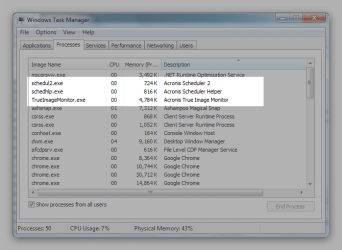
Acronis and System Restore running at the same time

BAZ

New member
Member
Local time
7:11 PM
Messages
78
I have recently started using Acronis True Image Home 2010 for my data backup needs. I made one system image at start and now a days I backup my important files manually.

Before having come across Acronis, I used to depend on Windows Restore feature only and that did help me go back on many occasions. Now I am inclined towards disabling Windows Restore since I think I will be able to roll back to a stable state (State Image) if I face any problems. Plus, I often make backup copies of my most important files on a separate disk and have softwares' setups if I need to reinstall any of them.

Q1. Should I disable Windows Restore? What do you think?
Q2. Can I disable Image Monitor service? And the other two services?
Magical Snap - 2010.05.31 15.28 - 002.png
 

My Computer

Computer Manufacturer/Model Number
TOSHIBA EQUIUM A200 (X86-based PC AT/AT COMPATIBLE)
OS
Windows 7 Ultimate x86
CPU
Intel(R) Pentium(R) Dual CPU T2310 @ 1.46GHz
Motherboard
Intel Corporation SANTA ROSA CRB
Memory
2GB
Graphics Card(s)
Mobile Intel(R) 965 Express Chipset Family
Screen Resolution
1280 * 800 Pixels
Hard Drives
ST9120822AS ATA Device (IDE)
Here is my suggestion

Make a complete backup of your hard drive now and put it away.

Make another copy of your hard drive and update once a week as well as using system restore on default for once a week backups.

In the case of a problem, you can use system restore. If that does not work you can use your weekly back up. In the event of a problem, such as the back up has a virus etc. Go back to the first one that I told you to forget about.

I do not use acronis. Most here use Macrium Reflex or Paragon.

The choice is yours.
 

My Computer

Computer type
PC/Desktop
Computer Manufacturer/Model Number
Dell XPS 420
OS
Windows 10, Home Clean Install
CPU
Intel Core2 processsor Q8200(2.33Ghz 1333FSB) Quad Core Tech
Motherboard
Dell
Memory
6 gb
Graphics Card(s)
ATI Radeon 256MB HD3650
Sound Card
Intergrated 7.1 Channel Audio
Monitor(s) Displays
Dell SP2009W 20"
Hard Drives
640 GB Serial ATA Hard drive
Cooling
Fan
Keyboard
Dell USB Keyboard
Mouse
Dell Premium Optical USB
Internet Speed
DSL 2.85
I'm going to suggest leaving System Restore alone. It is much easier and ultimately safer to do a System Restore than restore an Acronis image (which will overwrite your entire OS if you do a full image restore). Unless you have severe HDD space issues (and if so, really, get a 2nd HDD, it's the best way to store Images), then Restore doesn't hurt anything, and in Windows 7 is really quite good. A Guy
 

My Computer

Computer type
PC/Desktop
OS
Windows 10 Home x64
CPU
INTEL Core i5-750 Quad-Core 3.37GHz
Motherboard
ASUS P7P55D
Memory
HyperX Fury Black Series 8GB (2 x 4GB) 1866Mhz
Graphics Card(s)
EVGA GeForce GTX 750 Superclocked 1GB 128-Bit GDDR5
Monitor(s) Displays
LG 32MA68HY 32" IPS
Screen Resolution
1920 x 1080
Hard Drives
Samsung 840 Evo 120GB, SEAGATE 500GB Barracuda® 7200.12, SATA 3 Gb/s, 7200 RPM, 16MB cache
PSU
ANTEC TruePower New TP-550, 80 PLUS, 550W
Case
ANTEC Three Hundred Illusion
Cooling
COOLER MASTER Hyper 212 Plus, 4 x 120mm 1 x 140mm Noctua's
Internet Speed
85 + Mbps
Antivirus
Avast
Browser
Vivaldi
Thanks richc46, I have followed your advice. I have made and kept a full backup somewhere safe, and have set up scheduled incremental backups. I think it'll be good enough.

Thanks, A Guy. I'll turn System Restore on again. What you have said makes sense.
 

My Computer

Computer Manufacturer/Model Number
TOSHIBA EQUIUM A200 (X86-based PC AT/AT COMPATIBLE)
OS
Windows 7 Ultimate x86
CPU
Intel(R) Pentium(R) Dual CPU T2310 @ 1.46GHz
Motherboard
Intel Corporation SANTA ROSA CRB
Memory
2GB
Graphics Card(s)
Mobile Intel(R) 965 Express Chipset Family
Screen Resolution
1280 * 800 Pixels
Hard Drives
ST9120822AS ATA Device (IDE)
Thanks richc46, I have followed your advice. I have made and kept a full backup somewhere safe, and have set up scheduled incremental backups. I think it'll be good enough.

Thanks, A Guy. I'll turn System Restore on again. What you have said makes sense.

You will never have to reinstall, again. You always will have a nice clean copy. Good luck my friend.
 

My Computer

Computer type
PC/Desktop
Computer Manufacturer/Model Number
Dell XPS 420
OS
Windows 10, Home Clean Install
CPU
Intel Core2 processsor Q8200(2.33Ghz 1333FSB) Quad Core Tech
Motherboard
Dell
Memory
6 gb
Graphics Card(s)
ATI Radeon 256MB HD3650
Sound Card
Intergrated 7.1 Channel Audio
Monitor(s) Displays
Dell SP2009W 20"
Hard Drives
640 GB Serial ATA Hard drive
Cooling
Fan
Keyboard
Dell USB Keyboard
Mouse
Dell Premium Optical USB
Internet Speed
DSL 2.85
There's a reason richc46 has all those badges and pips :). Here's hoping you never need that backup. A Guy
 

My Computer

Computer type
PC/Desktop
OS
Windows 10 Home x64
CPU
INTEL Core i5-750 Quad-Core 3.37GHz
Motherboard
ASUS P7P55D
Memory
HyperX Fury Black Series 8GB (2 x 4GB) 1866Mhz
Graphics Card(s)
EVGA GeForce GTX 750 Superclocked 1GB 128-Bit GDDR5
Monitor(s) Displays
LG 32MA68HY 32" IPS
Screen Resolution
1920 x 1080
Hard Drives
Samsung 840 Evo 120GB, SEAGATE 500GB Barracuda® 7200.12, SATA 3 Gb/s, 7200 RPM, 16MB cache
PSU
ANTEC TruePower New TP-550, 80 PLUS, 550W
Case
ANTEC Three Hundred Illusion
Cooling
COOLER MASTER Hyper 212 Plus, 4 x 120mm 1 x 140mm Noctua's
Internet Speed
85 + Mbps
Antivirus
Avast
Browser
Vivaldi
There's a reason richc46 has all those badges and pips :). Here's hoping you never need that backup. A Guy


Nice comment A Guy, TY.
 

My Computer

Computer type
PC/Desktop
Computer Manufacturer/Model Number
Dell XPS 420
OS
Windows 10, Home Clean Install
CPU
Intel Core2 processsor Q8200(2.33Ghz 1333FSB) Quad Core Tech
Motherboard
Dell
Memory
6 gb
Graphics Card(s)
ATI Radeon 256MB HD3650
Sound Card
Intergrated 7.1 Channel Audio
Monitor(s) Displays
Dell SP2009W 20"
Hard Drives
640 GB Serial ATA Hard drive
Cooling
Fan
Keyboard
Dell USB Keyboard
Mouse
Dell Premium Optical USB
Internet Speed
DSL 2.85
Here is my suggestion

Make a complete backup of your hard drive now and put it away.

Make another copy of your hard drive and update once a week as well as using system restore on default for once a week backups.

In the case of a problem, you can use system restore. If that does not work you can use your weekly back up. In the event of a problem, such as the back up has a virus etc. Go back to the first one that I told you to forget about.

I do not use acronis. Most here use Macrium Reflex or Paragon.

The choice is yours.

+1 I work it the same as Rich i keep one System Restore Point so i have the option there if needed (I have not had a good success rate with System Restore)

Once a week i will do full scans with my Security Software, have a general clean up & defrag if needed then do an Image Back Up.

I also do an Image Back Up before installing any Software or Drivers i am not familiar with. (just in case)
 

My Computer

Computer Manufacturer/Model Number
Hewlett Packard Compaq Presario CQ60-305au
OS
Windows Seven Home Premium 32bit SP1
CPU
AMD Athlon QI46 2.1Ghz
Motherboard
Wistron 303c
Memory
2048 Mb DDR2 SD RAM
Graphics Card(s)
NVidea GE GoForce 8200M G/256mb dedicated graphics memory
Sound Card
MCP78S NVidea high definition
Monitor(s) Displays
15.6" High definition Brightview Widescreen
Screen Resolution
1336x768
Hard Drives
Toshiba MK2555GSX ATA
Here is my suggestion

Make a complete backup of your hard drive now and put it away.

Make another copy of your hard drive and update once a week as well as using system restore on default for once a week backups.

In the case of a problem, you can use system restore. If that does not work you can use your weekly back up. In the event of a problem, such as the back up has a virus etc. Go back to the first one that I told you to forget about.

I do not use acronis. Most here use Macrium Reflex or Paragon.

The choice is yours.

+1 I work it the same as Rich i keep one System Restore Point so i have the option there if needed (I have not had a good success rate with System Restore)

Once a week i will do full scans with my Security Software, have a general clean up & defrag if needed then do an Image Back Up.

I also do an Image Back Up before installing any Software or Drivers i am not familiar with. (just in case)
Thanks Mitch. To be honest, I stole the idea from another Guru, when I was new here.
 

My Computer

Computer type
PC/Desktop
Computer Manufacturer/Model Number
Dell XPS 420
OS
Windows 10, Home Clean Install
CPU
Intel Core2 processsor Q8200(2.33Ghz 1333FSB) Quad Core Tech
Motherboard
Dell
Memory
6 gb
Graphics Card(s)
ATI Radeon 256MB HD3650
Sound Card
Intergrated 7.1 Channel Audio
Monitor(s) Displays
Dell SP2009W 20"
Hard Drives
640 GB Serial ATA Hard drive
Cooling
Fan
Keyboard
Dell USB Keyboard
Mouse
Dell Premium Optical USB
Internet Speed
DSL 2.85
Here is my suggestion

Make a complete backup of your hard drive now and put it away.

Make another copy of your hard drive and update once a week as well as using system restore on default for once a week backups.

In the case of a problem, you can use system restore. If that does not work you can use your weekly back up. In the event of a problem, such as the back up has a virus etc. Go back to the first one that I told you to forget about.

I do not use acronis. Most here use Macrium Reflex or Paragon.

The choice is yours.

+1 I work it the same as Rich i keep one System Restore Point so i have the option there if needed (I have not had a good success rate with System Restore)

Once a week i will do full scans with my Security Software, have a general clean up & defrag if needed then do an Image Back Up.

I also do an Image Back Up before installing any Software or Drivers i am not familiar with. (just in case)
Thanks Mitch. To be honest, I stole the idea from another Guru, when I was new here.

:D we never seem to stop learning from each other, great thing about this place
 

My Computer

Computer Manufacturer/Model Number
Hewlett Packard Compaq Presario CQ60-305au
OS
Windows Seven Home Premium 32bit SP1
CPU
AMD Athlon QI46 2.1Ghz
Motherboard
Wistron 303c
Memory
2048 Mb DDR2 SD RAM
Graphics Card(s)
NVidea GE GoForce 8200M G/256mb dedicated graphics memory
Sound Card
MCP78S NVidea high definition
Monitor(s) Displays
15.6" High definition Brightview Widescreen
Screen Resolution
1336x768
Hard Drives
Toshiba MK2555GSX ATA
Best way to learn is to teach; and we help while learning.
 

My Computer

Computer type
PC/Desktop
Computer Manufacturer/Model Number
Dell XPS 420
OS
Windows 10, Home Clean Install
CPU
Intel Core2 processsor Q8200(2.33Ghz 1333FSB) Quad Core Tech
Motherboard
Dell
Memory
6 gb
Graphics Card(s)
ATI Radeon 256MB HD3650
Sound Card
Intergrated 7.1 Channel Audio
Monitor(s) Displays
Dell SP2009W 20"
Hard Drives
640 GB Serial ATA Hard drive
Cooling
Fan
Keyboard
Dell USB Keyboard
Mouse
Dell Premium Optical USB
Internet Speed
DSL 2.85
I have recently started using Acronis True Image Home 2010 for my data backup needs. I made one system image at start and now a days I backup my important files manually.

Before having come across Acronis, I used to depend on Windows Restore feature only and that did help me go back on many occasions. Now I am inclined towards disabling Windows Restore since I think I will be able to roll back to a stable state (State Image) if I face any problems. Plus, I often make backup copies of my most important files on a separate disk and have softwares' setups if I need to reinstall any of them.

Q1. Should I disable Windows Restore? What do you think?
Q2. Can I disable Image Monitor service? And the other two services?

Before I delve into this question, let me first note just a few things System Restore WILL NOT do:

1. restore personal files;
2. restore personal emails;
3. restore personal docs;
4. restore personal JPEGs, MPEGs;
5. restore a deleted file;
6. guarantee that a restore point will either exist or can be restored;
7. remove malware, viruses, Trojans, worms, etc.
8. many other things but I made my point.

BAZ raises the issue of "data backup needs." In computer parlance, data files are storage files; they are not program (*.exe) files, therefore, for the sake of this post, until one defines "data," I am not wont to make assumptions as how "best" to proceed - especially if one is to rely on System Restore to recover or replace lost or damaged JPEGs of the dog.

A suggestion has been made to make a copy of the HDD and put it away. Why? The assumption must certainly be that the files on the HDD are, presently, in a pristine state. Actually, Windows files on the install disc are in pristine state, everything thereafter is, well . . . who knows. My point is, following this recommendation provides no added security especially if my system is infected with a date-sensitive worm.

Given its limitations, I should think further debunking of the implied security of System Restore need not be addressed.

Because it was not asked for, I will not fully define what I consider a rational backup protocol except as follows:

1. In the overwhelming majority of cases, it is the OS partition that will become unstable - for whatever reason. Create and place the OS on an "OS-only" partition on the HDD. If ever one needs to go back to square one, format the partition and reinstall.

2. Once installed, institute and religiously follow an image-backup regimen. How often this is accomplished and whether one does full, incremental, or differential backups is a personal choice. For example, I only accomplish full image backups because (1) my OS-only partition of 100GB contains about 60GB of files which can be backed up in less than 20 minutes by Acronis - which I use and (2) creating incremental or differential backups are not an issue - until they have to be restored; the question I ask myself is, what would I like to do, restore one frequently made full image backup or restore a week-old full image back up and six incremental or differential backups at the same time. Anyone who has restored a slew of partial backups understands.

3. If one concludes that yesterday the OS was OK and today it is infected with whatever, format the OS partition and restore yesterday's image backup, which, of course, is stored other than on the HDD containing the OS partition.

4. Image backups of the remaining partitions/HDDs can be created on an as-needed basis, which is to imply that unless one is talking about a dynamic DBase directory, e.g., there is no need to regularly include image backups (backups in general) of unchanged or non-essential partitions/files.

The thrust of my discussion is that one can restore a full image backup of an OS partition, as I have defined it, faster and more reliably than utilizing System Restore - which is neither fast nor 100% reliable.

Monk

 

My Computer

Computer Manufacturer/Model Number
Custom
OS
Dual boot XP Pro SP3x86 and Win7 Pro x64
CPU
AMD Phenom II x3 720 BE OCed to 3.3 GHz
Motherboard
Asus M3A79T Deluxe
Memory
2x2GB OCZ OCZ2RPR10664GK PC2-8500 DDR2
Graphics Card(s)
Sapphire ATi Radeon 4830 HD x2 (XFire)
Sound Card
Integrated (SoundMax)
Monitor(s) Displays
Dual: LG L227WTG/LG M237WD
Screen Resolution
1680 x 1050; 1920 x1280
Hard Drives
3 WDC WD7501AALS-00J7B0
PSU
Zalman 750HD Modular
Case
Antec 900
Cooling
4 120mm, 1 200mm fans
Keyboard
Black with lots of keys
Mouse
Razer Lachesis, Logitech RumbePad2, Logitech Marble
Internet Speed
Who counts
Other Info
7:1 SS
...I do not use acronis. Most here use Macrium Reflex or Paragon.

I have been a devoted user of ATI Home for years -- and then, I upgraded a version on an xp box from 2009 to 2010 and networking stopped. Acronis was unable to come up with a fix that worked.

So, I tried out Macrium Reflect -- and was really impressed!

Now, I'm one of the ranks that uses MR all the time. I'm especially impressed with the WinPE boot disk creation feature, and the Recovery Boot Menu option.

IF you're an ATI Home user, you should take a serious look at MR. IF you're happy with a Linux boot CD, and it works for you, you can even use the free version indefinitely.
 

My Computer

Computer type
PC/Desktop
Computer Manufacturer/Model Number
Custom
OS
Win7 Pro 32-bit, Win8 Pro 32-bit
CPU
AMD Phenom II X6 1090T
Motherboard
Gigabyte
Memory
4GB ddr3 1300
Graphics Card(s)
AMD HD 4290 onboard
Sound Card
Builtin Realtek HD Audio
Monitor(s) Displays
Samsung 24" widescreen, LG 23" widescreen
Screen Resolution
1920x1200/1920x1080
Hard Drives
Kingston 256GB SSD
Keyboard
Logitech Illuminated Keyboard
Mouse
Logitech M705 wireless mouse
Antivirus
Norton Av 2013
Browser
IE v10
Back
Top