Static / Scratching Noises on Realtek audio on board
Hi
I've been reading lots of post of static noises on realtek on windows 7 but no luck yet.
I just bought my new PC and I got this noises since the beginning not sure if I've got them before installing service pack 1 because I did that right away after installing windows 7.
The sound is really low it can only be heard when there's no music or other audio playing.
Is there using: 5.1 speakers, 2 different headphones sets, connecting on front panel the noise is there also.
My gear:
Intel Core i7 2600 3.4Ghz
EVGA Nvidia Geforce 550 GTX ti 2GB
Mother board Intel Extreme DPB67BG
Case Sentey Butron
Power Supply Corsair 600x
RAM 8GB Corsair Vengance 1600
Windows 7 Ultimate x64 Service Pack 1
Solutions tried so far
1. Update BIOS / Update all intel drivers / Update Realtek Driver 2.67
2. Disconnect everything but the audio jacks
3. Different configurations on audio levels and sound configurations
4. Mute everything
5. Using old vista driver Realtek 2.22
6. Uninstalling nvidia video drivers
7. Disabling usb 3.0
8. Disabling front High definition front panel and unplugging the cable
9. Switching jack plug ins like mic - rear - front - line in noise still there
10. Even if I disable the realtek driver on device manager noise is there.
************ IMPORTANT **************
The noise is gone when:
1. Windows safe mode (This suggests is a driver problem)
2. On bios screen
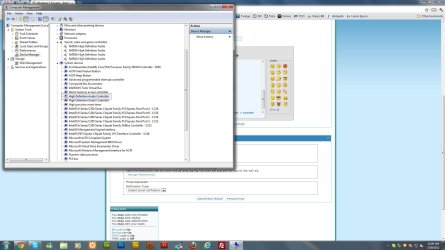
3. Disabling the first high definition audio controller on device manager > system devices (see attached)
I don't know if I can upgrade or downgrade that controller I tried updating it but it says that its already up to date, but this controller creates that noise but without it there's no sound at all so....
Hope anyone can help me... I think I've tried everything but this seems to be a drivers issue so fixable.
Oh and the noise get a little higher when the pc does like Hard Disc processing...
Also using the same 5.1 speakers or headphones with my old PC there's no noise at all...
What do you show for the actual sound device in the Device Manager? Do you have more than one entry? or show the generic HD Audio Codec? You should only have one entry and that should be the Motherboard vendor's Win 7 driver. I've seen a lot of problems with multiple entries/devices and with the generic Windows installed HD Audio Codec. Whether or not this will take care of your problems ??
The audio is on a shared Interrupt (IRQ) with a higher priority device. That can also cause some audio droputs in some cases. Sometimes, if you uninstall the sound in the device manager (but not the drivers) then restart the PC when Windows starts it will detect and install the sound and put it on a different shared IRQ and fix or at least change the symptoms.
Depending on what and how you've installed/uninstalled/reinstalled, etc that could also be an issue.
When you are on the BIOS, Windows and drivers have not been loaded so obviously you would not get any sound. Same way with Safe Mode, many device drivers are not loaded or in the case of the video a standard VGA mode is used.
My Computer
Computer type
PC/Desktop
Computer Manufacturer/Model Number
My Own Build
OS
Windows 10 64 bit
CPU
Intel i7 6700K
Motherboard
ASUS ROG Maximus VIII Hero
Memory
16GB Corsair Dominator
Graphics Card(s)
Intel CPU Graphics
Sound Card
RealTek
Monitor(s) Displays
27" Dell S2719dgf
Screen Resolution
2560X1440
Hard Drives
1 TB Samsung 850 EVO SSD for Win 10 Pro
500GB Samsung 850 EVO SSD for Win 10 Insider
2 TB drive for backup
PSU
EVGA Supernova 750G2
Case
BeQuiet Silent Base 600
Cooling
Deepcool Captain 120EX
Keyboard
Microsoft Wireless 2000
Mouse
Microsoft wireless
Internet Speed
100 MB/sec (Cable)
Antivirus
Microsoft Defender and Malwarebytes
Browser
Edge/Firefox
Other Info
Cakewalk (Sonar) by BandLab and Studio One 4.1 Pro recording studio software. MOTU 896Mk3 Hybrid recording interface, Frontier Tranzport wireless control unit, Behringer X-Touch Control Surface.
Five USB connected optical drives for CD Audio production using Nero BurningROM
I see you updated while I was posting. Where did you connect the headphones? to the rear GREEN speaker jack or to the front headphone jack? If it was to the rear speaker jack, that would point to the speakers as the problem.
My Computer
Computer type
PC/Desktop
Computer Manufacturer/Model Number
My Own Build
OS
Windows 10 64 bit
CPU
Intel i7 6700K
Motherboard
ASUS ROG Maximus VIII Hero
Memory
16GB Corsair Dominator
Graphics Card(s)
Intel CPU Graphics
Sound Card
RealTek
Monitor(s) Displays
27" Dell S2719dgf
Screen Resolution
2560X1440
Hard Drives
1 TB Samsung 850 EVO SSD for Win 10 Pro
500GB Samsung 850 EVO SSD for Win 10 Insider
2 TB drive for backup
PSU
EVGA Supernova 750G2
Case
BeQuiet Silent Base 600
Cooling
Deepcool Captain 120EX
Keyboard
Microsoft Wireless 2000
Mouse
Microsoft wireless
Internet Speed
100 MB/sec (Cable)
Antivirus
Microsoft Defender and Malwarebytes
Browser
Edge/Firefox
Other Info
Cakewalk (Sonar) by BandLab and Studio One 4.1 Pro recording studio software. MOTU 896Mk3 Hybrid recording interface, Frontier Tranzport wireless control unit, Behringer X-Touch Control Surface.
Five USB connected optical drives for CD Audio production using Nero BurningROM
It seems to be a hardware issue that some how the 5.1 speakers create that static noise...
I don't know how I missed testing only with headphones plugged in or maybe I change something I've really got no idea I thought I tested using only headphones before... or maybe I tested with the speakers plugged in and that seems to be the problem, the speakers some how create some sort of static that affects any other audio devices connected...
Connect only the green speaker connection from the speakers and see if it is there or OK. If it's OK, connect one of the other speaker leads and check again. Could be something feeding back from the speaker system that is causing it.
I assume you have the speaker configuration, in the Sound/Playback panel set for 5.1.
My Computer
Computer type
PC/Desktop
Computer Manufacturer/Model Number
My Own Build
OS
Windows 10 64 bit
CPU
Intel i7 6700K
Motherboard
ASUS ROG Maximus VIII Hero
Memory
16GB Corsair Dominator
Graphics Card(s)
Intel CPU Graphics
Sound Card
RealTek
Monitor(s) Displays
27" Dell S2719dgf
Screen Resolution
2560X1440
Hard Drives
1 TB Samsung 850 EVO SSD for Win 10 Pro
500GB Samsung 850 EVO SSD for Win 10 Insider
2 TB drive for backup
PSU
EVGA Supernova 750G2
Case
BeQuiet Silent Base 600
Cooling
Deepcool Captain 120EX
Keyboard
Microsoft Wireless 2000
Mouse
Microsoft wireless
Internet Speed
100 MB/sec (Cable)
Antivirus
Microsoft Defender and Malwarebytes
Browser
Edge/Firefox
Other Info
Cakewalk (Sonar) by BandLab and Studio One 4.1 Pro recording studio software. MOTU 896Mk3 Hybrid recording interface, Frontier Tranzport wireless control unit, Behringer X-Touch Control Surface.
Five USB connected optical drives for CD Audio production using Nero BurningROM
Yeah I tested only connecting the green one... I think it's the speakers that aren't so good (Genius) also they are kinda old. I also have the configuration set on 5.1.
I will test using like simple stereo ones... and perhaps buying a 5.1 logitech speakers
Also check if you have plugged in a wireless receiver in back near the audio on mobo. I exp'd noise whether plugged in to front or back I/O USB and realized it was a micro USB receiver i barely noticed and even forgot about for my Logitech wireless keyboard and my wireless mouse. I go back n' forth between wired k & M when gaming and reg usage. Had an epiphany and looked at what had chg'd, realized noise appeared when wireless was used. Upon playing with Windows Media Center and a new remote for internet tv, radio, etc. I discovered all the noise-horrible, sounded like digital rain! No matter if I used my headphones or spkrs, it was there. Once i unplugged the wireless receiver, all noise disappeared!!! I was thrilled not to have to delete audio Realtek HD drivers and update w/newest ones as some were doing, i also wondered if my ASUS 6890 was causing issues as the fan was going and then i wondered if my Icy Dock and its fan or location was an issue. My Motorola modem and Buffalo router were all in close location as well. I was going to unplug the Icy Dock next as that had been a purchase months ago and i wondered if that was an issue. Before having to do any of this with my last move to update Realtek drivers after I cleaned computer good w/drivercleaner. Very happy to say that the easiest thing resolved the issue and id begin there if anyone here goes wireless. Good luck!


 I was thrilled not to have to delete audio Realtek HD drivers and update w/newest ones as some were doing, i also wondered if my ASUS 6890 was causing issues as the fan was going and then i wondered if my Icy Dock and its fan or location was an issue. My Motorola modem and Buffalo router were all in close location as well. I was going to unplug the Icy Dock next as that had been a purchase months ago and i wondered if that was an issue. Before having to do any of this with my last move to update Realtek drivers after I cleaned computer good w/drivercleaner. Very happy to say that the easiest thing resolved the issue and id begin there if anyone here goes wireless. Good luck!