Realtek HDMI: HDCP in Vista; not in Win7

Dragonfly

Member
Power User
Local time
9:39 AM
Messages
221
Location
the 'burbs of @lanta, USA
I'm dual-booting Vista Ultimate x86 and Win7 x86. Running a Radeon HD4550 with native HDMI through an Onkyo 606 receiver to a Samsung 40A550 LCD.

Setup is exactly the same in Win7 as in Vista: same Catalyst version, latest Realtek HD and HDMI drivers (R214/R213). [updated to R215 drivers on 2/10 - made no difference]

Also running AnyDVD HD on both.

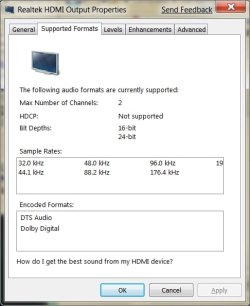
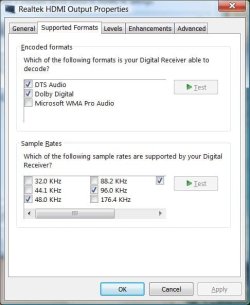
On Vista, Realtek HDMI Output Properties shows HDMI works fine. I'm able to have the 606 decode DTS and Dolby Digital.

On Win7, Realtek HDMI Output Properties says HDCP "not supported" and the 606 is not decoding DTS or Dolby Digital.

Anyone else seeing this?
 

Attachments
  • RealTek HDMI Settings Vista.jpg
    RealTek HDMI Settings Vista.jpg
    37.2 KB · Views: 1,600
  • RealTek HDMI Settings Win7.jpg
    RealTek HDMI Settings Win7.jpg
    32.8 KB · Views: 669
Last edited:

My Computer My Computer

At a glance

Windows 7 Ultimate 32 & 64 -(Boot Camped Snow...AMD Athlon A64 X2 6000+ 3.1GHz4GB Corsair XMS RAMGigabyte ATI Radeon HD4550/512MB/DDR3 passive...
Computer Manufacturer/Model Number
Self built
OS
Windows 7 Ultimate 32 & 64 -(Boot Camped Snow Leopard on a Mac Mini)
CPU
AMD Athlon A64 X2 6000+ 3.1GHz
Motherboard
DFI LanParty Jr 790GX M2RS
Memory
4GB Corsair XMS RAM
Graphics Card(s)
Gigabyte ATI Radeon HD4550/512MB/DDR3 passive cooled
Sound Card
latest RealTek HD/HDMI drivers
Monitor(s) Displays
Samsung LN40A550 (primary); Zalman 7" LCD (secondary)
Screen Resolution
1920x1080 ; 800x600
Hard Drives
WD Raptor for OS
Seagate 7211 640GB
Two Samsung EcoGreens for TV in RAID 0 = 3TB
Two WD MyBook 1TB externals for B/U and Movies
Optical Drive:
LG GGC-H20L Super Multi Blue BluRay/HD-DVD internal
PSU
Corsair HX520W
Case
Zalman HD160XT
Cooling
Zalman CNPS9500Cu on processor - Four Nexus case fans
Keyboard
Gyration wireless Media Center Keyboard
Mouse
Gyration Cordless Optical Air Mouse
Internet Speed
6344 kbps Down/1043 kbps Up (Comcast cable)
Other Info
HDMI audio/video out to Yamaha RX-V1065 receiver.
All controlled by a Harmony One universal remote.

Four other home built computers plus a Mac Mini, but this is my main Win7 testbed.
I havent tried Vista but I have the same issues in Win 7 as you.... I've tried all kinds of changes and both 7000 and 7022 with no luck.

Anybody out there get this working?
 

My Computer My Computer

At a glance

Windows 7
OS
Windows 7
Perhaps the OS isn't supporting it because of ...

no official W7 drivers?
 

My Computers My Computers

  • At a glance

    Windows 11 21H2 Current buildAMD Ryzen 9 3950X4 * 32 GB - Corsair Vengeance 3600 MHzEVGA GeForce RTX 3080 Ti XC3 ULTRA GAMING (12...
    Computer type
    PC/Desktop
    Computer Manufacturer/Model Number
    The Beast Model A (homebrew)
    OS
    Windows 11 21H2 Current build
    CPU
    AMD Ryzen 9 3950X
    Motherboard
    MSI MEG X570 GODLIKE
    Memory
    4 * 32 GB - Corsair Vengeance 3600 MHz
    Graphics Card(s)
    EVGA GeForce RTX 3080 Ti XC3 ULTRA GAMING (12G-P5-3955-KR)
    Sound Card
    Realtek® ALC1220 Codec
    Monitor(s) Displays
    2x Eve Spectrum ES07D03 4K Gaming Monitor (Matte) | Eve Spec
    Screen Resolution
    3x 3840 x 2160
    Hard Drives
    3x Samsung 980 Pro NVMe PCIe 4 M.2 2 TB SSD (MZ-V8P2T0B/AM) } 3x Sabrent Rocket NVMe 4.0 1 TB SSD
    PSU
    PC Power & Cooling’s Silencer Series 1050 Watt, 80 Plus Plat
    Case
    Fractal Design Define 7 XL Dark ATX Full Tower Case
    Cooling
    SteelSeries Apex Pro Wired Gaming Keyboard
    Keyboard
    SteelSeries Apex Pro
    Mouse
    Logitech MX Master 3S | MX Master 3 for business
    Internet Speed
    AT&T LightSpeed Gigabit Duplex Ftth
    Antivirus
    Windows Defender + MB 3
    Browser
    Nightly (default) + Firefox (stable),Chrome, Edge
  • At a glance

    ChromeOS Flex Dev Channel (current)Intel(R) Core(TM) i5-6300U CPU @ 2.40GHz, 250...16 GBIntel(R) HD Graphics 520
    Computer type
    PC/Desktop
    System Manufacturer/Model Number
    Dell Latitude E5470
    OS
    ChromeOS Flex Dev Channel (current)
    CPU
    Intel(R) Core(TM) i5-6300U CPU @ 2.40GHz, 2501 Mhz, 2 Core(s), 4 Logical Processor(s)
    Motherboard
    Dell
    Memory
    16 GB
    Graphics Card(s)
    Intel(R) HD Graphics 520
    Sound Card
    Intel(R) HD Graphics 520 + RealTek Audio
    Monitor(s) Displays
    Dell laptop display 15"
    Screen Resolution
    1920 * 1080
    Hard Drives
    Toshiba 128GB M.2 22300 drive
    INTEL Cherryville 520 Series SSDSC2CW180A 180 GB SATA III SSD
    PSU
    Dell
    Case
    Dell
    Cooling
    Dell
    Keyboard
    Dell
    Mouse
    Logitech MX Master 3S (shared w. Sys 1) | Dell TouchPad
    Internet Speed
    AT&T LightSpeed Gigabit Duplex Ftth
Well, that's certainly a possibility, but, if so, I'd expect to see a lot more howling from beta users with the same problem. Not supporting HDCP would be a deal killer for most Home Theater users of 7MC.

Because I haven't seen a big hue and cry, I suspect this may be an isolated instance or a setting problem.
 

My Computer My Computer

At a glance

Windows 7 Ultimate 32 & 64 -(Boot Camped Snow...AMD Athlon A64 X2 6000+ 3.1GHz4GB Corsair XMS RAMGigabyte ATI Radeon HD4550/512MB/DDR3 passive...
Computer Manufacturer/Model Number
Self built
OS
Windows 7 Ultimate 32 & 64 -(Boot Camped Snow Leopard on a Mac Mini)
CPU
AMD Athlon A64 X2 6000+ 3.1GHz
Motherboard
DFI LanParty Jr 790GX M2RS
Memory
4GB Corsair XMS RAM
Graphics Card(s)
Gigabyte ATI Radeon HD4550/512MB/DDR3 passive cooled
Sound Card
latest RealTek HD/HDMI drivers
Monitor(s) Displays
Samsung LN40A550 (primary); Zalman 7" LCD (secondary)
Screen Resolution
1920x1080 ; 800x600
Hard Drives
WD Raptor for OS
Seagate 7211 640GB
Two Samsung EcoGreens for TV in RAID 0 = 3TB
Two WD MyBook 1TB externals for B/U and Movies
Optical Drive:
LG GGC-H20L Super Multi Blue BluRay/HD-DVD internal
PSU
Corsair HX520W
Case
Zalman HD160XT
Cooling
Zalman CNPS9500Cu on processor - Four Nexus case fans
Keyboard
Gyration wireless Media Center Keyboard
Mouse
Gyration Cordless Optical Air Mouse
Internet Speed
6344 kbps Down/1043 kbps Up (Comcast cable)
Other Info
HDMI audio/video out to Yamaha RX-V1065 receiver.
All controlled by a Harmony One universal remote.

Four other home built computers plus a Mac Mini, but this is my main Win7 testbed.
Thanks. Good thread to watch. Although my HDMI config shows "2 Channel", Realtek sees my 7.1 setup correctly and plays a tone on each speaker. My Onkyo 606 indicates it's receiving a 5.1 signal. However, the receiver shows "Multich" when playing a DTS or Dolby Digital source. Truth be told, it "sounds" ok to me - it's just annoying that it displays differently than it does in Vista.
 

My Computer My Computer

At a glance

Windows 7 Ultimate 32 & 64 -(Boot Camped Snow...AMD Athlon A64 X2 6000+ 3.1GHz4GB Corsair XMS RAMGigabyte ATI Radeon HD4550/512MB/DDR3 passive...
Computer Manufacturer/Model Number
Self built
OS
Windows 7 Ultimate 32 & 64 -(Boot Camped Snow Leopard on a Mac Mini)
CPU
AMD Athlon A64 X2 6000+ 3.1GHz
Motherboard
DFI LanParty Jr 790GX M2RS
Memory
4GB Corsair XMS RAM
Graphics Card(s)
Gigabyte ATI Radeon HD4550/512MB/DDR3 passive cooled
Sound Card
latest RealTek HD/HDMI drivers
Monitor(s) Displays
Samsung LN40A550 (primary); Zalman 7" LCD (secondary)
Screen Resolution
1920x1080 ; 800x600
Hard Drives
WD Raptor for OS
Seagate 7211 640GB
Two Samsung EcoGreens for TV in RAID 0 = 3TB
Two WD MyBook 1TB externals for B/U and Movies
Optical Drive:
LG GGC-H20L Super Multi Blue BluRay/HD-DVD internal
PSU
Corsair HX520W
Case
Zalman HD160XT
Cooling
Zalman CNPS9500Cu on processor - Four Nexus case fans
Keyboard
Gyration wireless Media Center Keyboard
Mouse
Gyration Cordless Optical Air Mouse
Internet Speed
6344 kbps Down/1043 kbps Up (Comcast cable)
Other Info
HDMI audio/video out to Yamaha RX-V1065 receiver.
All controlled by a Harmony One universal remote.

Four other home built computers plus a Mac Mini, but this is my main Win7 testbed.
Must be nice! I've got the same card as you and I only have "2 channel and no DTS or DD'. Matter of fact, I don't have the sample rates you show either!

How in the world did you get those options? I'm running the 32bit Catalyst drivers from ATI's site and the Realtek HDMI 2.14 drivers. No luck. Do you show the Realtek icon in the taskbar?

Btw, I'm live in the same area (around Atlanta). Maybe it's something in the air? :D

Thanks. Good thread to watch. Although my HDMI config shows "2 Channel", Realtek sees my 7.1 setup correctly and plays a tone on each speaker. My Onkyo 606 indicates it's receiving a 5.1 signal. However, the receiver shows "Multich" when playing a DTS or Dolby Digital source. Truth be told, it "sounds" ok to me - it's just annoying that it displays differently than it does in Vista.
 

My Computer My Computer

At a glance

Windows 7
OS
Windows 7
Must be nice! I've got the same card as you and I only have "2 channel and no DTS or DD'. Matter of fact, I don't have the sample rates you show either!

How in the world did you get those options? I'm running the 32bit Catalyst drivers from ATI's site and the Realtek HDMI 2.14 drivers. No luck. Do you show the Realtek icon in the taskbar?

Btw, I'm live in the same area (around Atlanta). Maybe it's something in the air? :D

I'm running the Catalyst drivers off the Gigabyte install CD (8.531.1 RC4?) on both the Vista and Win7 partitions, but the most recent Realtek HD and HDMI drivers. Read somewhere that it's important to install the Realtek HD driver first, and then the HDMI driver, which is what I did.

Realtek HD Audio Manager looks the same in both Vista and Win7: 7.1 speaker config (and the speaker test works). I have a Realtek icon in the taskbar - you have to click on the "i" button on the Audio Manager screen to choose to show the taskbar icon.

One difference I've noticed : Realtek HDMI Output Properties in Vista shows under Controller Information - "2-ATI HDMI Audio", while under Win7, it just says "ATI HDMI Audio". The driver versions show the same for both: 6.0.1.5766. Don't know what significance this might have.

We could blame it on the Atlanta pollen, but we're a month away from that. ;)
 

Attachments

  • Realtek HD Audio Manager.JPG
    Realtek HD Audio Manager.JPG
    79.4 KB · Views: 3,033

My Computer My Computer

At a glance

Windows 7 Ultimate 32 & 64 -(Boot Camped Snow...AMD Athlon A64 X2 6000+ 3.1GHz4GB Corsair XMS RAMGigabyte ATI Radeon HD4550/512MB/DDR3 passive...
Computer Manufacturer/Model Number
Self built
OS
Windows 7 Ultimate 32 & 64 -(Boot Camped Snow Leopard on a Mac Mini)
CPU
AMD Athlon A64 X2 6000+ 3.1GHz
Motherboard
DFI LanParty Jr 790GX M2RS
Memory
4GB Corsair XMS RAM
Graphics Card(s)
Gigabyte ATI Radeon HD4550/512MB/DDR3 passive cooled
Sound Card
latest RealTek HD/HDMI drivers
Monitor(s) Displays
Samsung LN40A550 (primary); Zalman 7" LCD (secondary)
Screen Resolution
1920x1080 ; 800x600
Hard Drives
WD Raptor for OS
Seagate 7211 640GB
Two Samsung EcoGreens for TV in RAID 0 = 3TB
Two WD MyBook 1TB externals for B/U and Movies
Optical Drive:
LG GGC-H20L Super Multi Blue BluRay/HD-DVD internal
PSU
Corsair HX520W
Case
Zalman HD160XT
Cooling
Zalman CNPS9500Cu on processor - Four Nexus case fans
Keyboard
Gyration wireless Media Center Keyboard
Mouse
Gyration Cordless Optical Air Mouse
Internet Speed
6344 kbps Down/1043 kbps Up (Comcast cable)
Other Info
HDMI audio/video out to Yamaha RX-V1065 receiver.
All controlled by a Harmony One universal remote.

Four other home built computers plus a Mac Mini, but this is my main Win7 testbed.
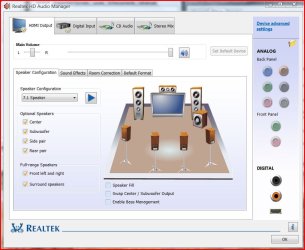
I've got the asus eah4550. Maybe I could try the version you run. Also I've looked under the "I" and don't see the realtek icon. I'll try uninstalling the catalyst drivers shortly and reinstalling the hd hmdi driver 2.14. Is there another hd piece of software u need to add from realtek? I don't have the software you show in the last screenshot.
 

My Computer My Computer

At a glance

Windows 7
OS
Windows 7
Is there another hd piece of software u need to add from realtek? I don't have the software you show in the last screenshot.

There sure is. You need to install both the Realtek Vista HD driver (latest version 2.15) AND then the Realtek ATI HDMI Audio Device driver (latest version 2.13) in that order. The HD install is not complete without BOTH and you won't get the screen I showed above, or the Realtek icon without the first.

This may be the root of your problem. Try that before changing your Catalyst version.
 

My Computer My Computer

At a glance

Windows 7 Ultimate 32 & 64 -(Boot Camped Snow...AMD Athlon A64 X2 6000+ 3.1GHz4GB Corsair XMS RAMGigabyte ATI Radeon HD4550/512MB/DDR3 passive...
Computer Manufacturer/Model Number
Self built
OS
Windows 7 Ultimate 32 & 64 -(Boot Camped Snow Leopard on a Mac Mini)
CPU
AMD Athlon A64 X2 6000+ 3.1GHz
Motherboard
DFI LanParty Jr 790GX M2RS
Memory
4GB Corsair XMS RAM
Graphics Card(s)
Gigabyte ATI Radeon HD4550/512MB/DDR3 passive cooled
Sound Card
latest RealTek HD/HDMI drivers
Monitor(s) Displays
Samsung LN40A550 (primary); Zalman 7" LCD (secondary)
Screen Resolution
1920x1080 ; 800x600
Hard Drives
WD Raptor for OS
Seagate 7211 640GB
Two Samsung EcoGreens for TV in RAID 0 = 3TB
Two WD MyBook 1TB externals for B/U and Movies
Optical Drive:
LG GGC-H20L Super Multi Blue BluRay/HD-DVD internal
PSU
Corsair HX520W
Case
Zalman HD160XT
Cooling
Zalman CNPS9500Cu on processor - Four Nexus case fans
Keyboard
Gyration wireless Media Center Keyboard
Mouse
Gyration Cordless Optical Air Mouse
Internet Speed
6344 kbps Down/1043 kbps Up (Comcast cable)
Other Info
HDMI audio/video out to Yamaha RX-V1065 receiver.
All controlled by a Harmony One universal remote.

Four other home built computers plus a Mac Mini, but this is my main Win7 testbed.
I tried uninstalling both and back on in the order. No luck. I'm formatting it. Should I do the realtek HD, then HDMI, and then the catalyst? Or, catalyst before the realteks?

Thanks so much for your help!
 

My Computer My Computer

At a glance

Windows 7
OS
Windows 7
I tried uninstalling both and back on in the order. No luck. I'm formatting it. Should I do the realtek HD, then HDMI, and then the catalyst? Or, catalyst before the realteks?

Thanks so much for your help!

Not sure it makes a difference, but I installed the video drivers first, followed by the Realtek HD, and then the HDMI.

Try using the catalyst setup from your Asus install disk and see if that makes a difference.
 

My Computer My Computer

At a glance

Windows 7 Ultimate 32 & 64 -(Boot Camped Snow...AMD Athlon A64 X2 6000+ 3.1GHz4GB Corsair XMS RAMGigabyte ATI Radeon HD4550/512MB/DDR3 passive...
Computer Manufacturer/Model Number
Self built
OS
Windows 7 Ultimate 32 & 64 -(Boot Camped Snow Leopard on a Mac Mini)
CPU
AMD Athlon A64 X2 6000+ 3.1GHz
Motherboard
DFI LanParty Jr 790GX M2RS
Memory
4GB Corsair XMS RAM
Graphics Card(s)
Gigabyte ATI Radeon HD4550/512MB/DDR3 passive cooled
Sound Card
latest RealTek HD/HDMI drivers
Monitor(s) Displays
Samsung LN40A550 (primary); Zalman 7" LCD (secondary)
Screen Resolution
1920x1080 ; 800x600
Hard Drives
WD Raptor for OS
Seagate 7211 640GB
Two Samsung EcoGreens for TV in RAID 0 = 3TB
Two WD MyBook 1TB externals for B/U and Movies
Optical Drive:
LG GGC-H20L Super Multi Blue BluRay/HD-DVD internal
PSU
Corsair HX520W
Case
Zalman HD160XT
Cooling
Zalman CNPS9500Cu on processor - Four Nexus case fans
Keyboard
Gyration wireless Media Center Keyboard
Mouse
Gyration Cordless Optical Air Mouse
Internet Speed
6344 kbps Down/1043 kbps Up (Comcast cable)
Other Info
HDMI audio/video out to Yamaha RX-V1065 receiver.
All controlled by a Harmony One universal remote.

Four other home built computers plus a Mac Mini, but this is my main Win7 testbed.
I just tried a fresh install and then the realtek hd, then hdmi. No go. I tried to add the latest catalyst drivers and the thing memory dumps everytime on that install. I'm formatting now and trying the asus vista drivers now.

I would use the CD that came with it but I chunked them the day I got 'em. :)
 

My Computer My Computer

At a glance

Windows 7
OS
Windows 7
I would use the CD that came with it but I chunked them the day I got 'em. :)

Been there; done that. Now I always backup copy every install CD I get to a "Reinstall" directory.
 

My Computer My Computer

At a glance

Windows 7 Ultimate 32 & 64 -(Boot Camped Snow...AMD Athlon A64 X2 6000+ 3.1GHz4GB Corsair XMS RAMGigabyte ATI Radeon HD4550/512MB/DDR3 passive...
Computer Manufacturer/Model Number
Self built
OS
Windows 7 Ultimate 32 & 64 -(Boot Camped Snow Leopard on a Mac Mini)
CPU
AMD Athlon A64 X2 6000+ 3.1GHz
Motherboard
DFI LanParty Jr 790GX M2RS
Memory
4GB Corsair XMS RAM
Graphics Card(s)
Gigabyte ATI Radeon HD4550/512MB/DDR3 passive cooled
Sound Card
latest RealTek HD/HDMI drivers
Monitor(s) Displays
Samsung LN40A550 (primary); Zalman 7" LCD (secondary)
Screen Resolution
1920x1080 ; 800x600
Hard Drives
WD Raptor for OS
Seagate 7211 640GB
Two Samsung EcoGreens for TV in RAID 0 = 3TB
Two WD MyBook 1TB externals for B/U and Movies
Optical Drive:
LG GGC-H20L Super Multi Blue BluRay/HD-DVD internal
PSU
Corsair HX520W
Case
Zalman HD160XT
Cooling
Zalman CNPS9500Cu on processor - Four Nexus case fans
Keyboard
Gyration wireless Media Center Keyboard
Mouse
Gyration Cordless Optical Air Mouse
Internet Speed
6344 kbps Down/1043 kbps Up (Comcast cable)
Other Info
HDMI audio/video out to Yamaha RX-V1065 receiver.
All controlled by a Harmony One universal remote.

Four other home built computers plus a Mac Mini, but this is my main Win7 testbed.
I give up. I've worked on this for hours (again). I got the Asus catalyst vista drivers installed, did the 2.15 Realtek HD, then the 2.13 HDMI drivers. No go. I've tried copying, replacing, turning services on and off, digging through ini's, every version and driver i could get... I can't get the HD audio manager to show up.

It's like audio manager never gets installed. I've got everything working except for my digital out. I tired of seeing "PCM, DSP" on my Onkyo! I'm delirious from this thing!!!!!

I would buy another low profile pci hdmi card tomorrow if I knew it would work...
 

My Computer My Computer

At a glance

Windows 7
OS
Windows 7
RtHDVCpl.exe is the HD Audio Control Panel. It's in the HDA folder under Program Files/Realtek/Audio on my Win7 machine.
 

My Computer My Computer

At a glance

Windows 7 Ultimate 32 & 64 -(Boot Camped Snow...AMD Athlon A64 X2 6000+ 3.1GHz4GB Corsair XMS RAMGigabyte ATI Radeon HD4550/512MB/DDR3 passive...
Computer Manufacturer/Model Number
Self built
OS
Windows 7 Ultimate 32 & 64 -(Boot Camped Snow Leopard on a Mac Mini)
CPU
AMD Athlon A64 X2 6000+ 3.1GHz
Motherboard
DFI LanParty Jr 790GX M2RS
Memory
4GB Corsair XMS RAM
Graphics Card(s)
Gigabyte ATI Radeon HD4550/512MB/DDR3 passive cooled
Sound Card
latest RealTek HD/HDMI drivers
Monitor(s) Displays
Samsung LN40A550 (primary); Zalman 7" LCD (secondary)
Screen Resolution
1920x1080 ; 800x600
Hard Drives
WD Raptor for OS
Seagate 7211 640GB
Two Samsung EcoGreens for TV in RAID 0 = 3TB
Two WD MyBook 1TB externals for B/U and Movies
Optical Drive:
LG GGC-H20L Super Multi Blue BluRay/HD-DVD internal
PSU
Corsair HX520W
Case
Zalman HD160XT
Cooling
Zalman CNPS9500Cu on processor - Four Nexus case fans
Keyboard
Gyration wireless Media Center Keyboard
Mouse
Gyration Cordless Optical Air Mouse
Internet Speed
6344 kbps Down/1043 kbps Up (Comcast cable)
Other Info
HDMI audio/video out to Yamaha RX-V1065 receiver.
All controlled by a Harmony One universal remote.

Four other home built computers plus a Mac Mini, but this is my main Win7 testbed.
Mines under program files/realtek/audio/installshield

Somethings not right when I install it...

RtHDVCpl.exe is the HD Audio Control Panel. It's in the HDA folder under Program Files/Realtek/Audio on my Win7 machine.
 

My Computer My Computer

At a glance

Windows 7
OS
Windows 7
So I enabled administrator log ons and did the 2.15 install. It memory dumped on the next boot and then ran the repair on the next boot. Whats weird, is after that, I see the install files under the realtek/audio directory. I'm getting closer! What I don't see is any reference to rthdvcpl.exe in the registry or startup items.

Anybody got some info on these? I WILL get this working. :)
 

My Computer My Computer

At a glance

Windows 7
OS
Windows 7
Hi,
i installed ATI vista audio driver for win7 ( not realtek ), but in pass thorugh mode it is not working with cyberlink , but using other player i am able to play .
but if i installed realtek driver then i uninstalled realtek and installed ati driver it is working fine ? have u seen this?
 

My Computer My Computer

At a glance

window7
OS
window7
Hello,

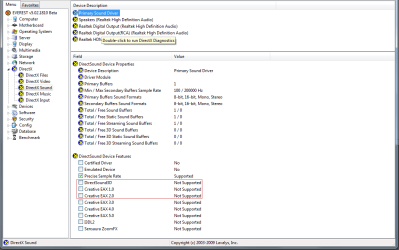
I confirm this problem - no HDCP on the Realtek ALC1200 from a P5Q, Asus 4850 HDMI connection to 1.3 HDMI monitor - through the usual DVI-HDMI dongle, if it's important. It worked on XP SP3.
There are also problems in the DirectX/EAX support take a look at the screenshots.

EDIT: After some reading (I skipped on Vista, so only now I find out about this...) I understand it's a... natural condition for Vista/Win 7, as it killed EAX and other proprietary formats in favor of OpenAL. As I didn't play any games yet I have no idea how this will affect me.
 

Attachments

  • hdcp.png
    hdcp.png
    11 KB · Views: 277
  • nodirectxandEAXsupport.png
    nodirectxandEAXsupport.png
    27.1 KB · Views: 456

My Computer My Computer

At a glance

Windows 7 x64 UltimateAMD FX 8350Kingston HyperX 8GBAsus EAH4850 512 MB
Computer type
PC/Desktop
Computer Manufacturer/Model Number
custom
OS
Windows 7 x64 Ultimate
CPU
AMD FX 8350
Motherboard
Gigabyte GA-990XA-UD3
Memory
Kingston HyperX 8GB
Graphics Card(s)
Asus EAH4850 512 MB
Sound Card
M-Audio Audiophile USB / Yamaha HS80M monitors
Monitor(s) Displays
Fujitsu-Siemens Amilo LSL 3230T 23" FullHD
Screen Resolution
1080p
Hard Drives
WD Caviar Blue 1TB
Case
Thermaltake
Keyboard
Logitech Wave Pro
Mouse
Logitech Performance MX
Internet Speed
100 mbps
Back
Top