
Possible virus? Need some help.

itsjustalogin

New member
Local time
5:38 PM
Messages
7
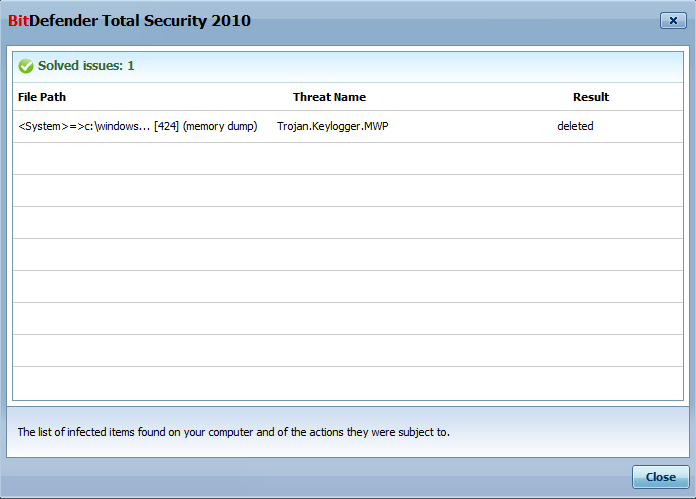
Hey everyone sorry if this is the wrong place to post this but, my BitDefender scan just finished and said it solved one issue, like anyone would do I clicked view to see what it was (thinking it was just cookies or something small like that) but it said it was a keylogger!

I'm very weary of if it actually is a keylogger or if BitDefender just mistook it for something and if it is how long it's been going ect. I'm very good with not downloading anything suspicious or any "key generators" ect. So what is this? Should I be concerned and needing to do something? Here's a picture of the details.
5nvCg.png


The full directory of where it was found is:
<System>=>c:\windows\microsoft.net\framework\v2.0.50727\vbc.exe *32 [424] (memory dump)

Hope someone can help!

Edit: BitDefender runs automatic deep scans everyday at 4:00 A.M and hasn't found anything before.
Edit2: I scanned the same file/directory on my laptop which also runs Win 7 64bit with BitDefender and Malwarebytes Anti-Malware and nothing showed up from either.
 
Last edited:

My Computer

OS
Windows 7 Home Premium 64bit
Quite honestly, I believe Bit Defender scans too harshly, detecting things it shouldn't. It claims it is just a memory dump. System created. It could be a keylogger, but I doubt it.

Make sure all important updates are installed (Windows update). It was found in the .net framework which have security vulnerabilities without updates. If it is updated already, Then I am almost positive it is a... false positive

Shouldn't Defender ask you before it deletes something? Like disable it first and then prompt?

If you want to check for other viruses and you are doubting Bit Defender, you might scan with this tool: http://www.microsoft.com/security/scanner/en-us/default.aspx, or you could install malwarebytes which should work fine next to any antivirus as an additional scanner: http://download.cnet.com/Malwarebyt...4572.html?part=dl-10804572&subj=dl&tag=button
 

My Computer

Computer type
PC/Desktop
Computer Manufacturer/Model Number
Custom Asus Build
OS
Microsoft Windows 8.1 Pro 64-bit
CPU
Intel(R) Core(TM) i3-4130 CPU @ 3.40GHz
Motherboard
B85M-E
Memory
8.00 GB
Graphics Card(s)
None
Sound Card
Realtek High Definition Audio
Monitor(s) Displays
Asus 23.6" Monitor
Screen Resolution
1920 x 1080 x 32 bits (4294967296 colors) @ 60 Hz
Hard Drives
INTEL SSDSC2BW180A4
Samsung SSD 840 PRO Series
PSU
Seasonic S12II-380Bronze
Case
Lian Li
Cooling
Fan, Passive
Keyboard
Logitech K120
Mouse
Microsoft Touch Mouse
Internet Speed
4ms Ping, 19.0 Mbps Download, 19.0 Mbps Upload
Antivirus
Eset Endpoint
Browser
Internet Explorer, Chrome
Thanks for the reply DustSailor, and vbc.exe is on my laptop that runs the same version of windows as this one I'm on now and I scanned it with BitDefender and Malwarebytes Anti-Malware and nothing was detected. So would you think it's safe to resume using my computer normally or anything?
More in detail, when BitDefender finished scanning, it said that it was deleted so it's not on my computer anymore, not even in quarantine. Also BitDefender didn't ask me before it was deleted or not. My computer is updated fully as well, and I wasn't sure what you meant by "Then I'm almost positive it is a... false positive" are you meaning it is a keylogger or isn't? Sorry for the blocky-ness of the reply, I was just trying to answer your questions in the response.
 

My Computer

OS
Windows 7 Home Premium 64bit
If Bit Defender deleted it, it is removed and your computer is safe to use. The keylogger wasn't anything to fret about. Even if you got infected, an antivirus should (and did) detect it and stop it. You're good.

If you worry it isn't finding all viruses, once again you can use the two tools i provided just to make sure, but I imagine you're fine just with Defender.
I wasn't sure what you meant by "Then I'm almost positive it is a... false positive" are you meaning it is a keylogger or isn't?
I meant that if you had all updates installed, it might have detected a harmless file and deleted it. That is what a false positive is. It detects something as a virus without it actually being one.

BUT that is taking my word against Bit Defender, and I have no way of actually knowing if it was a virus or not. Though the antivirus program scans agressively, I would still trust them as I have yet to find a reason not to. Most likely it was some form of low-end malware that has been removed. Hope this helps
 

My Computer

Computer type
PC/Desktop
Computer Manufacturer/Model Number
Custom Asus Build
OS
Microsoft Windows 8.1 Pro 64-bit
CPU
Intel(R) Core(TM) i3-4130 CPU @ 3.40GHz
Motherboard
B85M-E
Memory
8.00 GB
Graphics Card(s)
None
Sound Card
Realtek High Definition Audio
Monitor(s) Displays
Asus 23.6" Monitor
Screen Resolution
1920 x 1080 x 32 bits (4294967296 colors) @ 60 Hz
Hard Drives
INTEL SSDSC2BW180A4
Samsung SSD 840 PRO Series
PSU
Seasonic S12II-380Bronze
Case
Lian Li
Cooling
Fan, Passive
Keyboard
Logitech K120
Mouse
Microsoft Touch Mouse
Internet Speed
4ms Ping, 19.0 Mbps Download, 19.0 Mbps Upload
Antivirus
Eset Endpoint
Browser
Internet Explorer, Chrome
Sorry for all of these questions but the same vbc.exe file is in the x64 directory for microsoft.net framework;
"C:\Windows\Microsoft.NET\Framework64\v2.0.50727\vbc.exe". I scanned that file with both BitDefender and Malwarebytes but it came up clean and since I have BitDefender on my laptop and the same file on there was the same one on here then wouldn't it have shown up as a keylogger on my laptop too?
 

My Computer

OS
Windows 7 Home Premium 64bit
That is why I told you the first one may be a false positive. Have you scanned your system with that other tool I've given you yet (MS Safety Scannner)? Malwarebytes is especially good at detecting that sort of thing. If nothing is detecting it, you are virus free my friend.

Run this tool to repair any broken system files: http://www.sevenforums.com/tutorials/1538-sfc-scannow-command-system-file-checker.html - created by Brink

^ Has nothing to do with cleaning out viruses, but it will fix your system files.
 

My Computer

Computer type
PC/Desktop
Computer Manufacturer/Model Number
Custom Asus Build
OS
Microsoft Windows 8.1 Pro 64-bit
CPU
Intel(R) Core(TM) i3-4130 CPU @ 3.40GHz
Motherboard
B85M-E
Memory
8.00 GB
Graphics Card(s)
None
Sound Card
Realtek High Definition Audio
Monitor(s) Displays
Asus 23.6" Monitor
Screen Resolution
1920 x 1080 x 32 bits (4294967296 colors) @ 60 Hz
Hard Drives
INTEL SSDSC2BW180A4
Samsung SSD 840 PRO Series
PSU
Seasonic S12II-380Bronze
Case
Lian Li
Cooling
Fan, Passive
Keyboard
Logitech K120
Mouse
Microsoft Touch Mouse
Internet Speed
4ms Ping, 19.0 Mbps Download, 19.0 Mbps Upload
Antivirus
Eset Endpoint
Browser
Internet Explorer, Chrome
Back
Top