
Trojan:Win32/FakeSysdef

UsernameIssues

a.k.a. UNI
Guru
Gold Member
Local time
10:35 AM
Messages
8,138
Trojan:Win32/FakeSysdef - Trojan:DOS/Alureon.E

This computer again:
http://www.sevenforums.com/browsers-mail/214851-ie9-32bit-context-menu-fails-w7-pro-64bit.html

Here is some of what I know about the box build.
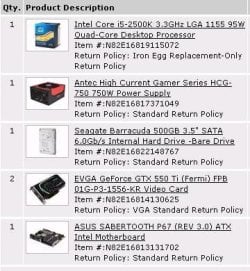
1spec.JPG


I was asked to cleanup the aftermath of this:
Encyclopedia entry: Trojan:Win32/FakeSysdef - Learn more about malware - Microsoft Malware Protection Center

There were no disk images or system restore points.

(See my rant about MSE's heuristics.) MSE is using default settings - except it is set to update and do a full scan every night. This computer does not sleep. The infection occurred on 01 July. The computer was turned off until I could deal with it.

A manual full scan by MSE found/cleaned this:
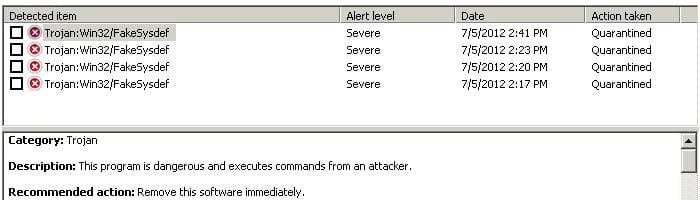
2infection.JPG


A full scan by Malwarebytes came up clean. I then started unhiding or replacing shortcuts and folders in the Start Menu - as well as uninstalling some stuff.


These started showing within minutes of the infection and yet they continue:
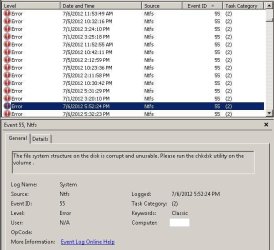
3disk-error.JPG


Did the infection scramble something on the hard drive?

Chkdsk came out like this:

Code:
Checking file system on C:
The type of the file system is NTFS.

A disk check has been scheduled.
Windows will now check the disk.                         

CHKDSK is verifying files (stage 1 of 5)...
  114432 file records processed.                                         

File verification completed.
  173 large file records processed.                                   

  0 bad file records processed.                                     

  2 EA records processed.                                           

  108 reparse records processed.                                      

CHKDSK is verifying indexes (stage 2 of 5)...
  158098 index entries processed.                                        

Index verification completed.
  0 unindexed files scanned.                                        

  0 unindexed files recovered.                                      

CHKDSK is verifying security descriptors (stage 3 of 5)...
  114432 file SDs/SIDs processed.                                        

Cleaning up 589 unused index entries from index $SII of file 0x9.
Cleaning up 589 unused index entries from index $SDH of file 0x9.
Cleaning up 589 unused security descriptors.
Security descriptor verification completed.
  21834 data files processed.                                           

CHKDSK is verifying Usn Journal...
  34642016 USN bytes processed.                                            

Usn Journal verification completed.
CHKDSK is verifying file data (stage 4 of 5)...
  114416 files processed.                                                

File data verification completed.
CHKDSK is verifying free space (stage 5 of 5)...
  100054981 free clusters processed.                                        

Free space verification is complete.
CHKDSK discovered free space marked as allocated in the
master file table (MFT) bitmap.
CHKDSK discovered free space marked as allocated in the volume bitmap.
Windows has made corrections to the file system.

 488272919 KB total disk space.
  87764456 KB in 89229 files.
     58584 KB in 21835 indexes.
         0 KB in bad sectors.
    229951 KB in use by the system.
     65536 KB occupied by the log file.
 400219928 KB available on disk.

      4096 bytes in each allocation unit.
 122068229 total allocation units on disk.
 100054982 allocation units available on disk.

Internal Info:
00 bf 01 00 e0 b1 01 00 5c 1d 03 00 00 00 00 00  ........\.......
4d 42 00 00 6c 00 00 00 00 00 00 00 00 00 00 00  MB..l...........
00 00 00 00 00 00 00 00 00 00 00 00 00 00 00 00  ................

Windows has finished checking your disk.
Please wait while your computer restarts.
 
Last edited:

My Computer My Computer

Computer type
Laptop
Computer Manufacturer/Model Number
Employer provided Dell Latitude
OS
W7 Pro SP1 64bit
CPU
i7
Memory
8GB
Graphics Card(s)
Intel HD Graphics
Hard Drives
crappy SSD
Antivirus
Employer mandated Symantec Endpoint Protection
Browser
Pale Moon 64bit, IE11 64bit & Chrome 64bit
Hello, UsernameIssues.

1. Try with Windows Defender Offline, to boot with it and before Windows start to delete all Trojans (Tutorial : http://www.sevenforums.com/tutorials/166445-windows-defender-offline.html )

2. Do sfc /scannow to repair system files (Tutorial : http://www.sevenforums.com/tutorials/1538-sfc-scannow-command-system-file-checker.html )

3. Try to uninstall all after 01 July.

Try with this...... Look at processes , msconfig , startup items and other , maybe you will find that virus.
 

My Computer My Computer

Computer Manufacturer/Model Number
Trinty Self Build 2011
OS
Windows 7 Ultimate x64 - Service Pack 1
CPU
Intel(R) Pentium(R) CPU G620 @ 2.60GHz
Motherboard
ASUSTeK Computer INC. P8H61-M LX2
Memory
Transcend Informations - 2*2048GB DDR3 @ 1066MHz
Graphics Card(s)
ATI Radeon HD 5670 - 1024MB DDR5 - Driver : 19.04.2011
Sound Card
AMD High Definition Audio Device
Monitor(s) Displays
SAMSUNG SyncMaster 2220LM 22"
Screen Resolution
1680x1050
Hard Drives
SAMSUNG HD503HI ATA Device - 500GB
PSU
Don't know for now !
Case
Case MSI
Cooling
Stock
Keyboard
MS Industrial 2.4GHz Wirelees Keyboard
Mouse
MS Industrial 2.4GHz Wirelees Optical Mouse
Internet Speed
Download speed : 6,5Mbps / Upload speed : 1Mpbs
Other Info
BIOS version : BIOS Date: 02/05/10 19:13:52 Ver: 08.00.10
Prime95 (4h) : max. 65°C
DirectX 11 version.
Logitech G13 Advanced Gaming Keyboard.
Thanks for the reply. So many computer problems and so little time :-)

I'm doing all of this via remote control. I'll give Windows Defender a try the next time I'm near that computer.

I should have mentioned that SFC showed no problems.
 

My Computer My Computer

Computer type
Laptop
Computer Manufacturer/Model Number
Employer provided Dell Latitude
OS
W7 Pro SP1 64bit
CPU
i7
Memory
8GB
Graphics Card(s)
Intel HD Graphics
Hard Drives
crappy SSD
Antivirus
Employer mandated Symantec Endpoint Protection
Browser
Pale Moon 64bit, IE11 64bit & Chrome 64bit
Windows Defender Offline found one problem that it could not fix:
Trojan:DOS/Alureon.E

Edit: the plan is to put some of the labor back on those that use this computer. The computer that this one replaced should still be functional. We'll get that one back in service and then spend some time on this infected one. Probably going to format the drive on this one, but I want to see if I can get the Event ID 55 stuff to go away first. I need to know if the drive is bad or if the rootkit is causing those entries.
 
Last edited:

My Computer My Computer

Computer type
Laptop
Computer Manufacturer/Model Number
Employer provided Dell Latitude
OS
W7 Pro SP1 64bit
CPU
i7
Memory
8GB
Graphics Card(s)
Intel HD Graphics
Hard Drives
crappy SSD
Antivirus
Employer mandated Symantec Endpoint Protection
Browser
Pale Moon 64bit, IE11 64bit & Chrome 64bit

If I recall Alureon is a trojan that creates a hidden partition and recopies itself from that partition everytime you remove it. In order to remove it completely use Hiren's boot CD to find and delete the partition. It should be about a 1MB in size and should labled as "(Hidden)". After removing the partition use Windows Defender Offline (WDO) to completely remove the virus. See links below for Hiren's Boot CD and WDO.

Download Hiren
What is Windows Defender Offline?
 

My Computer My Computer

Computer type
Laptop
Computer Manufacturer/Model Number
Toshiba P775-S7100
OS
Windows 7 Professional SP1 64-bit
CPU
Intel Core i5-2450M @2.5 GHz
Memory
6 GB DDR3 1333MHz
Graphics Card(s)
Intel HD 3000
Monitor(s) Displays
Built-in 17.3" LED; 22" Insignia NS-L22Q-10A
Screen Resolution
1600x900; 1360x768
Hard Drives
750 GB Hitachi
1TB Seagate FreeAgent External
Internet Speed
Verizon DSL Speed(Down/Up): 3360 Kbps / 800 Kbps
Antivirus
MSE and MBAM Pro
Browser
IE10
Thanks - I sure wish that MSE had prevented this infection :-(

Once the backup computer is functional, we will attack this again.

From within Windows:
partitions.JPG
 

My Computer My Computer

Computer type
Laptop
Computer Manufacturer/Model Number
Employer provided Dell Latitude
OS
W7 Pro SP1 64bit
CPU
i7
Memory
8GB
Graphics Card(s)
Intel HD Graphics
Hard Drives
crappy SSD
Antivirus
Employer mandated Symantec Endpoint Protection
Browser
Pale Moon 64bit, IE11 64bit & Chrome 64bit
Alureon is pretty tough Trojan to deal with. It's not a really an issue with MSE. It's an issue with all the smart people the spend so much time and effort trying to f*** over other people
 

My Computer My Computer

Computer type
Laptop
Computer Manufacturer/Model Number
Toshiba P775-S7100
OS
Windows 7 Professional SP1 64-bit
CPU
Intel Core i5-2450M @2.5 GHz
Memory
6 GB DDR3 1333MHz
Graphics Card(s)
Intel HD 3000
Monitor(s) Displays
Built-in 17.3" LED; 22" Insignia NS-L22Q-10A
Screen Resolution
1600x900; 1360x768
Hard Drives
750 GB Hitachi
1TB Seagate FreeAgent External
Internet Speed
Verizon DSL Speed(Down/Up): 3360 Kbps / 800 Kbps
Antivirus
MSE and MBAM Pro
Browser
IE10
Back
Top