Solved MSE system requirements

Heyyou

New member
Pro User
VIP
Local time
8:47 PM
Messages
212
Location
USA
Hi All, I am exploring the possibility of trying Microsoft Security Essentials, and notice in the system requirements that the prefered browsers are either IE V6 or later, and Firefox V2 or later. Does this mean that other browsers aren't compatible? I find it hard to believe that Microsoft would confine communication to two browsers, but I thought I'd ask here. At the moment, Chrome is my default browser and Cyberfox is my standby. If you are or have been a user, what is your opinion of it? Thanks for any input in advance. :)
 

My Computer

Computer Manufacturer/Model Number
DELLXPS 8300
OS
WIN7 x64 Home Premium SP1
CPU
Intel Core i5-2400 processor(6MB Cache, 3.1GHz)
Memory
8 GB RAM
Hard Drives
1.5TB C Drive
Right, but having Windows 7 you will have some form of Internet Explorer lying around in the shell.
It will work and run fine. You've looked in to the system requirements a bit too much.

I have MSE or "Windows Defender" stock standard with Windows 8 and I have only manually used it once, but my understanding is that it is the most efficient and reliable anti-malware available.
 

My Computer

Computer type
PC/Desktop
OS
Windows 8 Pro x64
CPU
i7 3820 @ 4.68GHz
Motherboard
ASUS Rampage IV Extreme RoG BF3
Memory
F3-12800CL9D-8GBXL (32GB)
Graphics Card(s)
GTX 480 SLI
Sound Card
Auzentech X-Fi HomeTheater HD
Monitor(s) Displays
Sony 32V5500
Screen Resolution
1920 x 1080
Hard Drives
LSI MR9260-4i (RAID10):
Toshiba DT01ACA300 x 4
iaStorA:
OCZ Vertex Enterprise 120GB
ST3500320AS 500GB
Intel 520 Series 120GB
PSU
OCZ ZX 1250W
Case
HAF X
Cooling
H80
Keyboard
Cyborg V.7
Mouse
Razer Lachesis 3.5G 5600dpi
Internet Speed
23296kbps ds / 812kbps us ADSL2+
Browser
Mozilla/5.0 (Windows NT 6.3; Win64; x64; rv:32.0) Gecko/2010
Other Info
AverMedia C127 Game Broadcaster HD
Right, but having Windows 7 you will have some form of Internet Explorer lying around in the shell.
It will work and run fine. You've looked in to the system requirements a bit too much.

I have MSE or "Windows Defender" stock standard with Windows 8 and I have only manually used it once, but my understanding is that it is the most efficient and reliable anti-malware available.

Yes, I do have IE10 installed but don't use it. Just having it is what's required? What browser do you use?
I had Windows defender included and activated by default on my new computer. I never saw it do anything the whole time I had it activated, so I rendered it disabled. MSE isn't the same thing as Defender is it?
 

My Computer

Computer Manufacturer/Model Number
DELLXPS 8300
OS
WIN7 x64 Home Premium SP1
CPU
Intel Core i5-2400 processor(6MB Cache, 3.1GHz)
Memory
8 GB RAM
Hard Drives
1.5TB C Drive
Honestly? i've never seen MSE do anything that required a browser. I think it's just requiring something with a half-decent rendering engine, so Chrome or whatever should be fine (it's not an exhaustive list)
 

My Computer

Computer type
PC/Desktop
Computer Manufacturer/Model Number
Apple 17" iMac MA199LL (Early 2006)
OS
Windows 8 Pro (32-bit)
CPU
1.83GHz Intel Core Duo
Memory
2GB 667MHz DDR2 SDRAM (PC2-5300) (upgrade)
Graphics Card(s)
ATI Radeon X1600 with 128MB GDDR3 memory
Monitor(s) Displays
17-inch TFT active-matrix LCD, millions of colors
Screen Resolution
1440 x 900
Hard Drives
Hitachi 320GB HDT721032SLA360 7200RPM SATA II (upgrade)
Keyboard
Microsoft Wired Keyboard 600
Mouse
Microsoft Basic Optical Mouse v2.0
Internet Speed
4 Mbps
Antivirus
Microsoft Security Essentials
Browser
Google Chrome
Other Info
WEI:
Base Score: 3.9 Processor: 4.4 Memory 4.7
Graphics: 3.9 Gaming Graphics: 4.1 Primary HD: 5.9
Right, but having Windows 7 you will have some form of Internet Explorer lying around in the shell.
It will work and run fine. You've looked in to the system requirements a bit too much.

I have MSE or "Windows Defender" stock standard with Windows 8 and I have only manually used it once, but my understanding is that it is the most efficient and reliable anti-malware available.

Yes, I do have IE10 installed but don't use it. Just having it is what's required? What browser do you use?
I had Windows defender included and activated by default on my new computer. I never saw it do anything the whole time I had it activated, so I rendered it disabled. MSE isn't the same thing as Defender is it?

System requirements will state if something more than having it is required. I use Mozilla Firefox Nightly.
On top of the above post, I will add that it doesn't really matter. If you run in to problems with MSE then what you have done to disable IE10 might have damaged your OS, but I don't think you will in to any problems with MSE.

As it says on the website if you have Windows Defender on Windows 8 then you pretty much have MSE, but if you don't have Windows 8 then installing MSE will give you the missing functionality that Windows 8's Windows Defender performs.

They're different things on different systems. I assume you have Windows 7 so you should install MSE unless you're confident in your ability to not execute malware on your computer.
 

My Computer

Computer type
PC/Desktop
OS
Windows 8 Pro x64
CPU
i7 3820 @ 4.68GHz
Motherboard
ASUS Rampage IV Extreme RoG BF3
Memory
F3-12800CL9D-8GBXL (32GB)
Graphics Card(s)
GTX 480 SLI
Sound Card
Auzentech X-Fi HomeTheater HD
Monitor(s) Displays
Sony 32V5500
Screen Resolution
1920 x 1080
Hard Drives
LSI MR9260-4i (RAID10):
Toshiba DT01ACA300 x 4
iaStorA:
OCZ Vertex Enterprise 120GB
ST3500320AS 500GB
Intel 520 Series 120GB
PSU
OCZ ZX 1250W
Case
HAF X
Cooling
H80
Keyboard
Cyborg V.7
Mouse
Razer Lachesis 3.5G 5600dpi
Internet Speed
23296kbps ds / 812kbps us ADSL2+
Browser
Mozilla/5.0 (Windows NT 6.3; Win64; x64; rv:32.0) Gecko/2010
Other Info
AverMedia C127 Game Broadcaster HD
Right, but having Windows 7 you will have some form of Internet Explorer lying around in the shell.
It will work and run fine. You've looked in to the system requirements a bit too much.

I have MSE or "Windows Defender" stock standard with Windows 8 and I have only manually used it once, but my understanding is that it is the most efficient and reliable anti-malware available.

Yes, I do have IE10 installed but don't use it. Just having it is what's required? What browser do you use?
I had Windows defender included and activated by default on my new computer. I never saw it do anything the whole time I had it activated, so I rendered it disabled. MSE isn't the same thing as Defender is it?

System requirements will state if something more than having it is required. I use Mozilla Firefox Nightly.
On top of the above post, I will add that it doesn't really matter. If you run in to problems with MSE then what you have done to disable IE10 might have damaged your OS, but I don't think you will in to any problems with MSE.

As it says on the website if you have Windows Defender on Windows 8 then you pretty much have MSE, but if you don't have Windows 8 then installing MSE will give you the missing functionality that Windows 8's Windows Defender performs.

They're different things on different systems. I assume you have Windows 7 so you should install MSE unless you're confident in your ability to not execute malware on your computer.

Thanks for your response. I didn't disable IE10, I just don't use it, preferring FF or Chrome. At the present time I'm using Avast Pro, and just looking for alternatives so I'm not without protection.
If you are using MSE, how do you like its performance? Is it doing the job and do they update definitions as they promise?
 

My Computer

Computer Manufacturer/Model Number
DELLXPS 8300
OS
WIN7 x64 Home Premium SP1
CPU
Intel Core i5-2400 processor(6MB Cache, 3.1GHz)
Memory
8 GB RAM
Hard Drives
1.5TB C Drive
I have used mse for a few years. I use it with chrome. I have never had any issues. As far as updating it does it on it's own and windows update also throws in the updates.
 

My Computer

Computer type
PC/Desktop
Computer Manufacturer/Model Number
Dude Build
OS
Windows 10 Pro X64
CPU
Intel(R) Core(TM) i5-3570K CPU OC@ 4.5GHZ Turbo
Motherboard
MSI Z77A-G45 Gaming
Memory
8.00 GB DDR3 1600Mhz
Graphics Card(s)
MSI Gaming X GTX 1070
Sound Card
Realtek High Definition
Monitor(s) Displays
Dell S23O9W, HP L1710
Screen Resolution
DELL-1920 x 1080 HP-1280 x1024
Hard Drives
Crucial m4 256 SSD, WD 7200RPM 500GB WD 1TB
PSU
Seasonic X650 GOLD
Case
Zalman Z12
Cooling
Antec Kuhler 920
Keyboard
Logitech
Mouse
MSI DS100 Interceptor
Internet Speed
50 down and 5 up
Antivirus
MSE
Browser
Chrome, IE 11
Other Info
Logitech X-620 Speakers
You can install MSE using any browser I have tried. I do recommend using I.E.
I have no charts, graphs, or websites to prove this is best.
MSE is Microsoft and I.E. is Microsoft and they do play will together for such things.
I always keep I.E. as my default browser but I use it seldom. Doing this hurts nothing and behind the scene it just might help with anything concerning Windows 7.
 

My Computer

Computer type
PC/Desktop
Computer Manufacturer/Model Number
Home made Desktop
OS
Windows 10 Pro. 64/ version 1709 Windows 7 Pro/64
CPU
Intel i7-6800K @ 4.3
Motherboard
ASUS X-99 Deluxe II
Memory
Corsair Platinum 16 gig @2400
Graphics Card(s)
EVGA GTX 1070 OC
Monitor(s) Displays
Asus 27" LED LCD/VE278Q
Screen Resolution
1920-1080 or 1280-720 HDMI
Hard Drives
INTEL SSD 730-240 Gb Sata 3.0/
PSU
EVGA Platium 1200W
Case
Phanteks Luxe Tempered Glass 8 fans/ one radiator
Cooling
XSPC/ Water Cooled CPU
Keyboard
Das 4 Professional
Mouse
Logitech M705/MX Anywhere 2-S
Internet Speed
100 mbits
Antivirus
Microsoft Security Essentials/ Malwarebytes Premium 3.0/ SAS
Browser
I.E. 11 default/Firefox/ ISP Time Warner Cable/Spectrum
Other Info
LG BluRay Burner/
Sound system-KLipsch-THX/
Icy Dock ssd Hot Swap bays.
OK thanks to all for the info. I'll put MSE on my short list. :)
 

My Computer

Computer Manufacturer/Model Number
DELLXPS 8300
OS
WIN7 x64 Home Premium SP1
CPU
Intel Core i5-2400 processor(6MB Cache, 3.1GHz)
Memory
8 GB RAM
Hard Drives
1.5TB C Drive
If it matters MSE is one of the security programs I use and it works well.
 

My Computer

Computer type
PC/Desktop
Computer Manufacturer/Model Number
Home made Desktop
OS
Windows 10 Pro. 64/ version 1709 Windows 7 Pro/64
CPU
Intel i7-6800K @ 4.3
Motherboard
ASUS X-99 Deluxe II
Memory
Corsair Platinum 16 gig @2400
Graphics Card(s)
EVGA GTX 1070 OC
Monitor(s) Displays
Asus 27" LED LCD/VE278Q
Screen Resolution
1920-1080 or 1280-720 HDMI
Hard Drives
INTEL SSD 730-240 Gb Sata 3.0/
PSU
EVGA Platium 1200W
Case
Phanteks Luxe Tempered Glass 8 fans/ one radiator
Cooling
XSPC/ Water Cooled CPU
Keyboard
Das 4 Professional
Mouse
Logitech M705/MX Anywhere 2-S
Internet Speed
100 mbits
Antivirus
Microsoft Security Essentials/ Malwarebytes Premium 3.0/ SAS
Browser
I.E. 11 default/Firefox/ ISP Time Warner Cable/Spectrum
Other Info
LG BluRay Burner/
Sound system-KLipsch-THX/
Icy Dock ssd Hot Swap bays.
Seems like those requirements are misleading (for not saying "fake"), as MSE or any antivirus don't even require any kind of browser to work. I tried MSE myself and use Opera as browser (keeping IE only because it's bundled within Windows itself) and as far as I remember it worked well as promised. It doesn't requires or uses the browser at all, other than for downloading it initially.

The only thing that might make an antivirus require a browser is if it includes a browser plugin for some additional security. That's not the case of MSE, which only includes very basic protection options.
 

My Computer

Computer type
Laptop
Computer Manufacturer/Model Number
Toshiba Sattelite A665-S6092
OS
Windows 7 Ultimate x64
CPU
Intel Core i7-740QM
Memory
8 GB DDR3
Graphics Card(s)
NVIDIA GeForce 330GT
Screen Resolution
1366x768
Hard Drives
Samsung 840 SSD 500GB
1TB USB3 external HD
Cooling
Coolermaster Notepal U3 notebook cooling pad
Internet Speed
3mbps ASDL
Antivirus
ClamWin 0.98.7
Browser
Opera 12.17 x86 (main), Firefox 38 (sec), IE11 (last resort)
You're wrong: MSE does require a browser to work. How else are you going to get a virus?
 

My Computer

Computer type
PC/Desktop
Computer Manufacturer/Model Number
Apple 17" iMac MA199LL (Early 2006)
OS
Windows 8 Pro (32-bit)
CPU
1.83GHz Intel Core Duo
Memory
2GB 667MHz DDR2 SDRAM (PC2-5300) (upgrade)
Graphics Card(s)
ATI Radeon X1600 with 128MB GDDR3 memory
Monitor(s) Displays
17-inch TFT active-matrix LCD, millions of colors
Screen Resolution
1440 x 900
Hard Drives
Hitachi 320GB HDT721032SLA360 7200RPM SATA II (upgrade)
Keyboard
Microsoft Wired Keyboard 600
Mouse
Microsoft Basic Optical Mouse v2.0
Internet Speed
4 Mbps
Antivirus
Microsoft Security Essentials
Browser
Google Chrome
Other Info
WEI:
Base Score: 3.9 Processor: 4.4 Memory 4.7
Graphics: 3.9 Gaming Graphics: 4.1 Primary HD: 5.9
USB flash drive, CD/DVD...
 

My Computer

Computer type
PC/Desktop
Computer Manufacturer/Model Number
home built
OS
Multi-Boot W7_Pro_x64 W8.1_Pro_x64 W10_Pro_x64 +Linux_VMs +Chromium_VM
CPU
AMD Athlon II x4 620
Motherboard
Gigabyte GA-MA785G-UD3H
Memory
6GB GSkill DDR2 800
Graphics Card(s)
AMD 4670 GPU + AMD 4200 IGP
Sound Card
on board Realtek ALC889A
Monitor(s) Displays
RCA 40" LCD TV, Insignia 32" LCD TV, HP 15" LCD monitor
Screen Resolution
1680 x 1050
Hard Drives
OCZ Vertex 3 120GB,
Samsung F3 1TB (3),
Several others - WD, Seagate, Hitachi, ...
PSU
Corsair 500 W
Case
Rosewill mid tower
Cooling
CM 90mm rifle
Keyboard
Gyration wireless, Logitech wireless, Dell USB wired
Mouse
Gyration wireless, Logitech wireless, V7 USB wired
Internet Speed
Spectrum - 100Mbps D / 10Mbps U
Antivirus
Avast, MBAM3, EMET, WinPatrol
Browser
Pale Moon, Firefox, IE
Other Info
2 multi-boot PC's
Mainly HTPC/Office/Gen purpose (no gaming).
Trendnet USB KVM.
LG DVD burner/Blue Ray Player.
Tray system for removable SATA backup drives.

Not currently OCd, under-volted.
I use Hybrid sleep, rarely re-boot or shutdown.

Hauppauge HD-PVR, Avermedia PCIe TV Tuner, Hauppauge PCI TV Tuner.
You're wrong: MSE does require a browser to work. How else are you going to get a virus?

To name a few: Pendrive, shared files over a network, trojans over local network, CDs, moving hard disks across machines, FTP, torrents, faulty program updates/compromised servers, running a server on your machine exposed to internet, SSH, any other internet facing program
and the list goes on, none of those require a browser.

Regardless, no antivirus requires a browser, be it MSE or another. They just limit to monitor filesystem in their most basic form. The browser is a common way of unsuspecting users getting a virus, but that has nothing to do with antiviruses, which really don't care at all how the virus reached there.
 

My Computer

Computer type
Laptop
Computer Manufacturer/Model Number
Toshiba Sattelite A665-S6092
OS
Windows 7 Ultimate x64
CPU
Intel Core i7-740QM
Memory
8 GB DDR3
Graphics Card(s)
NVIDIA GeForce 330GT
Screen Resolution
1366x768
Hard Drives
Samsung 840 SSD 500GB
1TB USB3 external HD
Cooling
Coolermaster Notepal U3 notebook cooling pad
Internet Speed
3mbps ASDL
Antivirus
ClamWin 0.98.7
Browser
Opera 12.17 x86 (main), Firefox 38 (sec), IE11 (last resort)
That was a joke...
 

My Computer

Computer type
PC/Desktop
Computer Manufacturer/Model Number
Apple 17" iMac MA199LL (Early 2006)
OS
Windows 8 Pro (32-bit)
CPU
1.83GHz Intel Core Duo
Memory
2GB 667MHz DDR2 SDRAM (PC2-5300) (upgrade)
Graphics Card(s)
ATI Radeon X1600 with 128MB GDDR3 memory
Monitor(s) Displays
17-inch TFT active-matrix LCD, millions of colors
Screen Resolution
1440 x 900
Hard Drives
Hitachi 320GB HDT721032SLA360 7200RPM SATA II (upgrade)
Keyboard
Microsoft Wired Keyboard 600
Mouse
Microsoft Basic Optical Mouse v2.0
Internet Speed
4 Mbps
Antivirus
Microsoft Security Essentials
Browser
Google Chrome
Other Info
WEI:
Base Score: 3.9 Processor: 4.4 Memory 4.7
Graphics: 3.9 Gaming Graphics: 4.1 Primary HD: 5.9
You're wrong: MSE does require a browser to work. How else are you going to get a virus?

To name a few: Pendrive, shared files over a network, trojans over local network, CDs, moving hard disks across machines, FTP, torrents, faulty program updates/compromised servers, running a server on your machine exposed to internet, SSH, any other internet facing program
and the list goes on, none of those require a browser.

Regardless, no antivirus requires a browser, be it MSE or another. They just limit to monitor filesystem in their most basic form. The browser is a common way of unsuspecting users getting a virus, but that has nothing to do with antiviruses, which really don't care at all how the virus reached there.

How do updates and definitions arrive in your AV, which is what keeps the AV current?
 

My Computer

Computer Manufacturer/Model Number
DELLXPS 8300
OS
WIN7 x64 Home Premium SP1
CPU
Intel Core i5-2400 processor(6MB Cache, 3.1GHz)
Memory
8 GB RAM
Hard Drives
1.5TB C Drive
For MSE, updates for definitions (and program updates) can be updated from Windows Update.
You can also Right click on the MSE tray icon and get new definition updates.
No browser needed for these.

Basically the same for Avast, as far as Right click the Tray Icon to get updates...
No browser needed for this.
Avast will NOT get updates via Windows update!
I would guess other Anti Virus products work similar to Avast, but I can't guarantee that...

Other Anti-Virus/Anti-Malware products may work differently and not allow updating from the tray icon :(
 

My Computer

Computer type
PC/Desktop
Computer Manufacturer/Model Number
home built
OS
Multi-Boot W7_Pro_x64 W8.1_Pro_x64 W10_Pro_x64 +Linux_VMs +Chromium_VM
CPU
AMD Athlon II x4 620
Motherboard
Gigabyte GA-MA785G-UD3H
Memory
6GB GSkill DDR2 800
Graphics Card(s)
AMD 4670 GPU + AMD 4200 IGP
Sound Card
on board Realtek ALC889A
Monitor(s) Displays
RCA 40" LCD TV, Insignia 32" LCD TV, HP 15" LCD monitor
Screen Resolution
1680 x 1050
Hard Drives
OCZ Vertex 3 120GB,
Samsung F3 1TB (3),
Several others - WD, Seagate, Hitachi, ...
PSU
Corsair 500 W
Case
Rosewill mid tower
Cooling
CM 90mm rifle
Keyboard
Gyration wireless, Logitech wireless, Dell USB wired
Mouse
Gyration wireless, Logitech wireless, V7 USB wired
Internet Speed
Spectrum - 100Mbps D / 10Mbps U
Antivirus
Avast, MBAM3, EMET, WinPatrol
Browser
Pale Moon, Firefox, IE
Other Info
2 multi-boot PC's
Mainly HTPC/Office/Gen purpose (no gaming).
Trendnet USB KVM.
LG DVD burner/Blue Ray Player.
Tray system for removable SATA backup drives.

Not currently OCd, under-volted.
I use Hybrid sleep, rarely re-boot or shutdown.

Hauppauge HD-PVR, Avermedia PCIe TV Tuner, Hauppauge PCI TV Tuner.
For MSE, updates for definitions (and program updates) can be updated from Windows Update.
You can also Right click on the MSE tray icon and get new definition updates.
No browser needed for these.

Basically the same for Avast, as far as Right click the Tray Icon to get updates...
No browser needed for this.
Avast will NOT get updates via Windows update!
I would guess other Anti Virus products work similar to Avast, but I can't guarantee that...

Other Anti-Virus/Anti-Malware products may work differently and not allow updating from the tray icon :(
Thanks for the MSE info. However, Avast sends definition updates automatically every 4 hours. No intervention on my part. To get updates you right click the taskbar icon and click program, which takes you to the Maintenance Window and the update progress bar. I would assume the updates and definitions come via the internet. I think the word browser was used, meaning to say internet where you don't have to access a particular browser. :)
 

My Computer

Computer Manufacturer/Model Number
DELLXPS 8300
OS
WIN7 x64 Home Premium SP1
CPU
Intel Core i5-2400 processor(6MB Cache, 3.1GHz)
Memory
8 GB RAM
Hard Drives
1.5TB C Drive
..........I think the word browser was used, meaning to say internet where you don't have to access a particular browser. :)

It would have been nice if you had posted a link to the website where you saw these system requirements, then we could have a better discussion about why IE6 or higher was mentioned.

In order for this website...
Microsoft Security Essentials - Microsoft Windows
...to offer you one button to click on to get MSE, you need the one of the browsers mentioned here*. The website will determine if you are visiting from a computer using a 64bit operating system or from a computer that is using a 32bit operating system - then that website should automatically deliver the correct file. If you visit that website using IE5.5, I do not think that the website can reliably tell the "bitness" of the visiting operating system. I don't have access to a version of IE lower than 6 right now, so I cannot test that theory - maybe someone else can test that for us.

*you can also get to that website's listing of the system requirements by clicking on the first link in this post, then "product info" in the lower left, the "system requirement" in the top center. So, those system requirements are related to the first link in this post.


If you visit this website...
Download Microsoft Security Essentials from Official Microsoft Download Center
...you will be presented with a different set of system requirements to download/install MSE. Notice that there are no minimum browser versions listed. Also notice that the website was updated recently.

MSE-26-FEB-2013.png


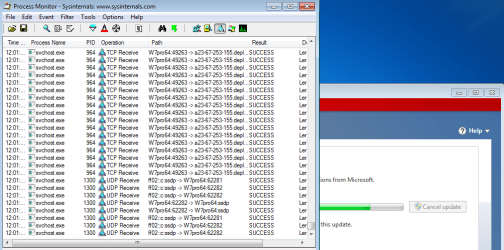
MSE uses svchost.exe to get the initial set of things to watch out for.
MSE-updating-1.png

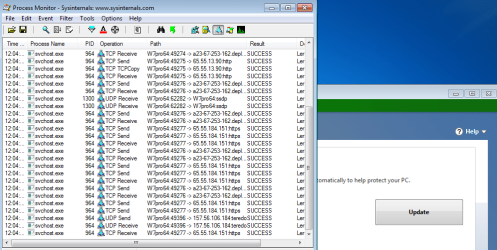
MSE uses svchost.exe to get to get subsequent lists too.
MSE-updating-2.png

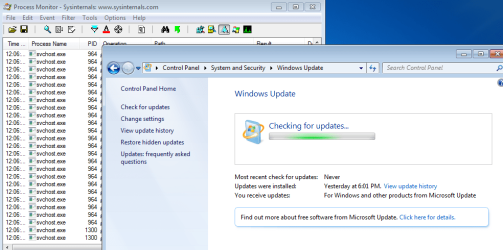
Notice what process Windows Update uses to get its updates:
windows-updates.png

Do you have any more questions about MSE that we can answer for you?
 

My Computer

Computer type
Laptop
Computer Manufacturer/Model Number
Employer provided Dell Latitude
OS
W7 Pro SP1 64bit
CPU
i7
Memory
8GB
Graphics Card(s)
Intel HD Graphics
Hard Drives
crappy SSD
Antivirus
Employer mandated Symantec Endpoint Protection
Browser
Pale Moon 64bit, IE11 64bit & Chrome 64bit
..........I think the word browser was used, meaning to say internet where you don't have to access a particular browser. :)

It would have been nice if you had posted a link to the website where you saw these system requirements, then we could have a better discussion about why IE6 or higher was mentioned.

In order for this website...
Microsoft Security Essentials - Microsoft Windows
...to offer you one button to click on to get MSE, you need the one of the browsers mentioned here*. The website will determine if you are visiting from a computer using a 64bit operating system or from a computer that is using a 32bit operating system - then that website should automatically deliver the correct file. If you visit that website using IE5.5, I do not think that the website can reliably tell the "bitness" of the visiting operating system. I don't have access to a version of IE lower than 6 right now, so I cannot test that theory - maybe someone else can test that for us.

*you can also get to that website's listing of the system requirements by clicking on the first link in this post, then "product info" in the lower left, the "system requirement" in the top center. So, those system requirements are related to the first link in this post.


If you visit this website...
Download Microsoft Security Essentials from Official Microsoft Download Center
...you will be presented with a different set of system requirements to download/install MSE. Notice that there are no minimum browser versions listed. Also notice that the website was updated recently.
I had accessed the url you mention above which is the url I was referring to that mentions IE6 and Firefox in the system requirements. Thanks to all for the info on MSE. I'm good. :)
 

My Computer

Computer Manufacturer/Model Number
DELLXPS 8300
OS
WIN7 x64 Home Premium SP1
CPU
Intel Core i5-2400 processor(6MB Cache, 3.1GHz)
Memory
8 GB RAM
Hard Drives
1.5TB C Drive
Back
Top