UKASH for 3rd time

darrenj1471

New member
Member
Local time
4:28 PM
Messages
75
Location
London, England
Hi

Firstly, huge thanks for the previous help in getting rid of UKASH via Hitmanpro and TSkiller but its back AGAIN. This time I wasnt even using/sitting at laptop. It was simply on and as far as I can tell doing nothing and as such the webcam pic is of my curtains and bizarrely the address its picked up isnt actually nearby either.

Regardless, its unusable again and this time it seems worse. It will not boot in safe mode or safe mode with networking as both these take you straight to ukash lock screen. It will boot in safe mode with command prompt though.

The reason I say its worse than before is:

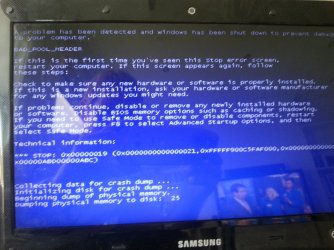
This time the system boots to white UKASH lock screen, and then displays a Blue screen (of death). I have attached a pic of the blue screen.

Pllleeeeeeaassse help

Ive also got an issue that my only clean computer wont let me download hitman pro 64bit as apparently this clean one is 32 bit but infected is 64 bit.

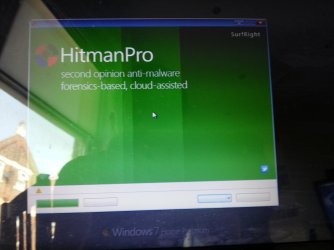
I managed to get infected one to boot from a USB stick with hitman pro on it, but when the hitman pro software loads it looks 'weird' ie I cannot actually see any options or click any buttons. Again I'll reply with a pic attached in a min

Finally, ive also tried rstrui.exe from command prompt as I read a thread about that, but again it wont display properly and thus I cannot actually do anything.

Im really worried my pc is now totally broken
 

Attachments
  • 20130924_125642.jpg
    20130924_125642.jpg
    729.7 KB · Views: 3

My Computer

OS
windows 7 64 bit
This is what I see when I boot to Hitman Pro on infected machine. Im super worried now
 

Attachments

  • 20130924_133616.jpg
    20130924_133616.jpg
    533.8 KB · Views: 2

My Computer

OS
windows 7 64 bit
I got infected with this piece of %$*! and although I thought I'd got rid of it, it came back. I had to reinstall.
 

My Computer

Computer type
PC/Desktop
Computer Manufacturer/Model Number
self build
OS
Windows 7 pro x64 SP1
CPU
Intel i7-2600k o/c to 4.6GHz
Motherboard
MSI Z68-GD80
Memory
8GB Mushkin 1866MHz
Graphics Card(s)
Nvidia GTX 750 Ti 2GB
Sound Card
integrated
Monitor(s) Displays
Liyama ProLite 27"
Screen Resolution
1920*1080 px
Hard Drives
Seagate 2TB
PSU
Coolermaster GX 750W
Case
Antec 300 case + 5 fans
Cooling
Dark Rock Pro
Internet Speed
62Mbit down 18Mbit up
Antivirus
MSE
Browser
Firefox
Other Info
Blackgold BGT3650 Quad HD TV card. Also have various 3770 + 4770K render boxes.
Im hoping someone here can help out again as there are files I really need on this laptop. last time I received some amazing dedicated help so fingers crossed.

its tge fact I cant seem to see any icons properly and the blue screen which is worrying me more than ukash itself
 

My Computer

OS
windows 7 64 bit
Could you take the laptop HDD out, put it in a USB caddy (less than 10 quid on Amazon etc), plug caddy into a good pc, check files are OK and can be copied, copy files to good pc, put HDD back in laptop, wipe + reinstall laptop OS, copy files back using flash drive. I am not a laptop user but I have done this in the past for mates, although I have seen some laptops whose HDD did not fit my USB caddy, others did.
 

My Computer

Computer type
PC/Desktop
Computer Manufacturer/Model Number
self build
OS
Windows 7 pro x64 SP1
CPU
Intel i7-2600k o/c to 4.6GHz
Motherboard
MSI Z68-GD80
Memory
8GB Mushkin 1866MHz
Graphics Card(s)
Nvidia GTX 750 Ti 2GB
Sound Card
integrated
Monitor(s) Displays
Liyama ProLite 27"
Screen Resolution
1920*1080 px
Hard Drives
Seagate 2TB
PSU
Coolermaster GX 750W
Case
Antec 300 case + 5 fans
Cooling
Dark Rock Pro
Internet Speed
62Mbit down 18Mbit up
Antivirus
MSE
Browser
Firefox
Other Info
Blackgold BGT3650 Quad HD TV card. Also have various 3770 + 4770K render boxes.
Let's remain with this thread, since the previous one is history.

1. Do you have an installation CD/DVD for Windows 7?

2. If not, when you start the computer, tap the F8 key. Does the Advanced Boot Options menu appear? Do you have access to the Repair your computer menu item?

3. If none of the above are options, do you have access to a computer with a Windows 7 64-bit system, to create a System Repair Disk? Is there a friend or someone you know that can let you create a Windows Repair Disk on their computer?

Instructions:
System Repair Disc - Create
 

My Computer

Computer type
PC/Desktop
Computer Manufacturer/Model Number
An ol' eMachines
OS
Windows 7 Home Premium
Internet Speed
Fine for me...I'm retired!
Ok great, lets stay in here and ignore previous thread as you fixed me that time. I believe somewhere I have the installation DVD which came with the PC. Can I just ask, if we do go down that route does it mean I lose all the videos and pictures on my laptop?

I will F8 when I get home later this evening.
 

My Computer

OS
windows 7 64 bit
...if we do go down that route does it mean I lose all the videos and pictures on my laptop?

At this point, my goal is to get your system running, and get past the ransomware block.

If we get to a point where some recovery is needed, someone with expertise in recovering videos and pictures will need to jump in.

Please post the results of trying F8...
 
Last edited:

My Computer

Computer type
PC/Desktop
Computer Manufacturer/Model Number
An ol' eMachines
OS
Windows 7 Home Premium
Internet Speed
Fine for me...I'm retired!

My Computer

Computer type
PC/Desktop
Computer Manufacturer/Model Number
Pauly Special
OS
Win7 Ultimate X64
CPU
Intel i5 3570K
Motherboard
Gigabyte Z77X-DS3H
Memory
8GB DDR3 1600
Graphics Card(s)
Onboard
Sound Card
Onboard
Screen Resolution
1280x1024
Hard Drives
Samsung 840 Evo SSD (OS)
1TB Spinner (Data)
PSU
800W Arctic
Case
Cooler Master
Cooling
3x120mm Fans
Keyboard
MS Wireless
Mouse
MS Wireless
Internet Speed
20M
ok f8 has gave me a repair computer option so ive selected that. ..which I hope was intended

will update with results
 

My Computer

OS
windows 7 64 bit
cant seem to edit via phone app here. I hace reached options of start up repair , system restore etc. what do I select?
 

My Computer

OS
windows 7 64 bit
This is a longshot, but, at this stage, if it works...:D

:info: With the computer/laptop powered off, turn on the machine. Wait for the Windows logo to appear, and immediately shut down pressing the power button. Don't let go of the power button until the laptop is off.

Turn the machine back on. Hopefully, a message appears telling you Windows failed to start properly.
Answer Yes if it asks whether you want to attempt to fix the problem.

Wait a few minutes, and Windows should ask if you want to return to a previous Restore point. Answer Yes.

Wait a while for the restore to complete. With any luck, Windows will reboot to your normal Desktop.

If it does...

:info: Right after, please Malwarebytes Anti-Malware Download
Save to the Desktop
Double-click the downloaded MBAM file to run it.

When the installation begins, follow the prompts in the setup process.
DO NOT make any changes to default settings, and when the program has finished installing, make sure only the following options are checked:
>Update Malwarebytes’ Anti-Malware
>Launch Malwarebytes’ Anti-Malware
Uncheck:
>Enable free trial of Malwarebytes Anti-Malware PRO

Click on the Finish button.

If an update is found, the program automatically updates itself.
At the program console, on the Scanner tab, and select: Perform Quick Scan

Next, click on the Scan button.

When the Malwarebytes scan is completed, click on: Show Results

When presented with a screen showing the malware detected, make sure everything is Checked, and click on: Remove Selected

When removal is completed, a report opens in Notepad.
:ar: Please copy/paste the entire contents of the MBAM report in your reply.

Note: If MBAM encounters a file that is difficult to remove, you are asked to reboot the computer so MBAM can proceed with the disinfection process.
If asked to restart the computer, please do so immediately. Failure to reboot normally (not into safe mode) prevents MBAM from removing all the malware.


:ar: :ar: If no luck with the above, then, do the following:

:info: Please plug a USB flash drive into a clean computer.
Go to Start > Computer
Double-click Computer, and select the flash drive.
Right-click and select: Format
Press Start on the Format prompt.
Remove when done.

You may want to print these instructions so you can have access to follow
Also, you may want to read them once before you apply them.

Go to the Farbar Recovery Scan Tool Download
Select the download that applies to the infected system.
Save the program to the >> USB flash drive.

Next, plug the flash drive into the problem computer.

Start the computer.

As soon as the BIOS is loaded begin tapping the F8 key until the Advanced Boot Options menu appears.
Use the arrow keys to select the Repair your computer menu item.
Select your language settings, and click: Next
Select your User account and click: OK (If you did not set a password, leave blank.)

On the System Recovery Options menu you get the following options:
Startup Repair
System Restore
Windows Complete PC Restore
Windows Memory Diagnostic Tool
Scan your computer's memory for errors
Command Prompt

Select: Command Prompt

In the Command window, at the blinking cursor type notepad and press: Enter
In Notepad, under the File menu select: Open
Double-click Computer, find the flash drive letter, remember what letter it is, click on it, and press: Open
Close out of Notepad.

Click the Command Prompt window
Type x:\frst64.exe, and press: Enter
Note: Replace the drive letter x with the drive letter of your flash drive!

The tool starts and prepares to run. Follow the prompts.
Click Yes to the disclaimer.
Press: Scan

When done, the program saves the FRST.txt report, on the flash drive.

Close Notepad, then, click the Command Prompt window, and type exit, and press: Enter

Back at the System Recovery Options, press: ShutDown

Remove the USB flash drive from the infected computer, and plug it into the good computer.

:ar: Please provide the FRST.txt report, located on the USB flash drive, in your reply

Also, the first time the tool is run, it also makes another log: Addition.txt
:ar: Also post the: Addition.txt in your reply.
 
Last edited:

My Computer

Computer type
PC/Desktop
Computer Manufacturer/Model Number
An ol' eMachines
OS
Windows 7 Home Premium
Internet Speed
Fine for me...I'm retired!
went with option 1 and was asked to launch startup repair so have.attempting repairs now. ..
 

My Computer

OS
windows 7 64 bit
the repair option took almost 15 mins and at end indicated something was repaired and then restarted itself ie no system restore to previous point option popped up. After restart the pc went to the white screen as if ukash was going to display and then the blue screen (as per 1st post) .
 

My Computer

OS
windows 7 64 bit
@Pauly,

Thank you for the link. Was not aware of it...have only been here since January and there are enough tutorials here to sink a ship.

Have used Puppy Linux, more than a year ago, but, would have to refresh my memory on what was done.
That is probably similar to Peppermint.


@darrenj1471,

Go with Post #12, and the Farbar Recovery Scan Tool.

If that does not pull you out of this mess, you may be looking at a Windows install, and recovering data.
 

My Computer

Computer type
PC/Desktop
Computer Manufacturer/Model Number
An ol' eMachines
OS
Windows 7 Home Premium
Internet Speed
Fine for me...I'm retired!
Hmmm F8 brings up different menu when I boot with USB in as BIOS is set to USB first as I have been trying the hitman route, I should change the BIOS back to HDD first right?
 

My Computer

OS
windows 7 64 bit
Addition seemed to be a checkbox which wasnt set and I didnt set it as per your instructions so this file was not generated, I have attached teh FRST file though
 

Attachments

My Computer

OS
windows 7 64 bit
Pressing on with FRST...

In the good computer, please open Notepad (Start > All Programs > Accessories > Notepad)
Copy the entire contents of the code box below to it
Save it on the pen drive, and name it: fixlist.txt

Code:
start
HKU\darren\...\Run: [AdobeBridge] - [x]
HKU\darren\...\Winlogon: [Shell] explorer.exe,C:\Users\darren\AppData\Roaming\data.dat [53760 2013-08-01] () <==== ATTENTION 
C:\Users\darren\AppData\Roaming\data.dat
C:\Users\darren\AppData\Roaming\settings.ini
C:\Users\darren\AppData\Roaming\i.ini
C:\Users\darren\AppData\Local\Temp\b34btbztdb0vavaw.exe
end

Note: This script is written specifically for use only on this computer.
Running this on another computer may cause damage to the Operating System!!

Run FRST, like you did in Post #12
Check the Addition.txt option
Press the Fix button, just once, and wait.

The tool creates a report on the pen drive called: Fixlog.txt
:ar: Please post the Fixlog.txt in your reply.

Restart the computer.
Are you back into Windows?

Let's get the results from this program, and take it from there.

Also, are you running an External disc drive, or plug a pen drive in systems other than yours?
 

My Computer

Computer type
PC/Desktop
Computer Manufacturer/Model Number
An ol' eMachines
OS
Windows 7 Home Premium
Internet Speed
Fine for me...I'm retired!
Hi

Ok Ive done as instructed ie pasted that code into notepad, saved as Fixlist.txt, started and F8. Then done the rest ie repair then fix
After fix was completed I have chosen restart...AND I HAVE MANAGED TO LOAD MY DESKTOP....WOOHOO

I have attached the fixlog.txt here. I definately checked Addition.txt but no file was created....

I dont fully understand the question about external disk drive or pen drive? I have an external harddrive yes, which I store hundreds of tvshows and movies on and regulary attach it to my pc. I only ever then use it with a PS3. I dont really use a pen drive of any kind any other time.
 

Attachments

My Computer

OS
windows 7 64 bit
Ut oh...hold the streamers and banners for celebration. Infected machine loaded desktop and I was happy then I looked back a min later at PC and it was at the screen saying 'Windows failed to load properly, start in safe mode or start normally etc' ie its obviously shut itself down. Just watching it now....:

Ok, loads desktop.... seems fine for approx 2 mins then blue screens and restarts...
 

My Computer

OS
windows 7 64 bit
Back
Top