Redirected to url4short.info when trying to visit a certain site

ThisIsMadness91

New member
Member
VIP
Local time
7:52 AM
Messages
204
I mentioned this yesterday in another thread but thought it might be better suited in its own thread here. Yesterday, I was looking up a possible birthday present for a friend on Google, and when I went I clicked on a link to the laracroftonline forums, I got redirected to url4short.info, a site with lots of dodgy-looking ads. I went back to Google as soon as I realised what had happened. While this may not have been the wisest decision, I clicked on the link again and was taken to the forums instead of the redirected site. Both Avira and Malwarebytes found nothing wrong.

I just decided to see if it happened again, and it did. I tried clicking on a few other links and didn't get redirected. Does this sound like a problem with my PC or with the site? What action should I take.

For what it's worth, the Google search I did was lara croft 9" statue. Thanks in advance for your help:).
 

My Computer My Computer

At a glance

Windows 7 Home Premium 64bit (Service Pack 1)Intel Core i76.00 GBNVIDIA GeForce GTX 550 Ti
Computer type
PC/Desktop
Computer Manufacturer/Model Number
Packard Bell ipower G5800
OS
Windows 7 Home Premium 64bit (Service Pack 1)
CPU
Intel Core i7
Memory
6.00 GB
Graphics Card(s)
NVIDIA GeForce GTX 550 Ti
Antivirus
Avira Free Antivirus
Browser
Firefox

My Computer My Computer

At a glance

Windows 7 Professional SP1 64-bitIntel Core 2 Duo Processor E8300 @ 2.83GHz4.00 GB Dual-Channel DDR2 @ 332MHz (5-5-5-15)Intel(R) G33/G31 Express Chipset Family
Computer type
PC/Desktop
Computer Manufacturer/Model Number
Dell Inspiron 530
OS
Windows 7 Professional SP1 64-bit
CPU
Intel Core 2 Duo Processor E8300 @ 2.83GHz
Motherboard
Dell Inc. 0RY007 (Socket 775)
Memory
4.00 GB Dual-Channel DDR2 @ 332MHz (5-5-5-15)
Graphics Card(s)
Intel(R) G33/G31 Express Chipset Family
Sound Card
Integrated 7.1 Channel Audio
Monitor(s) Displays
Acer G245HQL 23.6" LED(1920x1080@60Hz)
Screen Resolution
1920 x 1080
Hard Drives
Disk 0 HITACHI 1TB OS Installed - Disk 1 HITACHI 1TB For Backups
Keyboard
Dell USB Keyboard
Mouse
Dell Optical USB Mouse
Internet Speed
DSL 10 meg
Antivirus
Symantec(SEP)
Browser
Pale Moon
So it's not just me. That's a relief. Thanks for checking. I'll have a look at WOT as well. I'll mark this as solved at the end of the week if I don't notice anything unusual on my PC before then:).
 

My Computer My Computer

At a glance

Windows 7 Home Premium 64bit (Service Pack 1)Intel Core i76.00 GBNVIDIA GeForce GTX 550 Ti
Computer type
PC/Desktop
Computer Manufacturer/Model Number
Packard Bell ipower G5800
OS
Windows 7 Home Premium 64bit (Service Pack 1)
CPU
Intel Core i7
Memory
6.00 GB
Graphics Card(s)
NVIDIA GeForce GTX 550 Ti
Antivirus
Avira Free Antivirus
Browser
Firefox
One more thing...the first time I got the redirect, I closed of the ads on the page (before I noticed I'd been redirected) and it opened another ad in a pop-up window. I quickly closed that pop-up and went back to Google. Like I said, both Malwarebytes and Avira didn't find anything wrong after this and I haven't noticed any unusual behaviour on my PC or any of the websites I regularly visit, but is there anything else I should do to check or am I okay?
 

My Computer My Computer

At a glance

Windows 7 Home Premium 64bit (Service Pack 1)Intel Core i76.00 GBNVIDIA GeForce GTX 550 Ti
Computer type
PC/Desktop
Computer Manufacturer/Model Number
Packard Bell ipower G5800
OS
Windows 7 Home Premium 64bit (Service Pack 1)
CPU
Intel Core i7
Memory
6.00 GB
Graphics Card(s)
NVIDIA GeForce GTX 550 Ti
Antivirus
Avira Free Antivirus
Browser
Firefox

My Computer My Computer

At a glance

Vista, Windows7, Mint Mate, Zorin, Windows 8from 1.6GHz Duo to i7
Computer Manufacturer/Model Number
HP, Dell, Gateway, Toshiba - 4 laptops and 2 desktops
OS
Vista, Windows7, Mint Mate, Zorin, Windows 8
CPU
from 1.6GHz Duo to i7
Monitor(s) Displays
2x HP w2207
Hard Drives
5x HDD, 7x SSD, 12x Externals
Keyboard
with trackball - no mices
Mouse
Trackball mice
Internet Speed
DSL 6000
I used that last year when I thought I had adware. It found a couple of things in the Registry today that I decided to remove. I don't know if they were dangerous or not, but I've got a registry back-up from earlier this week in case it causes any problems.
 

My Computer My Computer

At a glance

Windows 7 Home Premium 64bit (Service Pack 1)Intel Core i76.00 GBNVIDIA GeForce GTX 550 Ti
Computer type
PC/Desktop
Computer Manufacturer/Model Number
Packard Bell ipower G5800
OS
Windows 7 Home Premium 64bit (Service Pack 1)
CPU
Intel Core i7
Memory
6.00 GB
Graphics Card(s)
NVIDIA GeForce GTX 550 Ti
Antivirus
Avira Free Antivirus
Browser
Firefox
Please download Junkware Removal Tool to your desktop.
  • Shut down your protection software now to avoid potential conflicts.
  • Run the tool by double-clicking it. If you are using Windows Vista, 7, or 8; instead of double-clicking, right-mouse click JRT.exe and select "Run as Administrator".
  • The tool will open and start scanning your system.
  • Please be patient as this can take a while to complete depending on your system's specifications.
  • On completion, a log (JRT.txt) is saved to your desktop and will automatically open.
  • Post the contents of JRT.txt into your next message.
download AdwCleaner by Xplode and save to your Desktop.

  • Double click on AdwCleaner.exe to run the tool.
    Vista/Windows 7/8 users right-click and select Run As Administrator.
  • Click on the Scan button.
  • AdwCleaner will begin...be patient as the scan may take some time to complete.
  • After the scan has finished, click on the Report button...a logfile (AdwCleaner[R#].txt) will open in Notepad for review (where the largest value of # represents the most recent report).
  • The contents of the log file may be confusing. Unless you see a program name that you know should not be removed, don't worry about it. If you see an entry you want to keep, let me know about it.
  • Copy and paste the contents of that logfile in your next reply.
  • A copy of all logfiles are saved in the C:\AdwCleaner folder which was created when running the tool.
Using AdwCleaner v3: Scan & Clean:
Double click on AdwCleaner.exe to run the tool again.
Click on the Scan button.
AdwCleaner will begin to scan your computer like it did before.
After the scan has finished...

This time click on the Clean button.
Press OK when asked to close all programs and follow the onscreen prompts.
Press OK again to allow AdwCleaner to restart the computer and complete the removal process.
After rebooting, a logfile report (AdwCleaner[S#].txt) will open automatically (where the largest value of # represents the most recent report).
Copy and paste the contents of that logfile in your next reply.
A copy of that logfile will also be saved in the C:\AdwCleaner folder

download TFC by Old Timer TFC - Temp File Cleaner by OldTimer - Geeks to Go Forums and save it to your desktop.
Save any unsaved work. TFC will close ALL open programs including your browser!
Double-click on TFC.exe to run it. If you are using Vista/Windows 7 right-click on the file and choose Run As Administrator.
Click the Start button to begin the cleaning process and let it run uninterrupted to completion.
Important! If TFC prompts you to reboot, please do so immediately. If not prompted, manually reboot the machine anyway to ensure a complete clean.
 

My Computer My Computer

At a glance

Windows 7 Home Premium 64BitAMD A6-3420M 1.5GHZ OC - 2.0GHZ4GB DDR3 1600MHZAMD RADEON 6520G+AMD RADEON HD7470M 1GB DDR3
Computer type
Laptop
Computer Manufacturer/Model Number
Packard Bell
OS
Windows 7 Home Premium 64Bit
CPU
AMD A6-3420M 1.5GHZ OC - 2.0GHZ
Memory
4GB DDR3 1600MHZ
Graphics Card(s)
AMD RADEON 6520G+AMD RADEON HD7470M 1GB DDR3
Screen Resolution
1366x768
Hard Drives
500GB SATA
Internet Speed
18Mb Unlimited
Antivirus
AVAST!
Browser
MOZILLA FIREFOX
ThisIsMadnes91,

Let's use the following program to find out if anything is hiding...

:info: Please use the tool Zoek:
Download > Download zoek.exe version 5.0.0.0

If your AntiVirus warns you about the program, either allow Zoek to run, or temporarily disable your AV program.
Info on how to disable your security applications > How To Temporarily Disable Your Anti-virus, Firewall And Anti-malware Programs - Security Mini-Guides

Double-click zoek.exe to start the program. (Give it a few seconds to appear.)
Next, copy and then paste the entire script in the code box below to the input field of Zoek (do not copy the word 'code'):

Code:
createsrpoint; 
process; 
filesrcm; 
startupall; 
installedprogs;
installer-list; 
uninstall-list;
hijackthis; 
firefoxlook; 
chromelook;  
srinfo; 
DIR /S /A:L "%systemdrive%\*">>"%temp%\log.txt";b


Now...
  • Close any open windows.
  • Click the Run script button and wait. It takes a few minutes to run all the script.
  • If a reboot is needed the log is opened after the reboot.
  • When finished, the zoek-results.log is opened in Notepad.
  • The log is also found on the systemdrive, normally C:\
:ar: Please post the zoek-results.log in your reply.
 

My Computer My Computer

At a glance

Windows 7 Home Premium
Computer type
PC/Desktop
Computer Manufacturer/Model Number
An ol' eMachines
OS
Windows 7 Home Premium
Internet Speed
Fine for me...I'm retired!
Which should I run first, Zoek or the programs Zevlin recommended?
 

My Computer My Computer

At a glance

Windows 7 Home Premium 64bit (Service Pack 1)Intel Core i76.00 GBNVIDIA GeForce GTX 550 Ti
Computer type
PC/Desktop
Computer Manufacturer/Model Number
Packard Bell ipower G5800
OS
Windows 7 Home Premium 64bit (Service Pack 1)
CPU
Intel Core i7
Memory
6.00 GB
Graphics Card(s)
NVIDIA GeForce GTX 550 Ti
Antivirus
Avira Free Antivirus
Browser
Firefox

My Computer My Computer

At a glance

Windows 7 Professional SP1 64-bitIntel Core 2 Duo Processor E8300 @ 2.83GHz4.00 GB Dual-Channel DDR2 @ 332MHz (5-5-5-15)Intel(R) G33/G31 Express Chipset Family
Computer type
PC/Desktop
Computer Manufacturer/Model Number
Dell Inspiron 530
OS
Windows 7 Professional SP1 64-bit
CPU
Intel Core 2 Duo Processor E8300 @ 2.83GHz
Motherboard
Dell Inc. 0RY007 (Socket 775)
Memory
4.00 GB Dual-Channel DDR2 @ 332MHz (5-5-5-15)
Graphics Card(s)
Intel(R) G33/G31 Express Chipset Family
Sound Card
Integrated 7.1 Channel Audio
Monitor(s) Displays
Acer G245HQL 23.6" LED(1920x1080@60Hz)
Screen Resolution
1920 x 1080
Hard Drives
Disk 0 HITACHI 1TB OS Installed - Disk 1 HITACHI 1TB For Backups
Keyboard
Dell USB Keyboard
Mouse
Dell Optical USB Mouse
Internet Speed
DSL 10 meg
Antivirus
Symantec(SEP)
Browser
Pale Moon
Downloaded it but a pop-up ad opened when I clicked it. Is that normal? I can provide the address for the ad if you like.
 

My Computer My Computer

At a glance

Windows 7 Home Premium 64bit (Service Pack 1)Intel Core i76.00 GBNVIDIA GeForce GTX 550 Ti
Computer type
PC/Desktop
Computer Manufacturer/Model Number
Packard Bell ipower G5800
OS
Windows 7 Home Premium 64bit (Service Pack 1)
CPU
Intel Core i7
Memory
6.00 GB
Graphics Card(s)
NVIDIA GeForce GTX 550 Ti
Antivirus
Avira Free Antivirus
Browser
Firefox
When clicking on the "zoek" link make sure you click the bar at the top that says "Download Zoek.exe Version 5.0.0.0" on so on..up pops a window, download and install and follow the instructions provided by cottonball, I'd recommend running all programs specified, in which order id go with the Zoek first and then the others i added. Cheers
 

My Computer My Computer

At a glance

Windows 7 Home Premium 64BitAMD A6-3420M 1.5GHZ OC - 2.0GHZ4GB DDR3 1600MHZAMD RADEON 6520G+AMD RADEON HD7470M 1GB DDR3
Computer type
Laptop
Computer Manufacturer/Model Number
Packard Bell
OS
Windows 7 Home Premium 64Bit
CPU
AMD A6-3420M 1.5GHZ OC - 2.0GHZ
Memory
4GB DDR3 1600MHZ
Graphics Card(s)
AMD RADEON 6520G+AMD RADEON HD7470M 1GB DDR3
Screen Resolution
1366x768
Hard Drives
500GB SATA
Internet Speed
18Mb Unlimited
Antivirus
AVAST!
Browser
MOZILLA FIREFOX
ThisIsMadness91,

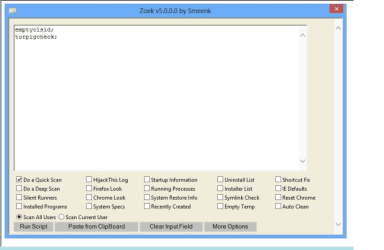
When you click on the link provided in Post #8, you should come up with the image shown below.
From there click Download Zoek.exe version

When the download shows, and you get the option to save, please save to the Desktop.

Once Zoek is on the Desktop, double-click the Zoek.exe file to start the program. (Give it a few seconds to appear.)

My apology for this. The download site was update very recently.

Zoek is a safe tool, otherwise I would not ask for you to download it.

Please, only run Zoek. At this point you do not need to run any other programs.
 

Attachments

  • Capture Zoek.png
    Capture Zoek.png
    42.1 KB · Views: 0
Last edited:

My Computer My Computer

At a glance

Windows 7 Home Premium
Computer type
PC/Desktop
Computer Manufacturer/Model Number
An ol' eMachines
OS
Windows 7 Home Premium
Internet Speed
Fine for me...I'm retired!
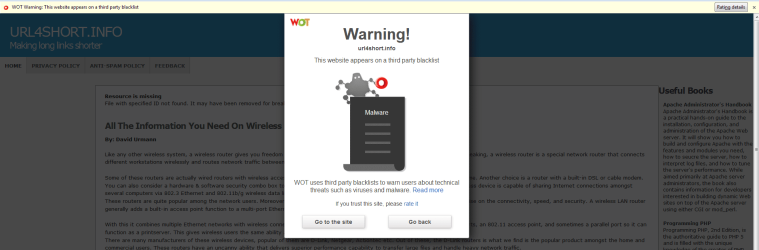
I didn't have a problem downloading the tool, but when I opened the page, I got the notification that Firefox had blocked a pop-up, then this one opened when I clicked the download link. That was just now, by the way. A different ad appeared when I tried it last night.

Does that site normally have ads like this? Should I go ahead and use the tool? Sorry if I'm acting like a worrywart.
 

Attachments

  • Pop-up.jpg
    Pop-up.jpg
    133.4 KB · Views: 2

My Computer My Computer

At a glance

Windows 7 Home Premium 64bit (Service Pack 1)Intel Core i76.00 GBNVIDIA GeForce GTX 550 Ti
Computer type
PC/Desktop
Computer Manufacturer/Model Number
Packard Bell ipower G5800
OS
Windows 7 Home Premium 64bit (Service Pack 1)
CPU
Intel Core i7
Memory
6.00 GB
Graphics Card(s)
NVIDIA GeForce GTX 550 Ti
Antivirus
Avira Free Antivirus
Browser
Firefox
Well when i opened the page i didnt get any ads like that through firefox, i would just close it and download the tool mate
 

My Computer My Computer

At a glance

Windows 7 Home Premium 64BitAMD A6-3420M 1.5GHZ OC - 2.0GHZ4GB DDR3 1600MHZAMD RADEON 6520G+AMD RADEON HD7470M 1GB DDR3
Computer type
Laptop
Computer Manufacturer/Model Number
Packard Bell
OS
Windows 7 Home Premium 64Bit
CPU
AMD A6-3420M 1.5GHZ OC - 2.0GHZ
Memory
4GB DDR3 1600MHZ
Graphics Card(s)
AMD RADEON 6520G+AMD RADEON HD7470M 1GB DDR3
Screen Resolution
1366x768
Hard Drives
500GB SATA
Internet Speed
18Mb Unlimited
Antivirus
AVAST!
Browser
MOZILLA FIREFOX
Can you now run the other programs?
Cottonball will have to have a look over the results you posted as im not familiar with the program, cheers
 

My Computer My Computer

At a glance

Windows 7 Home Premium 64BitAMD A6-3420M 1.5GHZ OC - 2.0GHZ4GB DDR3 1600MHZAMD RADEON 6520G+AMD RADEON HD7470M 1GB DDR3
Computer type
Laptop
Computer Manufacturer/Model Number
Packard Bell
OS
Windows 7 Home Premium 64Bit
CPU
AMD A6-3420M 1.5GHZ OC - 2.0GHZ
Memory
4GB DDR3 1600MHZ
Graphics Card(s)
AMD RADEON 6520G+AMD RADEON HD7470M 1GB DDR3
Screen Resolution
1366x768
Hard Drives
500GB SATA
Internet Speed
18Mb Unlimited
Antivirus
AVAST!
Browser
MOZILLA FIREFOX
The results of Zoek do not show any url4short.info entries.

If you wish, run AdwCleaner and the Junkware Removal Tool, and post their results.

Then, please run the ESET Online Scanner.

It has a very good detection rate, so please give it a whirl. Different scanners have varying definitions for what they look for, so throwing in a new perspective may help us.


:info: To run the ESET Online Scanner...

Since it is implemented as an ActiveX control, it is best run on Internet Explorer.
Right click the IE shortcut and select: Run as Administrator

Next, in IE, download > Free Virus Scan | Online Virus Scanner from ESET
On the ESET website, click on: Run ESET Online Scanner
Click: Start

When asked, allow the add-on to be installed.
Again, click: Start

On the next prompt, Computer Scan Settings, check: Remove found threats

Next, click on: Advanced Settings
Make sure the following options are checked:
>Scan for potentially unwanted applications
>Scan for potentially unsafe applications
>Enable Anti-Stealth Technology

By Current Scan Targets, Operating memory, Local drives, press: Change
In Selection of scan targets, Local drives, select the drives in question.
Click: OK

Click: Start
Follow the prompts.

When the scan completes, if threats are found, in the Scan Results prompt, click on: List of threats found
Click on: Export to text file
Save to the Desktop and name it: ESET Scan Results
Click on: Back
Click on: Finish, and close the program.

If anything is found, please provide the ESET Scan Results in your reply to determine what further action is necessary.
 

My Computer My Computer

At a glance

Windows 7 Home Premium
Computer type
PC/Desktop
Computer Manufacturer/Model Number
An ol' eMachines
OS
Windows 7 Home Premium
Internet Speed
Fine for me...I'm retired!
Adwcleaner looks pretty clean, do you have any pop up blockers active on your browser?
 

My Computer My Computer

At a glance

Windows 7 Home Premium 64BitAMD A6-3420M 1.5GHZ OC - 2.0GHZ4GB DDR3 1600MHZAMD RADEON 6520G+AMD RADEON HD7470M 1GB DDR3
Computer type
Laptop
Computer Manufacturer/Model Number
Packard Bell
OS
Windows 7 Home Premium 64Bit
CPU
AMD A6-3420M 1.5GHZ OC - 2.0GHZ
Memory
4GB DDR3 1600MHZ
Graphics Card(s)
AMD RADEON 6520G+AMD RADEON HD7470M 1GB DDR3
Screen Resolution
1366x768
Hard Drives
500GB SATA
Internet Speed
18Mb Unlimited
Antivirus
AVAST!
Browser
MOZILLA FIREFOX
I have the "block pop-up windows" option enabled in Firefox, and that usually stops pop-ups from opening until I click somewhere on the page. I don't have any third-party programs/plug-ins to stop pop-ups or any other ads.
 

My Computer My Computer

At a glance

Windows 7 Home Premium 64bit (Service Pack 1)Intel Core i76.00 GBNVIDIA GeForce GTX 550 Ti
Computer type
PC/Desktop
Computer Manufacturer/Model Number
Packard Bell ipower G5800
OS
Windows 7 Home Premium 64bit (Service Pack 1)
CPU
Intel Core i7
Memory
6.00 GB
Graphics Card(s)
NVIDIA GeForce GTX 550 Ti
Antivirus
Avira Free Antivirus
Browser
Firefox
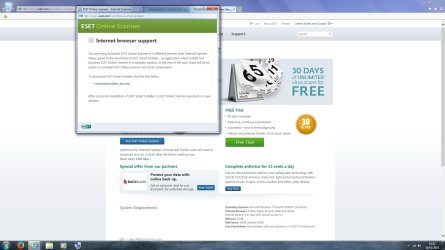
I'm getting this message despite using IE. Should I proceed?
 

Attachments

  • ESET.jpg
    ESET.jpg
    128.6 KB · Views: 7

My Computer My Computer

At a glance

Windows 7 Home Premium 64bit (Service Pack 1)Intel Core i76.00 GBNVIDIA GeForce GTX 550 Ti
Computer type
PC/Desktop
Computer Manufacturer/Model Number
Packard Bell ipower G5800
OS
Windows 7 Home Premium 64bit (Service Pack 1)
CPU
Intel Core i7
Memory
6.00 GB
Graphics Card(s)
NVIDIA GeForce GTX 550 Ti
Antivirus
Avira Free Antivirus
Browser
Firefox
Back
Top