Help needed with a acrer aspire all in one Z3801 with malware problems

marc1964

New member
Local time
11:26 PM
Messages
27
Location
uk / thailand
Please could anyone help re trying to sort out my sick all in one pc, for a few weeks now I have been noticing small changes like the DVD Rom drive stopped working but would play cd's and now I am having simple issues like being unable to log on to the wifi network (please note I use BT wifi to get on the net as I do not have my own Internet connection at the moment,) never the less never had problems streaming content or downloading files etc, today I've tried all sorts to try and find out what is the problem but am now stuck, I have a new win7 disc set but find the dvdrom stopped working , can load a Disc and hear it trying to start clicking and wiring but after about 10 seconds gives up, any ideas what I can do to get my pc working again. I can get into most services via run, also the diagnostics re the wifi not working gives a DNS not responding message when I run the troubleshoot tool,
I also noticed on thinking maybe it would help I let windows update some critical updates and since then things went from bad to worse so to speak. Also I tried to go back to an earlier restore point and although it goes through the motions on restart you get an error message saying it wasn't successful etc etc, tried that 4 or 5 times,
 

My Computer My Computer

At a glance

32bit win7 pro
Computer type
PC/Desktop
Computer Manufacturer/Model Number
Acer aspire all in one Z3081
OS
32bit win7 pro

My Computer My Computer

At a glance

Windows 10 Pro. 64/ version 1709 Windows 7 Pr...Intel i7-6800K @ 4.3Corsair Platinum 16 gig @2400EVGA GTX 1070 OC
Computer type
PC/Desktop
Computer Manufacturer/Model Number
Home made Desktop
OS
Windows 10 Pro. 64/ version 1709 Windows 7 Pro/64
CPU
Intel i7-6800K @ 4.3
Motherboard
ASUS X-99 Deluxe II
Memory
Corsair Platinum 16 gig @2400
Graphics Card(s)
EVGA GTX 1070 OC
Monitor(s) Displays
Asus 27" LED LCD/VE278Q
Screen Resolution
1920-1080 or 1280-720 HDMI
Hard Drives
INTEL SSD 730-240 Gb Sata 3.0/
PSU
EVGA Platium 1200W
Case
Phanteks Luxe Tempered Glass 8 fans/ one radiator
Cooling
XSPC/ Water Cooled CPU
Keyboard
Das 4 Professional
Mouse
Logitech M705/MX Anywhere 2-S
Internet Speed
100 mbits
Antivirus
Microsoft Security Essentials/ Malwarebytes Premium 3.0/ SAS
Browser
I.E. 11 default/Firefox/ ISP Time Warner Cable/Spectrum
Other Info
LG BluRay Burner/
Sound system-KLipsch-THX/
Icy Dock ssd Hot Swap bays.
Hi,
What were the last successful updates to install ?
Also which ones are failing ?
Post a screen shot of the history with the link on the top left View updates history.
See the links above my signature on how to take and upload screen shots here if you need help with that.
 

My Computer My Computer

At a glance

Win-7-Pro64bit 7-H-Prem-64biti7-5930K 2nd i9-9940x both water blocked VRM'...Trident-z 3200C14 2nd Trident-z 3600C16EVGA 1080ti ftw3 2nd Titan Xp both water blocked
Computer type
PC/Desktop
Computer Manufacturer/Model Number
Custom assembled by me :}
OS
Win-7-Pro64bit 7-H-Prem-64bit
CPU
i7-5930K 2nd i9-9940x both water blocked VRM's too
Motherboard
ASUS SABERTOOTH X99 2nd ASUS x299 Apex
Memory
Trident-z 3200C14 2nd Trident-z 3600C16
Graphics Card(s)
EVGA 1080ti ftw3 2nd Titan Xp both water blocked
Sound Card
Built-in Realtek
Monitor(s) Displays
1-AOC G2460PG 24"G-Sync 144Hz/ 2nd 1-ASUS VG248QE 24" 144Hz
Screen Resolution
1920 x 1080 144Hz
Hard Drives
2-Samsung M.2 Evo & Evo Plus
2-Samsung 850 EVO 500GB SSD's/ 3-2.5 W.D. Black 1tb-&3-1tb/3-3.5 WD Black 1tb hdd's
PSU
EVGA SuperNOVA 1000-P2 2nd 1200-P2
Case
2-Corsair Obsidian Series 450D Black ATX Mid Tower
Cooling
Custom water loops
Keyboard
Logitech G710+/ 2nd Logitech G910
Mouse
2-RedDragon M901 Perdition 16400 dpi Gaming mouse = wired
Internet Speed
Comcast Ping 19ms 89.31mbps download speed 6.12mbps upload
Antivirus
Malwarebytes Pro/ Superantispyware Pro
Browser
FireFox & Pale moon
Other Info
2nd ASUS X299 Apex/Intel i9-9940x with Custom water loop/7H-Prem-x64/Corsair 450D case/Ram Trident-z 3600C16 4x8gb / Samsung970Evo plus 500gb SSD/Dual ssd EZ swap evo/PSU EVGA SuperNova 1200w-P2 80+Platinum/GPU Titan Xp /8-ML-140 on push-pull on 2-280GTX rads
Re posting the second thread, was done in error as I wanted to edit and add further content to my original thread, but by mistake posted a second time, how do I remove the first sent thread?,
 

My Computer My Computer

At a glance

32bit win7 pro
Computer type
PC/Desktop
Computer Manufacturer/Model Number
Acer aspire all in one Z3081
OS
32bit win7 pro
Don't worry about the other thread. Just stay on this thread. I was just trying to stop more threads starting with same problem.
Management will take care of the extra thread. Thanks for your understanding.

Read ThrashZone post and continue on.
 

My Computer My Computer

At a glance

Windows 10 Pro. 64/ version 1709 Windows 7 Pr...Intel i7-6800K @ 4.3Corsair Platinum 16 gig @2400EVGA GTX 1070 OC
Computer type
PC/Desktop
Computer Manufacturer/Model Number
Home made Desktop
OS
Windows 10 Pro. 64/ version 1709 Windows 7 Pro/64
CPU
Intel i7-6800K @ 4.3
Motherboard
ASUS X-99 Deluxe II
Memory
Corsair Platinum 16 gig @2400
Graphics Card(s)
EVGA GTX 1070 OC
Monitor(s) Displays
Asus 27" LED LCD/VE278Q
Screen Resolution
1920-1080 or 1280-720 HDMI
Hard Drives
INTEL SSD 730-240 Gb Sata 3.0/
PSU
EVGA Platium 1200W
Case
Phanteks Luxe Tempered Glass 8 fans/ one radiator
Cooling
XSPC/ Water Cooled CPU
Keyboard
Das 4 Professional
Mouse
Logitech M705/MX Anywhere 2-S
Internet Speed
100 mbits
Antivirus
Microsoft Security Essentials/ Malwarebytes Premium 3.0/ SAS
Browser
I.E. 11 default/Firefox/ ISP Time Warner Cable/Spectrum
Other Info
LG BluRay Burner/
Sound system-KLipsch-THX/
Icy Dock ssd Hot Swap bays.
Hi Thrashzone,
Thank you for your help, ok I am posting using an old ipad1 so not sure how I can do you a screen shot?, I will try and answer your question, the updates were 15 security updates for Microsoft windows ( I can list them individually if it helps?) there is one security update for Microsoft office 2007 suites and two for Microsoft .net framework 4.5 and lastly one more for Adobe acrobat reader DC, as to which ones are failing I have no idea or if any are failing( is there a way to check?, if so I can for you) had the Internet wifi been working I could of sent it but the wifi as I said previously has stopped working,
As an after thought I have an iPhone 5 so could take a picture and send or will that just complicate maters,
 
Last edited:

My Computer My Computer

At a glance

32bit win7 pro
Computer type
PC/Desktop
Computer Manufacturer/Model Number
Acer aspire all in one Z3081
OS
32bit win7 pro
Can you do all our scans and post results PCHF System Scans
Problem is I can not get the wifi to work so not sure what I can do, I can take the infected machine to a family member and try their wifi link as I have often used that in the past, (trouble is its 75 miles away so not local) never the less I will if it helps,
 

My Computer My Computer

At a glance

32bit win7 pro
Computer type
PC/Desktop
Computer Manufacturer/Model Number
Acer aspire all in one Z3081
OS
32bit win7 pro
In that case can you run the following
Malwarebytes free (uncheck trial, in dashboard settings check rootkit detection)
Then ESET on-line, you will have to dissable your current AV.
Report any findings

Roy
 

My Computer My Computer

At a glance

W7 home premium 32bit/W7HP 64bit/w10 tp insid...E5300 dual core3gbNvidia Geforce 7100 Nforce 630i
Computer type
PC/Desktop
Computer Manufacturer/Model Number
medionl/Aspire 6930G/acer x55a
OS
W7 home premium 32bit/W7HP 64bit/w10 tp insider ring
CPU
E5300 dual core
Motherboard
medion MS7366
Memory
3gb
Graphics Card(s)
Nvidia Geforce 7100 Nforce 630i
Monitor(s) Displays
avixc
Internet Speed
n (isp resticted to 72)
Antivirus
mse/pands
Browser
palemoon
Other Info
Belkin Fd7050 n USB using Railink RT2870 drivers, more upto date
Hi,
Click Start and type in the search box
windows update
Click on the suggestion or the enter key
On the top left of the windows you'll see View update history that will show you successful and failed updates.

Pictures are good too :)
Just turn off the flash on the camera first.
 

My Computer My Computer

At a glance

Win-7-Pro64bit 7-H-Prem-64biti7-5930K 2nd i9-9940x both water blocked VRM'...Trident-z 3200C14 2nd Trident-z 3600C16EVGA 1080ti ftw3 2nd Titan Xp both water blocked
Computer type
PC/Desktop
Computer Manufacturer/Model Number
Custom assembled by me :}
OS
Win-7-Pro64bit 7-H-Prem-64bit
CPU
i7-5930K 2nd i9-9940x both water blocked VRM's too
Motherboard
ASUS SABERTOOTH X99 2nd ASUS x299 Apex
Memory
Trident-z 3200C14 2nd Trident-z 3600C16
Graphics Card(s)
EVGA 1080ti ftw3 2nd Titan Xp both water blocked
Sound Card
Built-in Realtek
Monitor(s) Displays
1-AOC G2460PG 24"G-Sync 144Hz/ 2nd 1-ASUS VG248QE 24" 144Hz
Screen Resolution
1920 x 1080 144Hz
Hard Drives
2-Samsung M.2 Evo & Evo Plus
2-Samsung 850 EVO 500GB SSD's/ 3-2.5 W.D. Black 1tb-&3-1tb/3-3.5 WD Black 1tb hdd's
PSU
EVGA SuperNOVA 1000-P2 2nd 1200-P2
Case
2-Corsair Obsidian Series 450D Black ATX Mid Tower
Cooling
Custom water loops
Keyboard
Logitech G710+/ 2nd Logitech G910
Mouse
2-RedDragon M901 Perdition 16400 dpi Gaming mouse = wired
Internet Speed
Comcast Ping 19ms 89.31mbps download speed 6.12mbps upload
Antivirus
Malwarebytes Pro/ Superantispyware Pro
Browser
FireFox & Pale moon
Other Info
2nd ASUS X299 Apex/Intel i9-9940x with Custom water loop/7H-Prem-x64/Corsair 450D case/Ram Trident-z 3600C16 4x8gb / Samsung970Evo plus 500gb SSD/Dual ssd EZ swap evo/PSU EVGA SuperNova 1200w-P2 80+Platinum/GPU Titan Xp /8-ML-140 on push-pull on 2-280GTX rads
In that case can you run the following
Malwarebytes free (uncheck trial, in dashboard settings check rootkit detection)
Then ESET on-line, you will have to dissable your current AV.
Report any findings

Roy
Re your question Roy, I had a laptop lent to me, this was what I ment, the malware infected machine is the acer all in one etc, just noticed Malwarbytes has stopped opening on the infected machine, think there is not much hope fixing the Acer what without being able to use the internet or use the DVD drive plus other mounting issues
 

My Computer My Computer

At a glance

32bit win7 pro
Computer type
PC/Desktop
Computer Manufacturer/Model Number
Acer aspire all in one Z3081
OS
32bit win7 pro
Hi,
Click Start and type in the search box
windows update
Click on the suggestion or the enter key
On the top left of the windows you'll see View update history that will show you successful and failed updates.

Pictures are good too :)
Just turn off the flash on the camera first.
Re your question, what do you want to know?, I opened update history and I notice a lot of failed updates mostly from the beginning of the year, apart from that I am not sure what you need to know?,
 

My Computer My Computer

At a glance

32bit win7 pro
Computer type
PC/Desktop
Computer Manufacturer/Model Number
Acer aspire all in one Z3081
OS
32bit win7 pro
Hi,
A list of the failing to install updates would be nice
If too many to list just reset the update system

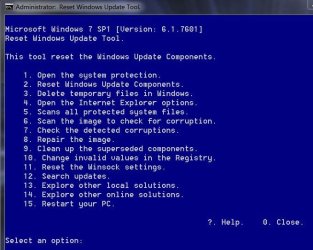
Try using this to reset the update system it's very good,
Use Option 2 on the list after right clicking it and select run as administrator
https://gallery.technet.microsoft.com/scriptcenter/Reset-Windows-Update-Agent-d824badc

Download it to your downloads folder
Right click it and select Extract all to the downloads folder.
Then right click ResetWUEng and select run as administrator
Follow the rest of the prompts
Press any key to continue
Type 2 for that Option on the list and the Enter key to reset update services..
Press y for Yes and then the Enter key I believe twice
After it has completed
Type 15 for that option and the Enter key to restart the machine.
Should say will restart in 60 seconds save your work.... press any key to continue.
After restart go to windows updates and manually check for updates shouldn't take a few minutes.
Reset win updates eng.JPG
 

My Computer My Computer

At a glance

Win-7-Pro64bit 7-H-Prem-64biti7-5930K 2nd i9-9940x both water blocked VRM'...Trident-z 3200C14 2nd Trident-z 3600C16EVGA 1080ti ftw3 2nd Titan Xp both water blocked
Computer type
PC/Desktop
Computer Manufacturer/Model Number
Custom assembled by me :}
OS
Win-7-Pro64bit 7-H-Prem-64bit
CPU
i7-5930K 2nd i9-9940x both water blocked VRM's too
Motherboard
ASUS SABERTOOTH X99 2nd ASUS x299 Apex
Memory
Trident-z 3200C14 2nd Trident-z 3600C16
Graphics Card(s)
EVGA 1080ti ftw3 2nd Titan Xp both water blocked
Sound Card
Built-in Realtek
Monitor(s) Displays
1-AOC G2460PG 24"G-Sync 144Hz/ 2nd 1-ASUS VG248QE 24" 144Hz
Screen Resolution
1920 x 1080 144Hz
Hard Drives
2-Samsung M.2 Evo & Evo Plus
2-Samsung 850 EVO 500GB SSD's/ 3-2.5 W.D. Black 1tb-&3-1tb/3-3.5 WD Black 1tb hdd's
PSU
EVGA SuperNOVA 1000-P2 2nd 1200-P2
Case
2-Corsair Obsidian Series 450D Black ATX Mid Tower
Cooling
Custom water loops
Keyboard
Logitech G710+/ 2nd Logitech G910
Mouse
2-RedDragon M901 Perdition 16400 dpi Gaming mouse = wired
Internet Speed
Comcast Ping 19ms 89.31mbps download speed 6.12mbps upload
Antivirus
Malwarebytes Pro/ Superantispyware Pro
Browser
FireFox & Pale moon
Other Info
2nd ASUS X299 Apex/Intel i9-9940x with Custom water loop/7H-Prem-x64/Corsair 450D case/Ram Trident-z 3600C16 4x8gb / Samsung970Evo plus 500gb SSD/Dual ssd EZ swap evo/PSU EVGA SuperNova 1200w-P2 80+Platinum/GPU Titan Xp /8-ML-140 on push-pull on 2-280GTX rads
Hi,
A list of the failing to install updates would be nice
If too many to list just reset the update system

Try using this to reset the update system it's very good,
Use Option 2 on the list after right clicking it and select run as administrator
https://gallery.technet.microsoft.com/scriptcenter/Reset-Windows-Update-Agent-d824badc

Download it to your downloads folder
Right click it and select Extract all to the downloads folder.
Then right click ResetWUEng and select run as administrator
Follow the rest of the prompts
Press any key to continue
Type 2 for that Option on the list and the Enter key to reset update services..
Press y for Yes and then the Enter key I believe twice
After it has completed
Type 15 for that option and the Enter key to restart the machine.
Should say will restart in 60 seconds save your work.... press any key to continue.
After restart go to windows updates and manually check for updates shouldn't take a few minutes.
View attachment 391355

OK, update from 1 week ago,
I Have now moved this Acer Aspire Z3801 pc to my friends home and i am now able to get onto the internet using his internet connection, (BT hub)
Before i couldn't get the wifi to work through BT-WiFi-Fon of which i have been using for some time at my place, OK i did as you suggested and downloaded and ran as administrator the windows reset update agent tool, i ran as per your instructions option 2 from the list and it ran/finished, completed successfully, it then asked to press any key to continue/finish which i did, it brought it back to the main menu, but!,as per your instructions press y for yes?? but its here i am not following you, where can i put y for yes? its just the 1 to 16 options list that appears after option 2 runs and finishes, then next you say Enter key I twice, that's a capital i!, thinking maybe to try option 15 ''download diagnostics'' i typed 15 and it opened a new options list 1 to 5 ''Download and run diagnostics for your system'', 1 on the list is for win7, 2, 3 ,4 and 5 are for 8, 8-1, and 10 etc etc, anyway i pressed option 1 and it opened up a scan, of which it ended with another box saying it had found two issues and it had fixed them, but i now notice it appears this copy of windows7 is not a legal copy, so will have to sort that problem out as well. ok, will do the restart and post back what i find re manually checking for updates, fingers crossed,
 

My Computer My Computer

At a glance

32bit win7 pro
Computer type
PC/Desktop
Computer Manufacturer/Model Number
Acer aspire all in one Z3081
OS
32bit win7 pro
update history and updates are all reset and showing as if a new instal!, what next? click update? what about this unlicensed copy of win7?
i have a new win7 disc set disc set here and just tried to put the licence number in but it does not accept it?
 

My Computer My Computer

At a glance

32bit win7 pro
Computer type
PC/Desktop
Computer Manufacturer/Model Number
Acer aspire all in one Z3081
OS
32bit win7 pro

My Computer My Computer

At a glance

Win-7-Pro64bit 7-H-Prem-64biti7-5930K 2nd i9-9940x both water blocked VRM'...Trident-z 3200C14 2nd Trident-z 3600C16EVGA 1080ti ftw3 2nd Titan Xp both water blocked
Computer type
PC/Desktop
Computer Manufacturer/Model Number
Custom assembled by me :}
OS
Win-7-Pro64bit 7-H-Prem-64bit
CPU
i7-5930K 2nd i9-9940x both water blocked VRM's too
Motherboard
ASUS SABERTOOTH X99 2nd ASUS x299 Apex
Memory
Trident-z 3200C14 2nd Trident-z 3600C16
Graphics Card(s)
EVGA 1080ti ftw3 2nd Titan Xp both water blocked
Sound Card
Built-in Realtek
Monitor(s) Displays
1-AOC G2460PG 24"G-Sync 144Hz/ 2nd 1-ASUS VG248QE 24" 144Hz
Screen Resolution
1920 x 1080 144Hz
Hard Drives
2-Samsung M.2 Evo & Evo Plus
2-Samsung 850 EVO 500GB SSD's/ 3-2.5 W.D. Black 1tb-&3-1tb/3-3.5 WD Black 1tb hdd's
PSU
EVGA SuperNOVA 1000-P2 2nd 1200-P2
Case
2-Corsair Obsidian Series 450D Black ATX Mid Tower
Cooling
Custom water loops
Keyboard
Logitech G710+/ 2nd Logitech G910
Mouse
2-RedDragon M901 Perdition 16400 dpi Gaming mouse = wired
Internet Speed
Comcast Ping 19ms 89.31mbps download speed 6.12mbps upload
Antivirus
Malwarebytes Pro/ Superantispyware Pro
Browser
FireFox & Pale moon
Other Info
2nd ASUS X299 Apex/Intel i9-9940x with Custom water loop/7H-Prem-x64/Corsair 450D case/Ram Trident-z 3600C16 4x8gb / Samsung970Evo plus 500gb SSD/Dual ssd EZ swap evo/PSU EVGA SuperNova 1200w-P2 80+Platinum/GPU Titan Xp /8-ML-140 on push-pull on 2-280GTX rads
Hi,
Can't help with activation besides use phone activation options.
You can post this report just simply copy and paste the results
http://go.microsoft.com/fwlink/?LinkID=52012

Diagnostic Report (1.9.0027.0):
-----------------------------------------
Windows Validation Data-->

Validation Code: 0
Cached Online Validation Code: 0x0
Windows Product Key: *****-*****-X92GV-V7DCV-P4K27
Windows Product Key Hash: aU2z1/fnhnLHmhBm699qYZT2E6s=
Windows Product ID: 00426-OEM-8992662-00400
Windows Product ID Type: 2
Windows License Type: OEM SLP
Windows OS version: 6.1.7601.2.00010100.1.0.001
ID: {C4F2230C-BACC-4B29-8170-E195C34FC171}(1)
Is Admin: Yes
TestCab: 0x0
LegitcheckControl ActiveX: N/A, hr = 0x80070002
Signed By: N/A, hr = 0x80070002
Product Name: Windows 7 Ultimate
Architecture: 0x00000000
Build lab: 7601.win7sp1_gdr.150525-0603
TTS Error:
Validation Diagnostic:
Resolution Status: N/A

Vista WgaER Data-->
ThreatID(s): N/A, hr = 0x80070002
Version: N/A, hr = 0x80070002

Windows XP Notifications Data-->
Cached Result: N/A, hr = 0x80070002
File Exists: No
Version: N/A, hr = 0x80070002
WgaTray.exe Signed By: N/A, hr = 0x80070002
WgaLogon.dll Signed By: N/A, hr = 0x80070002

OGA Notifications Data-->
Cached Result: N/A, hr = 0x80070002
Version: N/A, hr = 0x80070002
OGAExec.exe Signed By: N/A, hr = 0x80070002
OGAAddin.dll Signed By: N/A, hr = 0x80070002

OGA Data-->
Office Status: 109 N/A
OGA Version: N/A, 0x80070002
Signed By: N/A, hr = 0x80070002
Office Diagnostics: 025D1FF3-364-80041010_025D1FF3-229-80041010_025D1FF3-230-1_025D1FF3-517-80040154_025D1FF3-237-80040154_025D1FF3-238-2_025D1FF3-244-80070002_025D1FF3-258-3

Browser Data-->
Proxy settings: N/A
User Agent: Mozilla/4.0 (compatible; MSIE 8.0; Win32)
Default Browser: C:\Program Files\Google\Chrome\Application\chrome.exe
Download signed ActiveX controls: Prompt
Download unsigned ActiveX controls: Disabled
Run ActiveX controls and plug-ins: Allowed
Initialize and script ActiveX controls not marked as safe: Disabled
Allow scripting of Internet Explorer Webbrowser control: Disabled
Active scripting: Allowed
Script ActiveX controls marked as safe for scripting: Allowed

File Scan Data-->
File Mismatch: C:\Windows\system32\systemcpl.dll[6.1.7600.16385], Hr = 0x800b0100
File Mismatch: C:\Windows\system32\user32.dll[6.1.7600.16385], Hr = 0x800b0100

Other data-->
Office Details: <GenuineResults><MachineData><UGUID>{C4F2230C-BACC-4B29-8170-E195C34FC171}</UGUID><Version>1.9.0027.0</Version><OS>6.1.7601.2.00010100.1.0.001</OS><Architecture>x32</Architecture><PKey>*****-*****-*****-*****-P4K27</PKey><PID>00426-OEM-8992662-00400</PID><PIDType>2</PIDType><SID>S-1-5-21-3069225087-1665415207-3981302129</SID><SYSTEM><Manufacturer>Acer</Manufacturer><Model>Aspire Z3801</Model></SYSTEM><BIOS><Manufacturer>American Megatrends Inc.</Manufacturer><Version>P01-A2</Version><SMBIOSVersion major="2" minor="7"/><Date>20110707000000.000000+000</Date></BIOS><HWID>02FF3407018400FE</HWID><UserLCID>0809</UserLCID><SystemLCID>0409</SystemLCID><TimeZone>GMT Standard Time(GMT+00:00)</TimeZone><iJoin>0</iJoin><SBID><stat>3</stat><msppid></msppid><name></name><model></model></SBID><OEM><OEMID>ACRSYS</OEMID><OEMTableID>ACRPRDCT</OEMTableID></OEM><GANotification/></MachineData><Software><Office><Result>109</Result><Products/><Applications/></Office></Software></GenuineResults>

Spsys.log Content: 0x80070002

Licensing Data-->
Input Error: Can not find script file "C:\Windows\system32\slmgr.vbs".

Windows Activation Technologies-->
HrOffline: 0x00000000
HrOnline: 0x80072EE7
HealthStatus: 0x0000000000000000
Event Time Stamp: 9:3:2016 19:13
ActiveX: Registered, Version: 7.1.7600.16395
Admin Service: Registered, Version: 7.1.7600.16395
HealthStatus Bitmask Output:


HWID Data-->
HWID Hash Current: LAAAAAEAAQABAAEAAAABAAAAAgABAAEAeqggVVy2useUEbK9Sq+K+8ClLnM=

OEM Activation 1.0 Data-->
N/A

OEM Activation 2.0 Data-->
BIOS valid for OA 2.0: yes
Windows marker version: 0x20001
OEMID and OEMTableID Consistent: yes
BIOS Information:
ACPI Table Name OEMID Value OEMTableID Value
APIC ACRSYS ACRPRDCT
FACP ACRSYS ACRPRDCT
HPET ACRSYS ACRPRDCT
MCFG ACRSYS ACRPRDCT
SSDT AMICPU PROC
SLIC ACRSYS ACRPRDCT
ASF! INTEL HCG

 

My Computer My Computer

At a glance

32bit win7 pro
Computer type
PC/Desktop
Computer Manufacturer/Model Number
Acer aspire all in one Z3081
OS
32bit win7 pro
Hi Marc,

The install is classified as counterfiet.

You have the Dell factory W7 Ultimate default key on your Acer computer.
The exploit used to circumvent activation has failed and MS has picked it up.
File Scan Data-->
File Mismatch: C:\Windows\system32\systemcpl.dll[6.1.7600.16385], Hr = 0x800b0100
File Mismatch: C:\Windows\system32\user32.dll[6.1.7600.16385], Hr = 0x800b0100

You need to use the code on the OEM sticker, and it will also tell you which version,(shipped with Home premium)

Having stated its counterfiet in your case it can be caused by incorrect OS media, did you use Dell re-installation discs?
the report is also incomplete
Licensing Data-->
Input Error: Can not find script file "C:\Windows\system32\slmgr.vbs".
run the following
regsvr32 vbscript.dll

i would also like to see the results from this run the following command from a command Prompt window.

reg query HKEY_CLASSES_ROOT\CLSID\{B54F3741-5B07-11cf-A4B0-00AA004A55E8}\InprocServer32

finally did you realise your running 32bit

Roy
 
Last edited:

My Computer My Computer

At a glance

W7 home premium 32bit/W7HP 64bit/w10 tp insid...E5300 dual core3gbNvidia Geforce 7100 Nforce 630i
Computer type
PC/Desktop
Computer Manufacturer/Model Number
medionl/Aspire 6930G/acer x55a
OS
W7 home premium 32bit/W7HP 64bit/w10 tp insider ring
CPU
E5300 dual core
Motherboard
medion MS7366
Memory
3gb
Graphics Card(s)
Nvidia Geforce 7100 Nforce 630i
Monitor(s) Displays
avixc
Internet Speed
n (isp resticted to 72)
Antivirus
mse/pands
Browser
palemoon
Other Info
Belkin Fd7050 n USB using Railink RT2870 drivers, more upto date
hi Roy, ok this machine/pc i bought a few years ago as back up machine and at the time it switched on and operated just fine and apart from a pop up after booting saying windows was not genuine and click to make genuine i just stored it away until it was needed, i had no part in altering or modifying it so just dont know its pre history, when my tower type pc gave up i started using this acer aspire (all in one) of which has operated faultlessly until only a few months ago, i have a windows 7 box set i bought back in 2010 that is a 2 discs win7 32 and 64bit box set so if what you say its a mismatch of different programmes would it be best to do a clean instal? or do you think we can rectify what i have got installed?, ok in the mean time i will carry on with your last suggestion ''regsvr32 vbscript.dll and post the outcome, thanks,
 

My Computer My Computer

At a glance

32bit win7 pro
Computer type
PC/Desktop
Computer Manufacturer/Model Number
Acer aspire all in one Z3081
OS
32bit win7 pro
Back
Top