
User Account or Admin rights to install softwares??

amoretam

New member
Power User
Local time
6:56 AM
Messages
362
Hi there you all!
I just installed windows 7 64bit and i am having this new enigma with the proper way of installing my apllications:
I read that there are some applications that should be installed using the "run as administrator" option, and some of them not.
My question is how do i know a program should be installled using this option??

Is it possible that a program doesn 't run correctly or without optimun capacity because of using the wrong usser account??

How do i know that i am not running as Admin by default?

Which account should i use by default in order to be optimally safe?

Why when I go to my computer/manage/Local users and group/Users/double click on Administrator i see the "Account is disabled" check box checked??

Thanks in advance and sorry for my ignorance, i just need a clear and easy explanation for this because i have a lot installing to do (Audio plugins and softwares) and i think i need to be clear about this...

Thanks in advance
Cheers
Alberto
 

My Computer

Computer type
PC/Desktop
Computer Manufacturer/Model Number
Custom Build
OS
Windows 7 x64bit Home Premium
CPU
Intel Core i5-2500K Quad-Core Processor 3.3 GHz 6 MB Cache
Motherboard
Intel Desktop Board Media Series LGA 1155 DDR 1333 Micro-ATX
Memory
8GB G.Skill DDR3 PC3-12800 1600MHz - F3-12800CL9D-8GBRL
Graphics Card(s)
Sandy Bridge
Sound Card
M-Audio Fast Track PRO - Avid digidesign 003 rack factory
Monitor(s) Displays
Acer X233H LCD monitor
Screen Resolution
1920x1080
Hard Drives
OS Drive: Silicon Power 256GB SSD 3D NAND A55 SLC Cache Performance Boost SATA III
PSU
Cooler Master eXtreme Power Plus 500w Power Supply
Other Info
This Computer was built from scratch
Hi there you all!
I just installed windows 7 64bit and i am having this new enigma with the proper way of installing my apllications:
I read that there are some applications that should be installed using the "run as administrator" option, and some of them not.
My question is how do i know a program should be installled using this option??

Is it possible that a program doesn 't run correctly or without optimun capacity because of using the wrong usser account??

How do i know that i am not running as Admin by default?

Which account should i use by default in order to be optimally safe?

Why when I go to my computer/manage/Local users and group/Users/double click on Administrator i see the "Account is disabled" check box checked??

Thanks in advance and sorry for my ignorance, i just need a clear and easy explanation for this because i have a lot installing to do (Audio plugins and softwares) and i think i need to be clear about this...

Thanks in advance
Cheers
Alberto


1-for safety use a standard account.
2-run app normally unless they wont run. If run as admin is needed do so.
3-Which admin account is disabled?

Ken
 

My Computer

Computer Manufacturer/Model Number
HP Pavillion dv-7 1005 Tx
OS
Win 8 Release candidate 8400
CPU
[email protected]
Memory
4 gigs
Graphics Card(s)
Nvidia 9600M
Sound Card
HD built-in
Monitor(s) Displays
17" Wxga
Screen Resolution
1440x900
Cooling
none
Internet Speed
45Mb down 5Mb up
with a default Windows 7 installation, the account *you* set up as the primary account is an administrator account - but for installation of software and a few other choice actions, you still need privileges higher than administrator, as defined by your account. Anything that installs files to %ProgramFiles% or %ProgramFiles(X86)% (which are better known in default installations as C:\Program Files\ and C:\Program Files (x86) respectively) will require these same higher privileges. The user that you create has administrative privileges, but UAC will still make it ask (at the very least) when you try to write to these folders (unless you have it disabled - which is a *BIG* no-no!). This is for your safety, and by design, similar to (but not quite the same) as gaining privileges for a substitute user using the su command in Linux / UNIX.

Most installers today are well aware of this need for extended privileges and will automatically ask you either as soon as you start the installer or just after it gathers all the required information from you but before it actually starts copying files. Any installer that tries to write to either of those two directories (and a few others that are also locked down) will either ask for those privileges or else will give you an installation error when attempting to install.

So, if you do not see the error message your install has usually worked just fine. If you do see the error message, then you'll need to cancel / abort the install and start it again by right-clicking the installer and selecting Run as Administrator to run it.

The privileges are not different in Windows 7 regardless of your architecture (64-bit, aka x64, versus 32-bit, aka x86) so if you have used Windows 7 32bi or even Vista (either architecture) previously, then you're perfectly fine going about as you have in the past.

Finally, the Administrator account is disabled - and with good reason - you should only use this when your regular account is not working for some reason. Performing installations out of this account is a no-no also, (much like you don't log in as root in Linux / UNIX to install software).

If you have any more questions, please feel free to post back.
 

My Computers

System One System Two

  • Computer type
    PC/Desktop
    Computer Manufacturer/Model Number
    The Beast Model A (homebrew)
    OS
    Windows 11 21H2 Current build
    CPU
    AMD Ryzen 9 3950X
    Motherboard
    MSI MEG X570 GODLIKE
    Memory
    4 * 32 GB - Corsair Vengeance 3600 MHz
    Graphics Card(s)
    EVGA GeForce RTX 3080 Ti XC3 ULTRA GAMING (12G-P5-3955-KR)
    Sound Card
    Realtek® ALC1220 Codec
    Monitor(s) Displays
    2x Eve Spectrum ES07D03 4K Gaming Monitor (Matte) | Eve Spec
    Screen Resolution
    3x 3840 x 2160
    Hard Drives
    3x Samsung 980 Pro NVMe PCIe 4 M.2 2 TB SSD (MZ-V8P2T0B/AM) } 3x Sabrent Rocket NVMe 4.0 1 TB SSD
    PSU
    PC Power & Cooling’s Silencer Series 1050 Watt, 80 Plus Plat
    Case
    Fractal Design Define 7 XL Dark ATX Full Tower Case
    Cooling
    SteelSeries Apex Pro Wired Gaming Keyboard
    Keyboard
    SteelSeries Apex Pro
    Mouse
    Logitech MX Master 3S | MX Master 3 for business
    Internet Speed
    AT&T LightSpeed Gigabit Duplex Ftth
    Antivirus
    Windows Defender + MB 3
    Browser
    Nightly (default) + Firefox (stable),Chrome, Edge
  • Computer type
    PC/Desktop
    System Manufacturer/Model Number
    Dell Latitude E5470
    OS
    ChromeOS Flex Dev Channel (current)
    CPU
    Intel(R) Core(TM) i5-6300U CPU @ 2.40GHz, 2501 Mhz, 2 Core(s), 4 Logical Processor(s)
    Motherboard
    Dell
    Memory
    16 GB
    Graphics Card(s)
    Intel(R) HD Graphics 520
    Sound Card
    Intel(R) HD Graphics 520 + RealTek Audio
    Monitor(s) Displays
    Dell laptop display 15"
    Screen Resolution
    1920 * 1080
    Hard Drives
    Toshiba 128GB M.2 22300 drive
    INTEL Cherryville 520 Series SSDSC2CW180A 180 GB SATA III SSD
    PSU
    Dell
    Case
    Dell
    Cooling
    Dell
    Keyboard
    Dell
    Mouse
    Logitech MX Master 3S (shared w. Sys 1) | Dell TouchPad
    Internet Speed
    AT&T LightSpeed Gigabit Duplex Ftth
  • Like
Reactions: whs
Thanks johngalt

""with a default Windows 7 installation, the account *you* set up as the primary account is an administrator account - but for installation of software and a few other choice actions, you still need privileges higher than administrator, as defined by your account. Anything that installs files to %ProgramFiles% or %ProgramFiles(X86)% (which are better known in default installations as C:\Program Files\ and C:\Program Files (x86) respectively) will require these same higher privileges. The user that you create has administrative privileges, but UAC will still make it ask (at the very least) when you try to write to these folders (unless you have it disabled - which is a *BIG* no-no!). This is for your safety, and by design, similar to (but not quite the same) as gaining privileges for a substitute user using the su command in Linux / UNIX.""

I have no problems with UAC,
I installed my windows 7 64bit just a couple of days ago. Do this means i should leave everything as it was set by default??


""So, if you do not see the error message your install has usually worked just fine. If you do see the error message, then you'll need to cancel / abort the install and start it again by right-clicking the installer and selecting Run as Administrator to run it.""

So, the Run as administrator option should only be used when the application ask for it?? right?? ok

What would happen if I run an installation that is not asking me to run as administrator, but I still run it with the "run as administrator" option?

Thank you for your explanation, very clear!!
 

My Computer

Computer type
PC/Desktop
Computer Manufacturer/Model Number
Custom Build
OS
Windows 7 x64bit Home Premium
CPU
Intel Core i5-2500K Quad-Core Processor 3.3 GHz 6 MB Cache
Motherboard
Intel Desktop Board Media Series LGA 1155 DDR 1333 Micro-ATX
Memory
8GB G.Skill DDR3 PC3-12800 1600MHz - F3-12800CL9D-8GBRL
Graphics Card(s)
Sandy Bridge
Sound Card
M-Audio Fast Track PRO - Avid digidesign 003 rack factory
Monitor(s) Displays
Acer X233H LCD monitor
Screen Resolution
1920x1080
Hard Drives
OS Drive: Silicon Power 256GB SSD 3D NAND A55 SLC Cache Performance Boost SATA III
PSU
Cooler Master eXtreme Power Plus 500w Power Supply
Other Info
This Computer was built from scratch
I have no problems with UAC,
I installed my windows 7 64bit just a couple of days ago. Do this means i should leave everything as it was set by default??

Yup. Leaving it as default is good.


So, the Run as administrator option should only be used when the application ask for it?? right?? ok

What would happen if I run an installation that is not asking me to run as administrator, but I still run it with the "run as administrator" option?

Thank you for your explanation, very clear!!

If the application installer gives you an error message stating that it is unable to perform some function as a part of its installation routine, then you will need to run it as Admin. However, Windows 7 also has a built in function where it will ask you if the install performed correctly or not, with most installers, so that if you answer no, it will automatically restart the installer with the required elevated privileges.

Rule of thumb - if you get error messages, then look at manually running as administrator. If you get a UAC prompt asking for elevated privileges, then the installer is Windows 7 aware and is already doing this for you.
 

My Computers

System One System Two

  • Computer type
    PC/Desktop
    Computer Manufacturer/Model Number
    The Beast Model A (homebrew)
    OS
    Windows 11 21H2 Current build
    CPU
    AMD Ryzen 9 3950X
    Motherboard
    MSI MEG X570 GODLIKE
    Memory
    4 * 32 GB - Corsair Vengeance 3600 MHz
    Graphics Card(s)
    EVGA GeForce RTX 3080 Ti XC3 ULTRA GAMING (12G-P5-3955-KR)
    Sound Card
    Realtek® ALC1220 Codec
    Monitor(s) Displays
    2x Eve Spectrum ES07D03 4K Gaming Monitor (Matte) | Eve Spec
    Screen Resolution
    3x 3840 x 2160
    Hard Drives
    3x Samsung 980 Pro NVMe PCIe 4 M.2 2 TB SSD (MZ-V8P2T0B/AM) } 3x Sabrent Rocket NVMe 4.0 1 TB SSD
    PSU
    PC Power & Cooling’s Silencer Series 1050 Watt, 80 Plus Plat
    Case
    Fractal Design Define 7 XL Dark ATX Full Tower Case
    Cooling
    SteelSeries Apex Pro Wired Gaming Keyboard
    Keyboard
    SteelSeries Apex Pro
    Mouse
    Logitech MX Master 3S | MX Master 3 for business
    Internet Speed
    AT&T LightSpeed Gigabit Duplex Ftth
    Antivirus
    Windows Defender + MB 3
    Browser
    Nightly (default) + Firefox (stable),Chrome, Edge
  • Computer type
    PC/Desktop
    System Manufacturer/Model Number
    Dell Latitude E5470
    OS
    ChromeOS Flex Dev Channel (current)
    CPU
    Intel(R) Core(TM) i5-6300U CPU @ 2.40GHz, 2501 Mhz, 2 Core(s), 4 Logical Processor(s)
    Motherboard
    Dell
    Memory
    16 GB
    Graphics Card(s)
    Intel(R) HD Graphics 520
    Sound Card
    Intel(R) HD Graphics 520 + RealTek Audio
    Monitor(s) Displays
    Dell laptop display 15"
    Screen Resolution
    1920 * 1080
    Hard Drives
    Toshiba 128GB M.2 22300 drive
    INTEL Cherryville 520 Series SSDSC2CW180A 180 GB SATA III SSD
    PSU
    Dell
    Case
    Dell
    Cooling
    Dell
    Keyboard
    Dell
    Mouse
    Logitech MX Master 3S (shared w. Sys 1) | Dell TouchPad
    Internet Speed
    AT&T LightSpeed Gigabit Duplex Ftth
1-for safety use a standard account.
2-run app normally unless they wont run. If run as admin is needed do so.
3-Which admin account is disabled?

Ken[/QUOTE]

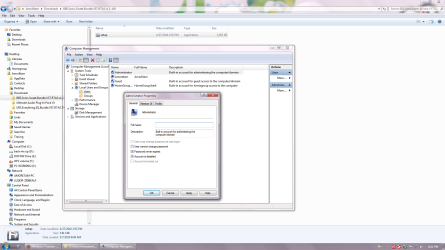
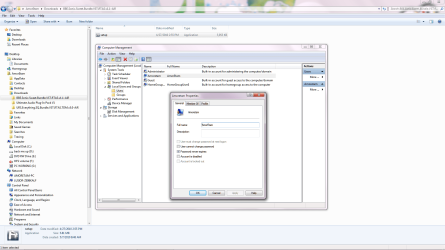
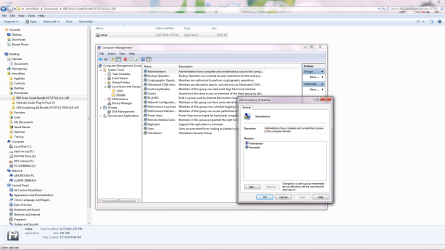
Here i attached you some of my users accounts privileges settings...........
amoretam is the name i gave when my installation asked me for a user account name::


THANKS MAN
 

Attachments

  • administrator disabled.png
    administrator disabled.png
    114 KB · Views: 1,141
  • Amoretam user account.png
    Amoretam user account.png
    101.8 KB · Views: 577
  • Administrators.png
    Administrators.png
    113.9 KB · Views: 521

My Computer

Computer type
PC/Desktop
Computer Manufacturer/Model Number
Custom Build
OS
Windows 7 x64bit Home Premium
CPU
Intel Core i5-2500K Quad-Core Processor 3.3 GHz 6 MB Cache
Motherboard
Intel Desktop Board Media Series LGA 1155 DDR 1333 Micro-ATX
Memory
8GB G.Skill DDR3 PC3-12800 1600MHz - F3-12800CL9D-8GBRL
Graphics Card(s)
Sandy Bridge
Sound Card
M-Audio Fast Track PRO - Avid digidesign 003 rack factory
Monitor(s) Displays
Acer X233H LCD monitor
Screen Resolution
1920x1080
Hard Drives
OS Drive: Silicon Power 256GB SSD 3D NAND A55 SLC Cache Performance Boost SATA III
PSU
Cooler Master eXtreme Power Plus 500w Power Supply
Other Info
This Computer was built from scratch
We don't get to have that prilvedge in Home Premiem...

to activate your admin account...

elevate your command prompt

type:
net user administrator /active:yes

hit enter

log off and log on into admin account

most importantly! change the password
 

My Computer

Computer Manufacturer/Model Number
HP Pavilion Elite HPE-410f
OS
Windows 7 Ultimate x64
CPU
AMD Phenom x6 1045t
Motherboard
N/A
Memory
8 GB
Graphics Card(s)
ATI Radeon HD 5570
Sound Card
Realtek Highdefinition Audio / 5.1 Dolby Setup
Monitor(s) Displays
HP w2207h Widescreen
Screen Resolution
1680*1050
Hard Drives
1 TB (fixed), 320 Portable maxtor, Server Hard drives
PSU
350 Watt
Case
HP CASE
Cooling
Bass
Keyboard
Logitech MX 5500
Mouse
Logitech MX 5500
Internet Speed
ROAD RUNNER 16MB D/512 U
I have no problems with UAC,
I installed my windows 7 64bit just a couple of days ago. Do this means i should leave everything as it was set by default??

Yup. Leaving it as default is good.


So, the Run as administrator option should only be used when the application ask for it?? right?? ok

What would happen if I run an installation that is not asking me to run as administrator, but I still run it with the "run as administrator" option?

Thank you for your explanation, very clear!!

If the application installer gives you an error message stating that it is unable to perform some function as a part of its installation routine, then you will need to run it as Admin. However, Windows 7 also has a built in function where it will ask you if the install performed correctly or not, with most installers, so that if you answer no, it will automatically restart the installer with the required elevated privileges.

Rule of thumb - if you get error messages, then look at manually running as administrator. If you get a UAC prompt asking for elevated privileges, then the installer is Windows 7 aware and is already doing this for you.


Damn it, you are fast...... this is already getting very clear for me...
Thanks a lot ...
 

My Computer

Computer type
PC/Desktop
Computer Manufacturer/Model Number
Custom Build
OS
Windows 7 x64bit Home Premium
CPU
Intel Core i5-2500K Quad-Core Processor 3.3 GHz 6 MB Cache
Motherboard
Intel Desktop Board Media Series LGA 1155 DDR 1333 Micro-ATX
Memory
8GB G.Skill DDR3 PC3-12800 1600MHz - F3-12800CL9D-8GBRL
Graphics Card(s)
Sandy Bridge
Sound Card
M-Audio Fast Track PRO - Avid digidesign 003 rack factory
Monitor(s) Displays
Acer X233H LCD monitor
Screen Resolution
1920x1080
Hard Drives
OS Drive: Silicon Power 256GB SSD 3D NAND A55 SLC Cache Performance Boost SATA III
PSU
Cooler Master eXtreme Power Plus 500w Power Supply
Other Info
This Computer was built from scratch
We don't get to have that prilvedge in Home Premiem...

to activate your admin account...

elevate your command prompt

type:
net user administrator /active:yes

hit enter

log off and log on into admin account

most importantly! change the password

I dont have home premium, i have windows 7 64 bit ultimate build 7600,
and someone wrote this::

""Finally, the Administrator account is disabled - and with good reason - you should only use this when your regular account is not working for some reason. Performing installations out of this account is a no-no also, (much like you don't log in as root in Linux / UNIX to install software).""

So why should i enable my administrator account??
thanks
 

My Computer

Computer type
PC/Desktop
Computer Manufacturer/Model Number
Custom Build
OS
Windows 7 x64bit Home Premium
CPU
Intel Core i5-2500K Quad-Core Processor 3.3 GHz 6 MB Cache
Motherboard
Intel Desktop Board Media Series LGA 1155 DDR 1333 Micro-ATX
Memory
8GB G.Skill DDR3 PC3-12800 1600MHz - F3-12800CL9D-8GBRL
Graphics Card(s)
Sandy Bridge
Sound Card
M-Audio Fast Track PRO - Avid digidesign 003 rack factory
Monitor(s) Displays
Acer X233H LCD monitor
Screen Resolution
1920x1080
Hard Drives
OS Drive: Silicon Power 256GB SSD 3D NAND A55 SLC Cache Performance Boost SATA III
PSU
Cooler Master eXtreme Power Plus 500w Power Supply
Other Info
This Computer was built from scratch
I have no problems with UAC,
I installed my windows 7 64bit just a couple of days ago. Do this means i should leave everything as it was set by default??

Yup. Leaving it as default is good.


So, the Run as administrator option should only be used when the application ask for it?? right?? ok

What would happen if I run an installation that is not asking me to run as administrator, but I still run it with the "run as administrator" option?

Thank you for your explanation, very clear!!

If the application installer gives you an error message stating that it is unable to perform some function as a part of its installation routine, then you will need to run it as Admin. However, Windows 7 also has a built in function where it will ask you if the install performed correctly or not, with most installers, so that if you answer no, it will automatically restart the installer with the required elevated privileges.

Rule of thumb - if you get error messages, then look at manually running as administrator. If you get a UAC prompt asking for elevated privileges, then the installer is Windows 7 aware and is already doing this for you.


ok, here i am again....

I just saw that if I right click on an already installed program icon, (for example VLC), I see this "run as administrator" option.
What is this??
I just read in a forum: "If a program needs administrator privileges to run, it will not run properly without them"

I can see that I can open this VLC icon with or without the "run as administrator" option. How do I know if the program is running at its full potency if by mistake I choose the wrong privilege?

I ask you this because a while ago I was using pro-tools and having crashing problems. I read that if I open the software using the "run as administrator" option
it would fix the problem.
I don't remember if it worked or not, but it made think about all of this.

Any further information is all welcome.

Thank you very much
 

My Computer

Computer type
PC/Desktop
Computer Manufacturer/Model Number
Custom Build
OS
Windows 7 x64bit Home Premium
CPU
Intel Core i5-2500K Quad-Core Processor 3.3 GHz 6 MB Cache
Motherboard
Intel Desktop Board Media Series LGA 1155 DDR 1333 Micro-ATX
Memory
8GB G.Skill DDR3 PC3-12800 1600MHz - F3-12800CL9D-8GBRL
Graphics Card(s)
Sandy Bridge
Sound Card
M-Audio Fast Track PRO - Avid digidesign 003 rack factory
Monitor(s) Displays
Acer X233H LCD monitor
Screen Resolution
1920x1080
Hard Drives
OS Drive: Silicon Power 256GB SSD 3D NAND A55 SLC Cache Performance Boost SATA III
PSU
Cooler Master eXtreme Power Plus 500w Power Supply
Other Info
This Computer was built from scratch
Back
Top