Security-problem with Comodo´s firewall & Defence+ !

hackerman1

New member
Local time
7:03 PM
Messages
759
Security-problem with Comodo´s firewall & Defence+ !

hi !

there seems to be a really BIG Security-problem with Comodo´s Firewall & Defence+.

last night i when running Comodo´s Leak-Test (CLT) i discovered that it´s NOT working as it should & as it used to do.
i only got 180 / 340 points !

OMG...:shock:

a complete disaster, although a-squared (now EAM) did a good job,
and detected 5 suspected activities that Comodo missed.

last time i checked with CLT i got 340/340, so there must be some problems.

last night i spent an hour checking all my settings & trying to improve the security, but nothing i did helped.
i´ve been working a few hours now, trying everything possible, but it´s still 180/340.

so if you are using Comodo´s Firewall & Defence+, the latest version 4.0.141842.828 from 12 April 2010, then i strongly suggest that you run CLT and check your own results !

i´m using Online Armor FREE now and i got 330/340 when running CLT.

i previously used W7-beta, W7-RC & W7-Professional, when i tested Comodo with CLT.
now i´m running W7-Enterprise 32-bit, but i also have both Vista & Windows Server 2008 installed, so i´m going to install Comodo on those 2 O/S´s just to verify that it isn´t W7-Enterprise that is acting weird.
 
Last edited:

My Computer

Computer Manufacturer/Model Number
Dell
OS
W7-Enterprise + WS-2008 (Converted to Workstation)
CPU
P4 2,4GHz (at 1,8GHz, "slow" RDRAM, only 400MHz FSB...)
Motherboard
Intel 850E
Memory
2GB
Graphics Card(s)
NVIDIA QUADRO2 PRO 64MB
Sound Card
Yes
Monitor(s) Displays
Dell 1702FP
Screen Resolution
1280x1024
Hard Drives
Yes
PSU
Yes
Case
Yes
Cooling
Yes
Keyboard
Yes
Mouse
Yes, and i also have Cats...
Internet Speed
University: 100 MBit/s, Home: UMTS 7,2 MBit/s
Other Info
W7 on a DINOSAUR: P2 with 266MHz CPU & 160MB RAM
Wow! Coming from a "devout" Comodo fan, this is something.
 

My Computer

OS
Windows 7 & Windows Vista Ultimate
well, if Comodo doesn´t provide the security, then it´s time to switch to something else....

i just checked my old emails, i seem to have licenses for both Online Armor Premium &
Online Armor ++.

OA++ = OA-premium & a-squared.

hmmm....:D
 

My Computer

Computer Manufacturer/Model Number
Dell
OS
W7-Enterprise + WS-2008 (Converted to Workstation)
CPU
P4 2,4GHz (at 1,8GHz, "slow" RDRAM, only 400MHz FSB...)
Motherboard
Intel 850E
Memory
2GB
Graphics Card(s)
NVIDIA QUADRO2 PRO 64MB
Sound Card
Yes
Monitor(s) Displays
Dell 1702FP
Screen Resolution
1280x1024
Hard Drives
Yes
PSU
Yes
Case
Yes
Cooling
Yes
Keyboard
Yes
Mouse
Yes, and i also have Cats...
Internet Speed
University: 100 MBit/s, Home: UMTS 7,2 MBit/s
Other Info
W7 on a DINOSAUR: P2 with 266MHz CPU & 160MB RAM
I wonder what changed with Comodo? I am a new users of comodo so I have no point of reference. I may try the OA though. I was figuring out how to use Comodo though :) This could become a very time consuming experience chasing the holy grail of firewalls. I can already see OA or any other vendor making what ever mistake Comodo made and then jumping vendor to vendor.
 

My Computer

Computer Manufacturer/Model Number
ASUS N61JQ-A1
OS
Win7
CPU
Intel Core i7
Memory
4 GB
Graphics Card(s)
ATI 5730
Internet Speed
http://www.speedtest.net/result/823059694.png
TY hackerman1 for the great post... :)

I see they are also testing a beta system for the 64 bit windows7 users... will wait for the outcome... :)
 
Last edited:

My Computer

Computer Manufacturer/Model Number
Toshiba Satellite
OS
Windows 7 Home Premium 64-bit
CPU
Pentium(R) Dual-Core T4300 @ 2.10GHz
Motherboard
Toshiba Model KSWAA - Chipset Intel GL40 Rev 07
Memory
3 GB DDR2 PC2-6400 (400 MHz) Samsung M4 70T2864Q23-CF7
Graphics Card(s)
Mobile Intel GMA4500M 32bit OS (64bit OS) dynamically
Sound Card
Realtek ALC272-GR Software Sound
Monitor(s) Displays
16.0" HD TFT with TrueBrite Matrix colour LCD display
Screen Resolution
1366 x 768
Hard Drives
FUJITSU MJA2320BH G2-(S2) 320GB (5400RPM) Serial-ATA
Keyboard
Canadian Bilingual Keyboard 105 keys with 13 Function keys
Mouse
Touchpad Point device & Lexma USB Mouse
Internet Speed
Walking is Faster
Other Info
Wireless LAN Realtek RTL89191SE 802.11n PCI-E NIC + a
LAN Realek PCIe FE Family Controller and
TOSHIBA Software Modem
After fiddling with the settings after my outcome kept getting 220 i now get 340 with Comodo.

...Keep failing COAT. :|
 

My Computer

Computer type
PC/Desktop
OS
Win7 Home Premium x64 SP1, Archlinux x86_64. Elementary Luna
After fiddling with the settings after my outcome kept getting 220 i now get 340 with Comodo.

...Keep failing COAT. :|

Care to share what settings you fiddled with? For me this is a learning experience of the various software firewalls out there and how well they do what they claim.
 

My Computer

Computer Manufacturer/Model Number
ASUS N61JQ-A1
OS
Win7
CPU
Intel Core i7
Memory
4 GB
Graphics Card(s)
ATI 5730
Internet Speed
http://www.speedtest.net/result/823059694.png
Yeah sure no prob.

Firewall:
Safe Mode
Everything under advance tab in "Firewall Behavior Settings" checked
Stealth Ports set to "Block All Incoming Connections..."
------------------------------------------------------

Defense+
Safe Mode
On Common Tasks Tab -> "My Protected Files" i added the Executables File Group.
SandBox Default Settings.

Advance Tab -> Image Exeution Control Settings.. is on Normal, Detect Shellcode Injections.. Checked
Everything else Default.

Oh and my config is set to Proactive Security.
 

My Computer

Computer type
PC/Desktop
OS
Win7 Home Premium x64 SP1, Archlinux x86_64. Elementary Luna
Comodo have too many bad practices for me to ever use them again. It's a shame as some of their products are good.

Online Armor is an excellent alternative.
 

My Computer

OS
Arch Linux 64-bit
With CIS4.x, you must keep in mind the sandbox portion of this suite will create a virtual registry, letting your software think it is writing to the real one (which is, btw, also protected by D+).
CLT has issues with this new software in that it does not recognize the sandbox and therefore cannot deal with it to show you how secure you really are.
 

My Computer

Computer Manufacturer/Model Number
Personal build
OS
Windows 7 Ultimate x64 (Retail)
CPU
Intel I7-860
Motherboard
Asus Maximus III Formula
Memory
G.Skill RipJaw DDR3-1333 16GB (4x4GB)
Graphics Card(s)
Nvidia GTS-250 1GB
Sound Card
SupremeFX X-Fi 7.1 HD sound system.
Monitor(s) Displays
VisionQuest VQL-22WSHD LCD Monitor
Screen Resolution
1680x1050
Hard Drives
1x Seagate ST3500418AS 500G SATA2 HDD
1x Western Digital Caviar SE16 500G SATA2 HDD
1x Western Digital Caviar SE16 750G SATA2 HDD
2x Western Digital Caviar Green 2TB SATA2 HDD, configured RAID1
PSU
OCZ EliteXtream OCZ1000EXS 1000W ATX12V 20/24 Pin Active PFC
Case
Antec 1200
Cooling
Swifteck H2O-220 Ultima XT Liquid Cooling w/ 320 Radiator
Keyboard
Logitech G11 Keyboard
Mouse
Logitech MX518 Optical Mouse
Internet Speed
Cable Modem
Other Info
Visiontek TV Wonder 650 Theater PCI-E TV Tuner Card
Logitech 9000 Pro Web Camera
Logitech Cordless RumblePad 2 game controller
LG 18x SuperMulti SATA2 DVD Writer
NmediaPC CR98 Multi Card reader
Nmedia Pro-LCD
Corsair Dominator Memory Fan
Coolermaster R4-L2R-20ac 120mm Case Fan x2
Explains how i got 210 with it in the Sandbox and 330 out of it... I guess, right?
 

My Computer

Computer type
PC/Desktop
OS
Win7 Home Premium x64 SP1, Archlinux x86_64. Elementary Luna
finally some good news, after having had enough of Online Armor blocking my soundcard, i decided to reinstall Comodo.

guess what ?
now everything is back to normal....:huh:
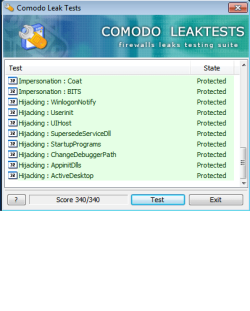
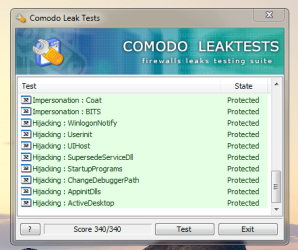
after running a new test with CLT it´s 340/340 !

but now the BIG question remains: how the he*l could Comodo suddenly stop working ???
 

Attachments

  • CLT.png
    CLT.png
    77.4 KB · Views: 9

My Computer

Computer Manufacturer/Model Number
Dell
OS
W7-Enterprise + WS-2008 (Converted to Workstation)
CPU
P4 2,4GHz (at 1,8GHz, "slow" RDRAM, only 400MHz FSB...)
Motherboard
Intel 850E
Memory
2GB
Graphics Card(s)
NVIDIA QUADRO2 PRO 64MB
Sound Card
Yes
Monitor(s) Displays
Dell 1702FP
Screen Resolution
1280x1024
Hard Drives
Yes
PSU
Yes
Case
Yes
Cooling
Yes
Keyboard
Yes
Mouse
Yes, and i also have Cats...
Internet Speed
University: 100 MBit/s, Home: UMTS 7,2 MBit/s
Other Info
W7 on a DINOSAUR: P2 with 266MHz CPU & 160MB RAM
After getting 330 and now getting 220 yet again.. is really odd considering i haven't touched nothing. This is wack...

EDIT: So obviously sandbox is messing with it no matter what so i just disabled it.
Got:
 

Attachments

  • Capture.PNG
    Capture.PNG
    127 KB · Views: 1

My Computer

Computer type
PC/Desktop
OS
Win7 Home Premium x64 SP1, Archlinux x86_64. Elementary Luna
The Comodo leak test doesn't make sense to me. Since its made my Comodo, their product will obviously score 100% marks.
 

My Computer

Computer Manufacturer/Model Number
Samsung NP530U4B-S02IN
OS
Windows® 8 Pro (64-bit)
CPU
Intel® Core™ i5 Processor 2467M (1.60GHz, 3MB L3 Cache)
Motherboard
Samsung Electronics
Memory
6GB DDR3 System Memory at 1,333MHz (on BD 4GB + 2GB x 1)
Graphics Card(s)
AMD Radeon™ HD7550M 1GB DDR3 (Ext. Graphic)
Sound Card
Realtek High Definition Audio
Monitor(s) Displays
35.56cm (14.0) SuperBright 300nit HD LED Display
Screen Resolution
1366x768
Hard Drives
1TB S-ATA II Hard Drive (5400RPM) with ExpressCache 16GB SSD
Internet Speed
sucks
Antivirus
Microsoft Security Essentials
Browser
Google Chrome (Sync enabled)
what other leak / firewall tests are there ?
 

My Computer

Computer Manufacturer/Model Number
Dell
OS
W7-Enterprise + WS-2008 (Converted to Workstation)
CPU
P4 2,4GHz (at 1,8GHz, "slow" RDRAM, only 400MHz FSB...)
Motherboard
Intel 850E
Memory
2GB
Graphics Card(s)
NVIDIA QUADRO2 PRO 64MB
Sound Card
Yes
Monitor(s) Displays
Dell 1702FP
Screen Resolution
1280x1024
Hard Drives
Yes
PSU
Yes
Case
Yes
Cooling
Yes
Keyboard
Yes
Mouse
Yes, and i also have Cats...
Internet Speed
University: 100 MBit/s, Home: UMTS 7,2 MBit/s
Other Info
W7 on a DINOSAUR: P2 with 266MHz CPU & 160MB RAM

My Computer

Computer Manufacturer/Model Number
Toshiba Satellite
OS
Windows 7 Home Premium 64-bit
CPU
Pentium(R) Dual-Core T4300 @ 2.10GHz
Motherboard
Toshiba Model KSWAA - Chipset Intel GL40 Rev 07
Memory
3 GB DDR2 PC2-6400 (400 MHz) Samsung M4 70T2864Q23-CF7
Graphics Card(s)
Mobile Intel GMA4500M 32bit OS (64bit OS) dynamically
Sound Card
Realtek ALC272-GR Software Sound
Monitor(s) Displays
16.0" HD TFT with TrueBrite Matrix colour LCD display
Screen Resolution
1366 x 768
Hard Drives
FUJITSU MJA2320BH G2-(S2) 320GB (5400RPM) Serial-ATA
Keyboard
Canadian Bilingual Keyboard 105 keys with 13 Function keys
Mouse
Touchpad Point device & Lexma USB Mouse
Internet Speed
Walking is Faster
Other Info
Wireless LAN Realtek RTL89191SE 802.11n PCI-E NIC + a
LAN Realek PCIe FE Family Controller and
TOSHIBA Software Modem
what other leak / firewall tests are there ?
Why do you even need to test your firewall? If a bad packet is blocked, your firewall is working. If its allowed, your browser, anti virus software, etc. will still prevent you from getting infected.
 

My Computer

Computer Manufacturer/Model Number
Samsung NP530U4B-S02IN
OS
Windows® 8 Pro (64-bit)
CPU
Intel® Core™ i5 Processor 2467M (1.60GHz, 3MB L3 Cache)
Motherboard
Samsung Electronics
Memory
6GB DDR3 System Memory at 1,333MHz (on BD 4GB + 2GB x 1)
Graphics Card(s)
AMD Radeon™ HD7550M 1GB DDR3 (Ext. Graphic)
Sound Card
Realtek High Definition Audio
Monitor(s) Displays
35.56cm (14.0) SuperBright 300nit HD LED Display
Screen Resolution
1366x768
Hard Drives
1TB S-ATA II Hard Drive (5400RPM) with ExpressCache 16GB SSD
Internet Speed
sucks
Antivirus
Microsoft Security Essentials
Browser
Google Chrome (Sync enabled)
For me, the leak tests or any firewall test are a good way to learn how the software works and to adjust settings.
 

My Computer

Computer Manufacturer/Model Number
ASUS N61JQ-A1
OS
Win7
CPU
Intel Core i7
Memory
4 GB
Graphics Card(s)
ATI 5730
Internet Speed
http://www.speedtest.net/result/823059694.png
what other leak / firewall tests are there ?
Why do you even need to test your firewall? If a bad packet is blocked, your firewall is working. If its allowed, your browser, anti virus software, etc. will still prevent you from getting infected.

leaktests check for leaks on OUTGOING connections.

it´s not about getting infected, it´s about not letting unauthorized software connect to internet.

fx. stopping a spyware from "calling home"...
 

My Computer

Computer Manufacturer/Model Number
Dell
OS
W7-Enterprise + WS-2008 (Converted to Workstation)
CPU
P4 2,4GHz (at 1,8GHz, "slow" RDRAM, only 400MHz FSB...)
Motherboard
Intel 850E
Memory
2GB
Graphics Card(s)
NVIDIA QUADRO2 PRO 64MB
Sound Card
Yes
Monitor(s) Displays
Dell 1702FP
Screen Resolution
1280x1024
Hard Drives
Yes
PSU
Yes
Case
Yes
Cooling
Yes
Keyboard
Yes
Mouse
Yes, and i also have Cats...
Internet Speed
University: 100 MBit/s, Home: UMTS 7,2 MBit/s
Other Info
W7 on a DINOSAUR: P2 with 266MHz CPU & 160MB RAM
Back
Top